
- Age rating4+
- CategoryUtilities
- DeveloperLanguageCraft
- LanguagesEnglish
- Size27.8 MB
Links to the official App Store page
Download.org hosts no file of Ambient Time. The button opens its official App Store page, published by LanguageCraft. Listing last checked on Nov 16, 2026.
Screenshots




About
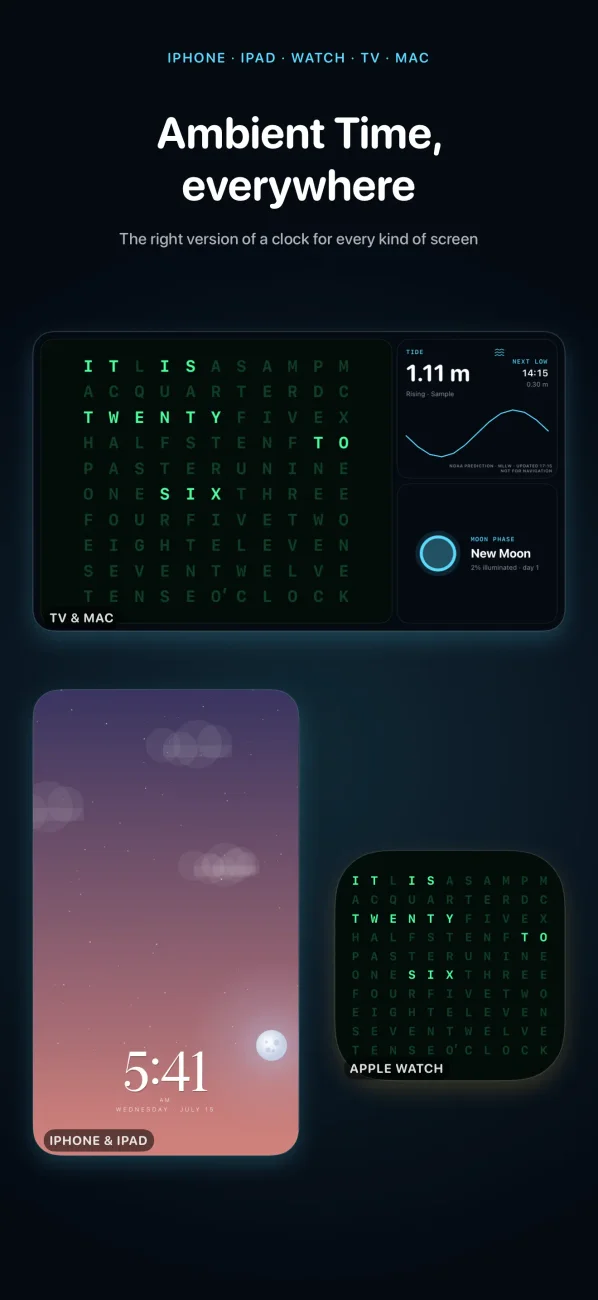
Put time where it belongs: on your Home Screen, Lock Screen, Apple Watch,
Apple TV, Mac, or the biggest display in the room.
Ambient Time is a native collection of clocks and useful glances. Explore 47
ways to read the moment on iPhone and iPad—from precise word grids
and binary displays to astronomy, weather, mathematics, and generative art.
ONE HOME FOR EVERY SCREEN
The destination-first control center organizes Widgets, Apple Watch, TV &
Displays, Clocks, and Instruments. Browse what fits each surface, preview it
live, and choose starting defaults without pretending to control system-owned
placement.
CLOCKS WITH A POINT OF VIEW
• Word Clock spells out time in nine languages plus IPA.
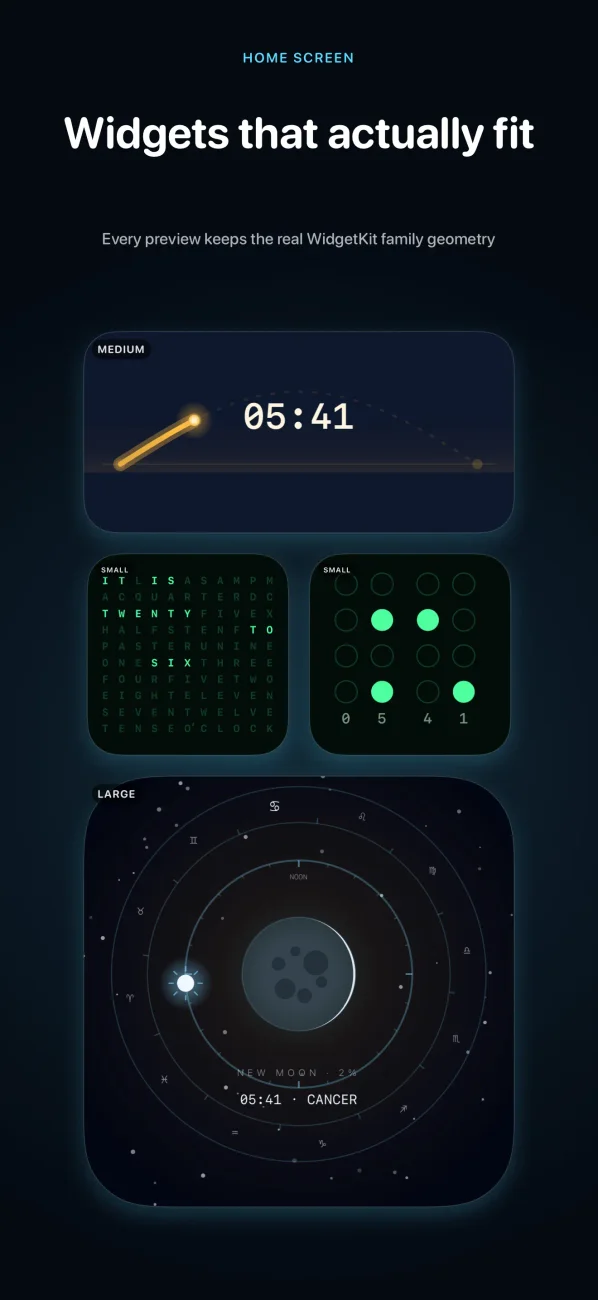
• Cosmic brings the sun, moon, horizon, and zodiac into one quiet astrolabe.
• Tide follows local predictions and highlights the next high or low.
• ASCII World Clock wraps global hours around a text-art globe.
• Moon Track follows the live lunar phase.
• About Time turns optimistic phrases into the hands of a clock.
• Inkwell Ledger lets the day unfold as a handwritten journal.
• Mandaza draws a generative clock that never repeats exactly.
WIDGETS MADE FOR THEIR SPACE
Ambient Time groups Home Screen clocks and information widgets by size, so
every layout stays clear and useful. Because the Lock Screen already shows Apple's clock, Ambient
Time adds context instead: moon phase, golden hour, rain, tides, and poetry in
Inline, Circular, and Rectangular forms.
A CALMER GLANCE ON APPLE WATCH
Choose from six legible clocks in the Watch app. Add nine Smart Stack widgets
and complications for tides, rain, forecasts, golden hour, moon phase, world
moments, words, compliments, and poetry.
MADE FOR THE ROOM—AND THE MAC
Apple TV offers a remote-first gallery of Ambient clocks and fixed dashboards.
Mac brings the same destination control center to the desktop, including
fullscreen Ambient Mode, dashboards, and Desktop or Notification Center
widgets. Five global color themes are available where a clock supports them.
Weather, sun, moon, and tide features use coarse location only with permission.
There are no accounts, ads, subscriptions, or purchases, and location is never
used for tracking.
Built natively in SwiftUI with Reduce Motion support.
Made by Luke Steuber.
What’s new
Version 1.6 · Nov 3, 2026
Version 1.6 makes widgets better company on a shelf or a wall:
• Weather and tide widgets refresh in the background, and follow the forecast and tide curve for up to six hours offline
• Where the widget background is removed, as in StandBy, small instrument widgets show one large reading you can see across a room
• Ask Siri to show any clock, or to read the temperature, tide, sunrise, moon phase and more
• Clocks appear in Spotlight
• Spoken sets each phrase at the largest size that fits
• Clearer names in the widget gallery
App privacy
What LanguageCraft declares on the App Store about how this app handles data.
-
Data not collected
The developer does not collect any data from this app.
Privacy practices may vary, for example with the features you use or your age.
Information
- Seller
- Bridge City Lab LLC
- Category
- Utilities
- Version
- 1.6
- Updated
- Nov 3, 2026
- Released
- Jun 17, 2026
- Size
- 27.8 MB
- Requires
- iOS 17.0 or later
- Age rating
- 4+
- Price
- Free
- Languages
- English
- Copyright
- © 2026 Luke Steuber
You might also like
-
 Hubr: Smart Tv Remote ControlControl Any Smart Tv
-
 Converty: Convert & CompressConvert files, all offline
-
 Inventory Scanner: OrganizerScan barcodes & Store
-
 Keep&Go: AI Photo CleanerDelete Duplicates, Save Space
-
 TVRC: TV Remote ControlUniversal Remote & TV Cast
-
 Pacific BlockStop web images and video
-
 FlixarrUtilities
-
 unroll - Screenshot StitchStitch Screenshots into One
-
 LongShot: Screenshot StitchAuto stitch screenshots &chats
-
 Aura Notes AIRecord, Transcribe, Summarize