- Age rating17+
- CategoryNavigation
- DeveloperWuhan Huakexunce Technology Co., Ltd.
- LanguagesEnglish+ 14 more
- Size162.2 MB
Links to the official App Store page
Download.org hosts no file of Ango Ebike. The button opens its official App Store page, published by Wuhan Huakexunce Technology Co., Ltd. Listing last checked on Nov 18, 2026.
Screenshots

About
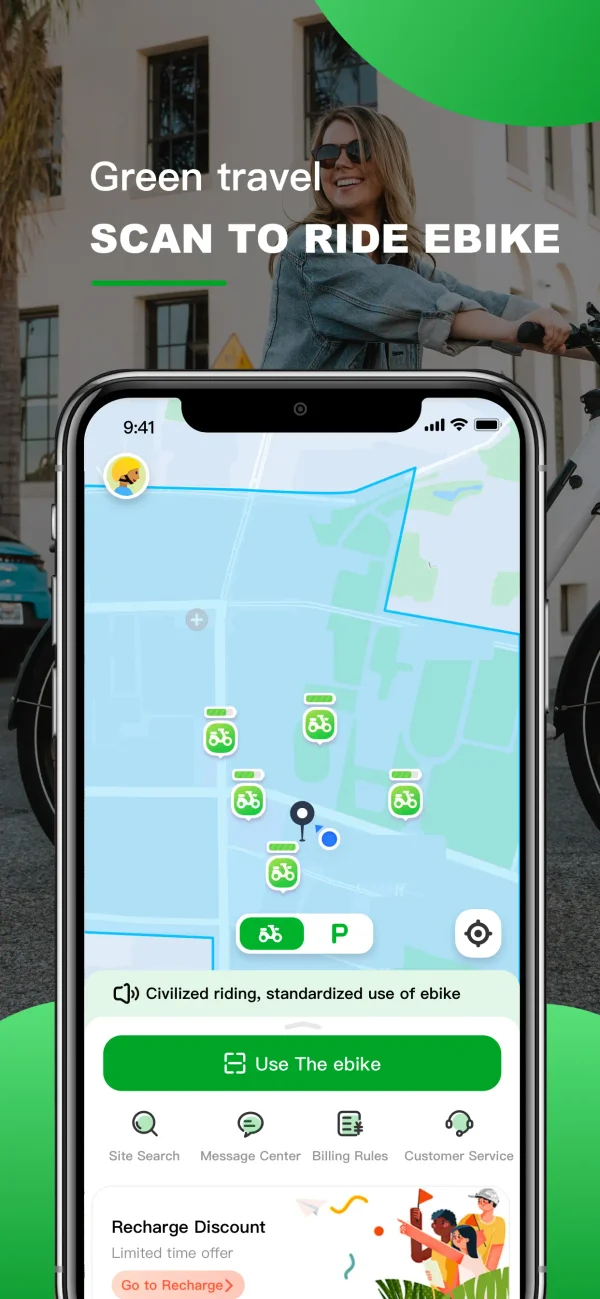
Ango Ebike is an electric bike-sharing platform that is easily accessible via a mobile application. Here are the instructions:
1. **Usage Instructions**
- **Finding a Bike:** Discover nearby bikes by clicking on the bike icon to view information.
- **Unlocking:** Scan the QR code on the bike, display the unlocking interface, tap the unlock button, and the bike will unlock automatically.
- **Starting:** Gently twist the right handle inward to start riding.
- **Ending the Ride:** Tap the "End Ride" button, and the bike will automatically lock, ending the billing.
2. **Locking Failure**
- If locking fails, check if the network is functioning properly. You can also try unlocking via Bluetooth. Multiple attempts might lead to successful locking. If repeated attempts fail, provide timely feedback through the "Online Customer Service."
3. **How to Unlock**
- Hello, open the "Scan to Ride" feature at the bottom of the app. Enter the scanning page and place the bike's QR code in the viewfinder. Confirm clear focus. Shortly, the remaining mileage of the bike will pop up. Confirm that the displayed distance is greater than the distance to your destination. Click "Unlock," and the bike will audibly confirm "Unlock Successful." If the lighting is low, you can choose to activate the "Flashlight." Alternatively, on the scanning page, select "Input Number to Unlock" and manually input the bike number.
4. **Unlocking Failure**
- If scanning indicates bike maintenance, ongoing use by others, or unlocking failure, Ango Ebike suggests switching to another bike. Check the network or attempt unlocking via Bluetooth.
5. **How to Lock**
- After using Ango Ebike, freely return the bike within the service area. You can park the bike at roadside white lines or non-motorized vehicle parking areas. In the app, tap "End Ride." Don't rush to leave. Upon hearing the bike audibly confirm "Lock Successful," the corresponding trip details will display your ride bill, confirming a successful return. Currently, Ango Ebike only supports bike return via mobile app operation.
6. **Forgetting to Lock**
- Overdue orders will incur certain fees. Therefore, promptly lock the bike after use. Ango Ebike sends reminders via SMS or calls for long periods of inactivity or excessive overdue periods. Fees incurred during this time will be charged normally. Thus, after returning the bike, ensure it's properly locked. If forgotten and the bike cannot be found, please contact customer service promptly for assistance.
7. **Temporary Locking**
- Temporary locking incurs regular charges. To save costs, manage the duration of temporary parking according to your needs. Drive to your destination promptly to minimize expenses.
What’s new
Version 1.1.38 · Nov 10, 2026
fix bug
App privacy
What Wuhan Huakexunce Technology Co., Ltd. declares on the App Store about how this app handles data.
-
Data not collected
The developer does not collect any data from this app.
Privacy practices may vary, for example with the features you use or your age.
Information
- Seller
- Wuhan Huakexunce Technology Co., Ltd.
- Category
- Navigation
- Version
- 1.1.38
- Updated
- Nov 10, 2026
- Released
- Jan 17, 2024
- Size
- 162.2 MB
- Requires
- iOS 14.0 or later
- Age rating
- 17+
- Price
- Free
- Languages
- English, Filipino, French, Georgian, Japanese, Kazakh, Korean, Laotian, Mongolian, Russian, Simplified Chinese, Thai + 3 more
- Copyright
- © Wuhan Xiaoan Technology Co., LTD
You might also like
-
 Alona Beach GuideTravel Guide and Maps
-
 MapPathGPS Tracker, Map Measure Tool
-
 Aayo - Ride & Quick CommerceTravel
-
 Heritage Charge PointHeritage Charge Point
-
 Divenote: Marine ID&Dive SitesMarine Life ID & Dive Sites
-
 Nepcab DriverDrive with NepCab & earn daily
-
 strgpsNavigation
-
 Hotel LinkTravel
-
 NepcabBook rides & rentals in Nepal
-
 GoMyGo Operators: Manage BusManage, Earn and Grow