
AntiScroll -Beat the Scroll-
Quit scrolling, with a cat
Designed for iPhone
In-app purchases
- Age rating4+
- CategoryHealth & Fitness
- DeveloperTomoki Hosoya
- LanguagesJapanese+ 1 more
- Size64.6 MB
Links to the official App Store page
Download.org hosts no file of AntiScroll -Beat the Scroll-. The button opens its official App Store page, published by Tomoki Hosoya. Listing last checked on Nov 12, 2026.
Screenshots
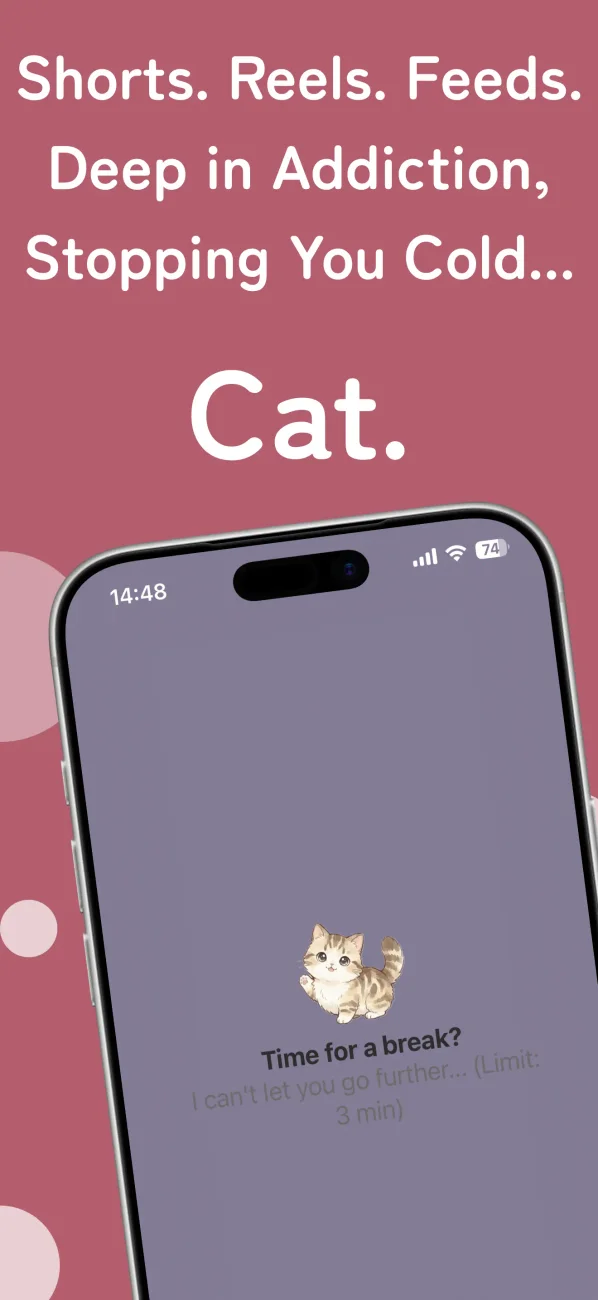
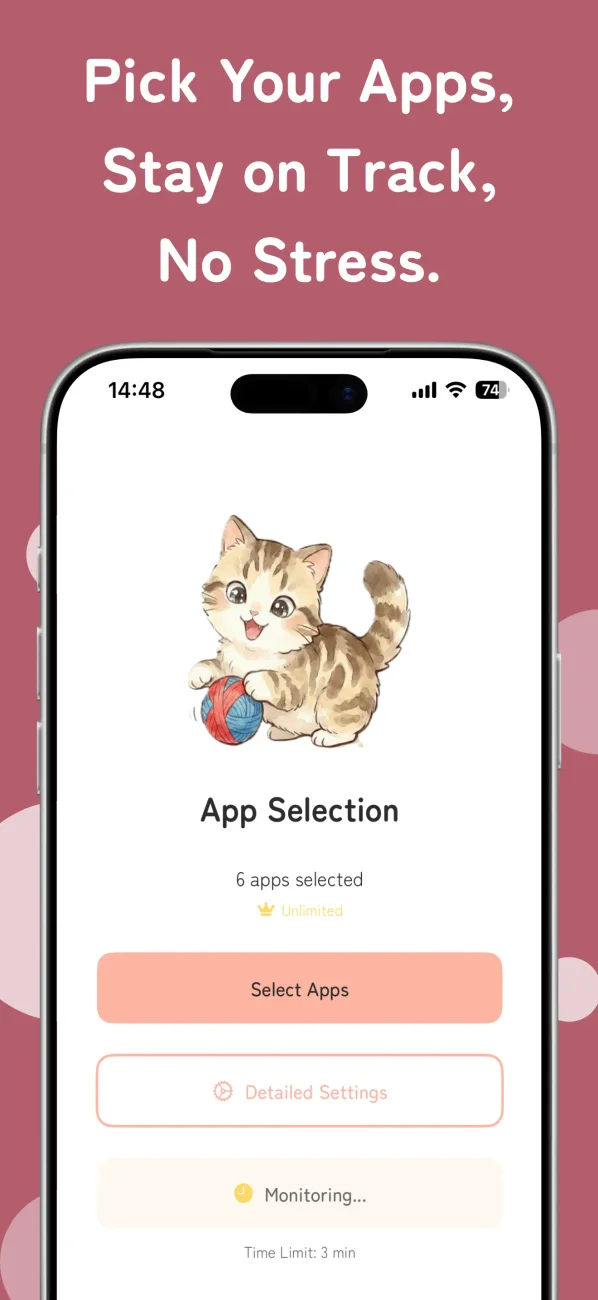


About
AntiScroll is a screen time app built for one problem: the endless scroll of short-form video and social feeds.
"I only meant to look for a second — and an hour was gone." Sound familiar?
YouTube Shorts, TikTok, X, Instagram. Their feeds are tuned to keep you there.
AntiScroll gives you a way out.
[What it does]
Three features that change how you use short-form video.
1. Block apps in small slices
Pick the apps you want to limit and start. (Up to 3 apps for free, as many as you want with Premium.)
You get 3 minutes. Want more? Ask for an extension.
Short limits are what stop "an hour was gone" from happening.
2. Extension activities grounded in brain science
Research suggests the prefrontal cortex is barely engaged while you scroll short-form video — you keep going without really thinking. To stop, you have to wake that part back up.
So an extension in AntiScroll costs you a small activity. Each one asks for just enough thought to break you out of autopilot.
3. See your usage
Time spent in limited apps is counted precisely. Check today and this week at a glance in simple charts.
Watch the numbers come down — useful for staying motivated, and for knowing where you actually stand.
We don't think there's another app that does all three.
With AntiScroll, short-form video stops taking the time you meant to spend on what matters to you.
Start today, and get out of the short-form video loop.
[Plans]
AntiScroll is free to use.
- Free
- Limit up to 3 apps
- A banner ad is shown at the bottom of the screen
- When you request an extension, you may be asked to watch an ad
- Time-based customization is not available
- Premium (auto-renewing, 1 year)
- Limit as many apps as you want
- No ads at all — neither the banner nor the extension ads
- Time-based customization is available
[About the auto-renewing subscription]
- Title: AntiScroll Premium Plan
- Length: 1 year, auto-renewing
- Price: shown in your local currency on the plan screen in the app and on the App Store product page. (The base price is ¥1,000/year; Apple converts it for each storefront.)
- Payment is charged to your Apple ID account at confirmation of purchase.
- The subscription renews automatically unless auto-renew is turned off at least 24 hours before the end of the current period. Your account is charged for the renewal within 24 hours of the end of the current period.
- You can manage or cancel auto-renew any time in iOS Settings > Apple ID > Subscriptions (also reachable from "Manage Subscription" in the app).
- Terms of Use: https://astonishing-mackerel-e21.notion.site/AntiScroll-Terms-of-Service-befe3f58f50b4b0196343ea07a6c7e20?source=copy_link
- Privacy Policy: https://astonishing-mackerel-e21.notion.site/AntiScroll-Privacy-Policy-2938dc7e6a0144df93de64c9ed2c69d1?source=copy_link
What’s new
Version 1.3.0 · Nov 4, 2026
・When you tap "Stop" on the shield, the cat now sends you a note of praise.
・Added a card on Home that shows how many times you tapped "Stop" today.
・The restriction screen now calls the app you were about to open by name, and mentions how many times you've extended today.
・Refreshed the plan screen to explain time-based customization more clearly. When you reach the free plan's app limit, you can view plans right from there.
・In the tap gauge, tapping the wrong color now takes the gauge back by one.
・If an ad can't be shown, you'll switch to a different ad-free activity instead.
App privacy
What Tomoki Hosoya declares on the App Store about how this app handles data.
-
Data used to track you
May be used to track you across apps and websites owned by other companies.
- Location
- Identifiers
- Usage data
- Diagnostics
-
Data linked to you
May be collected and linked to your identity.
- Location
- Identifiers
- Usage data
- Diagnostics
-
Data not linked to you
May be collected but is not linked to your identity.
- Diagnostics
Privacy practices may vary, for example with the features you use or your age.
Information
- Seller
- Tomoki Hosoya
- Category
- Health & Fitness
- Version
- 1.3.0
- Updated
- Nov 4, 2026
- Released
- Dec 11, 2025
- Size
- 64.6 MB
- Requires
- iOS 18.0 or later
- Age rating
- 4+
- In-app purchases
- Yes
- Languages
- Japanese, English
- Copyright
- © 2026 KojoBarbie.
You might also like
-
 Animal Walk: Daily StepsWalk with your companion
-
 Piyori - Bedtime Bird HabitGrow a bird while phone rests
-
 Muscle Memo & CounterGym Log & Interval Rep Counter
-
 スマホをやめる:自己管理アプリ MirueruHealth & Fitness
-
 間(ま)Health & Fitness
-
 OFFLINE:ゆるくデジタルデトックスHealth & Fitness
-
 Owla -Health TrackerSee yourself clearly
-
 FitForce - AI食事&筋トレ管理Health & Fitness
-
 カロリー家計簿 やりくりダイエットHealth & Fitness
-
 ぽてまる - 歩いて育てる かわいい歩数計ゲームHealth & Fitness