
- Age rating17+
- CategoryPhoto & Video
- DeveloperLively Video
- LanguagesEnglish
- Size25.6 MB
Links to the official App Store page
Download.org hosts no file of Aperture Live. The button opens its official App Store page, published by Lively Video. Listing last checked on Nov 15, 2026.
Screenshots



About
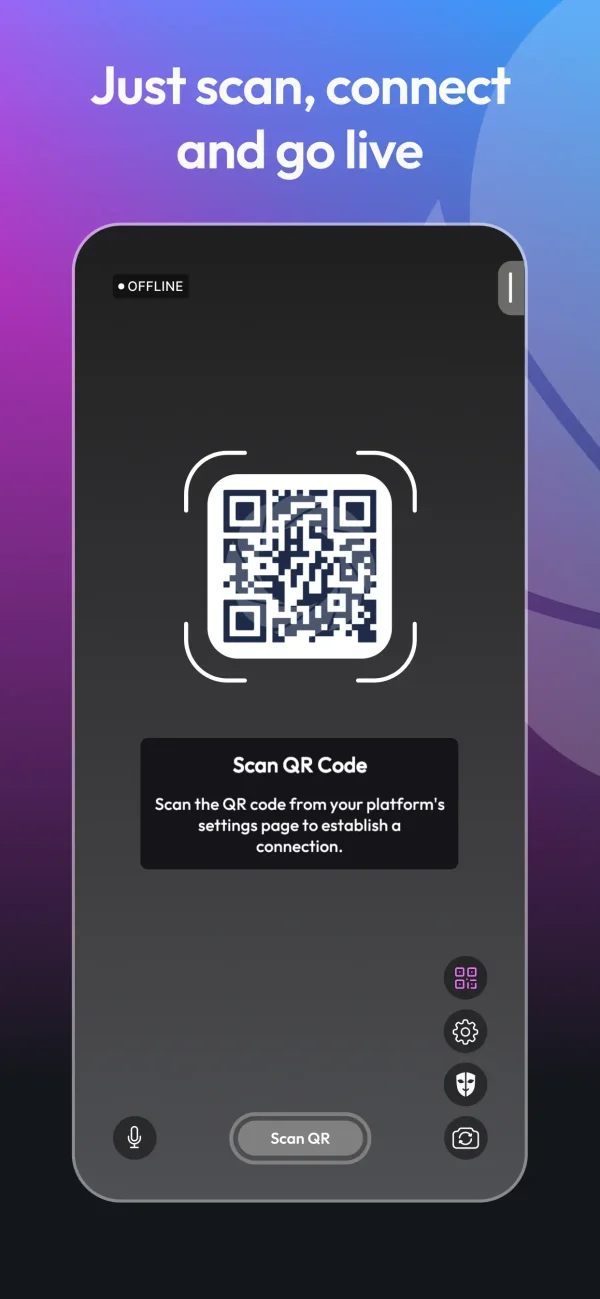
Aperture Live turns your phone into a professional broadcast studio. Scan a QR code, tap to go live—it's that simple.
ONE TAP TO GO LIVE Scan the QR code. Hit the “Go Live” button. That's it. No complicated settings, no technical knowledge required. Parents, students, volunteers—anyone can broadcast like a pro from their phone.
CUSTOM PLATFORM EXTENSIONS Seamless integration with your platform’s functionality to overlay proprietary overlays like live scores, product tiles, graphics, and user specific data. From basketball games to swim meets to dance competitions, deliver professional, branded streams without asking your broadcasters to learn new software or fumble with complicated steps.
TURNKEY MOBILE SOLUTION No app development needed. No technical setup required. Your platform generates a QR code, users scan it with Aperture Live, and they're broadcasting with professional features instantly. We handle all the complex mobile app infrastructure so you don't have to.
ULTRA-LOW LATENCY STREAMING Built on modern WHIP protocol for real-time interaction. While traditional RTMP broadcasters have 3-5 second delays, Aperture Live keeps latency minimal so audiences can engage with your content as it happens. Perfect for interactive experiences where every second counts.
PERFECT FOR Sports events and tournaments with live scores and automatic graphics, community broadcasts with sponsor logos and overlays, youth sports leagues streaming to multiple fields simultaneously, amateur competitions with fan created content.
What’s new
Version 2.7 · Nov 12, 2026
If your stream drops, the app now keeps trying to reconnect for up to 90 seconds and shows you it's reconnecting, so a short network blip doesn't end your broadcast.
SRT links can now carry the stream ID, passphrase and latency, so one scan or paste sets everything up.
RTMP and SRT profiles now let you choose the H.264 profile and level, for destinations that need a particular one.
Profile changes now save as you make them, so there's no Save button to remember. You can add a new profile from the profile menu, expired profiles are marked there, Manage Profiles has a cleaner look, and the settings gear opens the Control Panel.
An expired stream link is now spotted on the home screen, and Scan QR Code lets you rescan it straight away.
The app no longer gets stuck when camera or microphone access is turned off.
Banners can now be closed with ×, and when your stream is ended on the server side you'll see "[Stream Name] ended".
Also: the confirm button is easier to tap, and stream links and scanned codes are no longer written to device logs.
App privacy
What Lively Video declares on the App Store about how this app handles data.
-
Data not linked to you
May be collected but is not linked to your identity.
- Diagnostics
- Body
Privacy practices may vary, for example with the features you use or your age.
Information
- Seller
- Lively Video LLC
- Category
- Photo & Video
- Version
- 2.7
- Updated
- Nov 12, 2026
- Released
- Oct 13, 2025
- Size
- 25.6 MB
- Requires
- iOS 18.0 or later
- Age rating
- 17+
- Price
- Free
- Languages
- English
- Copyright
- © 2025 Lively Video LLC
You might also like
-
 EventdoorPhoto & Video
-
 StreamsterControl your stream remotely
-
 StreamChamp: Streaming AppStream Games on TW, YT, FB
-
 Merkury SmartFor Merkury Smart device users
-
 ImgPlay: GIF Maker & MemeVideo to GIF Creator & Editor
-
 ProxyPicsWorld of Photos
-
 ProCamera. Professional CameraPro HDR, RAW+ Manual Video Cam
-
 Darkroom: Photo & Video EditorFilm Filters, Presets, AI Edit
-
 Filterly - AI Photo EnhancerUnveil Your Best Self!
-
 YouTube Create: Video editorOfficial YouTube Video Maker