- Age rating4+
- CategoryPhoto & Video
- Developertakayuki atsumi
- LanguagesEnglish
- Size12.7 MB
Links to the official App Store page
Download.org hosts no file of ままモニ - mamamoni - リモートモニター. The button opens its official App Store page, published by takayuki atsumi. Listing last checked on Nov 13, 2026.
Screenshots
About
The developer has not provided this text in your language.
くろねこ研究所 KuronekoLab.
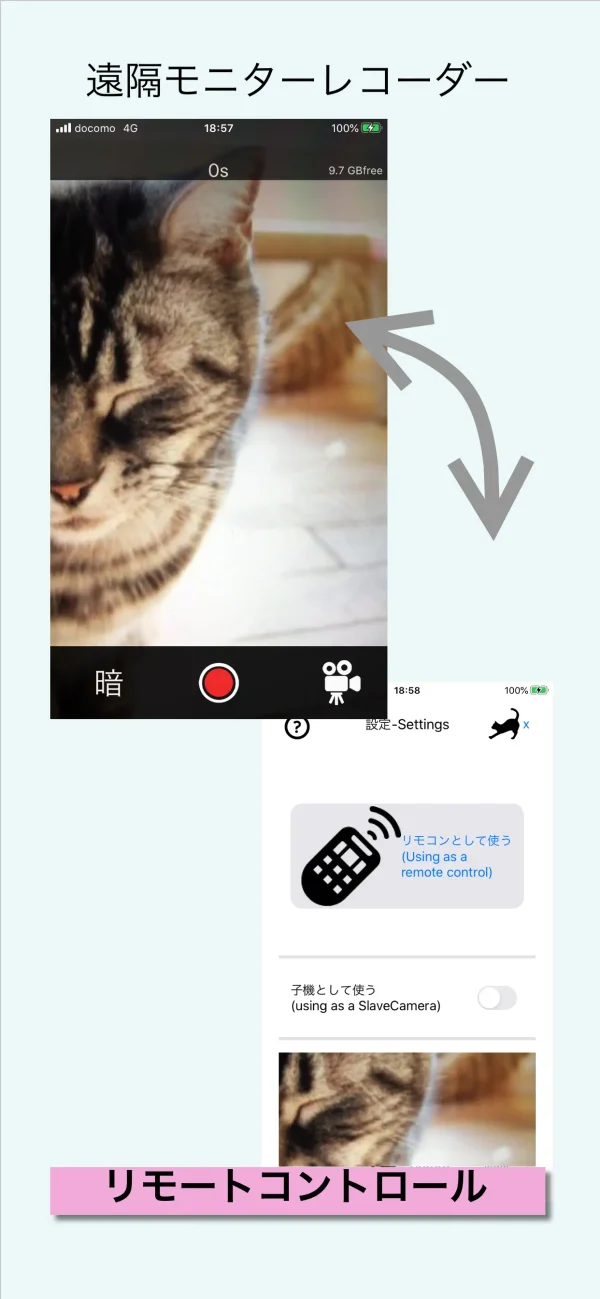
近距離通信を使用したリモートモニターです。単体で録画する事もできますが、1台を子機モードにして1台をリモコンとして使用するとリモートで操作できます
It is a remote monitor that uses near field communication. It is possible to record by itself, but you can operate it remotely by setting one as a remote unit and using one as a remote control.
録画や撮影を行うためには、カメラとマイクへの許可が必要です。設定から許可してください。また、動画を保存するためには写真ライブラリへのアクセス許可が必要です
In order to record, permission to the camera and microphone is required. Please allow from settings. You must also have access to your photo library to save videos.
リモコン機能は短距離通信機能を使用します。使う為にはWifiかBluetoothをONにする必要があります。車の後部に取り付けたデバイスを操作する等、近い距離で利用します
The remote control function uses the short-range communication function. To use, you need to turn on Wifi or Bluetooth. Use at a short distance, such as operating a device attached to the rear of the car.
リモコンの繋ぎ方
1.最初にカメラ側を子機(Slave Mode)として設定します
2.親機(リモコン)側はリモコン画面を表示しShowDeviceで子機を探します
3.子機の名前が表示されたらタップすると、子機側に接続確認ダイアログが表示されるため接続を許可します
4.リモコンは、リモコン画面から戻ると接続が解除されます
1.First, set the camera side as slave unit (Slave Mode)
2.The master device displays the remote control screen and searches for a slave device with ShowDevice.
3.If you tap the name of the slave unit, tap it and a connection confirmation dialog will be displayed on the slave unit.
4.Remote control is disconnected when you return from the remote control screen.
リモコン上の子機の一覧のデバイス名をTapすると画像をモニターできます
You can monitor the image by tapping the device name in the list of slave units on the remote control.
録画したファイルは1分単位で分割されます
録画ファイルは子機側に保管されます
The recorded file will be divided by 1 minute.
The recording file is stored on the slave unit side.
What’s new
Version 1.5.3 · Feb 4, 2026
くろねこ研究所 KuronekoLab.
minor update
軽微な修正
App privacy
What takayuki atsumi declares on the App Store about how this app handles data.
-
Data not collected
The developer does not collect any data from this app.
Privacy practices may vary, for example with the features you use or your age.
Information
- Seller
- takayuki atsumi
- Category
- Photo & Video
- Version
- 1.5.3
- Updated
- Feb 4, 2026
- Released
- Jun 24, 2020
- Size
- 12.7 MB
- Requires
- iOS 12.0 or later
- Age rating
- 4+
- Languages
- English
- Copyright
- © 2020 kuronekoLab.
You might also like
-
 PolaCameraWatch your memories develop
-
 NearbyMonitoringObserve nearby
-
 Dual Cam Visio: Dual CameraFilm front and rear together
-
 Radiant: Film & Digital CameraPro Log Video, 4K, RAW & LUTs
-
 Remote Video RecorderRecording Movie on Web
-
 Akiba GuardPhoto & Video
-
 Brighten View :Cat'sEye CameraColored Night Vision Effect.
-
 AR Rising-Sun FinderPhoto & Video
-
 Video Teleprompter CameraRead Scripts, Record & Edit
-
 SC-CAMPhoto & Video