- Age rating4+
- CategoryUtilities
- Developernoboru hizukuri
- LanguagesJapanese+ 1 more
- Size1.2 MB
Links to the official App Store page
Download.org hosts no file of らくらく電卓 - 履歴・式編集. The button opens its official App Store page, published by noboru hizukuri. Listing last checked on Nov 12, 2026.
Screenshots

About
The developer has not provided this text in your language.
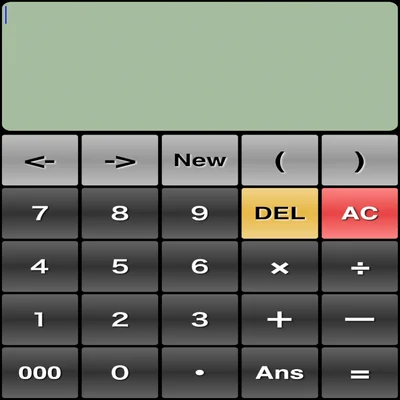
「らくらく電卓」は、計算式と結果を残しながら使える、シンプルな電卓アプリです。
日々の計算から、お買い物での価格比較まで、手軽に使えます。
計算式と答えを画面に残せるので、あとから計算の流れを確認できます。
入力中の式はカーソルを動かして修正でき、過去の式や結果を誤って書き換える心配もありません。
お買い物には「比較」機能が便利です。
2商品の価格と内容量・個数を入力すると、単価を自動で比較し、どちらがお得かすぐに分かります。
【主な機能】
- 四則演算、括弧、累乗、平方根
- 計算式と結果の履歴保存
- 前回の計算結果の呼び出し
- 過去の式・結果のコピー
- 入力中の式へのペースト
- 2商品の単価比較
- 全消去前の確認表示
インターネット接続やアカウント登録は不要です。
計算と履歴保存は端末内で完結し、オフラインでも使えます。
What’s new
Version 2.0.2 · Oct 9, 2026
・比較ページの商品Aなどの名前を変更できるように改善しました。
・ACボタンの確認ウィンドウを出さないように改善しました。
・軽微な不具合を修正しました。
App privacy
What noboru hizukuri declares on the App Store about how this app handles data.
-
Data not collected
The developer does not collect any data from this app.
Privacy practices may vary, for example with the features you use or your age.
Information
- Seller
- noboru hizukuri
- Category
- Utilities
- Version
- 2.0.2
- Updated
- Oct 9, 2026
- Released
- Nov 17, 2020
- Size
- 1.2 MB
- Requires
- iOS 15.6 or later
- Age rating
- 4+
- Languages
- Japanese, English
- Copyright
- © 2020 Noboru Hizukuri
You might also like
-
 編集電卓 ボタンをカスタムしてよく使う数字を入力できる計算機ボタンをカスタムしてよく使う数字を入力・保存できる計算機
-
 KeepCalcUtilities
-
 リスト計算機:式と履歴が見える電卓Utilities
-
 bwCalc(シンプルにデザインされた計算機、税込みも表示)Utilities
-
 UnTidy - 片付けに「散らかす」という革命Utilities
-
 万能電卓Utilities
-
 RedoCalcSimple calculator with fomulas
-
 CalcLink - Calculator for PCSend results to Windows
-
 Triple CalcUtilities
-
 e-おうちリモコンUtilities