
- Age rating4+
- CategoryProductivity
- DeveloperEran Katsav
- LanguagesEnglish+ 1 more
- Size66.0 MB
Links to the official App Store page
Download.org hosts no file of App. The button opens its official App Store page, published by Eran Katsav. Listing last checked on Nov 20, 2026.
Screenshots


About
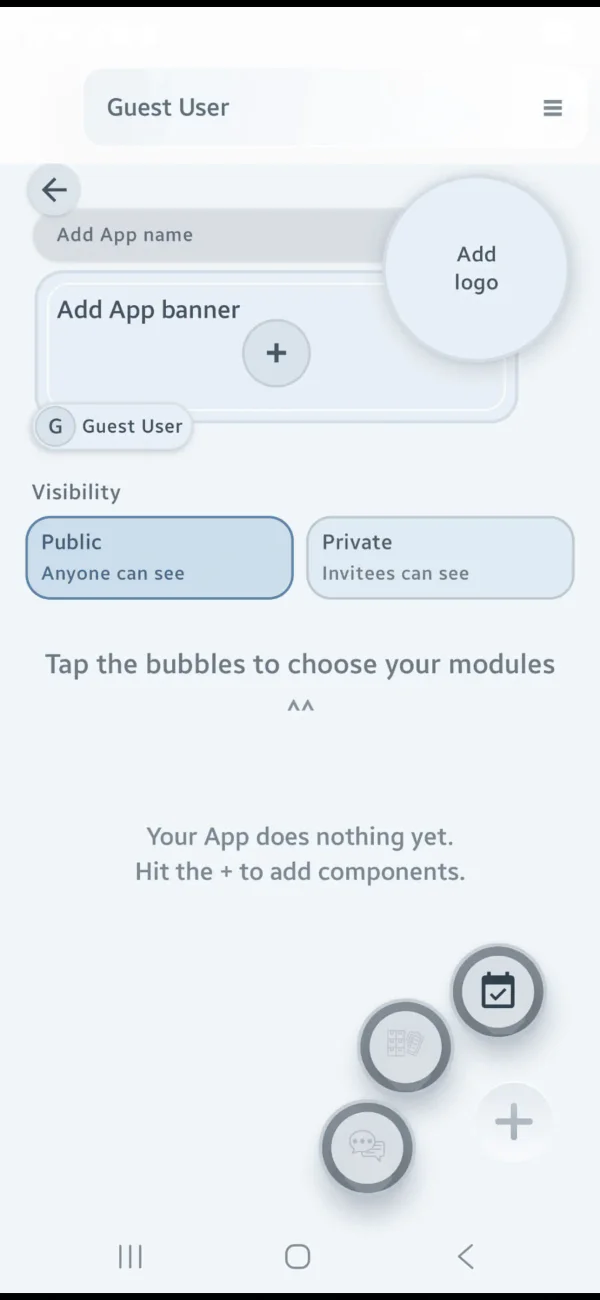
App. is a no-code app builder for small teams and groups — built entirely on your phone. Tired of juggling a separate scheduling app, a calendar, a group chat, and a spreadsheet just to coordinate a team or share an event? Build your own — schedules, calendars, shift planning, shared events — all inside one workspace. No code. No designer.
If you've ever cobbled together different tools to plan a recurring class, coordinate a team's shifts, or share a community event, you know the cost of "app fatigue." App. is the antidote: a single mobile-first builder where you assemble exactly the modules you need.
A NO-CODE APP BUILDER FOR SCHEDULING & TEAM COORDINATION
• Build your own mini-apps — no engineering background required
• Plug-and-play modules: scheduling, calendar events, shift planner
• Combine multiple modules in a single workspace
• Add or remove modules anytime — keep only what you use
SCHEDULING & EVENT TOOLS
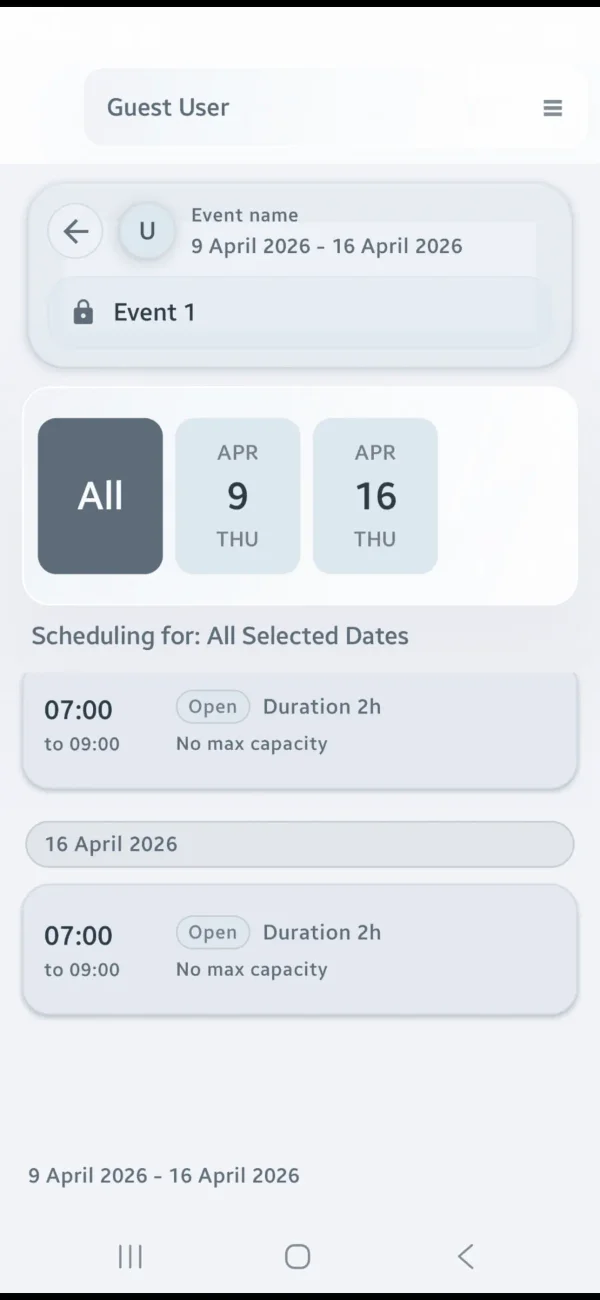
• Create recurring events — daily, weekly, monthly, or yearly
• Capacity-limited time slots with participant assignment
• Per-date overrides for exceptional days
• Drag-and-drop participant assignment for shift planning
• Search and join community apps to find shared events relevant to you
SHARE WHAT YOU BUILD
• Share an entire workspace, or just one event, via a single link
• Community apps that anyone can discover and join
• Private apps with explicit member invitations
• Real-time sync across all your devices and your Desktop though a designated web site
WHAT PEOPLE BUILD WITH APP.
• A team shift planner and roster
• A shared class or appointment calendar
• A community event with capacity-limited time slots
• A private team workspace that everyone signs into from any device
• A shared event you publish via one link
DESIGNED FOR NON-TECHNICAL BUILDERS
• Drag, tap, done — no engineering background required
• Clean, distraction-free interface
• Cloud-backed so your data is with you on every device
WHO IT'S FOR
• Small teams that need flexible scheduling and shift planning
• Classes, groups, and communities that need to coordinate events
• Solo founders and freelancers who want a private mobile workspace
• Citizen builders who have ideas but don't write code
HOW IT WORKS
1. Sign in with your Apple acount or other email addresses
2. Create a workspace, or browse community apps to find one to join
3. Add the modules you need — scheduling, calendar, shift planner
4. Share with your team or community via a single link
PRIVACY & SECURITY
Your data is yours. Built on a secure cloud foundation that keeps your workspaces synced across devices. Sign in with Apple supported for fully private authentication. No advertising trackers.
Stop downloading workarounds. Start building exactly what you need.
What’s new
Version 1.0.2 · Jun 9, 2026
• Sharing reworked: Copy now writes the link directly to the clipboard (separate from the system share sheet), and your invite list + visibility settings persist automatically before any share or copy.
• New confirmation if you'd be sharing with nobody, and the primary action stays correctly enabled after removing an invitee.
• Private share links now support a personal note — type a message (up to 300 characters) and it's emailed to invitees alongside the link.
• Home card now shows the specific day you RSVP'd to with a clear "Tap to edit" affordance, and the displayed date range covers every event date, not just the first recurrence.
• New: download the attendee roster as Excel (.xlsx) or CSV from a popup on the download icon. Column headers switch to Hebrew when the app's language is Hebrew. One row per (slot × participant) for easy filtering.
• Cancel your own RSVP and the date carousel auto-jumps back to "All" so you're not left looking at an empty day.
• Hebrew/RTL fixes: slot drag direction is correct in the planner; calendar in the web build starts on Sunday in Hebrew with a clean separator between adjacent months.
• Polish: app-name field is more visible on the creation wizard, and the share button gently pulses for a few seconds after you create a fresh event so you don't forget to invite attendees.
App privacy
What Eran Katsav declares on the App Store about how this app handles data.
-
Data linked to you
May be collected and linked to your identity.
- Contact info
- User content
- Identifiers
Privacy practices may vary, for example with the features you use or your age.
Information
- Seller
- Eran Katsav
- Category
- Productivity
- Version
- 1.0.2
- Updated
- Jun 9, 2026
- Released
- May 31, 2026
- Size
- 66.0 MB
- Requires
- iOS 18.2 or later
- Age rating
- 4+
- Price
- Free
- Languages
- English, Hebrew
- Copyright
- © 2026 App Dot Com
You might also like
-
 Calculator X — Dev & GraphsProductivity
-
 WidgetFlow.ioDrag & drop mobile app builder
-
 Daily Mark: Minimal HabitsMinimal habit tracker & maker
-
 Buno Maker - DIY AppYour Ideas, No Code Needed
-
 Tape: תמלול וסיכוםProductivity
-
 DeeBee - Database-style notesText, Image, Checklist, etc.
-
 Plando ConnectProductivity
-
 OtipoProductivity
-
 המשמרות שליProductivity
-
 FixCyprusProductivity