- Age rating4+
- CategoryPhoto & Video
- Developer云飞 陈
- LanguagesEnglish
- Size28.5 MB
Links to the official App Store page
Download.org hosts no file of 小猫补光灯 - 花叔官方出品. The button opens its official App Store page, published by 云飞 陈. Listing last checked on Nov 12, 2026.
Screenshots



About
The developer has not provided this text in your language.
小猫补光灯 - 专业便携补光神器
小猫补光灯是花叔专为小红书爱拍照的姐妹们打造的专业补光工具。帮助你在餐厅、清吧、剧院、机舱等昏暗场景下拍出与众不同的更有氛围感、更美的照片。
【特色功能】
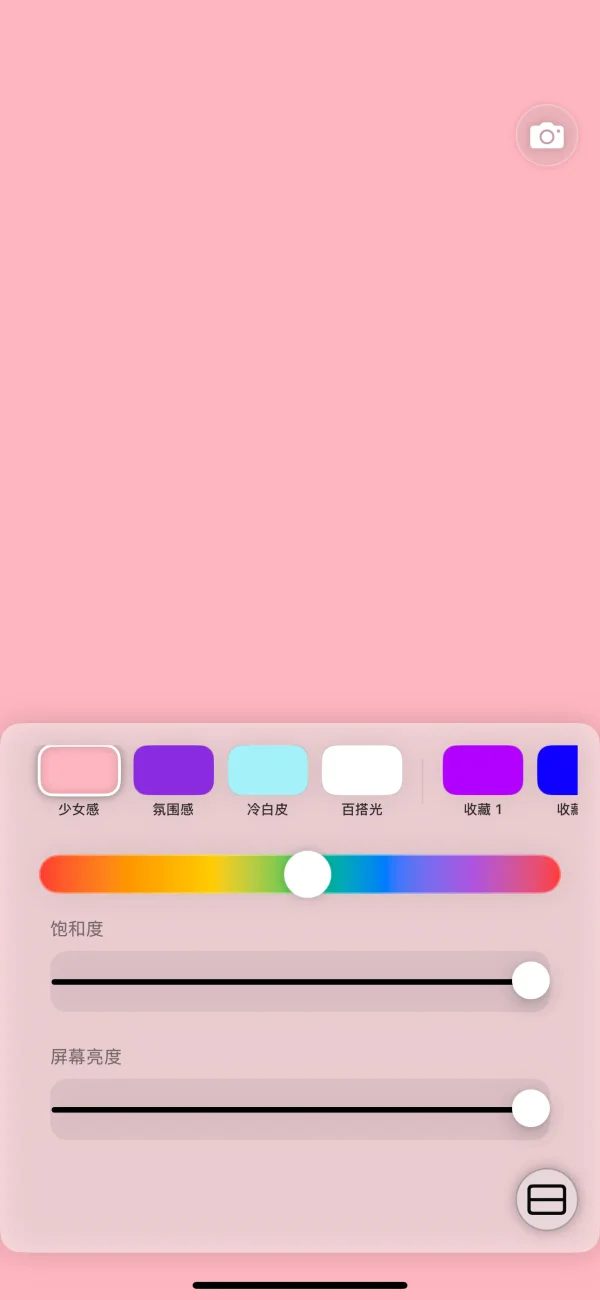
• 11款精选补光预设,覆盖各种场景需求
• 支持自定义颜色,打造专属补光效果
• 简约优雅的界面设计,操作便捷
• 智能亮度调节,保护眼睛
【场景预设】
• 少女感:温暖粉嫩,打造甜美气质
• 磨皮感:柔和光线,完美肤质
• 冷白皮:清透冷调,塑造高级感
• 网感紫:时尚潮流,展现个性
• DeepSeek蓝:科技感强,适合商务直播
【适用场景】
• 直播带货,展示商品
• 美妆教程,妆容精致
• 视频会议,专业形象
• 自拍美照,气质出众
让小猫补光灯帮你轻松打造专业级补光效果!
我的网站:
https://www.bookai.top/
https://www.huasheng.ai/
https://www.img2046.com/
What’s new
Version 1.9.0 · Sep 18, 2026
这版把右上角那两个按钮重做了。之前那个相机图标缩小之后糊成一团,还带着一圈白色方边,和下面的相册入口长得太像,不少人反馈会点错。
· 两个图标重画了,现在靠形状区分:圆角方块是开相机,圆形是去小猫相册,不用再盯着看图案细节
· 按钮描边会跟着当前补光色走,以前在白光下几乎看不见,现在什么颜色下都能看清轮廓
· 相机打开后按钮不再跟着面板一起消失,现在一眼能看出相机是开着还是关着
· 冷启动快了差不多四成,从一秒二出画面变成零点七秒
· 拖色相滑杆时不再每一帧都往磁盘写一次,拖动更跟手,也更省一点电
还有问题继续在评论区说,我继续修。
App privacy
What 云飞 陈 declares on the App Store about how this app handles data.
-
Data used to track you
May be used to track you across apps and websites owned by other companies.
- Identifiers
-
Data not linked to you
May be collected but is not linked to your identity.
- Identifiers
Privacy practices may vary, for example with the features you use or your age.
Information
- Seller
- 云飞 陈
- Category
- Photo & Video
- Version
- 1.9.0
- Updated
- Sep 18, 2026
- Released
- Nov 4, 2024
- Size
- 28.5 MB
- Requires
- iOS 15 or later
- Age rating
- 4+
- Price
- Free
- Languages
- English
- Copyright
- © 2024 AI进化论-花生
You might also like
-
 Swan Cam – AI Film CameraCinematic photos made easy
-
 iSoftBoxCreative Lighting Made Easy
-
 CamFusion - Dual Camera 视频抽帧截图frame grabber, multi 2camera
-
 Remo Cam - Vintage CameraRetro filters & Video effects
-
 CamFun - Film&Creative CameraFilm Looks & One-Tap Shooting!
-
 美颜补光灯 - Live自拍Photo & Video
-
 Bebo Cam:Retro Instant CameraHighlight the Moment.
-
 Colorby: AI Color Editor & CamOwn any look, shape your taste
-
 Vibe Cam - Moments Never FadePro RAW Camera & Film Look
-
 说得AI提词器相机-编拍演剪全能的口播视频创作和直播提词神器Photo & Video