
- Age rating4+
- CategoryPhoto & Video
- DeveloperShanghai Yomage Intelligent Technology Co., Ltd.
- LanguagesEnglish
- Size3.8 MB
Links to the official App Store page
Download.org hosts no file of 小熊提词器. The button opens its official App Store page, published by Shanghai Yomage Intelligent Technology Co., Ltd. Listing last checked on Nov 13, 2026.
Screenshots


About
The developer has not provided this text in your language.
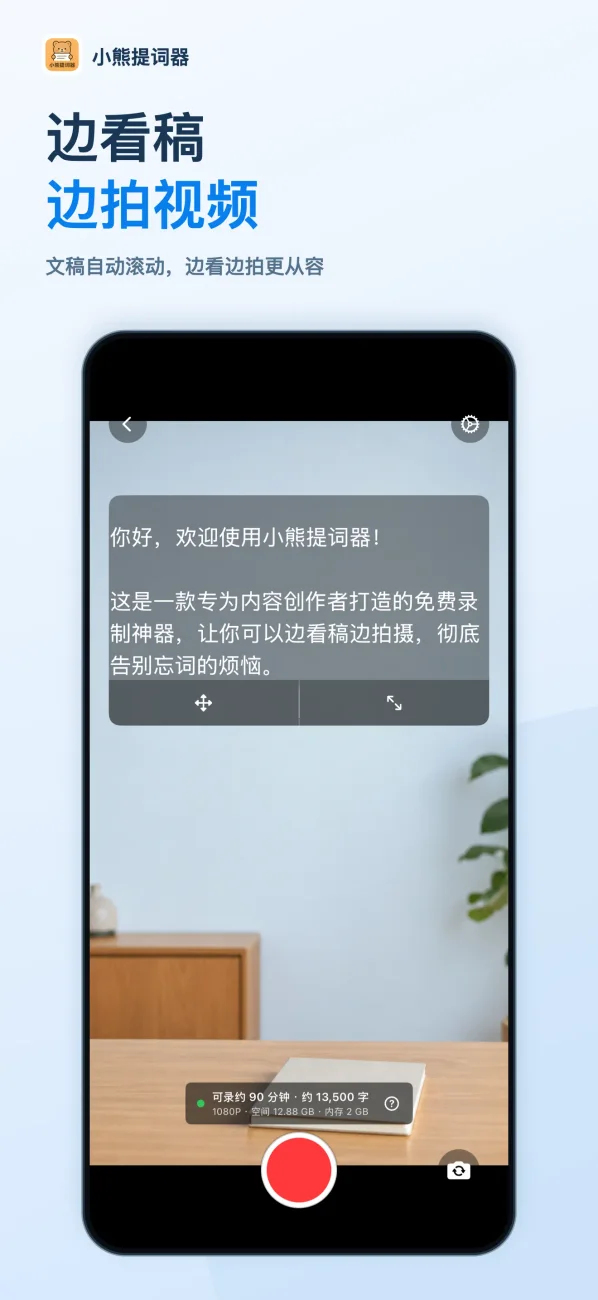
小熊提词器,让你边看稿边拍视频。准备好文稿,调整适合自己的阅读节奏,就能更从容地面对镜头,减少忘词和反复重录。
口播拍摄 | 提词与录制一起完成
在 App 内查看滚动文稿并录制视频,支持前后摄像头切换。提词窗口可拖动、缩放,横屏竖屏都能调整到顺手的位置。
阅读设置 | 按自己的习惯来看稿
调节滚动速度、字号、文字颜色、背景颜色与透明度;选择对齐方式、行间距、倒计时和阅读提示线。支持文字镜像,也可以为不同文稿单独保存设置。
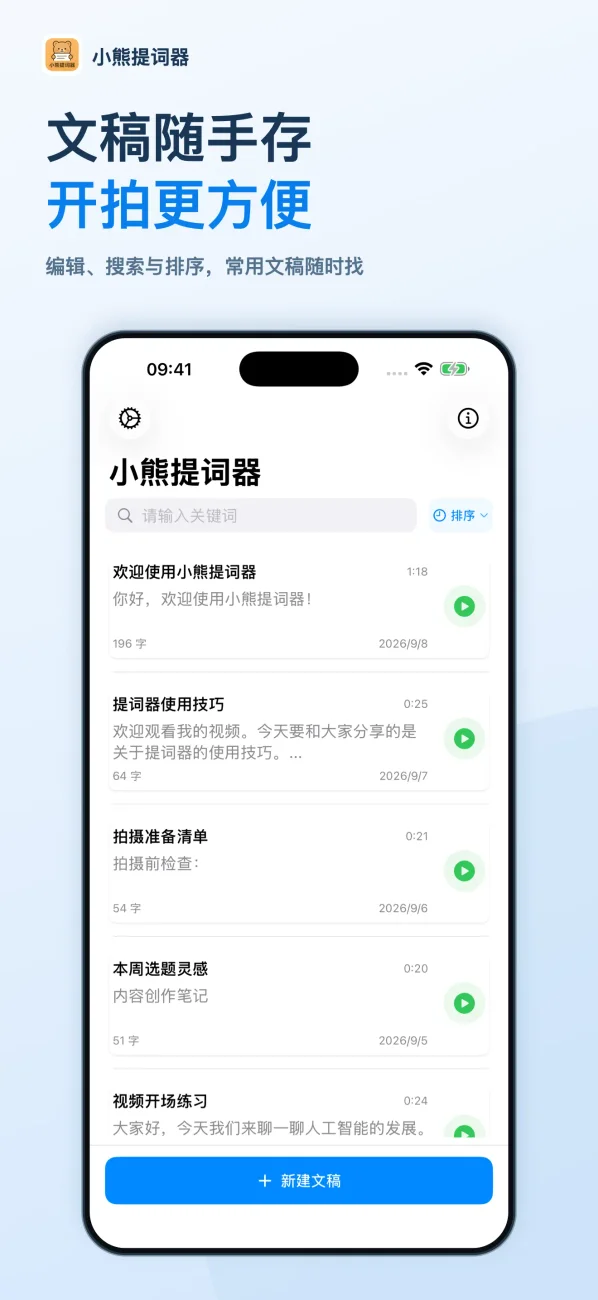
文稿管理 | 准备、编辑与查找更方便
新建和编辑文稿,从剪贴板粘贴内容,或导入 UTF-8 文本文件;备忘录里的文字也可以复制后使用。支持搜索、排序、字数统计和预计阅读时长。文稿和阅读设置保存在当前设备。
画质选择 | 根据当前镜头能力拍摄
提供设备与当前摄像头支持的视频画质选项,最高可选 4K。录制界面显示根据可用空间等信息估算的可录时长与字数,方便提前安排拍摄内容。实际可录时长会随设备状态和录制内容变化。
适合口播视频、知识分享、课程录制、采访讲解,以及面对镜头的演讲练习。界面简洁,无广告干扰,让注意力回到你想表达的内容上。
What’s new
Version 1.5 · Sep 8, 2026
• 新增文字镜像,可按拍摄需求调整文稿显示。
• 新增可录时长与字数提示,方便提前安排拍摄内容。
• 优化录制稳定性,修复部分可能引发闪退、卡顿的问题。
• 改进录制中断后的保存处理,降低已录内容丢失的风险。
App privacy
What Shanghai Yomage Intelligent Technology Co., Ltd. declares on the App Store about how this app handles data.
-
Data not linked to you
May be collected but is not linked to your identity.
- Identifiers
- Diagnostics
Privacy practices may vary, for example with the features you use or your age.
Information
- Seller
- Shanghai Yomage Intelligent Technology Co., Ltd.
- Category
- Photo & Video
- Version
- 1.5
- Updated
- Sep 8, 2026
- Released
- Jul 21, 2025
- Size
- 3.8 MB
- Requires
- iOS 15.0 or later
- Age rating
- 4+
- Price
- Free
- Languages
- English
- Copyright
- © 2025 小熊提词器
You might also like
-
 爱拍蜂-视频拍摄提词器剪辑相机|直播口播悬浮提词智能台词助手Photo & Video
-
 提词器-可翻页可悬浮Photo & Video
-
 Lusun Teleprompter for VideoFloating Script, Voice Scroll
-
 Teleprompter⁺Smart Video Prompter Prompt
-
 Teleprompter-Record ScriptRead script while recording
-
 说得AI提词器相机-编拍演剪全能的口播视频创作和直播提词神器Photo & Video
-
 提客AI Teleprompter & 智能脚本创作与改写滚动字幕提词器&行业脚本优质创作与智能悬浮提词一站式拍摄神器
-
 Kaipai - Talking Video with AIAI Templates,AI Cover,HD Cam
-
 Teleprompter: Prompt Smart ProTeleprompter Video Recording
-
 必剪-B站官方出品Photo & Video