- Age rating4+
- CategoryTravel
- DeveloperHsiang Hsu
- LanguagesEnglish+ 3 more
- Size692.8 MB
Links to the official App Store page
Download.org hosts no file of 軌島:台灣鐵道動態地圖. The button opens its official App Store page, published by Hsiang Hsu. Listing last checked on Nov 26, 2026.
Screenshots



About
The developer has not provided this text in your language.
把全台鐵道放進口袋
依真實時刻表看列車在島上穿梭
展開完整或推估編組
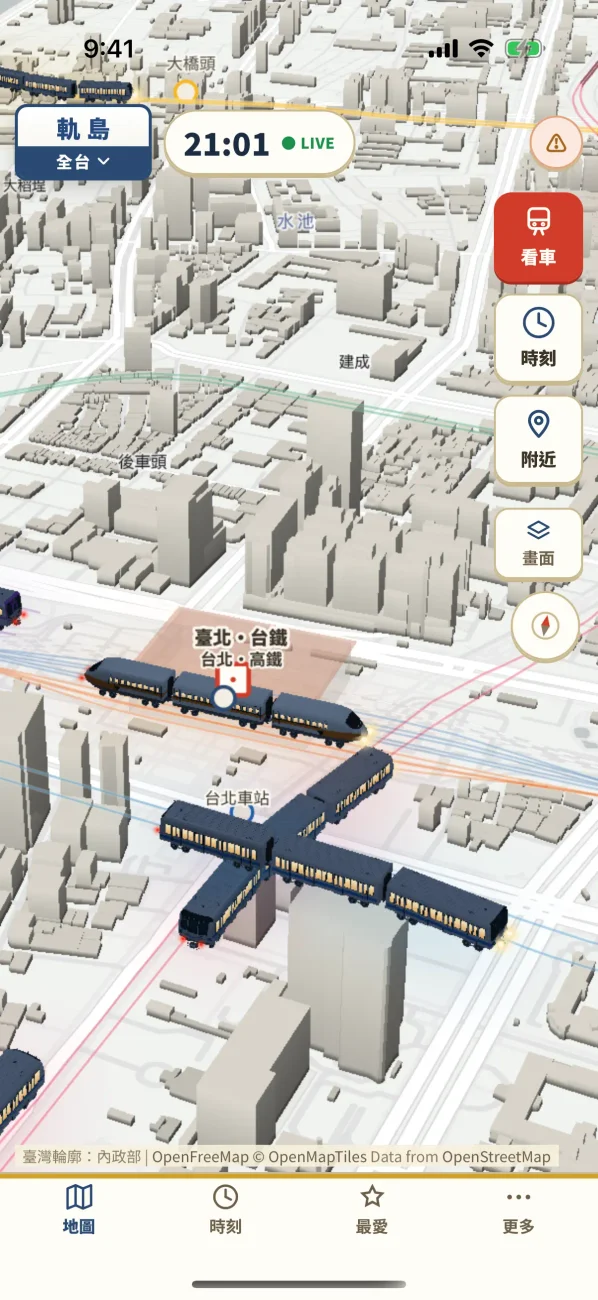
跟著 3D 視角穿越橋梁與隧道
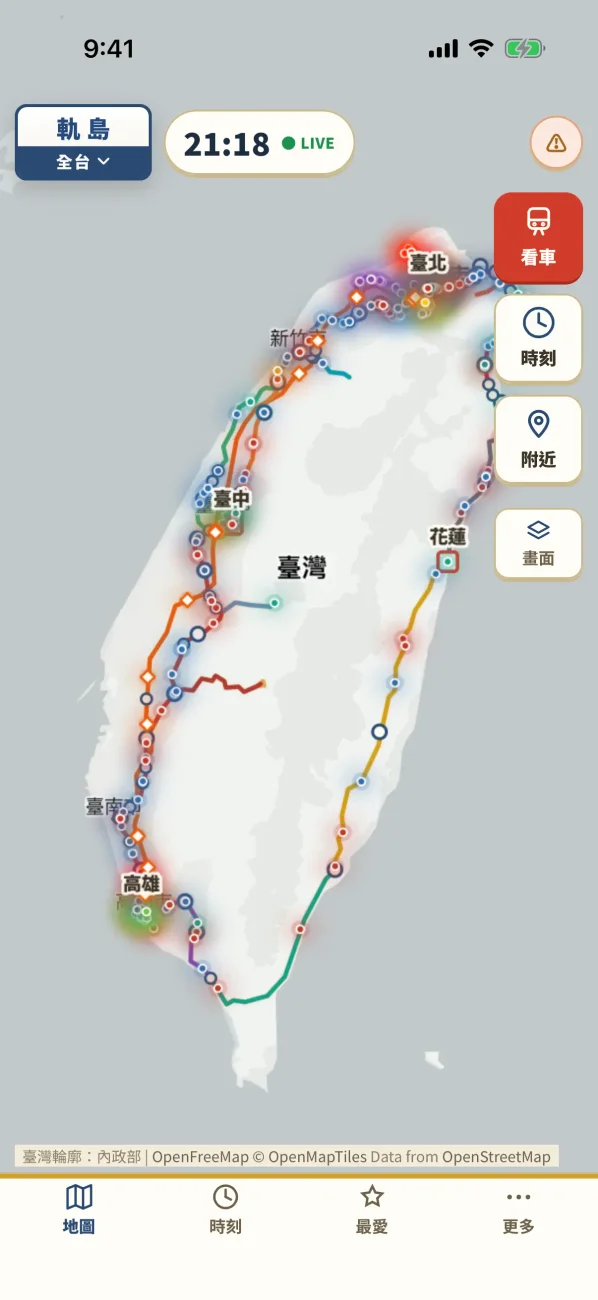
軌島把台灣所有主要鐵道系統放進同一張動態地圖。
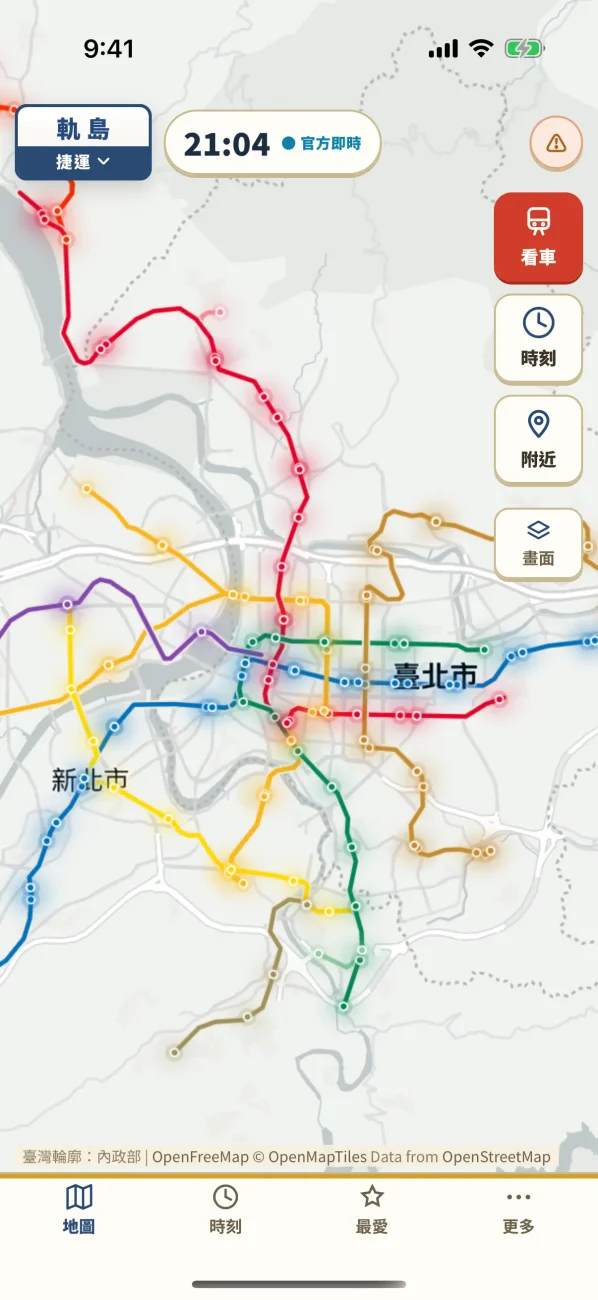
台鐵、高鐵、阿里山林鐵、台北捷運、新北捷運、桃園機場捷運、台中捷運與高雄捷運/輕軌,會依當日時刻表在同一條時間軸上運行。你可以從全台同框開始,縮放到熟悉的城市、跟隨一班列車,或進入放空模式觀看整座島的鐵道流動。
主要功能:
・三種用法:「時刻表+小工具」「地圖看車」或「完整」,第一次打開先選,之後隨時可換
・全台鐵道在同一時間軸運行的 2D/3D 動態地圖
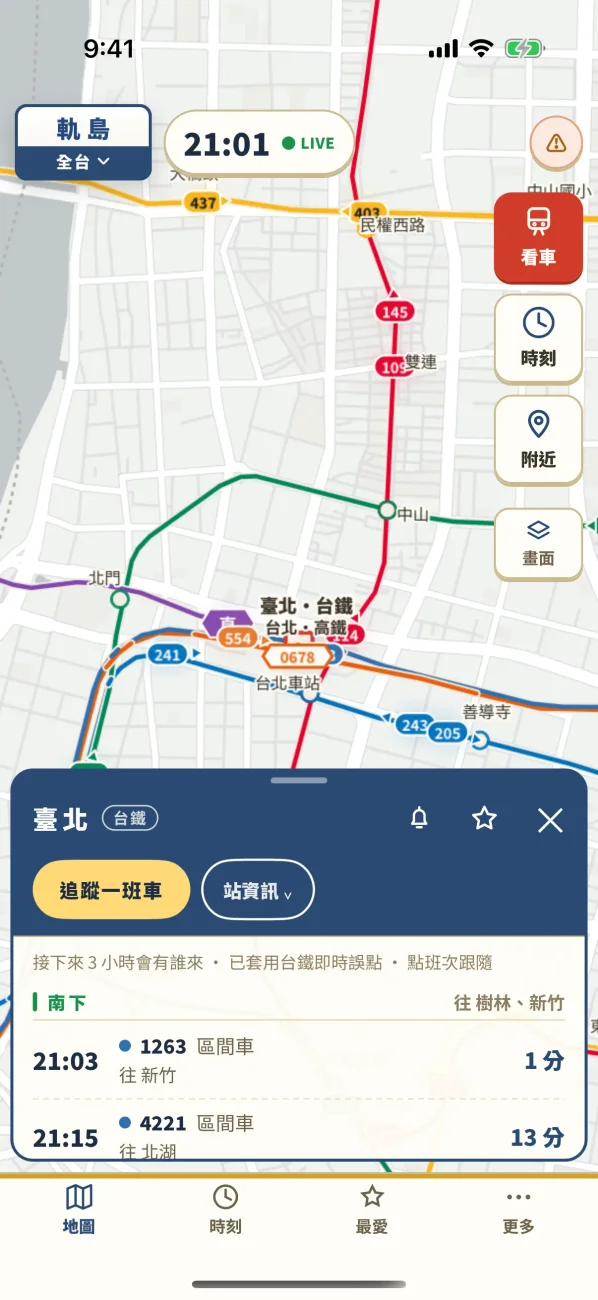
・台鐵即時誤點、月台資訊與各系統營運公告
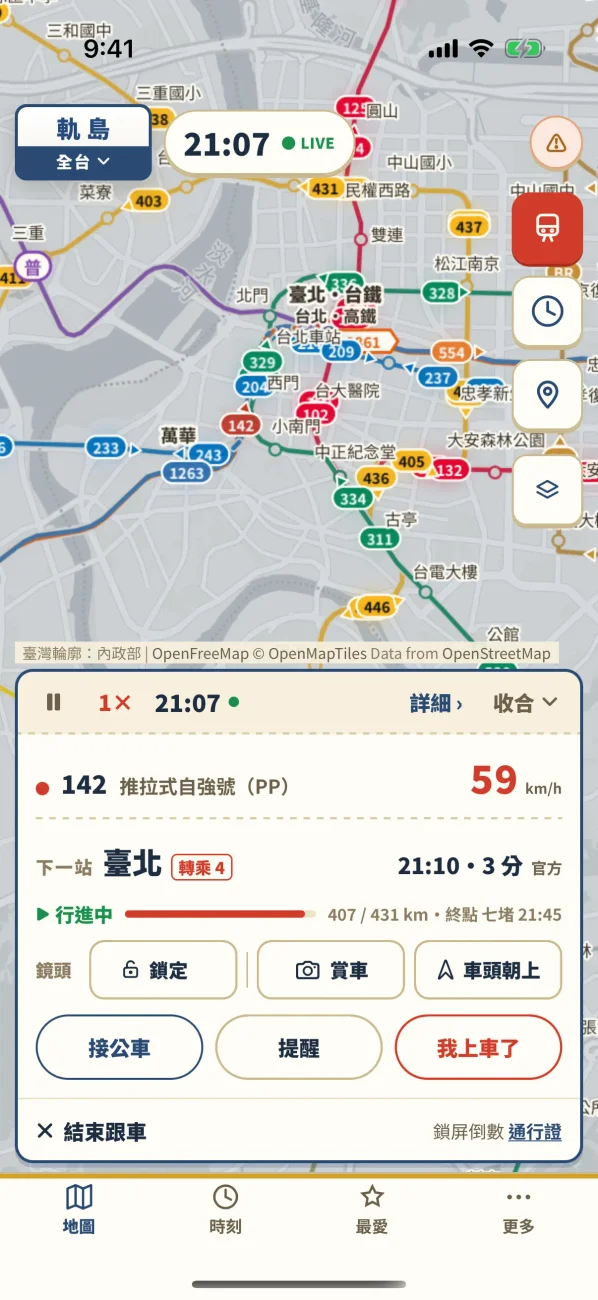
・點擊列車跟隨、站點來車看板與附近列車
・發車看板小工具:台鐵、高鐵、捷運的車站看板放上桌面,有翻牌、液晶、LED 多種樣式
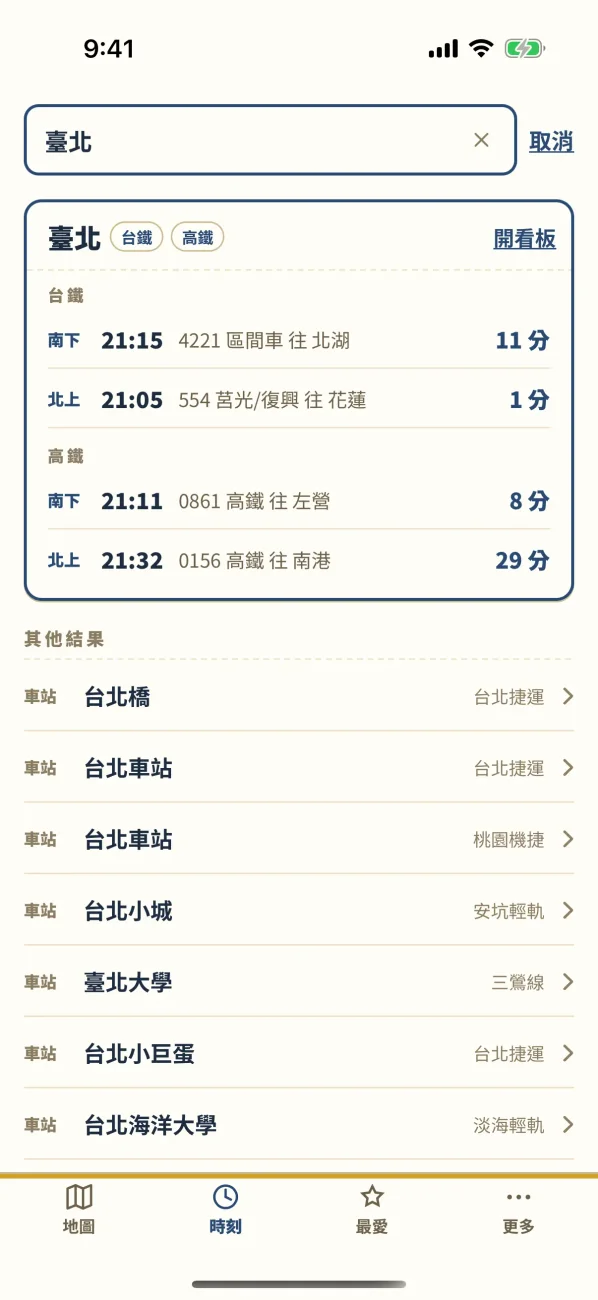
・「時刻」畫面:先列出最近車站的下一班;輸入起訖站,列出含轉乘的搭法與班次
・搜尋公車站牌與即時到站,接續下車後的旅程
・所有列車顯示完整或明確標示為推估的編組與車廂數
・自由調整時間與播放速度
・放空巡航、全畫面與省電模式
・收藏地點、列車與完乘紀錄
・到站/離站本地提醒通知,可設定每天、平日或自訂星期重複
・iPhone 營運通知:台鐵、高鐵、捷運停駛或發生重大事故時通知你
・分享目前畫面、跟車連結與接續旅程
・內建台灣輪廓、軌道與時刻表;線上底圖中斷時不會只剩空白畫面
・車站收集與搭乘模式:蓋章記錄去過的車站與搭過的路段;護照的收集地圖只亮起你搭過的區間
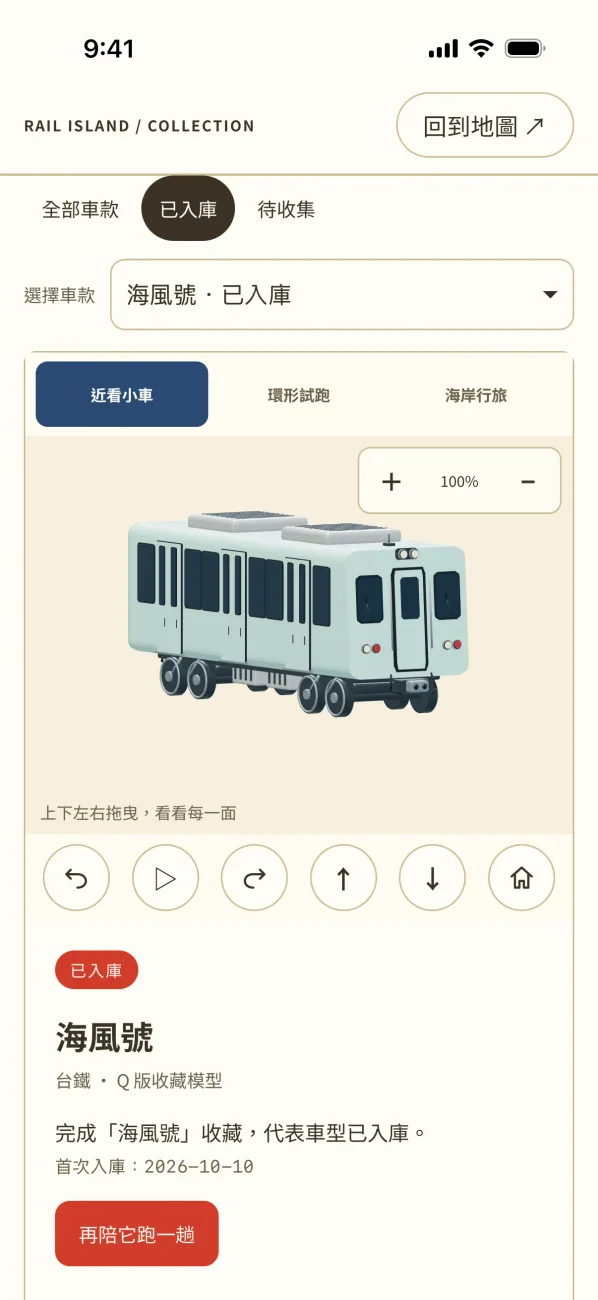
・我的車庫:已入庫的車可以用 3D 觀看、在「田園小站」等場景繞圈跑,也能錄 10 秒短片分享
・校正懸賞(選擇性參加):搭車時錄下旅程,上傳後幫忙校正列車位置,並賺島民點數兌換車庫場景與經典車;有軌島通行證的人點數多 50%
・軌道邊倒數(軌島通行證功能):在鐵道邊存一個點,小工具與鎖定畫面顯示下一班台鐵、高鐵還有幾分鐘經過
・自製列車(軌島通行證功能):替車庫裡的車排路線和發車時間,照你的班表在地圖上跑
・軌島通行證有月票、年票,以及一次付款、不會自動續訂的終身通行證
・介面支援繁體中文、英文、日文與韓文
資料說明:地圖上的列車與軌道邊倒數依公開時刻表與軌道幾何推演,台鐵套用可取得的即時誤點,部分捷運系統依官方到站看板或列車動態校正。這不是所有車輛的官方即時定位;停駛、取消、加開與臨時班距調整也可能未反映。實際乘車、營運與安全資訊請以交通營運單位及現場公告為準。
軌島是獨立開發的開源專案,並非任何交通營運單位的官方 App。
使用條款(EULA):https://www.apple.com/legal/internet-services/itunes/dev/stdeula/
隱私權政策:https://railisland.tw/privacy.html
Rail Island puts Taiwan’s major railway systems on one animated map.
TRA, Taiwan High Speed Rail, the Alishan Forest Railway, Taipei Metro, New Taipei Metro, Taoyuan Airport MRT, Taichung Metro, and Kaohsiung Metro and Light Rail all run on the same timeline using the day’s schedules. Start with the whole island, zoom into a familiar city, follow one train, or enter cruise mode and watch Taiwan’s rail network flow.
Features:
• Three modes: Timetable & widgets, Live map or Everything, switchable any time
• Animated 2D and 3D maps for Taiwan’s major rail systems
• TRA delay and platform information, plus service alerts
• Train following, station arrival boards, and nearby trains
• Departure board widgets for TRA, THSR and metro in split-flap, LCD and LED styles
• Times tab: next trains at your nearest station, plus routes with transfers between any two stations
• Bus stop search and live arrivals for onward journeys
• Formations and car counts for every train, estimates clearly labeled
• Adjustable time and playback speed
• Cruise, full-screen, and power-saving modes
• Favorites, route completion, station collection, and a Passport map that lights up only the segments you’ve ridden
• Trackside countdown (Rail Island Pass): save a spot by the tracks to see when the next TRA or HSR train passes, on a widget or the Lock Screen
• Arrival and departure alerts with daily, weekday or custom-day repeats
• iPhone alerts when TRA, THSR or a metro line suspends service or has a major incident
• Share the view, a train-following link or an onward journey
• Built-in outline, tracks and timetables, so the map still works without online basemaps
• My garage: view collected trains in 3D, run them in scenes such as Countryside Station, and record 10-second clips to share
• Optional Calibration bounties: record a trip to help correct train positions and earn Islander Points for garage scenes and classic trains; Pass holders earn 50% more
• Custom trains (Rail Island Pass): give a garage train its own route and times, and it runs on the map
• Rail Island Pass comes as a monthly or annual pass, or a one-time Lifetime Pass with no auto-renewal
• Interface in Traditional Chinese, English, Japanese and Korean
Train positions and Trackside countdowns are simulated from public timetables and track geometry. TRA delay data and supported metro live corrections are applied where available. The app may not reflect cancellations, special services, or temporary headway changes. Always follow information from operators and on-site staff for travel and safety decisions.
Rail Island is an independent open-source project and is not affiliated with any transport operator.
Terms of Use (EULA): https://www.apple.com/legal/internet-services/itunes/dev/stdeula/
Privacy Policy: https://railisland.tw/privacy.html
What’s new
Version 2.0.8 · Nov 24, 2026
・AI 排行程改版:在「時刻」最上面的輸入框直接打一句話就能排(例如「明天早上 8 點到台中」),不用登入也能用,每天 5 次(登入 10 次、通行證 30 次);聽懂的起訖、日期和時間排成一列,點一下就能改
・排出來的方案改成列出可以搭的幾班車,標出票價、台鐵近 30 天準點率,當天的班次也標月台;也能選最便宜的走法
・目的地是景點(例如日月潭、阿里山)時,會排到有公車或客運到得了的車站,把公車段一起排進方案
・「配樂情境」新增 Lo-fi、提琴、爵士、鋼琴四個歌單,共 20 首,有通行證就能選;它們不會跟著列車自動切換
・懸賞板最上面改成接任務三步,並新增「我錄的趟次」,列出錄好、還在等判定的趟次;「護照」的校正懸賞卡也會寫幾趟等判定
・台鐵列車進站減速改照校正懸賞錄到的實際速度,並補上兩處防追撞的漏洞
・App 在背景放很久再打開時,台鐵列車會馬上對上誤點後的位置,不再慢慢追上
・沒改過設定的人,「立體大小」預設改回「容易辨認」,標準底圖的「透視顯示」預設改回開,地下段的列車不再畫成深色
・沒選過「列車編組」時,不少手機(例如 iPhone 17 Pro)上的立體列車只畫三節示意,現在改照真實或推算的節數畫;Q 版維持三節
・地景底圖上下行分開的道路畫出車道線,兩條路面中間畫黃線
・教學影片「查時刻與轉乘」「立體列車、建物與地圖」照現在的畫面重錄
• The AI trip planner is redesigned: type a sentence in the box at the top of Times (for example “To Taichung at 8 am tomorrow”). No sign-in needed: 5 questions a day (10 when signed in, 30 with the Pass). What it understood (from, to, date and time) appears in a row you can tap to change
• Trip results now list several trains you can take, with fares, TRA on-time rates for the last 30 days and, for today, platforms; you can also pick the cheapest way
• When your destination is a sight such as Sun Moon Lake or Alishan, the plan ends at a station with buses or coaches that reach it, and includes the bus ride
• Soundtrack adds four playlists — Lo-fi, Violin, Jazz and Piano — 20 tracks in all, available with the Pass; they don’t switch automatically with the train
• The Bounty board now opens with three steps for taking a bounty, and a new My recorded trips card lists trips still awaiting review; the Calibration bounties card in Passport shows how many are waiting
• TRA trains now slow down into stations at the speeds recorded through calibration bounties, and two gaps in collision avoidance are fixed
• When you reopen the app after a long time in the background, TRA trains jump straight to their delayed positions instead of slowly catching up
• If you never changed these settings, 3D size goes back to Readable and See-through view on the Standard map is on again, so trains underground are no longer drawn dark
• If you never chose a Train formation, 3D trains on many phones (such as iPhone 17 Pro) were drawn as a 3-car illustration; they now show the real or estimated number of cars. Q-style stays at 3 cars
• Divided roads on the Landscape map now have lane lines, with a yellow line between the two carriageways
• Tutorial videos 5 and 7 (Times and transfers; 3D trains, buildings and maps) are re-recorded with the current screens (Traditional Chinese)
・「AIで経路検索」を作り直しました。「時刻表」のいちばん上の入力欄に文章で入力するだけで検索できます(例:「明日の朝8時に台中へ」)。ログインなしでも1日5回(ログインで10回、パスで30回)使えます。読み取った出発地・目的地・日付・時刻は一列に並び、タップして変更できます
・検索結果は乗れる列車を何本か並べ、運賃、台鉄の直近30日の定時運行率、当日の列車はホームも表示します。最安の行き方も選べます
・目的地が日月潭や阿里山などの観光地のときは、そこまでバスが出ている駅まで検索し、バスの区間も経路に含めます
・「サウンドトラック」に Lo-fi・ヴァイオリン・ジャズ・ピアノの4つのプレイリスト(計20曲)を追加しました。パスがあれば選べます。列車に合わせて自動で切り替わることはありません
・懸賞板のいちばん上に懸賞の受け方を3ステップで表示し、「記録した乗車」で判定待ちの乗車が見られるようになりました。「パスポート」の校正懸賞カードにも判定待ちの回数を表示します
・台鉄の列車が駅に入るときの減速を、校正懸賞で記録した実際の速度に合わせました。追突防止の抜けも2か所直しました
・バックグラウンドに長く置いたあとでアプリを開いたとき、台鉄の列車がすぐに遅れを反映した位置に合うようになりました
・設定を変えたことがない場合、「立体のサイズ」の既定値を「見やすく」に、標準の地図の「透視表示」の既定値をオンに戻しました。地下区間の列車が暗い色で描かれなくなります
・「列車編成」を選んだことがない場合、多くのスマートフォン(iPhone 17 Pro など)で3D列車が「3 両イメージ」で描かれていましたが、実際の両数または推定した両数で描くようにしました。デフォルメは3両のままです
・「風景」の地図で、上下線が分かれた道路に車線を描き、2本の路面の間に黄色の線を描くようにしました
・チュートリアル動画「時刻と乗り換え」「3D 列車・建物と地図」を今の画面で撮り直しました(繁体字中国語)
App privacy
What Hsiang Hsu declares on the App Store about how this app handles data.
-
Data linked to you
May be collected and linked to your identity.
- Purchases
- Location
- Contact info
- Identifiers
- Usage data
- Other data
-
Data not linked to you
May be collected but is not linked to your identity.
- User content
- Usage data
- Diagnostics
Privacy practices may vary, for example with the features you use or your age.
Information
- Seller
- Hsiang Hsu
- Category
- Travel
- Version
- 2.0.8
- Updated
- Nov 24, 2026
- Released
- Jul 25, 2026
- Size
- 692.8 MB
- Requires
- iOS 17.0 or later
- Age rating
- 4+
- Price
- Free
- In-app purchases
- Yes
- Languages
- English, Japanese, Korean, Traditional Chinese
- Copyright
- © 2026 Hsu Hsiang
You might also like
-
 FindTransit TWTRA THSR Metro Bus Live Times
-
 MapsprinkVisited Districts
-
 TransTaiwan: 雙鐵/捷運 時刻表 路徑規劃台鐵、高鐵、捷運、輕軌 列車動態/智慧轉乘規劃/通阻推播
-
 白沙屯 GPS 即時定位Navigation
-
 華信航空Travel
-
 WeMo - 24H Scooter SharingScooter Rental: Ride & Share
-
 大都會叫計程車 55178Travel
-
 Travel & Trip Video Animator3D Animated Route Map Maker
-
 台灣高鐵Travel
-
 USPACEParking, EV charging & more