- Age rating4+
- CategoryProductivity
- LanguagesTraditional Chinese
- Size57.1 MB
Links to the official App Store page
Download.org hosts no file of 一鍵去手寫. The button opens its official App Store page, published by . Listing last checked on Nov 12, 2026.
Screenshots



About
The developer has not provided this text in your language.
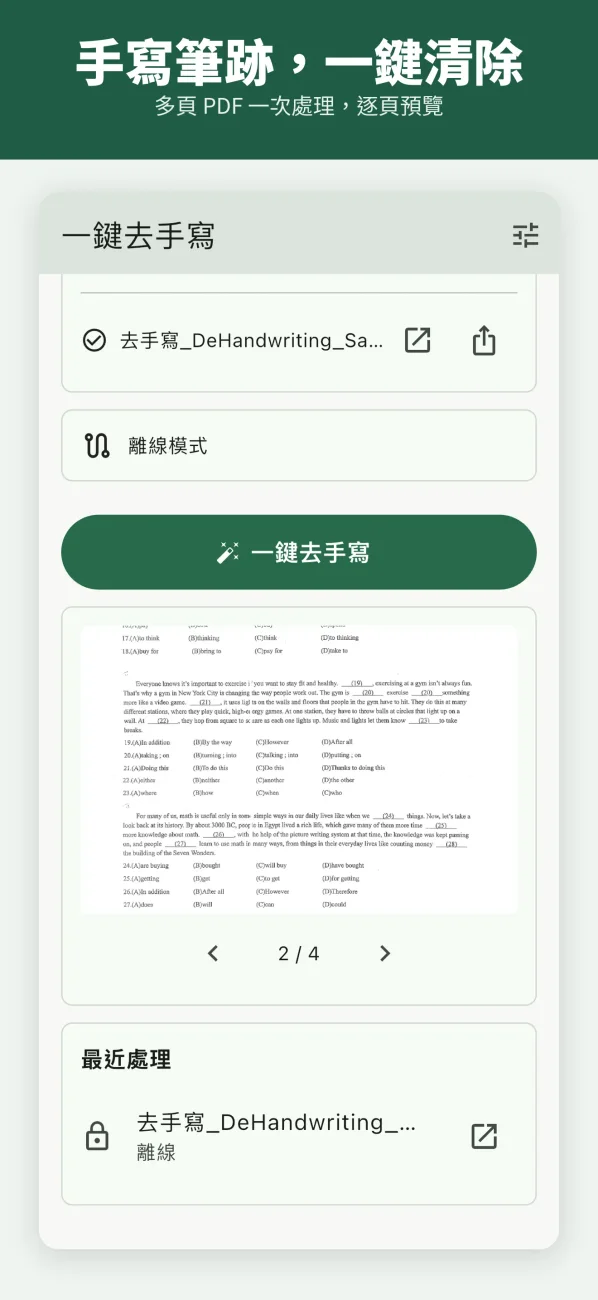
一鍵移除 PDF 與照片中的手寫筆跡,還原乾淨的原始文件。
所有處理都在你的裝置上完成。內建地端 AI 模型,檔案不上傳雲端、不需註冊帳號、沒有網路也能使用。你的文件從頭到尾不離開你的 iPhone。
適合:
• 考卷還原,重複練習
• 講義與表格清理再利用
• 掃描文件整理
文件怎麼進來都可以:用相機直接掃描考卷、從相簿挑選照片、瀏覽檔案,或在「檔案」App、Safari、郵件的分享選單選「一鍵去手寫」直接送進來。支援 PDF、JPG、PNG、HEIC,處理完成可直接分享或儲存。
我們不蒐集任何資料——因為根本沒有伺服器收得到。本版本所有功能皆於裝置端完成;未來若推出需要雲端運算的進階功能,我們會在更新中明確說明,並取得你的同意後才會啟用任何上傳。
What’s new
Version 1.1.2 · Sep 8, 2026
1.1.2 讓「拍的」和「掃的」一樣乾淨。
改善
・相簿照片會自動抓出紙張邊緣並校正歪斜,不再受桌面、陰影影響。
・偏黃、偏灰、光線不均的照片會先做紙張白平衡,手寫這才擦得掉;白紙掃描件維持原樣不動。
・解析度偏低的來源會自動放大到最佳處理尺度,並在畫質不足時提醒重拍。
・影印再影印、印刷偏淡的考卷會自動加深,輸出不再灰灰的。
・去手寫速度提升約兩成。
App privacy
What declares on the App Store about how this app handles data.
-
Data not collected
The developer does not collect any data from this app.
Privacy practices may vary, for example with the features you use or your age.
Information
- Seller
- Hsien Chi Hou
- Category
- Productivity
- Version
- 1.1.2
- Updated
- Sep 8, 2026
- Released
- Aug 22, 2026
- Size
- 57.1 MB
- Requires
- iOS 15.5 or later
- Age rating
- 4+
- In-app purchases
- Yes
- Languages
- Traditional Chinese
- Copyright
- © 2026 Jack Studio
You might also like
-
 Xurf⁺ 零售門市管理Productivity
-
 揪筆記 Join Note寫下來, 再揪人一起。
-
 KIDSDAY 托嬰中心版Productivity
-
 Mobile ESSPProductivity
-
 StudySnap:AI Homework ScannerAI Erase, Create new papers
-
 StudiaryProductivity
-
 Podix: AI Tutor & MockPast papers, notes & revision
-
 JotHeroAI Scan Notices & Family Sync!
-
 Cat Todo:AI & Tasks & ReminderPlanner & To do List, widget