
Tsuranari: Continuous Calendar
Weeks without month breaks
Designed for iPhone
In-app purchases
- Age rating4+
- CategoryProductivity
- DeveloperToru Ishii
- LanguagesJapanese+ 1 more
- Size11.9 MB
Links to the official App Store page
Download.org hosts no file of Tsuranari: Continuous Calendar. The button opens its official App Store page, published by Toru Ishii. Listing last checked on Nov 24, 2026.
Screenshots




About
Tsuranari is a calendar that joins the end of one month to the start of the next. It is designed for both screens of iPhone Duo, and it shows and edits the calendars already on your iPhone, such as iCloud and Google.
■ See across month boundaries
In the Month Flow view, weeks run from top to bottom with no break between months. Events that run from the end of one month into the next stay in one piece. The month you're viewing is shown in white and the months around it in a faint tint, so you can still tell where each month begins.
■ Days that don't stop at midnight
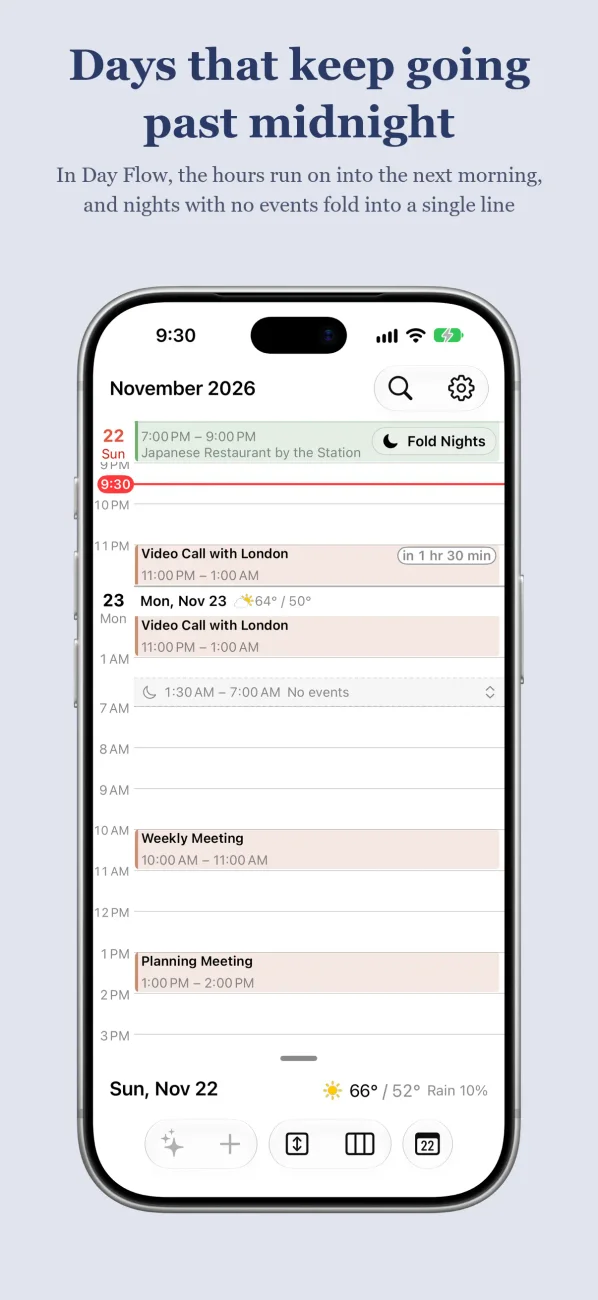
In the Day Flow view, the hours of each day continue past midnight, so late-night events stay in one piece. Nights with no events fold into a single line, and the next event shows how long until it starts.
■ Made for both screens of iPhone Duo
On the outer screen, the calendar sits on top and the day's events below. Unfold the large inner screen and they sit side by side, with event details opening where the list is. When the phone is half open, the layout splits at the fold so no date lands on the crease. Tsuranari also works on regular iPhones; turn the phone sideways to place the two side by side.
■ Six views
Choose from Month, Month Flow, Week, 3 Days, Day, and Day Flow. Put up to three favorite views on buttons and switch with a single tap.
■ Draft events from invitations
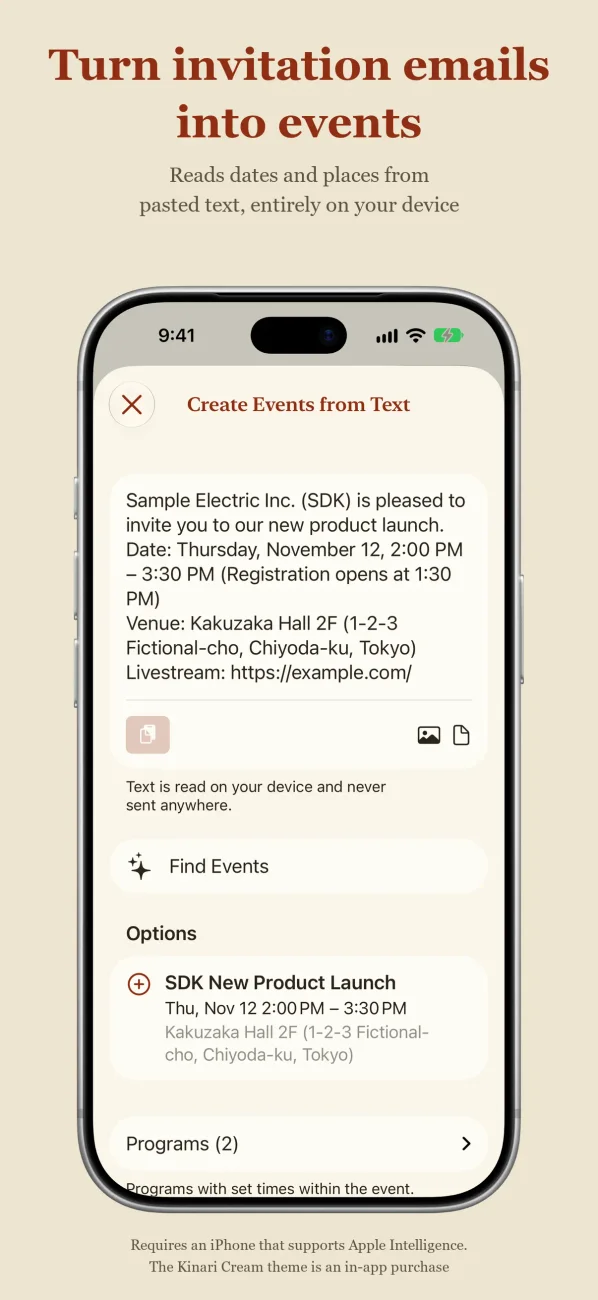
Paste an invitation to a launch, a meeting, or a get-together, and Tsuranari reads the date, time, place, and URL to draft the events. It also reads photos, PDFs, and LINE chat history, in English and Japanese. If it finds a sign-up deadline, you can add it to Reminders. Everything is read on your device by Apple's language model. This feature requires an iPhone that supports Apple Intelligence (iOS 27 or later).
■ Japanese Colors themes
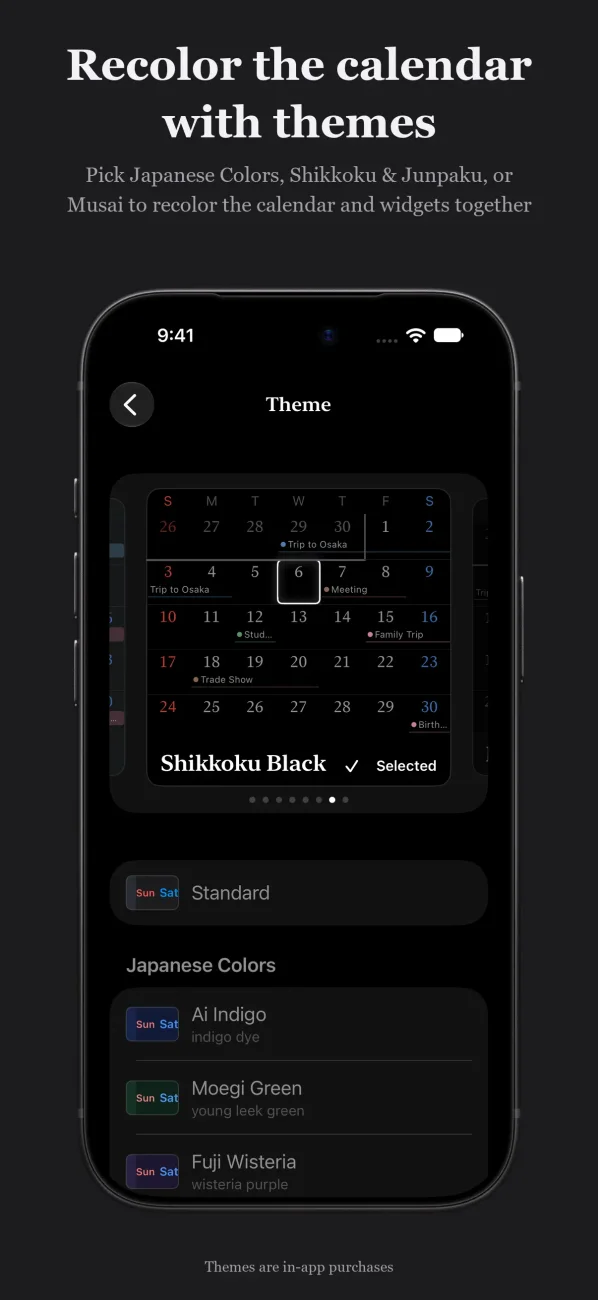
Recolor the app and its widgets in five traditional Japanese colors: Ai Indigo, Moegi Green, Fuji Wisteria, Kinari Cream, and Ginnezu Silver. The Standard theme is free; the five Japanese Colors themes are a single in-app purchase.
■ Privacy
Your events are saved in the iPhone Calendar and never copied into the app. No events or text are sent to the developer's servers.
What’s new
Version 1.7 · Nov 23, 2026
- New Day Flow view: the hours of each day continue past midnight, so late-night events stay in one piece. Nights with no events fold into a single line, and the next event shows how long until it starts.
- The Scroll view is now called Month Flow. Flicking no longer overshoots, and the view settles at the start of a month more easily.
- New Second Time Zone setting: when your device is in a different time zone, the Day and Day Flow views also show times in the zone you choose.
- When creating events from text, invitations that give separate times for each part (such as Part 1 and Part 2, or morning and afternoon sessions) now produce a draft for each part. An end time is also worked out from a start time and a duration.
- Fixed an issue where long theme names in English could be cut off in the theme list.
App privacy
What Toru Ishii declares on the App Store about how this app handles data.
-
Data not collected
The developer does not collect any data from this app.
Privacy practices may vary, for example with the features you use or your age.
Information
- Seller
- Toru Ishii
- Category
- Productivity
- Version
- 1.7
- Updated
- Nov 23, 2026
- Released
- Nov 4, 2026
- Size
- 11.9 MB
- Requires
- iOS 26.0 or later
- Age rating
- 4+
- In-app purchases
- Yes
- Languages
- Japanese, English
- Copyright
- © 2026 aroka works
You might also like
-
 Breaking Editor締切、執筆、写真、メール納品が一つのアプリで
-
 HiMemo2Simple hierarchical memo app
-
 ToduProductivity
-
 Calendar - NorenProductivity
-
 Fumi ReaderA lightweight RSS reader
-
 スマホ de サーベイProductivity
-
 Fast MemoQuick Notes and Text
-
 漢字ルーペ(漢字拡大 v2)Productivity
-
 Clean Ocean EnsembleImpact of Ensemble
-
 タグと階層とAIのメモ | TagMindProductivity