
App Usage & Habit Widget: nuff
Logs itself from Screen Time
Designed for iPhone, iPad
Free · In-app purchases
- Age rating4+
- CategoryProductivity
- DeveloperMaxim Konstantinovich Velli
- LanguagesEnglish
- Size6.4 MB
Links to the official App Store page
Download.org hosts no file of App Usage & Habit Widget: nuff. The button opens its official App Store page, published by Maxim Konstantinovich Velli. Listing last checked on Nov 10, 2026.
Screenshots

About
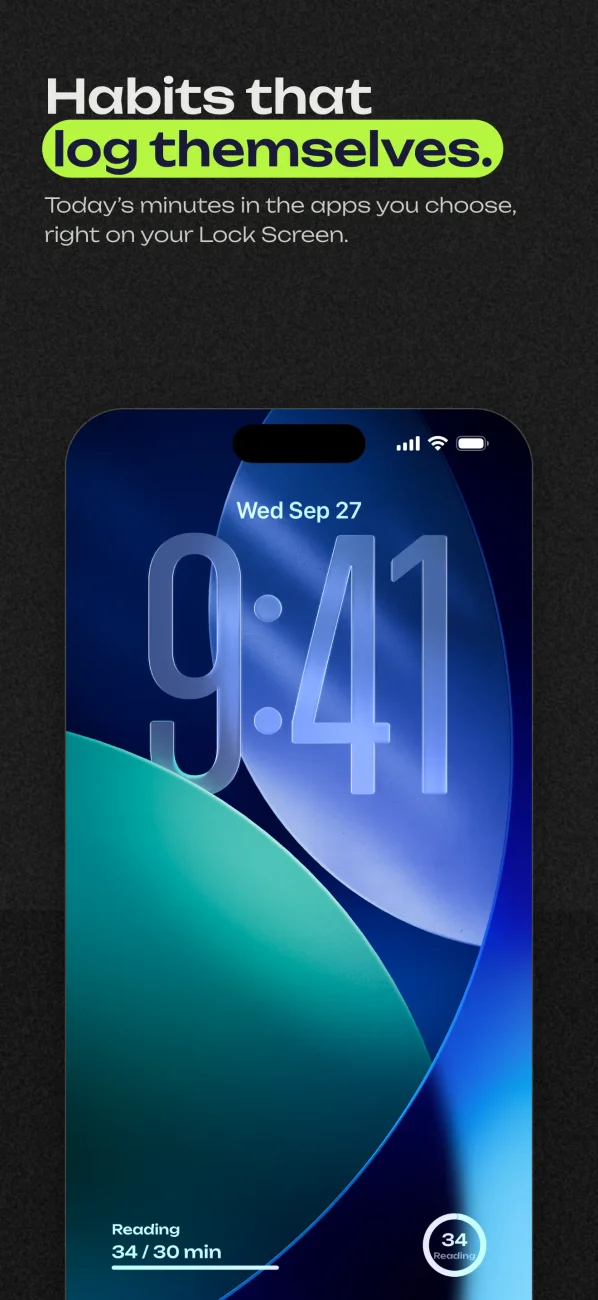
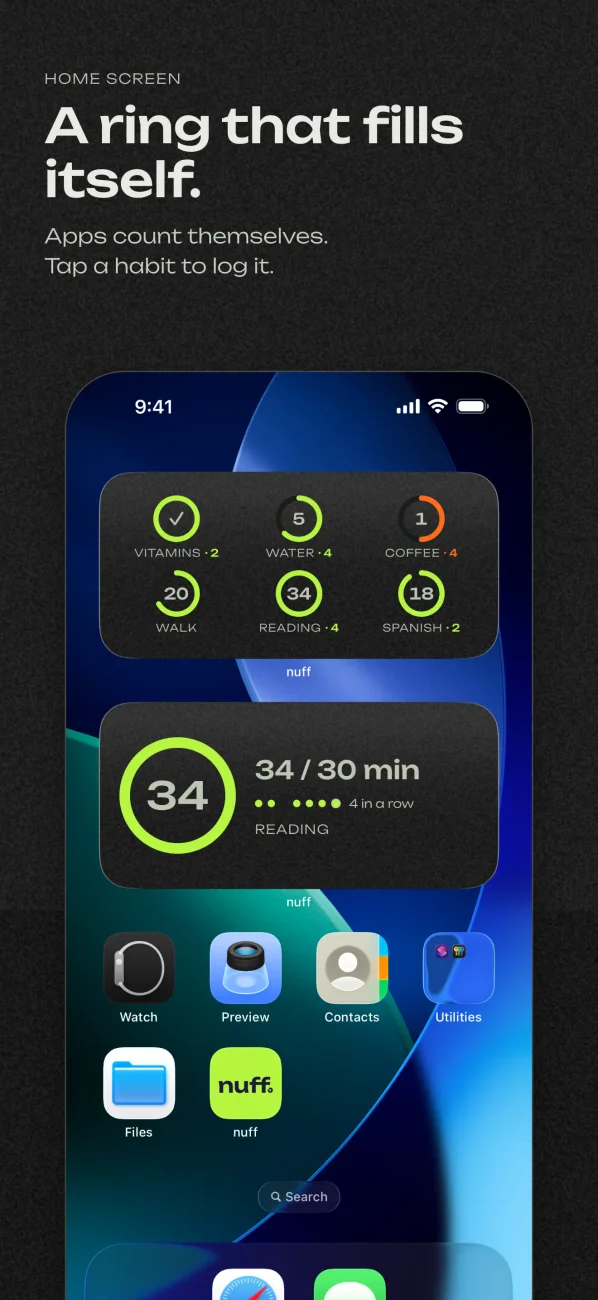
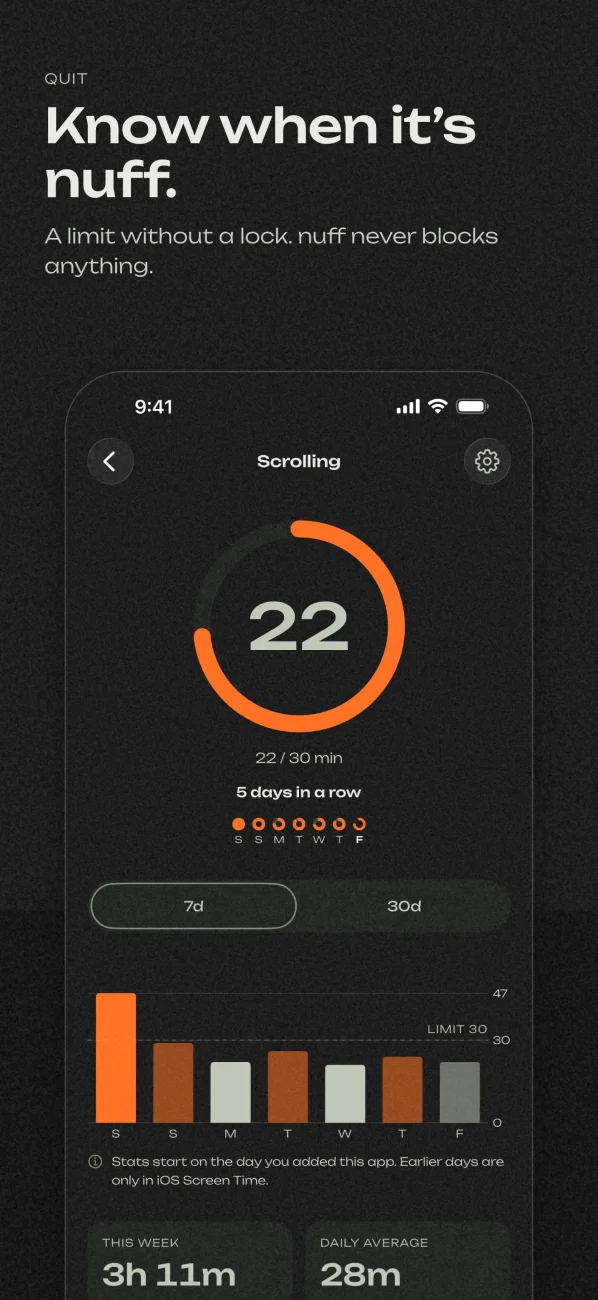
A habit tracker for habits that happen on your phone. If you read, learn or practice in an app, nuff counts those minutes from Screen Time and shows them as a ring on your Home Screen and Lock Screen. It logs itself.
MADE FOR PHONE HABITS
• Reading in a books or articles app
• Learning a language, flashcards or a course
• Practicing or unwinding: an instrument app, meditation, puzzles
• Or using a social app less
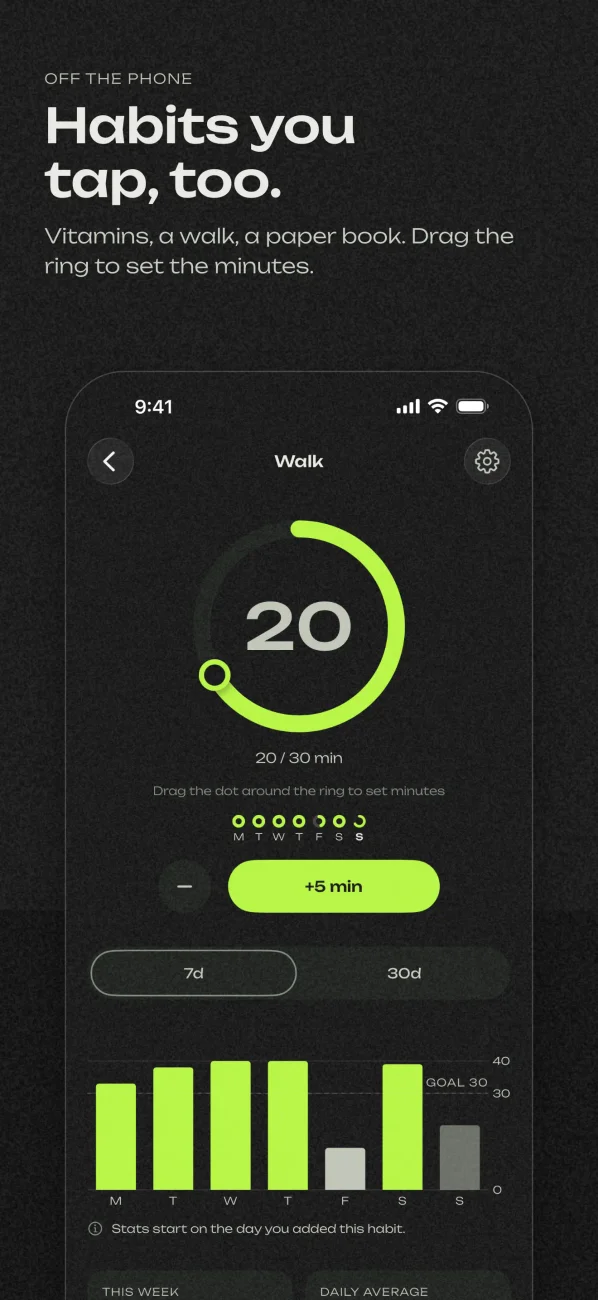
Habits off the phone too, like vitamins, a paper book or the gym: add them and tap to log, right from the widget.
TWO WAYS TO COUNT
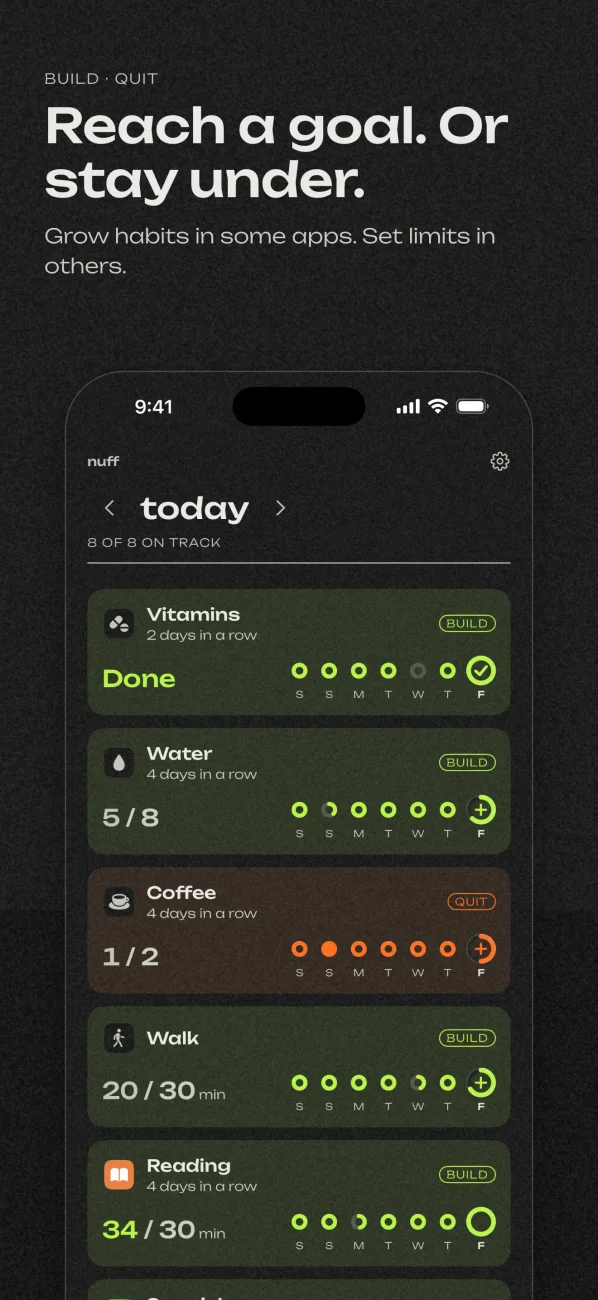
• Build: reach a goal. 20 minutes in a language app. 30 minutes of reading.
• Quit: stay under a limit. 30 minutes of social media is enough.
Same ring, both ways. Every app gets its own goal.
ON YOUR HOME AND LOCK SCREEN
• Home Screen widgets, small and medium: today's ring, filling as you go
• Lock Screen widgets: a ring, or your minutes right under the clock
• Give each app a short name for its widget, like "Spanish" or "Reading"
SEE YOUR WEEK, AND YOUR MONTH
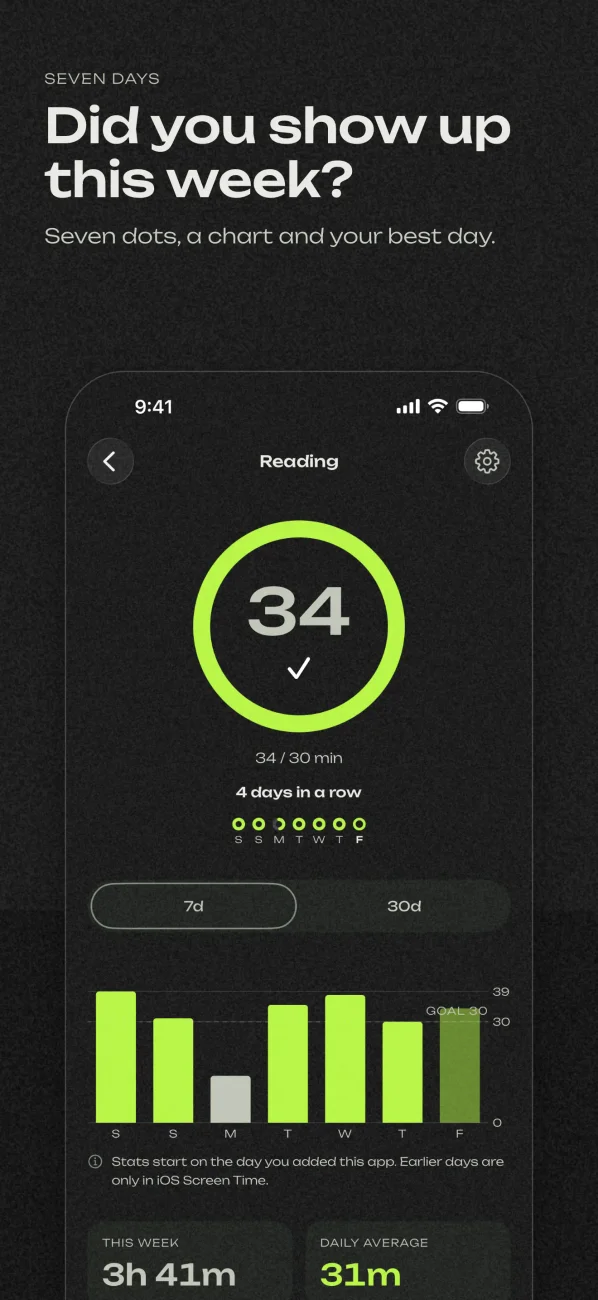
• Seven dots: did you show up this week?
• 7- and 30-day charts, daily averages and a month calendar
• Your full history for every app you add
CALM BY DESIGN
• nuff never blocks anything. No lockouts, no timers, no guilt.
• Optional notifications: one when an app reaches its goal or limit, and a gentle reminder at your usual time on days you haven't started.
• Want iOS to step in at your limit? nuff shows you where to set an App Limit in Settings.
PRIVATE BY DESIGN
• Built on Apple's Screen Time framework. Your minutes stay on this iPhone.
• No account. No server. No analytics. No ads.
• nuff sees minutes, never what you type, read or browse.
HOW IT WORKS
1. Allow Screen Time access (Apple asks, Apple gates it).
2. Pick your apps.
3. Choose build or quit, and set a number.
4. Add a widget.
Minutes count one by one for the first hour of each app, then in bigger steps. Widgets catch up every few minutes, so they can run a minute or two behind.
NUFF+ SUBSCRIPTION
Free: one app and one habit, with their rings and Home Screen widgets. nuff+ adds Lock Screen widgets, your week and history, and as many apps and habits as you need.
• nuff+ yearly: $4.99 a year, with a 7-day free trial. Prices vary by country.
• Payment is charged to your Apple Account when you confirm, or when the free trial ends. The subscription renews automatically unless you turn it off at least 24 hours before the end of the current period. Manage or cancel in Settings > Apple Account > Subscriptions.
• Works with Family Sharing.
Terms of Use: https://www.apple.com/legal/internet-services/itunes/dev/stdeula/
Privacy: https://nuff.click/privacy.html
Requires iOS 17.4 or later and Screen Time turned on.
What’s new
Version 1.0.2 · Oct 24, 2026
• Log a habit from Control Center, the Lock Screen or the Action button (iOS 18 and later). Add the "Log a habit" control and choose which habit it logs.
• Easier to read: stronger text contrast in light mode, calmer animations with Reduce Motion, and missed days on widgets you can tell apart without color.
• VoiceOver reads the bar chart day by day, with an audio graph.
• Minutes look off? Settings now shows the fix.
• Fixes: past days keep the goal they had when you change a goal, the day's first Screen Time reading can't jump ahead, the chart's goal label stays readable over tall bars, and the price shows "Try again" instead of loading forever when the App Store can't be reached.
App privacy
What Maxim Konstantinovich Velli declares on the App Store about how this app handles data.
-
Data not collected
The developer does not collect any data from this app.
Privacy practices may vary, for example with the features you use or your age.
Information
- Seller
- Maxim Konstantinovich Velli
- Category
- Productivity
- Version
- 1.0.2
- Updated
- Oct 24, 2026
- Released
- Oct 24, 2026
- Size
- 6.4 MB
- Requires
- iOS 17.4 or later
- Age rating
- 4+
- Price
- Free
- In-app purchases
- Yes
- Languages
- English
- Copyright
- © 2026 Maxim Konstantinovich Velli EI
You might also like
-
 FeedOff: Block Reels & ShortsKeep Your DMs, Lose the Feed
-
 Do It Now - RPG To Do ListImprove your motivation Do It!
-
 Dual: Solo Leveling For LifeGamify Focus, Habits & Goals
-
 AI Meeting Note Taker - JamieCapture, transcribe, summarize
-
 iEditor – Text Code EditorBest source code editor
-
 No Scroll - Limit Screen TimeApp Blocker, Control + Reduce
-
 ScreenApp: AI Voice RecorderTranscribe & Meeting Notes AI
-
 TimeBloc - Daily PlannerTime Block, To-Do & Routines
-
 24me: Calendar・Planner & To DoReminders, Schedule, Organizer
-
 everyday - Habit TrackerDaily Routine Checklist