
- Age rating4+
- CategoryUtilities
- DeveloperKUAN TING PAN
- LanguagesEnglish+ 12 more
- Size91.9 MB
Links to the official App Store page
Download.org hosts no file of AquaWiz. The button opens its official App Store page, published by KUAN TING PAN. Listing last checked on Nov 15, 2026.
Screenshots

About
AquaWiz is the companion app for AquaWiz KHA and CRA hardware devices, giving marine aquarium hobbyists and professional aquaculturists precise, real-time control over water chemistry.
Connect your devices, monitor critical parameters, and let automation handle the rest, so you can focus on enjoying your reef.
REAL-TIME MONITORING
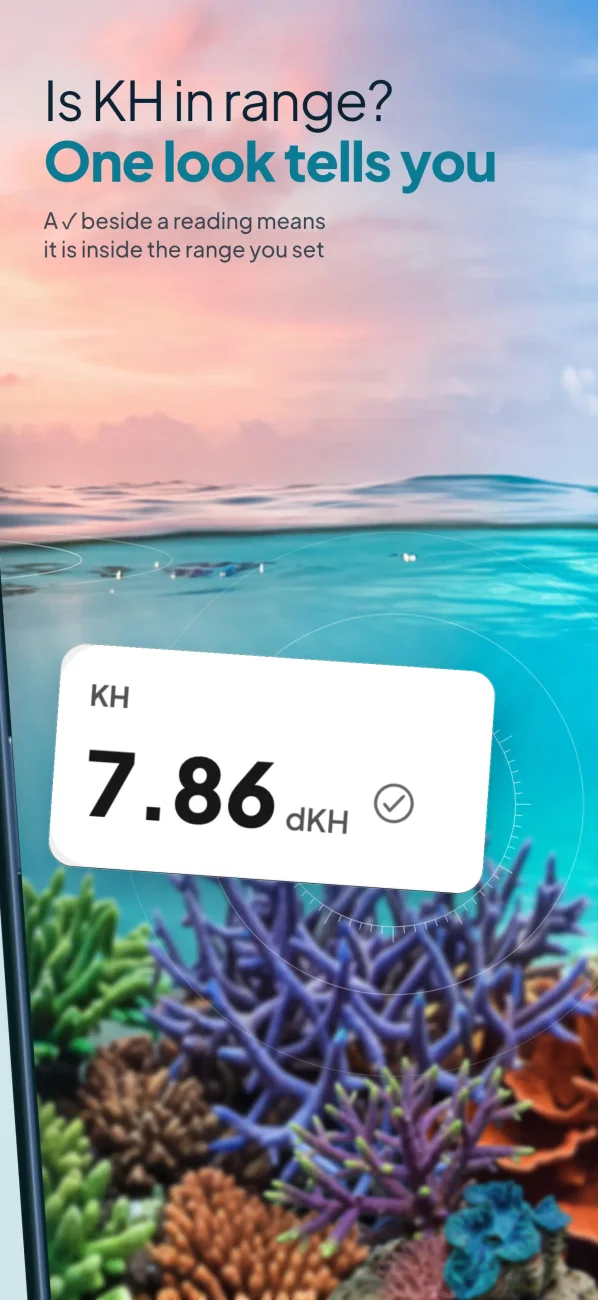
View live KH (carbonate hardness), pH, and CO2 data from your connected devices. The home dashboard displays your latest readings at a glance, each with an indicator of its state, and tells you when a device is offline or its data is late. Pull to refresh for instant updates.
KHA - KH MONITORING & AUTO-DOSING
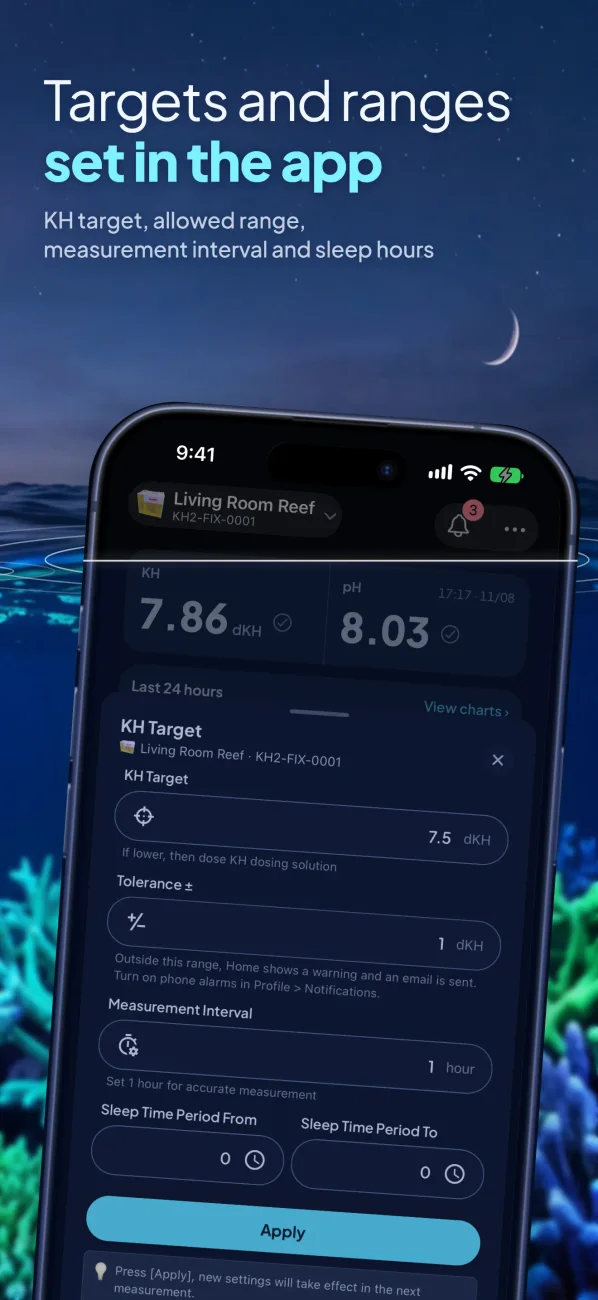
The KHA device continuously measures your tank's KH and automatically doses KH-raising solution to maintain your target level. With AquaWiz you can:
- Set your target KH and deviation alert thresholds
- Calibrate KH readings for maximum accuracy
- Configure dosing parameters and monitor solution levels
- Track KH-raising and calibration solution remaining volume
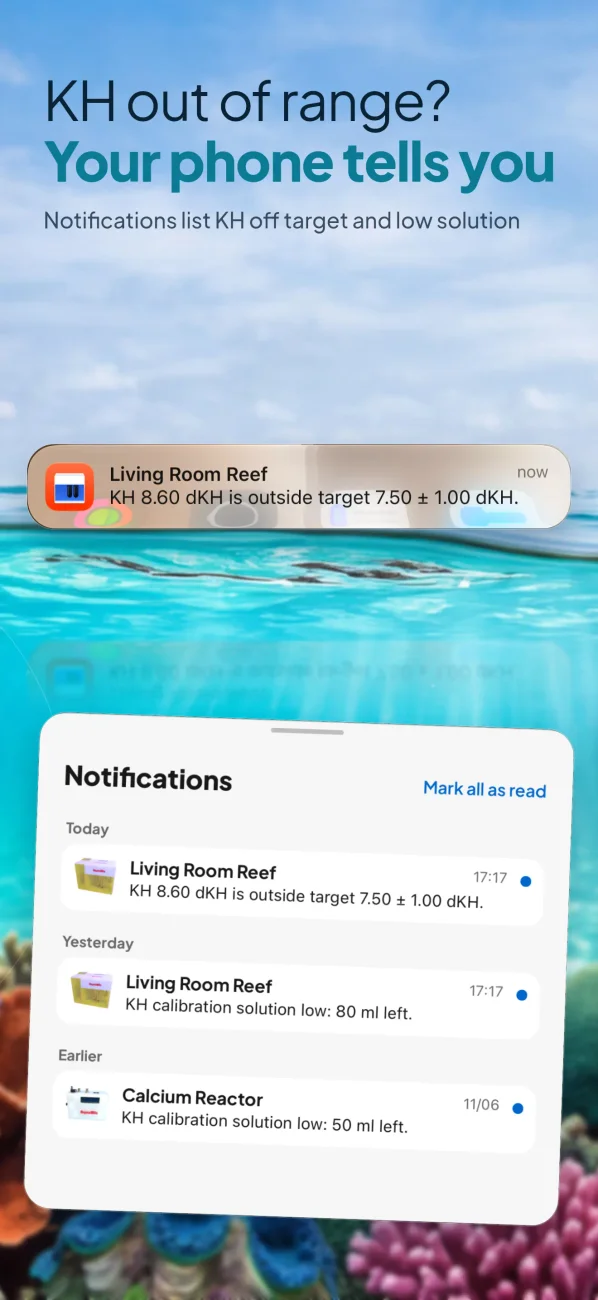
- Receive email alerts and phone notifications when solution is running low
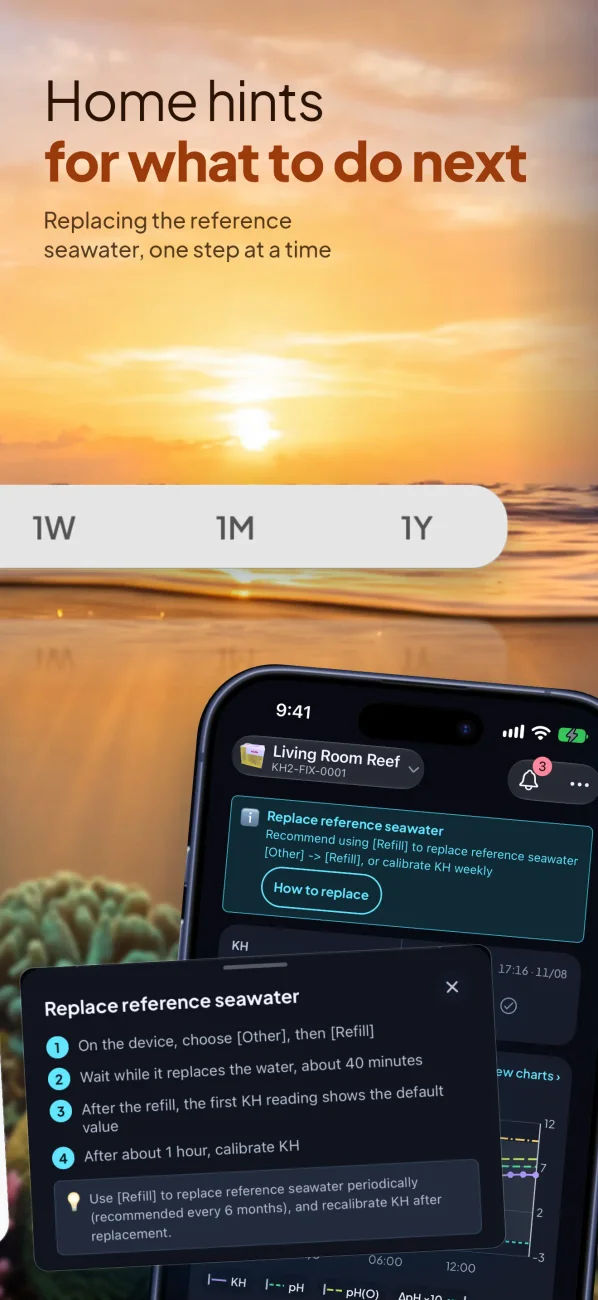
- See a hint on Home when the reference seawater needs replacing or the bubbles need checking
- View pH probe status and values
CRA - CO2 REACTOR CONTROL
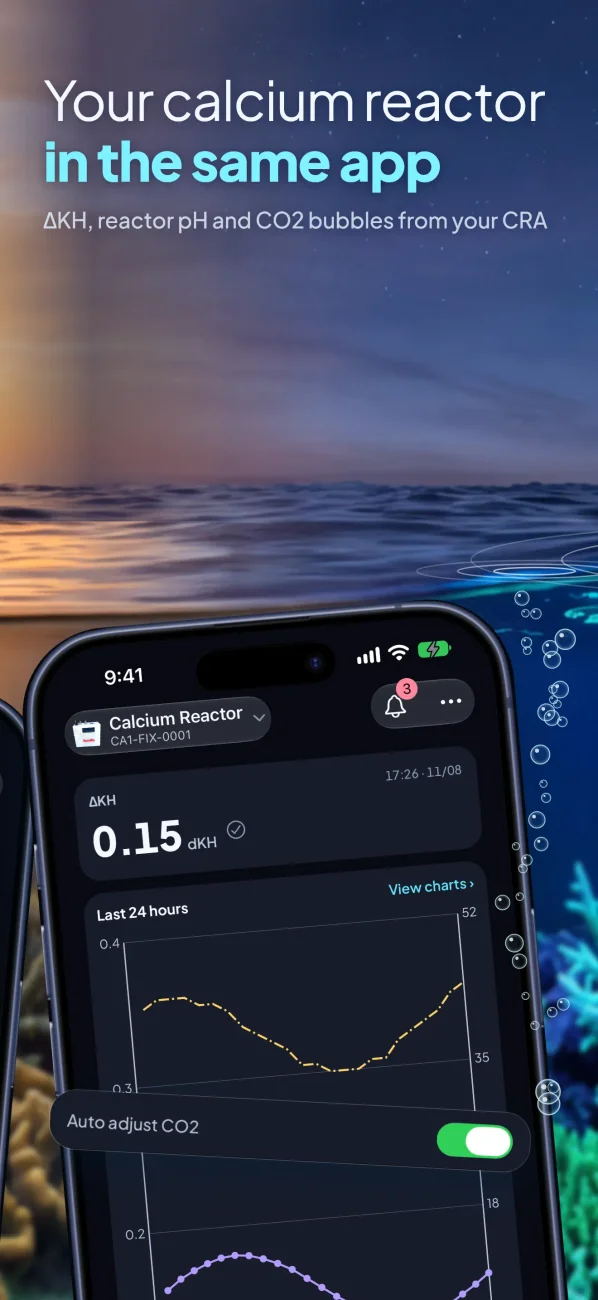
The CRA manages CO2 injection for calcium reactors. Through the app you can:
- Monitor delta-KH (d-KH) and CaRx pH in real time
- Configure CO2 bubble rates with hourly scheduling (24-hour control)
- Set auto-adjust mode for hands-free CO2 optimization
- Use the suggested settings calculator based on tank volume and coral load
- Adjust water flow rate for fine-tuned reactor performance
PHONE NOTIFICATIONS
Get the tank alarms your email already receives as notifications on your iPhone or iPad. Choose which alarms each phone gets in Profile > Notifications, and tap an alarm to open that device.
INTERACTIVE CHARTS & ANALYTICS
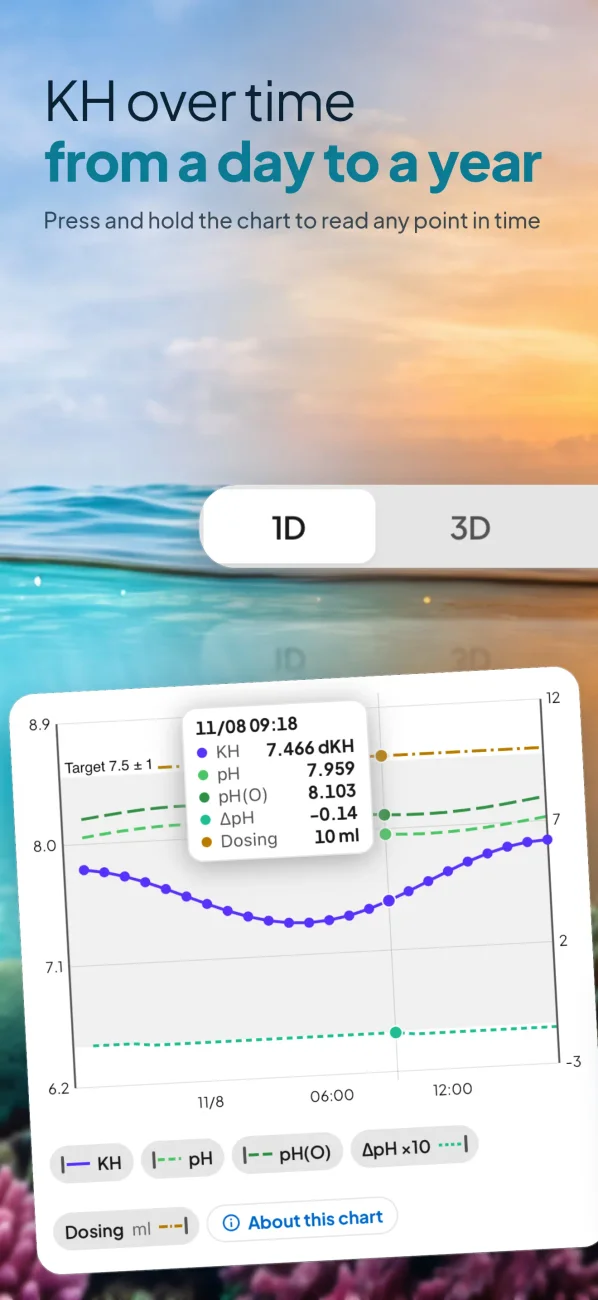
Explore your data across five time ranges: 1 day, 3 days, 7 days, 1 month, and 1 year. Interactive charts let you touch and drag to inspect individual data points with exact values and timestamps. Turn your iPhone sideways for a full-screen chart. Export your history as CSV files to track long-term trends or share them.
ICP ANALYSIS
On a KHA device, open Analysis from the menu on Home to review your Fauna Marin ICP test results on aquawiz.net.
MULTI-DEVICE MANAGEMENT
Manage multiple AquaWiz devices from a single account. Add, rename, link, unlink, or remove devices with ease. Switch between devices instantly from the home screen.
MADE FOR iPhone, iPad AND iPhone Duo
On iPad and iPhone Duo, your device list sits beside the page and wider screens use two columns. Choose System, Light or Dark appearance in Profile.
SECURITY & ACCOUNT
- Biometric login (Face ID / Touch ID / fingerprint) with secure credential storage
- Change email and password
- Full account deletion support
MULTI-LANGUAGE SUPPORT
Available in 13 languages, with full right-to-left support for Hebrew.
MULTI-REGION
Automatic region detection with dedicated servers for global (aquawiz.net) and China (aquawiz.cn) users, ensuring fast and reliable connectivity wherever you are.
AquaWiz requires a compatible AquaWiz KHA or CRA hardware device and an internet connection. Visit aquawiz.net to learn more about our devices.
What’s new
Version 1.6.2 · Nov 12, 2026
- Your tank can now tap you on the shoulder. Alarms come to your phone as notifications, and you decide which ones are worth hearing about. Switch them on in Profile > Notifications.
- Home tells you how things stand at a glance. Every reading shows its status, and if a device goes offline or stops sending data, you'll know.
- KHA owners: the temperature is now right there on Home and in Charts. And when it's time to swap the reference seawater, or KH is swinging more than it should, a note at the top of Home says so and shows you what to do.
- Pinch into a chart to take a closer look at that KH dip, then drag to follow it along.
- Lights out? Switch to the Dark theme. Feeling festive? Pick one of five new app icons, Christmas included. Both live in Profile > Appearance.
- iPad and iPhone Duo get layouts made for their screens, and the tab bar is the standard one now.
- You stay signed in. After you change a setting, its row shows whether your device has picked it up, so there's no more guessing.
- And the usual round of bug fixes.
App privacy
What KUAN TING PAN declares on the App Store about how this app handles data.
-
Data linked to you
May be collected and linked to your identity.
- Contact info
- User content
- Identifiers
- Diagnostics
- Other data
-
Data not linked to you
May be collected but is not linked to your identity.
- Identifiers
- Usage data
- Diagnostics
Privacy practices may vary, for example with the features you use or your age.
Information
- Seller
- KUAN TING PAN
- Category
- Utilities
- Version
- 1.6.2
- Updated
- Nov 12, 2026
- Released
- Feb 25, 2025
- Size
- 91.9 MB
- Requires
- iOS 16.4 or later
- Age rating
- 4+
- Price
- Free
- Languages
- English, French, German, Hebrew, Japanese, Malay, Portuguese, Russian, Simplified Chinese, Spanish, Traditional Chinese, Turkish + 1 more
- Copyright
- © 2026 Coral Bay Technology Ltd.
You might also like
-
 Orphek iConUtilities
-
 TUNZEYour TUNZE. Your control.
-
 Kamoer RemoteKamoerRemoteAbroad
-
 Smart Reefmarine aquarium management
-
 HYDROS AppAquarium Monitoring & Control
-
 NatureBotAI Aquarium Assistant
-
 AquarinoAquarism with technology
-
 GHL ConnectProfiLux, Doser & Mitras LX7
-
 SimalaiSimalai
-
 Reef Brite 2.0Control your lighting