
- Age rating4+
- CategoryMusic
- DeveloperBirk Paul William Roolf
- LanguagesEnglish
- Size123.6 MB
Links to the official App Store page
Download.org hosts no file of ArcaLyra. The button opens its official App Store page, published by Birk Paul William Roolf. Listing last checked on Nov 18, 2026.
Screenshots

About
ArcaLyra is a digital sheet music app for musicians who want to use their music flexibly, stay organized, and leave paper clutter behind.
The app replaces traditional paper-based workflows with a customizable digital system for practice, rehearsals, and performances. ArcaLyra combines an organized library, editing tools, annotations, setlists, and customizable autoscroll in one clear interface.
Your sheet music, edits, and settings remain stored locally on your device. No user account, no cloud-storage requirement, no advertising, no cross-app tracking, and no user profiling.
AUTOSCROLL FOR SHEET MUSIC
ArcaLyra can scroll through your sheet music automatically, so you no longer have to turn pages constantly. You decide how the page moves and which settings work best for the way you play.
Autoscroll can be used together with audio playback. You can also scroll manually or control page turns with a foot pedal if that suits your setup better.
EDIT DIRECTLY IN THE APP
Edit your sheet music directly in ArcaLyra. Add annotations, symbols, and text, adjust pages, and prepare your music exactly the way you need it while playing.
The tools are intentionally kept clear and accessible, so you can make changes quickly without getting lost in complicated menus and return your focus to the music.
LIBRARY AND SETLISTS
Organize your sheet music using titles, parts, ensembles, and setlists. This keeps even larger collections clear and manageable.
Fast search and a structured library help you find the right piece at any time. Create setlists for rehearsals or performances and switch between different musical settings without losing track of your music.
DISPLAY AND READABILITY
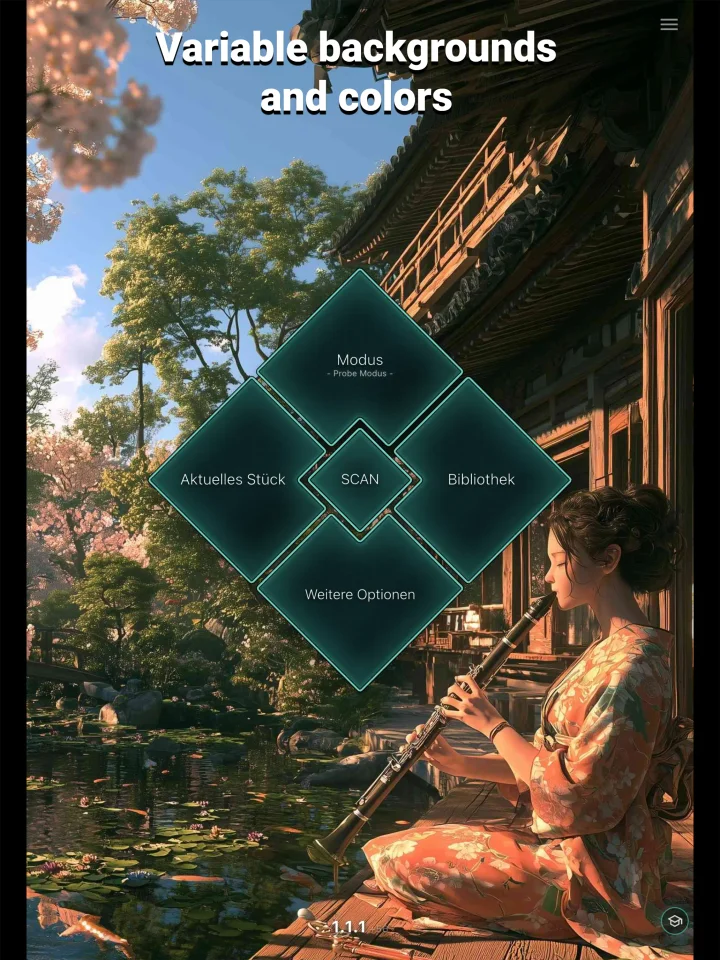
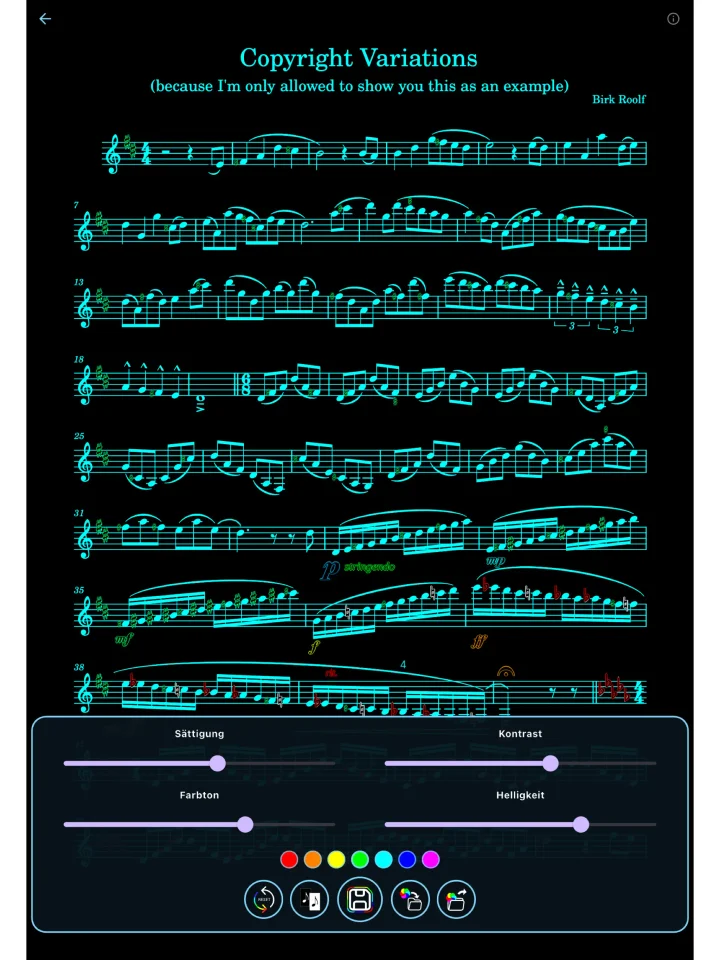
Customize colors, themes, and the overall display to suit your setup, surroundings, and personal reading preferences. Clear visibility was a central goal throughout development, ensuring that important annotations remain easy to recognize while playing.
PRIVACY FROM THE GROUND UP
ArcaLyra does not require a user account. Your sheet music, edits, and settings remain stored locally on your device.
There are no advertisements, no cross-app tracking, no user profiling, and no automatic synchronization of your sheet music or edits. Subscription and access verification, the public development section, and strictly limited aggregated usage statistics process only the technical data required for those functions.
SUBSCRIPTION
ArcaLyra is actively developed and will continue to expand over time. Your subscription supports ongoing improvements, new tools, and the continued development of the app.
The goal is to create a digital sheet music environment that supports musicians in real-world use: during practice, in rehearsals, and on stage.
SUBSCRIPTION REQUIRED
Eligible new subscribers can try ArcaLyra free for 14 days. Continued regular access after the trial requires a separately purchased auto-renewable in-app subscription.
Terms of Use (EULA): https://www.apple.com/legal/internet-services/itunes/dev/stdeula/
Privacy Policy: https://arcalyra.com/app-privacy-policy
What’s new
Version 1.1.2 · Oct 11, 2026
New in version 1.1.2
• Bring in entire sheet music folders
The new folder import recognizes German and English instrument and part abbreviations in file and folder names. Review and correct titles, parts and ensembles before importing. Assign a shared part to titles without a recognized abbreviation. Import your originals or link them in place. Clearer previews and progress indicators also help with large collections.
• Prepare better sheet music photos
Page-edge detection on iPad has been improved. The camera preview keeps the correct aspect ratio; uncertain boundaries leave the full photo available for manual cropping. The Gentle Sheet Music filter and contrast control help improve readability. Supported cameras start with photo flash, and captured-photo previews stay visible longer.
• Edit and return more easily
The editor’s finish button now takes you back even when nothing has changed. An additional stamp button opens and closes the stamp menu. Drag stamp and quick menus directly by their close buttons. Size controls and the layout in windowed mode have also been improved.
• Get started with autoscroll
If a piece has no autoscroll markers yet, a helpful dialog takes you directly to Marker Mode and, if you choose, its tutorial. Your preference not to start the tutorial automatically every time is remembered.
• Improvements for rehearsals and concerts
The metronome is reliably audible at low tempos again. Pedal view supports two pages. The main menu shows your current mode, piece, ensemble and library totals more clearly.
Further improvements cover first-time setup, tutorials, backups, error messages and reliable saving of your annotations.
App privacy
What Birk Paul William Roolf declares on the App Store about how this app handles data.
-
Data not linked to you
May be collected but is not linked to your identity.
- Purchases
- Identifiers
- Usage data
- Diagnostics
Privacy practices may vary, for example with the features you use or your age.
Information
- Seller
- Birk Paul William Roolf
- Category
- Music
- Version
- 1.1.2
- Updated
- Oct 11, 2026
- Released
- Jul 30, 2026
- Size
- 123.6 MB
- Requires
- iOS 15.6 or later
- Age rating
- 4+
- Price
- Free
- In-app purchases
- Yes
- Languages
- English
- Copyright
- © 2026 Birk Paul William Roolf
You might also like
-
 LaboKe VieWKemper Player Live Monitor
-
 Ostino - Learn Piano from MIDILearn Songs from PDF & MIDI
-
 Piano AccordionMusic
-
 doozzoo classroomMusic
-
 dimuscoDigital Music Scores
-
 Ultimate Tuner ProMost Precise & Universal Tuner
-
 Archtone: Jazz Guitar ChordsChords, theory & improvising
-
 MusicBook ProWrite songs. Perform live
-
 ARC Score악보 편집, 필기부터 연주까지
-
 doozzooTeach & Learn Music Easily