Archivist
AI powered document archive
Designed for iPhone, iPad, Mac
Free · In-app purchases
- Age rating4+
- CategoryProductivity
- DeveloperDominik Butz
- LanguagesEnglish+ 2 more
- Size29.4 MB
Links to the official App Store page
Download.org hosts no file of Archivist. The button opens its official App Store page, published by Dominik Butz. Listing last checked on Nov 12, 2026.
Screenshots


About
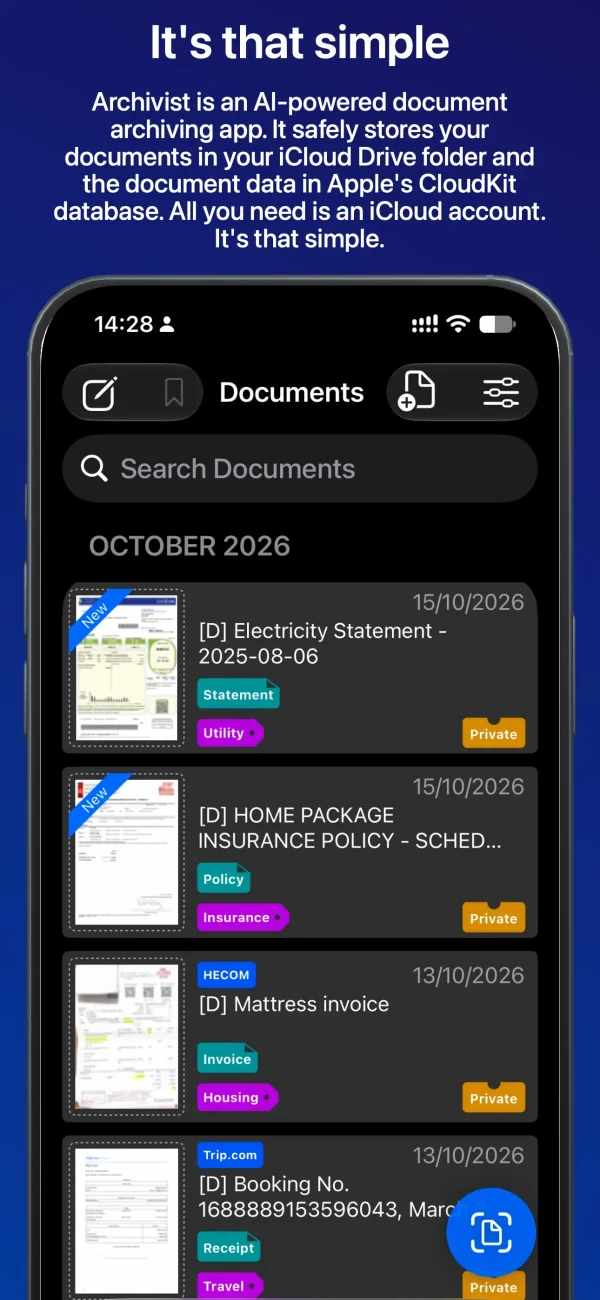
Archivist is a document archiving app available for iOS, iPadOS and macOS. No account signup, no login required other than iCloud. And best of all: no subscription. Archivist stores your documents as PDF securely in iCloud Drive, following a simple folder path pattern: Archive Drawer - Topic(s) - Correspondent - year - PDF file. Archivist lets you search through your documents using full text search and filter labels like topics, document type, correspondents and archive drawer. Get rid of your messy folder system and let Archivist manage your documents for you!
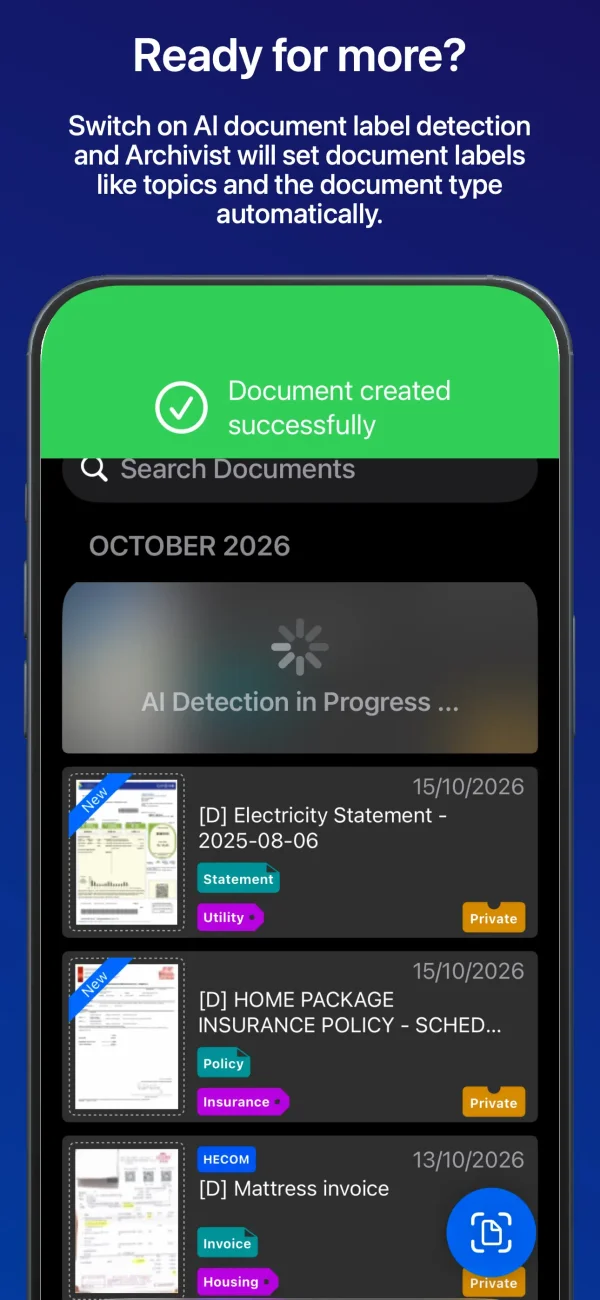
Ready for more? Switch on automatic AI document properties detection for new documents for enhanced document labelling including topics, document type and the document title.
You can also use AI to export the data of a name card as new contact!
Data privacy information: other than document creation with AI support, your document data will never leave your device(s) and Apple's iCloud servers. Archivist will never:
- send data to third parties other than Apple's iCloud service without your consent
- use any of your data for advertising purposes
- store any of your document or user data on other servers than Apple's iCloud servers.
New: Apple Intelligence is now available on supported devices. Instead of sending your document data to a third party AI provider, you can use Apple Intelligence locally for document auto-tagging. Apple Intelligence may not be available in all regions.
What’s new
Version 2.2 · Nov 8, 2026
- Introducing document attribute batch updates: You can now update the attributes of several selected documents at once.
- The document list filter now supports finding documents without attributes, e.g. no topics.
- PDF reader mode: open a PDF file distraction-free in a separate sheet (iOS/iPadOS)
- Adjustments for iPhone Duo
- visual improvements and bug fixes
App privacy
What Dominik Butz declares on the App Store about how this app handles data.
-
Data not collected
The developer does not collect any data from this app.
Privacy practices may vary, for example with the features you use or your age.
Information
- Seller
- Dominik Butz
- Category
- Productivity
- Version
- 2.2
- Updated
- Nov 8, 2026
- Released
- Mar 14, 2024
- Size
- 29.4 MB
- Requires
- iOS 16.4 or later
- Age rating
- 4+
- Price
- Free
- In-app purchases
- Yes
- Languages
- English, German, Simplified Chinese
- Copyright
- © 2024 Dominik Butz
You might also like
-
 AktenverwaltungProfessional case management
-
 Smart Receipts - Captize ProPDF & Business Card Scanner
-
 Smart Document Manager: PDFOrganize receipts & contracts
-
 Filex AI: File ManagerDocument Organizer & Scanner
-
 Smart Archive by Software EZScan & file automatically
-
 ArchiveSorterSort documents with AI
-
 SmartSqan - Private AI ScannerPDF Document Scans & Organizer
-
 ContactMind: Clean & OrganizeDuplicates, Backup & Import
-
 Falz – Document ScannerPDF scanner, no subscription
-
 MyOfficePilotEverything in One File