- Age rating4+
- CategoryMusic
- DeveloperHare Tech Inc
- Size6.9 MB
Links to the official App Store page
Download.org hosts no file of ASR-V Remote Pro. The button opens its official App Store page, published by Hare Tech Inc. Listing last checked on Nov 26, 2026.
Screenshots

About
ASR-V Remote Pro turns your iPad into a wireless control surface AND a
live display monitor for the ASR-V desktop sampler. Tap, slide, rename,
and watch the LCD update in real time across the room.
Built for producers using the ASR-V from Hare Tech, this is the
professional companion remote — every pixel of the desktop's display
mirrored 1:1 on your iPad over Bluetooth and WiFi MIDI.
PIXEL-PERFECT DISPLAY MIRROR
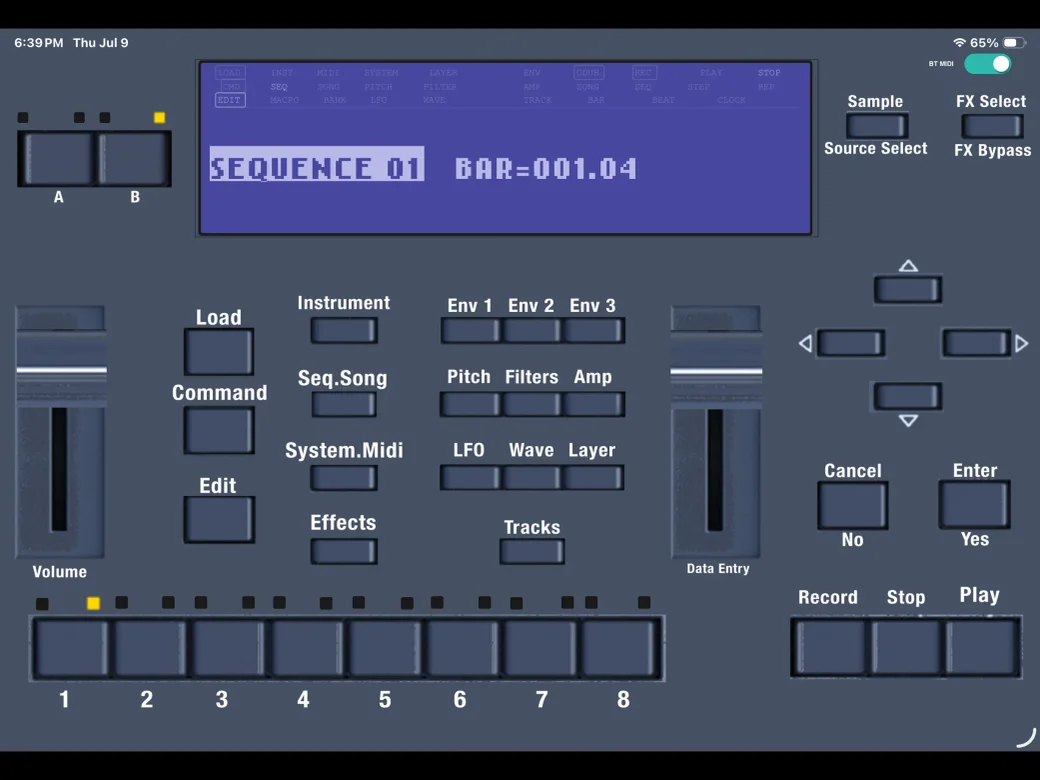
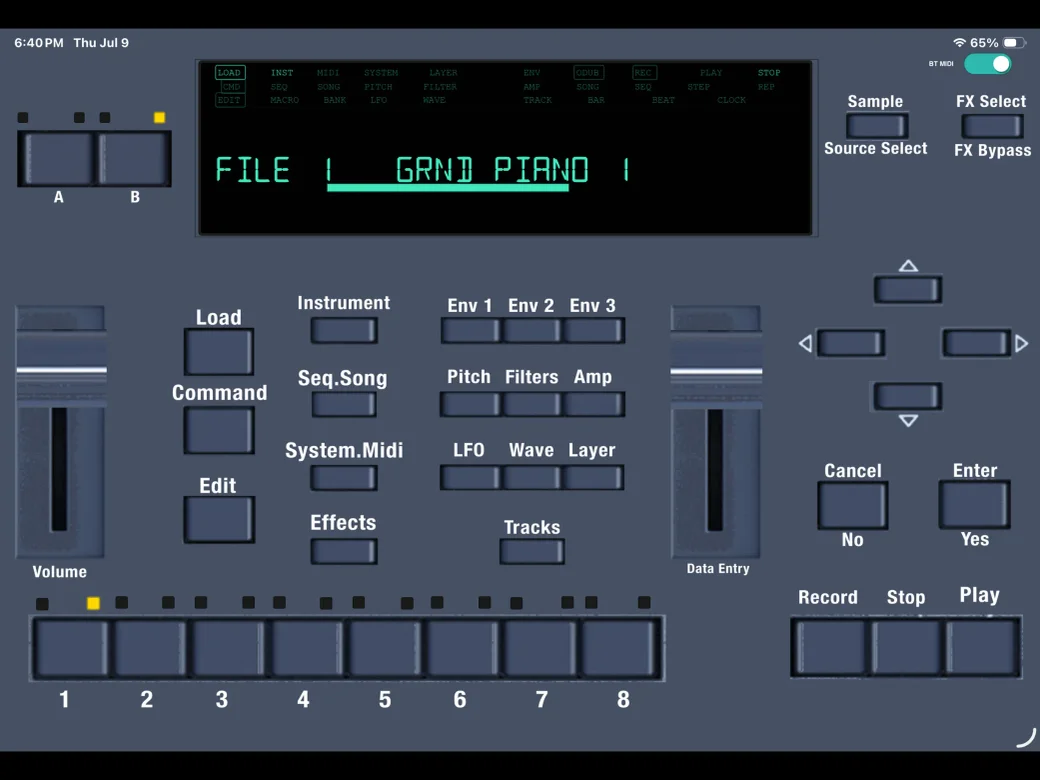
The full ASR-V VFD display, mirrored to your iPad in real time:
• Two-line main text (instrument names, parameter values, prompts)
• All 29 annunciators in their authentic positions — LOAD, INST, MIDI,
SYSTEM, LAYER, ENV, ODUB, REC, PLAY, STOP, and the rest
• Inverse-video cursor highlight on the active parameter
• Three display themes: Amber VFD, Green OLED, Purple LCD — whichever
you pick on the desktop, the iPad follows
TAP TO RENAME
Tap any editable text on the iPad's display, the iOS keyboard slides up
pre-filled with the current value. Type the new name, hit return — the
desktop applies it instantly.
FULL CONTROL SURFACE
Every button on the ASR-V's front panel is here:
• Mode buttons — Load, Command, Edit
• Page selectors — Instrument, Seq.Song, System.MIDI, Effects
• Parameter access — Env 1/2/3, Pitch, Filters, Amp, LFO, Wave,
Layer, Track
• Sample, FX Select, Cancel, Enter
• Navigation — Up, Down, Left, Right
• Transport — Record, Stop, Play
• Track Select 1-8 with real-time LED state
• Audio Track A / B with monitor toggle
• Volume + Data Entry faders
VISUAL CONFIRMATION ON THE DESKTOP
When you press a button on the iPad, the corresponding button on the
desktop ASR-V flashes — same visual feedback as a mouse click.
WIRELESS BLUETOOTH + WIFI MIDI
Connect over Bluetooth MIDI in under 30 seconds, or join the same WiFi
network for sub-5ms latency. Pro uses BOTH paths simultaneously.
PRIVACY-FIRST
No analytics. No tracking. No accounts. No data collection.
REQUIREMENTS
• iPadOS 15 or later
• iPad with Bluetooth 4.0+
• The ASR-V desktop application on Mac (available separately at
asr-v.com)
ABOUT HARE TECH
Hare Tech makes modern audio production tools and sample libraries.
Visit asr-v.com for the ASR-V desktop sampler, drum kits, and more.
Questions? Email info@haretechusa.com.
What’s new
Version 2.0.1 · Nov 25, 2026
A new icon, plus button and Bluetooth reliability fixes.
App privacy
What Hare Tech Inc declares on the App Store about how this app handles data.
-
Data not collected
The developer does not collect any data from this app.
Privacy practices may vary, for example with the features you use or your age.
Information
- Seller
- HARE TECH INC
- Category
- Music
- Version
- 2.0.1
- Updated
- Nov 25, 2026
- Released
- Aug 22, 2026
- Size
- 6.9 MB
- Requires
- iOS 15.0 or later
- Age rating
- 4+
- Price
- $5.00
- Copyright
- © 2026 Hare Tech Inc.
You might also like
-
 Groove RunnerDrum practice for e-kits
-
 Juicy Scales: UnleashedInteractive Fretboard
-
 Synofi: NAS Music PlayerFor Synology Audio Station
-
 eSPiThe Future of the Past is Now
-
 ChordPadX 2Chords at your fingertips
-
 RRS EQP-1AClassic Program Equalizer
-
 GuitarMaxx - Guitar RatingRate and level up your playing
-
 AI Lyric Generator・Song Writer#1 Lyrics & RAP Maker App
-
 TAL-U-NO-LX80's Synthesizer
-
 PracticeBird Learn Sheet MusicPractice with live feedback