
- Age rating4+
- CategoryUtilities
- DeveloperGaston Dombiak
- LanguagesEnglish
- Size60.3 MB
Links to the official App Store page
Download.org hosts no file of Astro Conditions. The button opens its official App Store page, published by Gaston Dombiak. Listing last checked on Nov 25, 2026.
Screenshots



About
Astro Conditions — Know when, where, and what to observe.
Plan better nights under the stars.
Astro Conditions combines stargazing weather, darkness, Moon conditions, modeled light pollution, nearby observing locations, equipment guidance, and recommended celestial targets in one private, ad-free app.
See whether tonight is worth going out, find a better place to observe, and discover what will be visible—from planets and double stars to clusters, nebulae, and galaxies.
• Observing Quality and Night Conditions scores from 0 to 100
• Offline modeled light pollution for more location-aware planning
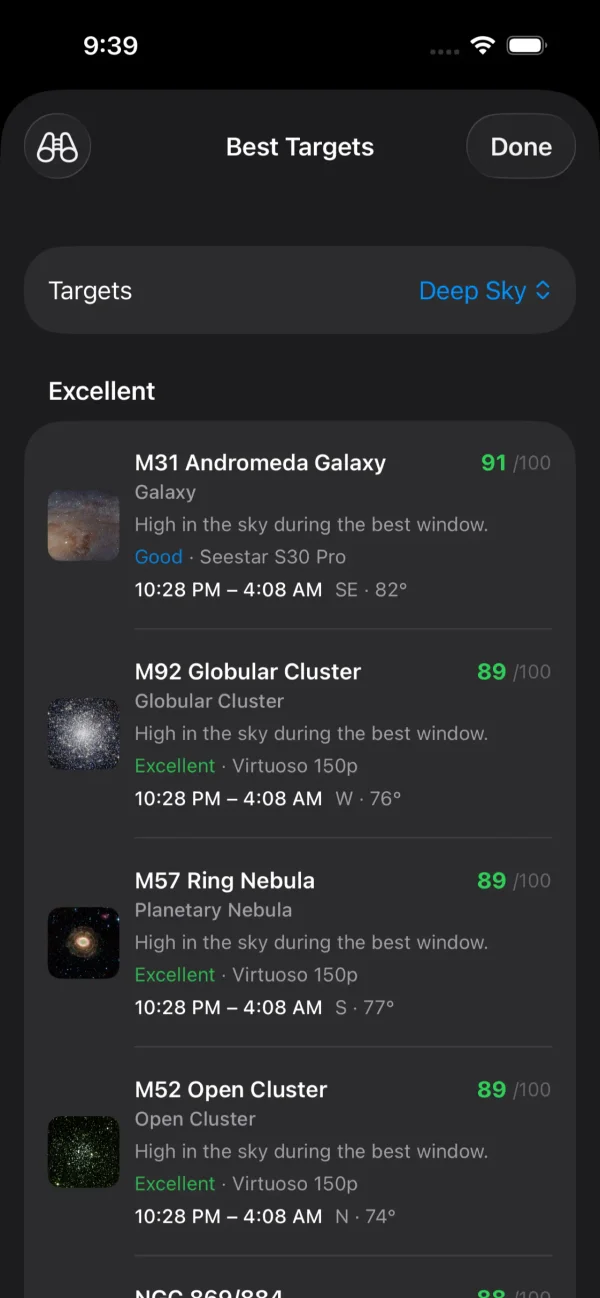
• Best Targets for your location, night, and equipment
• Nearby areas ranked for better observing conditions
• No account, subscription, or advertising
ASTRONOMER IN GROK BOT
Plan a night, compare stargazing spots, or find targets for your gear. Open Astronomer from the Dashboard or Settings.
NIGHT CONDITIONS & OBSERVING QUALITY
Night Conditions combines clouds, seeing, transparency, fog risk, wind, moonlight, and the useful nighttime window.
Observing Quality builds on those conditions and accounts for modeled light pollution when available, giving you a more realistic picture of your selected location.
• Early- and late-night trends
• Three-day forecast
• Hourly clouds, visibility, humidity, wind, and temperature
• Seeing estimates using temperature stability and upper-atmosphere wind
• Transparency estimates using cloud layers and visibility
BEST TARGETS
Explore recommended objects from a curated catalog for your selected location and night.
Add binoculars, visual telescopes, or Smart/EAA telescopes, then choose what you plan to use. You can also choose Naked Eye.
• See how well each target matches your equipment
• Find the best observing time, direction, and altitude
• Understand how weather, darkness, moonlight, and visibility affect the view
• Get Finding Tips, equipment guidance, and Observing Notes
• Browse offline reference images for many targets
• Choose from Easy, Standard, and Challenge observations
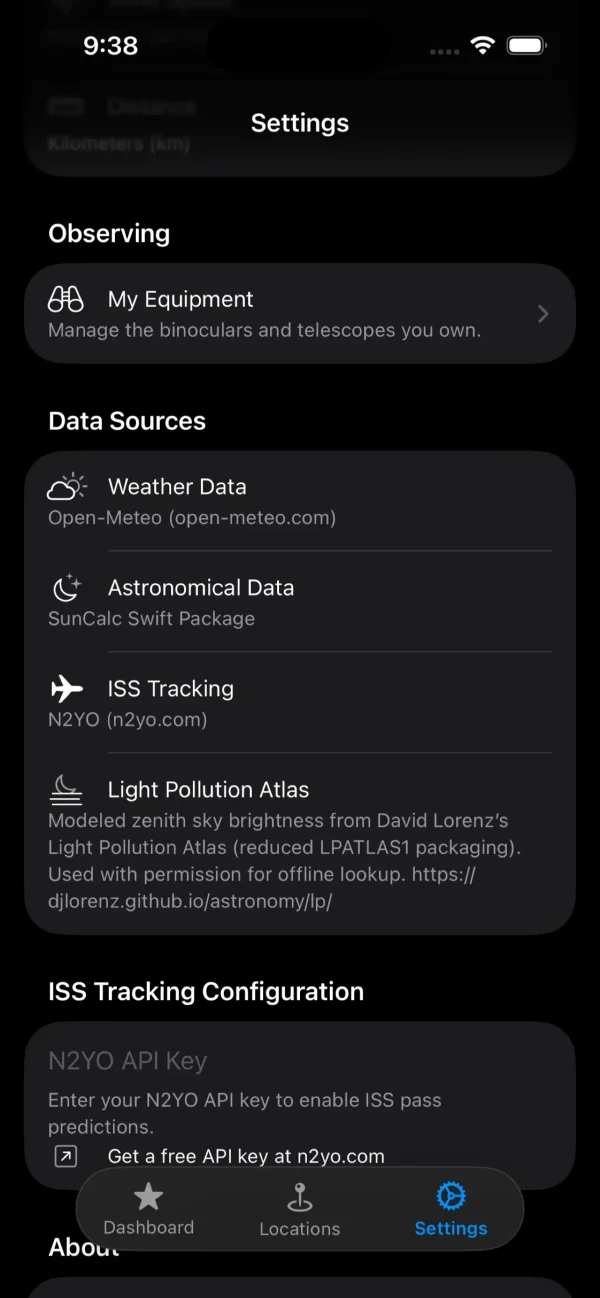
MY EQUIPMENT
• Save binoculars, visual telescopes, and Smart/EAA telescopes
• Select one or more instruments for each session
FIELD MODE
Use a dim red appearance at the telescope to help preserve night vision.
SUN, MOON & DARKNESS
• Sunrise and sunset
• Astronomical night timing
• Moonrise and moonset
• Moon phase, illumination, and altitude
• Moonlight-aware target recommendations
BEST NEARBY AREA
• Compare nearby areas using forecast conditions and modeled light pollution
• See ranked observing locations on a map
• Adjust search radius and location spacing
• Open a selected location in Apple Maps
LOCATION MANAGEMENT
• Use your current position or save favorite observing sites
• Search Apple Maps for places and addresses, enter coordinates, or pick a spot on the map
• See elevation in meters or feet when available
• Rename and reorder saved locations
• See modeled light-pollution category and sky brightness for saved sites
• Use each location’s local date and time
OPTIONAL ISS TRACKING
Add your N2YO API key to see visible International Space Station passes.
• View rise, peak, and set times
• See peak elevation and direction
• Follow the ISS path across the sky
• Identify passes already in progress
WIDGETS & APPLE WATCH
• Tonight at a Glance widget for quick condition checks
• Tonight’s Targets widget with up to three recommendations
• Three-Night Outlook widget for planning ahead
• Apple Watch app and complications for quick condition checks
• Observing Quality across supported phone, widget, and Watch views
• Sync locations, preferences, and conditions with Apple Watch
PRIVATE & CUSTOMIZABLE
• Layouts adapt to larger iOS text sizes
• Modeled sky brightness from David Lorenz’s Light Pollution Atlas
• Astronomical calculations and target recommendations performed on your device
What’s new
Version 2.3.2 · Nov 23, 2026
New Features
• Meet Astronomer in the Grok Bot app. Plan a night, compare observing spots, and find targets for your gear. Open it from Dashboard or Settings.
Improvements
• Search Apple Maps for parks, campgrounds, observatories, and addresses.
• See elevation when available for map pins and entered coordinates. Choose meters or feet in Settings.
• Open the Light Pollution Atlas from Settings.
Bug Fixes
• Fixed Field Mode toggling and toolbar buttons on iOS 27.
• Fixed unit settings getting out of sync across iPad windows.
• Fixed Apple Watch complication updates after upgrading from 2.3.1.
App privacy
What Gaston Dombiak declares on the App Store about how this app handles data.
-
Data not collected
The developer does not collect any data from this app.
Privacy practices may vary, for example with the features you use or your age.
Information
- Seller
- Gaston Dombiak
- Category
- Utilities
- Version
- 2.3.2
- Updated
- Nov 23, 2026
- Released
- Feb 18, 2026
- Size
- 60.3 MB
- Requires
- iOS 18.0 or later
- Age rating
- 4+
- Price
- Free
- Languages
- English
- Copyright
- © 2026 Gaston Dombiak
You might also like
-
 My Mechanics - For MechanicHelp fix cars and make money.
-
 Speed - private & elegantGPS Speedometer & Odometer
-
 Astro TransitAstronomical Transit Times
-
 AstroTool: Night Sky PlannerNight Sky Planner & Logger
-
 Aqua NovaUtilities
-
 Calendar HelperFrom Calendar to Reminders!
-
 MyEmergencyKitMy Emergency Kit
-
 MLAstro HubOnStepX Smart Controller
-
 Longitude - World ClockClock Walls, Widgets & Overlap
-
 OnStep Controller - GDAUtilities