
- Age rating4+
- CategoryBusiness
- DeveloperCole Perry
- LanguagesEnglish
- Size65.3 MB
Links to the official App Store page
Download.org hosts no file of Autolawn. The button opens its official App Store page, published by Cole Perry. Listing last checked on Nov 20, 2026.
Screenshots

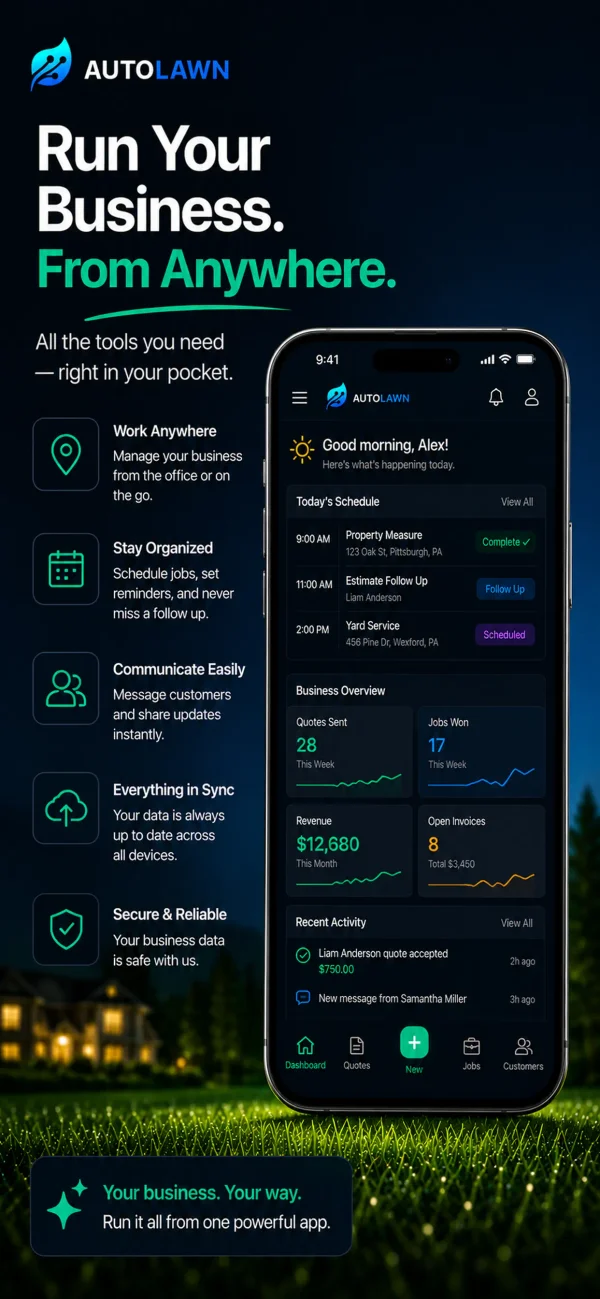


About
AutoLawn is the all-in-one business management app for lawn care professionals.
FEATURES:
• Smart Route Optimization - Save time and fuel with optimized daily routes
• Job Scheduling - Easily schedule and manage recurring jobs
• Team Management - Assign jobs to employees and contractors
• Customer Management - Keep all customer info in one place
• Satellite Quoting - Measure yards remotely and create accurate quotes without site visits
• Invoicing & Payments - Create invoices and accept payments via Stripe
• Two-Way Communication - Easy SMS and email messaging with customers
• Time Tracking - Track employee hours and job completion
• Quote Builder - Create professional quotes on the go
• Business Analytics - Track revenue, jobs, and performance across all tiers
Perfect for solo operators and growing lawn care businesses. Manage your entire operation from your phone.
SUBSCRIPTION PLANS:
AutoLawn offers the following auto-renewable monthly subscriptions:
• Starter – $49.00/month
Up to 25 customers, 150 SMS/email messages/month, all app features included.
• Growth – $79.00/month
Up to 100 customers, 250 SMS/email messages/month, all app features included.
• Scale – $199.00/month
Unlimited customers, unlimited messaging, all app features included.
Payment will be charged to your Apple ID account at confirmation of purchase. Subscriptions automatically renew unless auto-renew is turned off at least 24 hours before the end of the current period. Your account will be charged for renewal within 24 hours prior to the end of the current period. You can manage and cancel your subscription in your Apple ID Account Settings at any time. Any unused portion of a free trial period will be forfeited upon purchase of a subscription.
Privacy Policy: https://autolawn.app/privacy
Terms of Use: https://autolawn.app/terms
Terms of Use (EULA): https://www.apple.com/legal/internet-services/itunes/dev/stdeula/
What’s new
Version 1.8.9 · Nov 15, 2026
What's new
Voice assistant
Talk to AutoLawn to add a customer, a weekly job, and the visits on the calendar. Name a time, say to go after another customer, or ask for the first open spot between 8 AM and 6 PM. Ask who is on the crews and assign the job to a crew or an employee. Ask the size, slope, and whether a yard is flat, hilly, or steep, and measure a new address before you save it. She can list the day, move a visit, look up unpaid invoices, build a quote, and message leads who have never been contacted. Deletes and route changes wait for you to say yes. If she still needs one fact, the mic stays open. When she is done, she waits until you tap talk again.
Money
Collected lifetime revenue counts paid invoices, cash you marked on each visit, and imported payments. The same dollars are not counted twice. Completing a visit is not the same as getting paid. Uncaptured revenue opens the jobs for that period so you can mark them collected or skip a job you will not bill. Cash due lists each visit with its date. A customer profile can bill a different person while the yard stays the service address. Charge a card already on file, and pick which card when they have more than one. Monthly invoices can run on the 1st, the 15th, or the last day of the month. The Paid list shows the date it was paid. A recurring job can use a higher price on the first visit, then the normal price after that. The customer profile shows what the next invoice will be.
Calendar, routes, and the crew day
Skip this day removes only that visit. Closing a job keeps you on the day you were viewing. Each crew, employee, or contractor keeps their own color stripe. The last visit of a recurring series is marked. Add a task on the day and assign it. Phone Schedule is a day list with assign, move, and time. Live Job Manager shows the day by crew, with the map, drag to reassign, push a day, and balance the routes. On a phone, the route map uses the full screen. Projects can span several days as one block.
Service history, snow, and photos
Service History is a live board of visits in progress and finished. Proof photos upload as each shot is taken, including more before photos before Finish. Snow mode adds depth on the proof, price bands by surface, and a dispatch visit you bill from that history. You can complete a visit from Service History, including when photos are not required.
Customers, quotes, and alerts
Tags on customers, bulk CSV import, and address suggestions that stay on the profile. Job alerts for the day before, the morning of, and on the way. Quote search matches the customer, address, phone, and amount. Accepting a quote copies every line onto the job. Start a new quote by copying an old one.
Notifications and plans
Job and payment alerts can show as a banner with sound. If you only see a badge, open iPhone Settings, then AutoLawn, then Notifications, and turn on Banners and Sounds.
Yard measure
LawnScope tags a yard flat, hilly, or steep. Pools and parking lots are their own surfaces and stay out of the lawn size. On a phone, the instructions stay above the photo and Measure sits underneath.
App privacy
What Cole Perry declares on the App Store about how this app handles data.
-
Data used to track you
May be used to track you across apps and websites owned by other companies.
- Contact info
-
Data linked to you
May be collected and linked to your identity.
- Contact info
-
Data not linked to you
May be collected but is not linked to your identity.
- Location
- Contact info
- User content
- Usage data
- Diagnostics
Privacy practices may vary, for example with the features you use or your age.
Information
- Seller
- Cole Perry
- Category
- Business
- Version
- 1.8.9
- Updated
- Nov 15, 2026
- Released
- Mar 4, 2026
- Size
- 65.3 MB
- Requires
- iOS 15.0 or later
- Age rating
- 4+
- Price
- Free
- In-app purchases
- Yes
- Languages
- English
- Copyright
- © 2026 AutoLawn
You might also like
-
 Grass Go: Lawn Care BusinessMowing Routes, Invoices & CRM
-
 YardQuote Pro: Lawn EstimatorContractor Pricing And Billing
-
 Lawn LogisticsLawn and Snow Route Management
-
 BuildQuo: Lawn Care QuotesInvoices, scheduling & routes
-
 Lawn CalcBusiness
-
 LawnBook - Smart Lawn CareAI Invoicing & Job Scheduling
-
 WinPal: Estimate Invoice MakerAI Estimate Generator
-
 SortScape: Lawn Care BusinessScheduling, Crews & Invoicing
-
 Lawn ProLawnProSoftware.com
-
 Lawn Buddy Management SoftwareOrganize Lawn Care Operations