
- Age rating4+
- CategoryUtilities
- DeveloperJonas Jannersten
- LanguagesEnglish
- Size1.9 MB
Links to the official App Store page
Download.org hosts no file of AutoLog GPS. The button opens its official App Store page, published by Jonas Jannersten. Listing last checked on Nov 17, 2026.
Screenshots

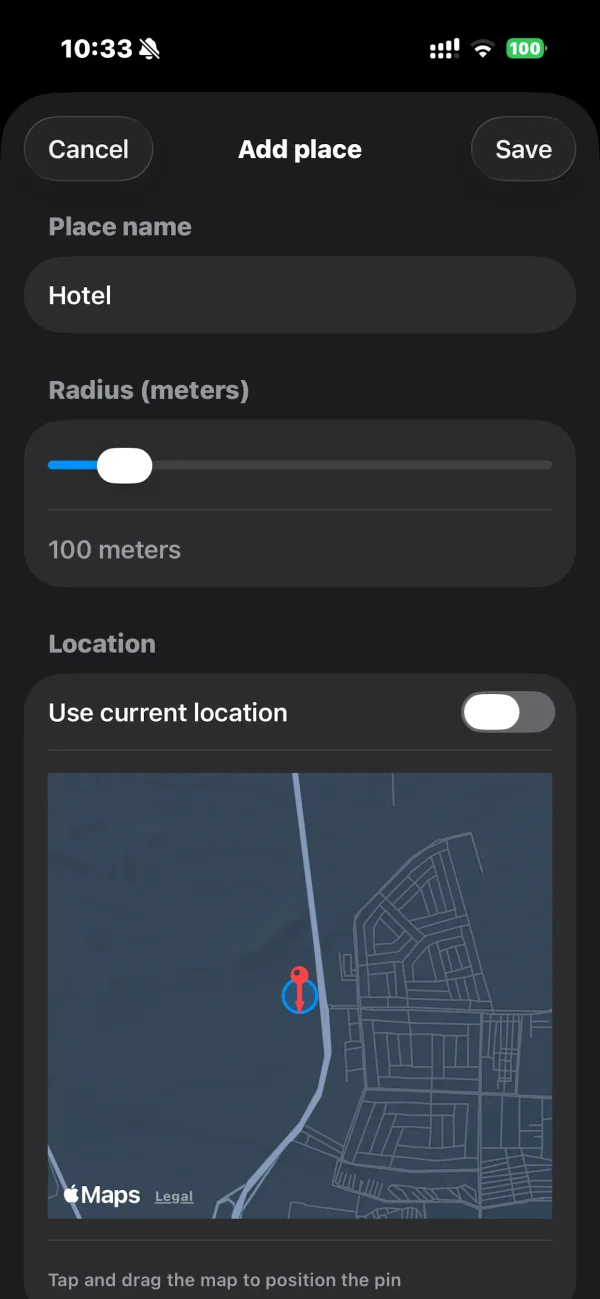


About
Effortless Location-Based Time Tracking
AutoLog automatically records when you arrive and leave any location you choose. No more manual timers or forgotten entries—just set your places and let the app do the rest.
HOW IT WORKS
1. Add locations using your current position or by placing a pin on the map
2. AutoLog monitors these places in the background
3. Arrival and departure times are logged automatically
4. Review your complete time history anytime
PERFECT FOR:
• Consultants tracking billable hours at client sites
• Field workers logging job site visits
• Sales professionals recording customer visits
• Service providers documenting on-site time
• Personal tracking of gym visits, office hours, or any routine location
• Anyone who needs accurate time records without manual effort
KEY FEATURES
Automatic Logging
• Hands-free arrival and departure tracking
• Works even when the app is closed
• Intelligent visit merging prevents false exits from GPS fluctuations
• Filters out brief GPS glitches (visits under 1 minute)
Custom Notifications
• Optional arrival notifications ("You've arrived at Client Office")
• Optional departure notifications ("You've left the gym")
• Fully customize notification text for each location
Flexible Location Setup
• Use your current location
• Place a pin anywhere on the map
• Set custom geofence radius (50-500 meters)
• Name locations whatever you want
Complete History
• View all visits with arrival and departure times
• See visit duration automatically calculated
• Group visits by month with statistics
• Delete individual visits or entire locations
• Track total time and weekly averages
Manual Controls
• Manually close a visit if needed
• Perfect for when GPS doesn't detect your exit
• Full control alongside automatic tracking
Privacy First
• All data stays on your device
• No account required
• No data collection or tracking
• Location access used only for geofencing
Simple & Reliable
• Clean, intuitive interface
• Battery-efficient background monitoring
• Works offline
• No subscription required
COMMON USE CASES
Professional Time Tracking: Consultants, contractors, and freelancers can automatically log billable hours at client locations, making invoicing and timekeeping effortless.
Field Service: HVAC technicians, electricians, plumbers, and other service professionals can document time spent at job sites without manual entry.
Sales & Customer Service: Track visit duration at customer locations for activity reporting and time management.
Personal Productivity: Monitor time spent at the gym, office, coffee shop, or any location that matters to your routine.
WHY AUTOLOG?
Unlike complex time-tracking apps with timers and manual entries, AutoLog is purpose-built for location-based logging. It's simple, automatic, and just works. Perfect for anyone who needs accurate time records tied to specific places.
Download AutoLog today and never manually log arrival times again.
App privacy
What Jonas Jannersten declares on the App Store about how this app handles data.
-
Data not collected
The developer does not collect any data from this app.
Privacy practices may vary, for example with the features you use or your age.
Information
- Seller
- Jonas Jannersten
- Category
- Utilities
- Version
- 1.0
- Updated
- Mar 18, 2026
- Released
- Mar 18, 2026
- Size
- 1.9 MB
- Requires
- iOS 18.6 or later
- Age rating
- 4+
- Price
- Free
- Languages
- English
- Copyright
- © Victoria Consulting AB
You might also like
-
 PlaceRemindLocation History & Alerts
-
 Visited Places BetaTrack All Visited Places
-
 Note Taker: WristScribeRecord, Transcribe, Organize
-
 LocaNotes: Location ReminderGeofence To-Do & Grocery List
-
 QR LensInspect every code in detail.
-
 ReliqraValue coins, cards & comics
-
 DuoCorder+Live sensor scanner
-
 Mobile MockupFast screen mockup generator!
-
 GeoStamp CameraGeolocated Photo Evidence
-
 Office Tracker: Hybrid RTOAttendance Work Goal Calendar