
- Age rating17+
- CategoryNavigation
- DeveloperIvan Larenas
- LanguagesEnglish
- Size68.6 MB
Links to the official App Store page
Download.org hosts no file of AviateHub. The button opens its official App Store page, published by Ivan Larenas. Listing last checked on Nov 17, 2026.
Screenshots
About
AviateHub is built for VFR pilots who want planning, aviation charts, briefing, navigation, and community in one cockpit-grade mobile app.
BUILT BY ONE PILOT-IN-TRAINING AviateHub is a solo project from a software developer who left high-tech to pursue aviation — and built the planner they wished existed while learning to fly. It started as a personal tool for real flights; now it's shared with pilots who want the same thing.
Things won't always be perfect. If something breaks, a quick note through Support helps more than a one-star review — your feedback genuinely shapes what ships next.
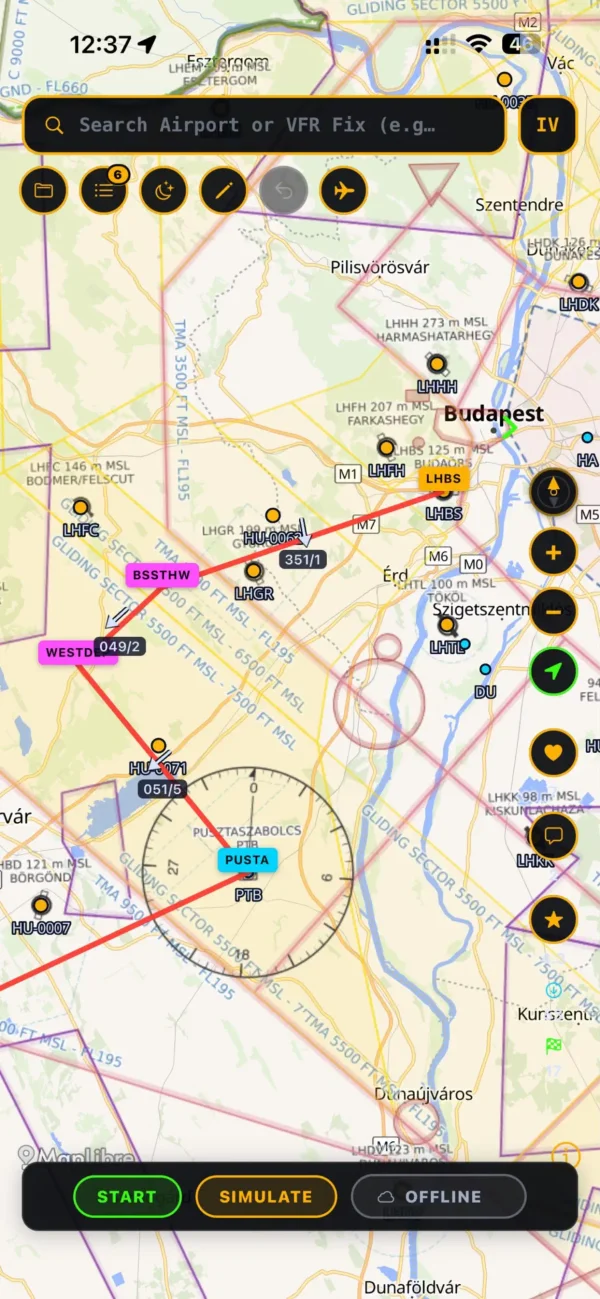
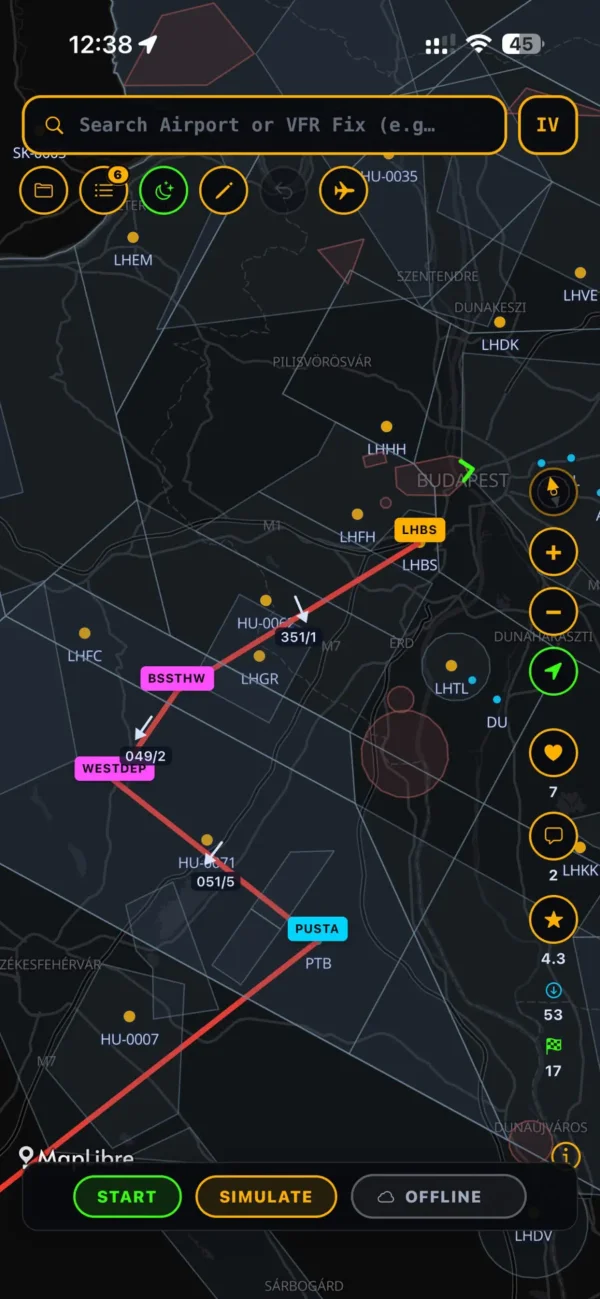
PLAN YOUR ROUTE • Tap the map to build multi-leg VFR routes • Search airports and VFR fixes • Snap to official navaids and edit waypoints easily • Add return legs to your departure airport • Rehearse your flight with map simulation before you take off • Map winds aloft with per-leg wind barbs and direction/speed readouts
AVIATION CHARTS & MAP MODES • Chart-friendly basemap aviation overlay by default • Airspace, airports, and navaid symbology on the map • One-tap dark mode for a cockpit-style map at night or in low light • Keep your route, winds, and navigation HUD in either map mode
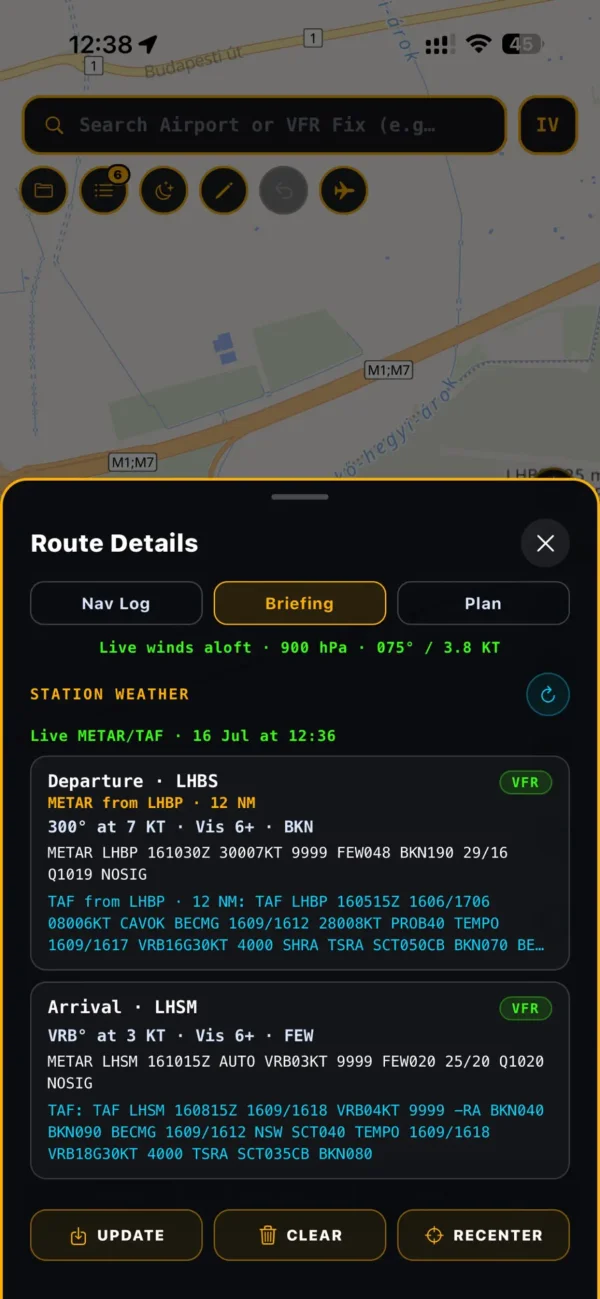
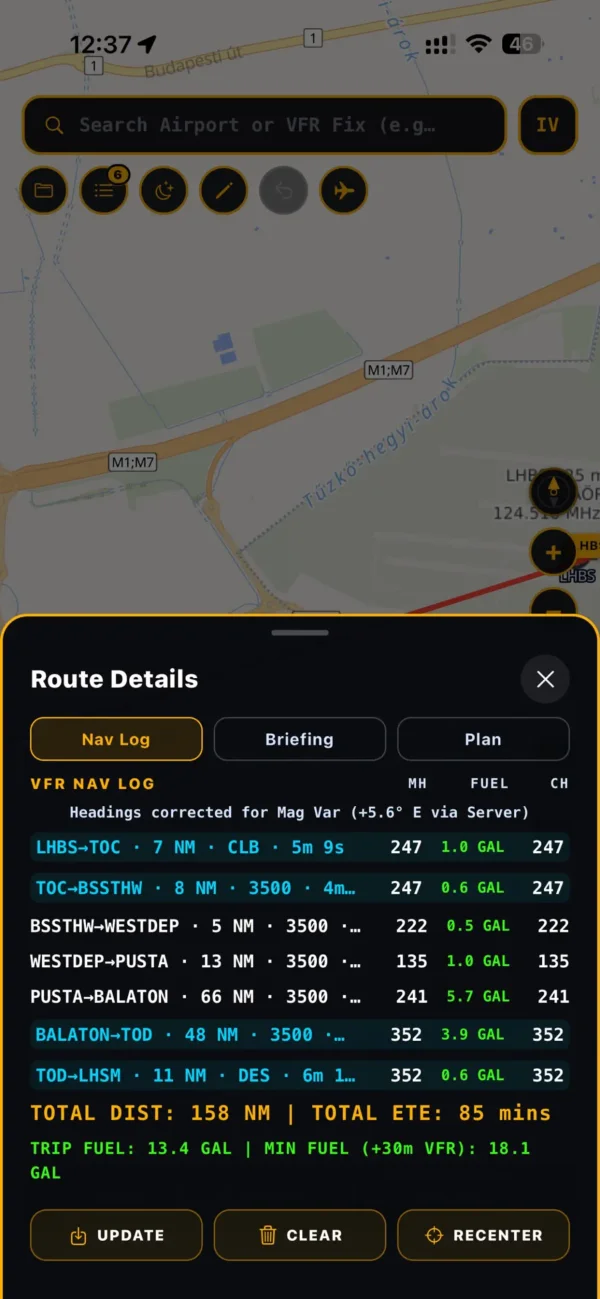
BRIEF WITH CONFIDENCE • Departure and arrival METAR/TAF with flight category • Winds aloft at your planned altitude — on the map and in your navigation log • Wind-corrected magnetic headings in your navigation log • Full route details: leg distances, courses, ETE, fuel burn, TOC/TOD, and vertical profile
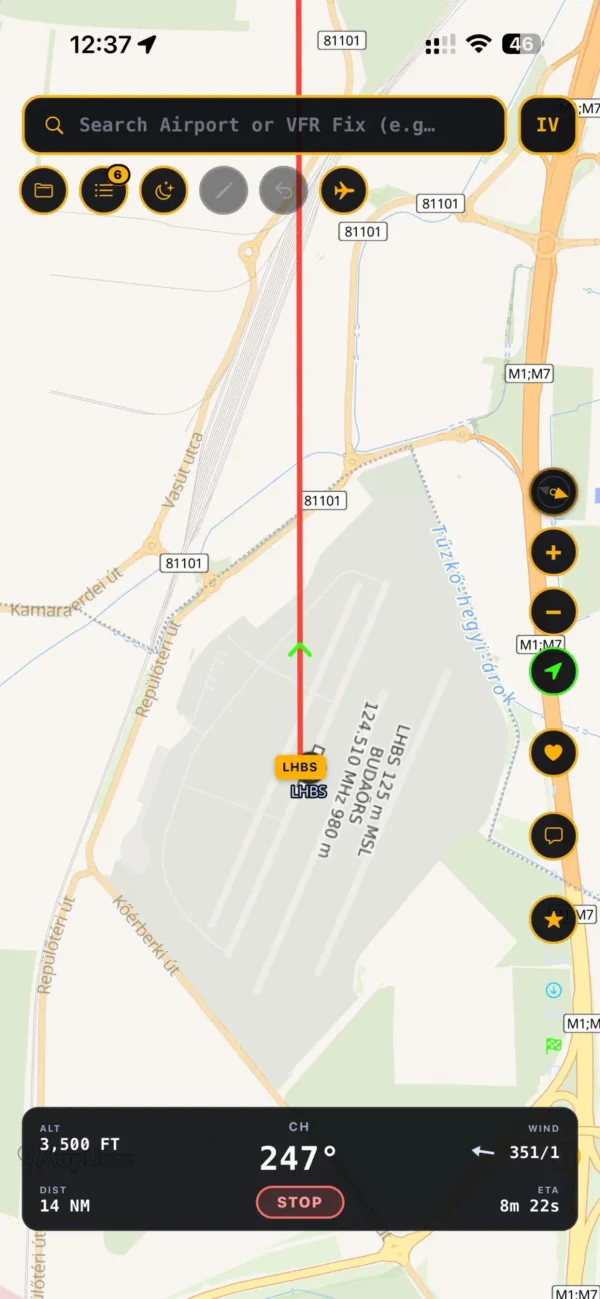
FLY WITH LIVE GPS NAVIGATION • Track-up map rotation keeps your heading in front of you • Cockpit bar with compass heading, live wind, altitude, distance, and ETA • North compass when the map rotates • Real-time cross-track error and distance to next fix • Live ETA and arrival detection • Voice copilot for leg changes, off-track alerts, airspace warnings, and arrival notices
SMART AIRSPACE • Controlled and restricted airspace loaded along your route • In-flight breach alerts and spoken warnings • Stay aware of the sectors that matter to your flight
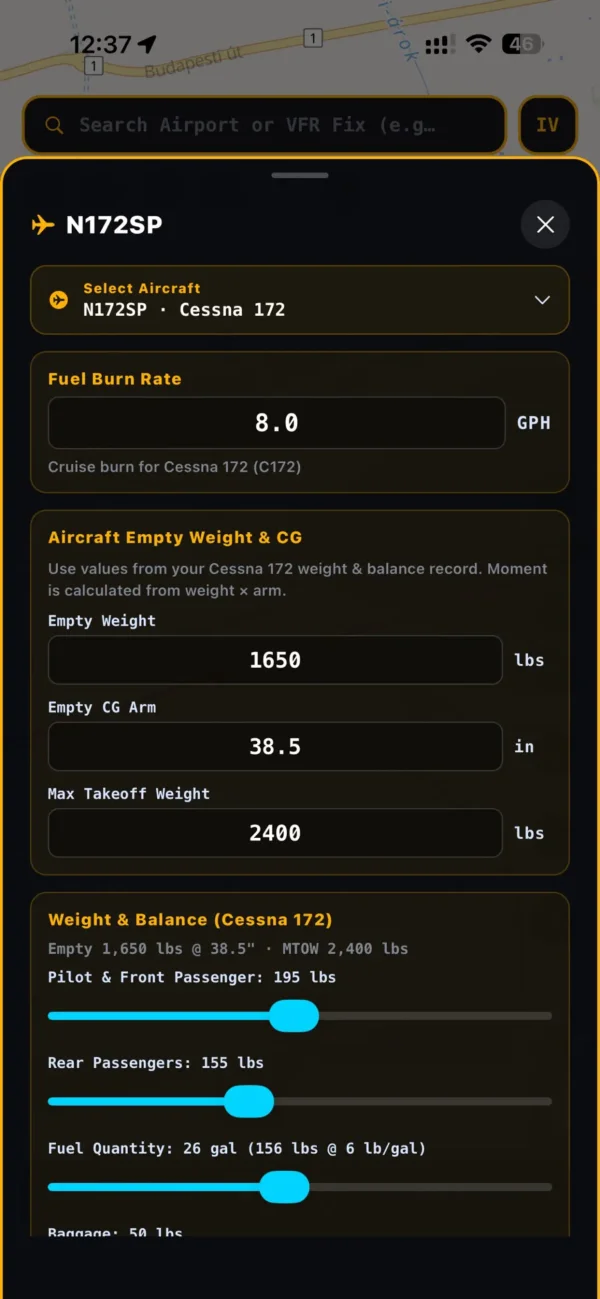
AIRCRAFT PROFILES • Save cruise speed, climb performance, fuel burn, and more • Weight & balance envelope and compass deviation card • Aircraft data flows into saved plans, briefing, and offline bundles
SAVE, UPDATE & SHARE • Save private or public flight plans • Update your own routes when plans change • Discover community routes, like, rate, and comment • See load and completion counts when pilots fly your plans
OFFLINE MODE (AviateHub Pro) • Cache your route, per-leg winds aloft, departure and arrival METAR/TAF, nav log, airspace, aircraft profile, and corridor map tiles — including the aviation chart overlay • Keep navigating when cell service disappears — GPS keeps working
FREE VS PRO Free includes interactive VFR planning, aviation charts with overlay, dark mode map toggle, live navigation with track-up map, METAR/TAF and winds aloft briefing, map wind barbs, smart airspace, voice copilot, community features, a starter aircraft profile, and up to 3 saved flight plans.
AviateHub Pro unlocks offline flight bundles (including chart map tiles), unlimited saved plans, and your full aircraft fleet. Subscriptions are optional and managed through your Apple ID.
IMPORTANT AviateHub is a VFR planning and navigation aid. It is not a substitute for official charts, NOTAMs, regulatory compliance, or pilot-in-command judgment. Always verify weather, airspace, and route information before and during flight.
How to use: https://www.youtube.com/shorts/jWIDlFgfxu4
Support: https://aviatehub.app/contact
Privacy: https://aviatehub.app/privacy
Terms: https://aviatehub.app/terms
What’s new
Version 1.2.1 · Sep 22, 2026
Fly Log is more useful in the cockpit and after the flight.
• Filter by crew, airport, or date
• Request an instructor signature in the app or with a shareable link
• Export matching flights as CSV or PDF (free)
• Pro: EASA-style logbook PDF, including signature images
Always a planning aid — not an official logbook or CAA form.
App privacy
What Ivan Larenas declares on the App Store about how this app handles data.
-
Data linked to you
May be collected and linked to your identity.
- Contact info
-
Data not linked to you
May be collected but is not linked to your identity.
- Diagnostics
Privacy practices may vary, for example with the features you use or your age.
Information
- Seller
- Ivan Larenas
- Category
- Navigation
- Version
- 1.2.1
- Updated
- Sep 22, 2026
- Released
- Jul 31, 2026
- Size
- 68.6 MB
- Requires
- iOS 16.4 or later
- Age rating
- 17+
- In-app purchases
- Yes
- Languages
- English
- Copyright
- © Ivan Larenas 2026
You might also like
-
 ZuluCheckAircraft Checklists for Pilots
-
 OpenVFRVFR EFB & Flight Navigation
-
 Air Map IsraelAir Map Israel
-
 AviNOTAMDecode, plot and brief NOTAMs
-
 Altimate Pilot Flight PlanningWeather, METAR, NOTAM, Logbook
-
 CaptainVFRFlight tracking and planning.
-
 ATC DriveATC radio-style driving nav
-
 Angel Flight EastAngel Flight East App
-
 YetiFlightNavigation
-
 Airspace MapsFlight preparation tool