BibleScribe
Handwritten Notes & Journaling
Designed for iPad
Free · In-app purchases
- Age rating4+
- CategoryReference
- DeveloperJames Sumners
- LanguagesEnglish
- Size2.6 MB
Links to the official App Store page
Download.org hosts no file of BibleScribe. The button opens its official App Store page, published by James Sumners. Listing last checked on Nov 18, 2026.
Screenshots



About
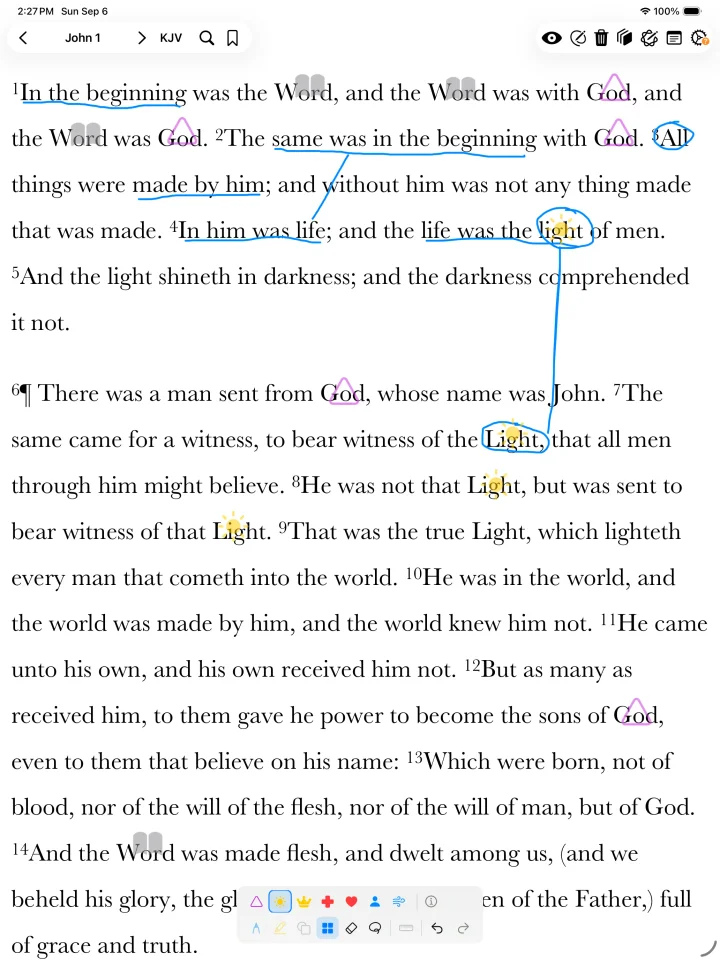
BibleScribe turns your iPad and Apple Pencil into a real study Bible you can write on — directly on the actual Scripture text, not a scanned page or a static image.
**WRITE ON REAL SCRIPTURE TEXT**
Underline, circle, and take handwritten notes right on the Bible text itself, in multiple translations — NASB '95, NKJV, CSB, BSB, WEB, WEBBE, KJV, and ASV (more to come). Your ink stays attached to that translation and chapter, exactly where you drew it.
**FIVE LAYERS PER CHAPTER**
Keep your first read-through markup separate from a topical study, a sermon-prep pass, or a small-group discussion — up to 5 independent drawing layers per chapter, each toggleable on or off, so your annotations never collide.
**SYMBOL STAMPS**
Mark themes and cross-references with a customizable symbol legend — place a stamp, drag it, undo it, just like ink.
**HANDWRITTEN NOTES WITH AUTOMATIC VERSE DETECTION**
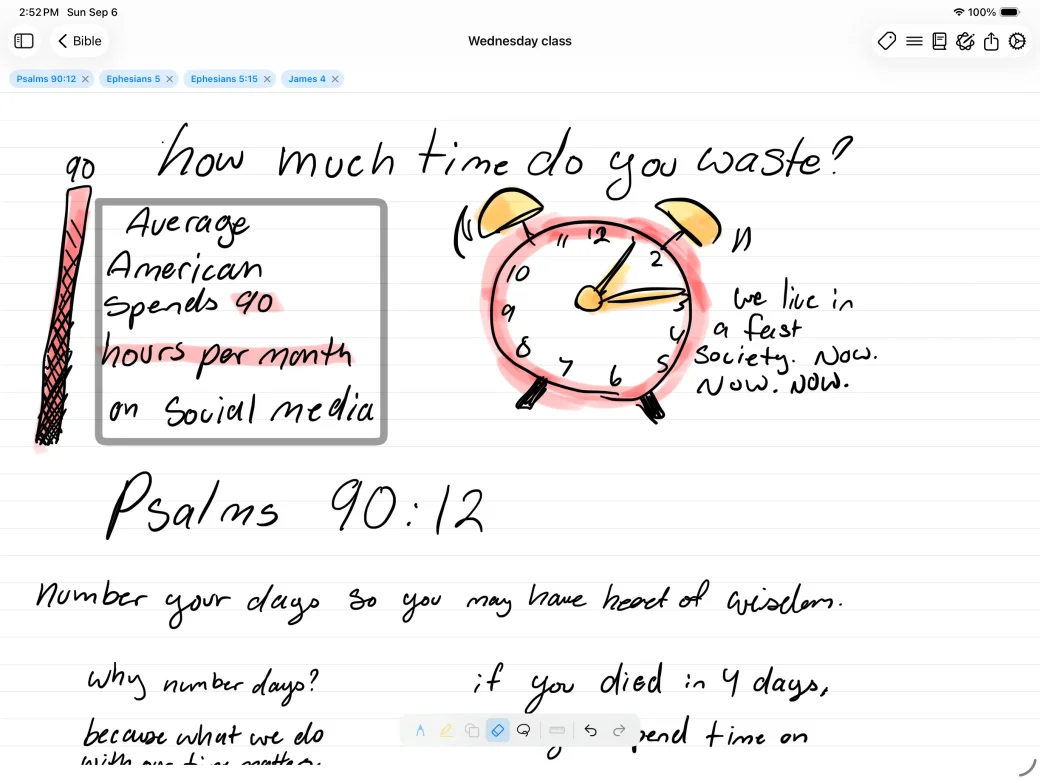
Take free-form handwritten notes on a separate notepad canvas. BibleScribe reads your handwriting on-device and detects Bible references on command — tap a detected reference to jump straight to that passage. Notes support multiple pages, line ruling, tags, and full-text search.
**TEACH AND PRESENT LIVE**
Mirror your Bible view — including your live, in-progress ink — to an external display or projector via AirPlay or a wired connection. Perfect for teaching, preaching, or leading a Bible study where the room needs to see what you're marking up in real time.
**BUILT FOR REAL STUDY**
- Bookmark any chapter and jump back instantly
- Reading history, kept per translation
- Full-text keyword search across every translation
- Adjustable font, line spacing, and margin ruling
- Left-handed drawing margin support
- Apple Pencil double-tap and squeeze actions (toggle eraser, undo, switch tools)
- Offline-capable: All translations with Pro purchase.
**PRIVATE BY DESIGN**
No ads. No tracking. No account to create — your notes and drawings sync through your own iCloud account.
**FREE TO START**
Read, search, and annotate five free translations (BSB, WEB, WEBBE, KJV, ASV) with the full drawing and notes toolset at no cost. BibleScribe Pro unlocks NASB '95, NKJV, and CSB, plus bulk offline downloads for every translation.
Terms of Use (EULA): https://www.apple.com/legal/internet-services/itunes/dev/stdeula/
What’s new
Version 1.1 · Nov 11, 2026
New in 1.1
CUSTOM STAMPS
Create your own stamps for marking up Scripture. Choose from a curated set of symbols or search thousands of SF Symbols, then set a color and a meaning. Reorder or edit your stamps at any time, and they sync across your devices through iCloud.
LIGHT AND DARK APPEARANCE
A new Appearance setting at the top of Settings lets you choose Auto, Light or Dark. Auto follows your iPad's setting, and your choice applies everywhere in the app, including the external display.
FIXES AND IMPROVEMENTS
- General stability and performance improvements.
App privacy
What James Sumners declares on the App Store about how this app handles data.
-
Data not collected
The developer does not collect any data from this app.
Privacy practices may vary, for example with the features you use or your age.
Information
- Seller
- James Sumners
- Category
- Reference
- Version
- 1.1
- Updated
- Nov 11, 2026
- Released
- Sep 17, 2026
- Size
- 2.6 MB
- Requires
- iOS 18.1 or later
- Age rating
- 4+
- Price
- Free
- In-app purchases
- Yes
- Languages
- English
- Copyright
- © SumFam Software LLC 2026
You might also like
-
 The Scripture ScribeStudy, Annotate & Grow Daily
-
 Journal BibleReference
-
 Pencil Bible: Catholic EditionDouay-Rheims & Mass Readings
-
 KalamosBibleA World Class Bible App
-
 Pew: Sermon Notes, Bible StudyOffline recorder for church
-
 WrittenWordReference
-
 See and Learn Vocabulary 1Teach first words
-
 The Pillar Bible StudySermon Notes & Bible Journal
-
 ScriptureWriterMeditate-Handwriting Scripture
-
 Sacred Hour: Bible Prayer NoteAI Sermon Notes & App Blocker