
Bill Tracker & Subscriptions
Organizer & Payment Reminders
Designed for iPhone, iPad
Free · In-app purchases
- Age rating4+
- CategoryFinance
- DeveloperVolkan Azimob
- LanguagesEnglish+ 1 more
- Size99.0 MB
Links to the official App Store page
Download.org hosts no file of Bill Tracker & Subscriptions. The button opens its official App Store page, published by Volkan Azimob. Listing last checked on Nov 18, 2026.
Screenshots



About
Every bill and subscription in one place, with a reminder before the money leaves.
Bill Tracker & Subscriptions is a simple bill tracker and subscription manager for people who want to see what is coming out and when. No bank connection, no signup, no questionnaire — open the app and add your first bill in two taps.
WHAT IT DOES
• Bill tracker for monthly bills, rent, utilities, insurance and internet
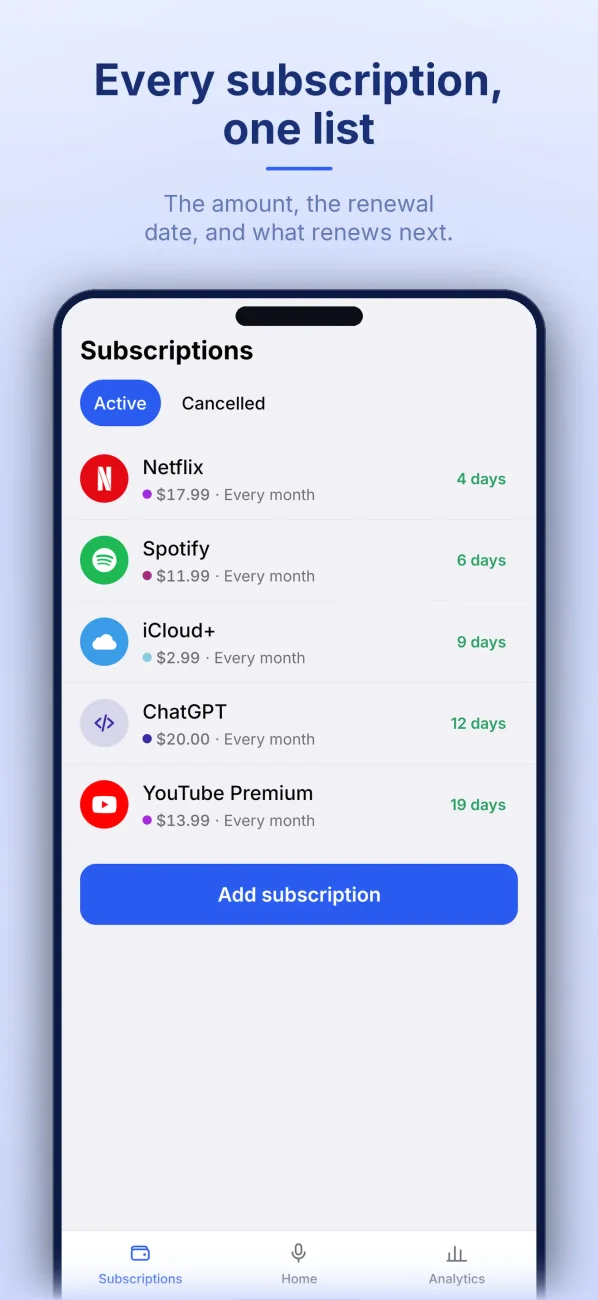
• Subscription manager for streaming, the gym and everything you forgot about
• Payment reminder before every due date, not after
• Total per month and per year, at a glance
• Paid, overdue and still to come — every charge in one place
MONTHLY BUDGET PLANNER
Plan the month in one number. Set a monthly budget and the app shows what is left, how much you can spend per day until the month ends, and how much of it the bills still due this month will take. Limits for single categories sit below, each with a bar and a mark showing where you should be today. The amount is suggested from what you spent last month, so there is nothing to guess. What is left shows on the app's Home tab and in the note after every expense; at 80% and 100% of a limit you get a notification, and on the 1st a short summary of how the month went. Every month starts fresh by itself.
FOUR WAYS IN, PICK THE ONE YOU LIKE
Nobody enjoys typing bills into a form. So there are four ways in, all of them seconds.
SAY IT
Speak one line — "coffee 5", "pharmacy 12", "taxi 18" — and the expense is saved with the amount and the category already filled in. Voice input follows your app language.
SCREENSHOT IT
Pick a screenshot of a payment screen or a bank notification and the app reads the amount and the merchant off the picture. The image is recognized on the device and never leaves your phone.
IMPORT A STATEMENT
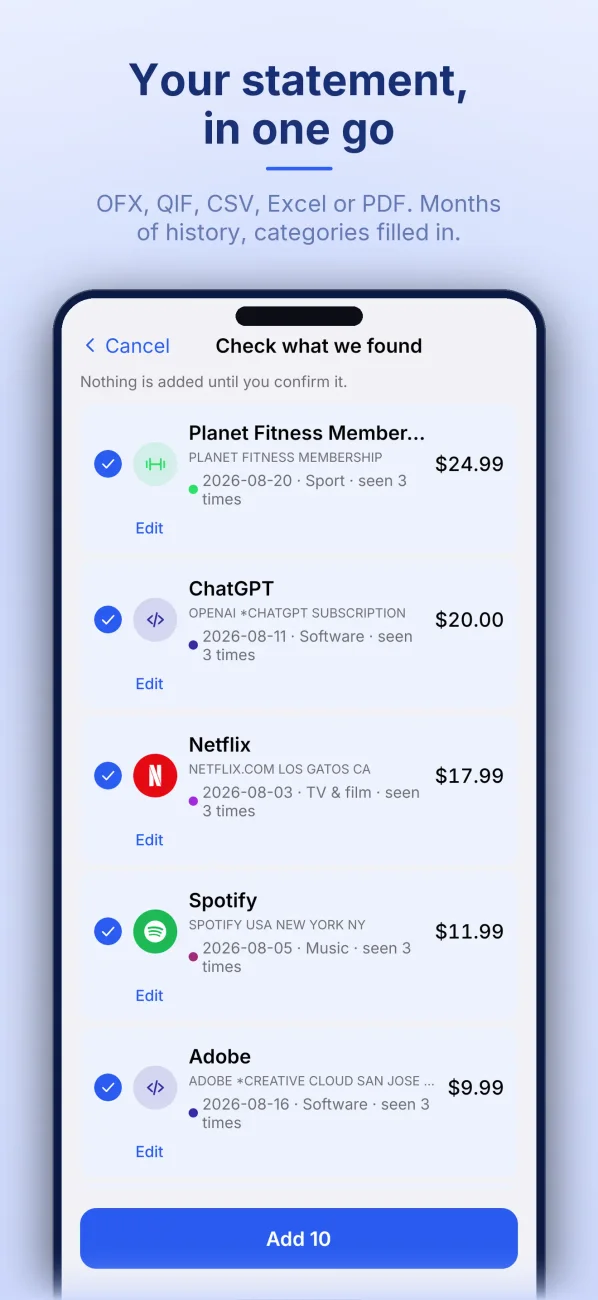
Whatever your bank gives you: OFX, QIF, CSV, Excel or PDF. Months of history land in one go, each payment on its own date, with categories filled in. Repeating charges are detected so you can see the subscriptions you forgot you were paying. No account linking, no bank login, no read-only access to anything.
TYPE IT
Two taps and a number. Amount first, category suggested, done.
REMINDERS THAT ACTUALLY ARRIVE
Most bill reminder apps go quiet after a while. This one re-checks its schedule every time you open the app. You choose how many days ahead and at what hour. A reminder that comes late is the same as no reminder.
SUBSCRIPTIONS TICK THEMSELVES OFF
A subscription on autopay has no reason to ask whether it went through: on the charge date it marks itself paid and rolls on to the next one. Nothing to tick by hand. If the money never left — the card was short, or you canceled — one tap puts it back as owed, or ends the subscription for good.
SEE WHERE THE MONEY WENT
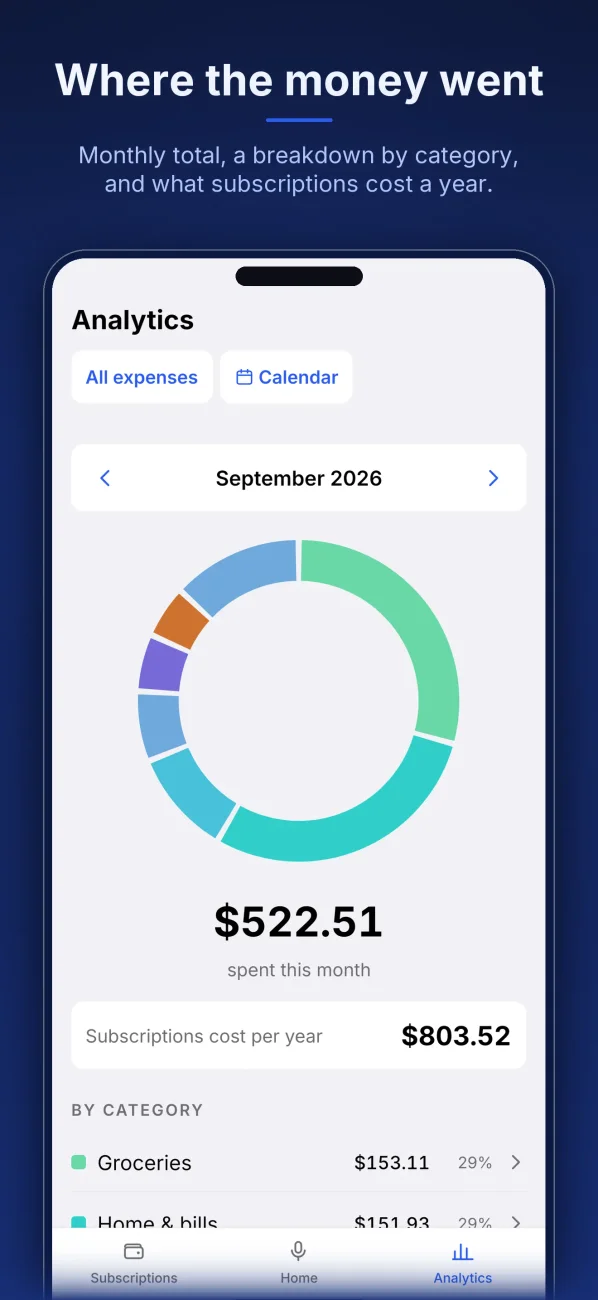
Monthly total, a breakdown by category, and a calendar of what is due when. Yearly cost of every subscription, so a "cheap" monthly charge is shown for what it adds up to.
ANY CURRENCY
Over fifty currencies. Keep bills in the currency you actually pay in. Where a rate was saved on the payment day the total uses it, not today's; where there is none, the amount is counted separately, never blended into a wrong total.
YOURS, ON YOUR PHONE
Add a bill with no signal, get the reminder on a plane. Your bills, every reminder, the calendar and the totals work with no connection at all; statement import needs one, because the file is read on our server. No account required; an optional one syncs between your devices. Export everything to CSV whenever you want.
14 DAYS FREE, THEN ONE PAYMENT
Everything is open for 14 days. After that a single purchase keeps it open forever: no subscription, no renewals, no ads and no limit on how many bills you track. Your records, the calendar, CSV export and reminders for bills you already added stay free either way.
What’s new
Version 1.3.2 · Oct 14, 2026
BillPal now works on iPad: full screen, in portrait and landscape.
Also: smoother animations and small fixes.
App privacy
What Volkan Azimob declares on the App Store about how this app handles data.
-
Data linked to you
May be collected and linked to your identity.
- Contact info
- User content
- Identifiers
-
Data not linked to you
May be collected but is not linked to your identity.
- Purchases
- Financial info
- Usage data
- Diagnostics
Privacy practices may vary, for example with the features you use or your age.
Information
- Seller
- Volkan Azimob
- Category
- Finance
- Version
- 1.3.2
- Updated
- Oct 14, 2026
- Released
- Sep 16, 2026
- Size
- 99.0 MB
- Requires
- iOS 16.4 or later
- Age rating
- 4+
- Price
- Free
- In-app purchases
- Yes
- Languages
- English, Russian
- Copyright
- © 2026 BillPal
You might also like
-
 SubBell: Subscription ManagerRenewal and trial alerts
-
 Drip – Subscription TrackerSee Where Your Money Drips
-
 Mis Suscripciones y GastosFinance
-
 Spento: Voice Expense TrackerSpeak naturally. Track easily.
-
 Vault - Budget PlannerFinance
-
 Mis Gastos – Mis CuentasFinance
-
 Budgie: Subscription TrackerBill reminders, budget & save
-
 Pecunia - Personal FinancesPersonal Finance Tracker
-
 BudgsyBill Reminder & Budget Tracker
-
 Budget, Bills & Expensesexpense,budget,spending,money