
- Age rating4+
- CategoryProductivity
- DeveloperKevin Esprit
- LanguagesFrench+ 1 more
- Size9.4 MB
Links to the official App Store page
Download.org hosts no file of Boulot. The button opens its official App Store page, published by Kevin Esprit. Listing last checked on Nov 15, 2026.
Screenshots

About
Boulot is the task management app that truly respects your privacy. Your data stays on your iPhone, with optional encrypted iCloud sync. No external servers, no tracking, no account required.
Based on simplified GTD (Getting Things Done) methodology, Boulot helps you capture ideas, organize projects, and focus on what matters. Its elegant and intuitive interface lets you master the app in minutes.
WHY BOULOT?
Absolute Privacy
Unlike most productivity apps, Boulot collects no personal data. Everything stays on your device. With iCloud sync to back up your data, but no third-party server will ever access it. Your tasks, projects, notes: everything belongs to you.
Simplified GTD
The Getting Things Done method is globally recognized for its effectiveness, but can seem complex. Boulot extracts the essentials to offer you an accessible yet powerful approach. Capture everything that comes to mind, organize by priority, and accomplish more with less stress.
Clean and Modern Interface
Boulot features a polished design that highlights your tasks without distraction. Every detail has been carefully considered for a smooth and pleasant experience. Customizable project colors let you quickly identify your different life areas.
MAIN FEATURES
Inbox - Your Capture Box
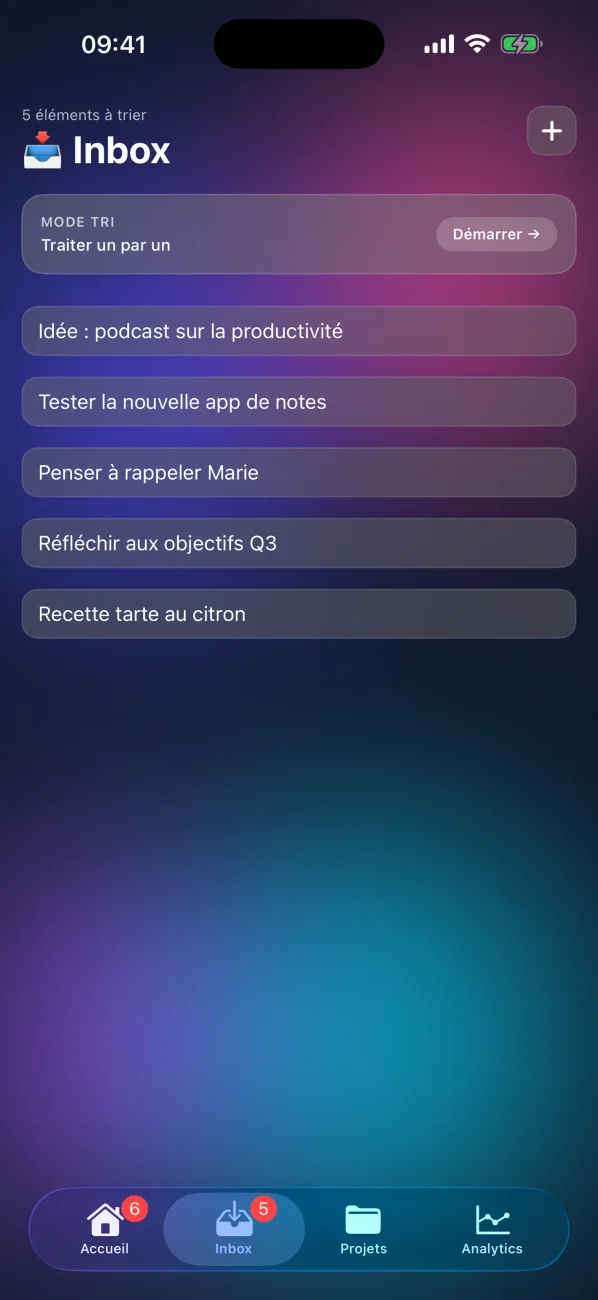
Instantly note all your ideas and tasks in the Inbox. It's your quick collection space, without having to think about organization right away. You'll process these items later, following GTD principles.
Projects - Organize by Goals
Create a project for each major life goal. Add the tasks needed to achieve it. Choose a color for each project to quickly visualize your organization. Add notes and descriptions to keep all important information in one place.
Today - Focus on What Matters
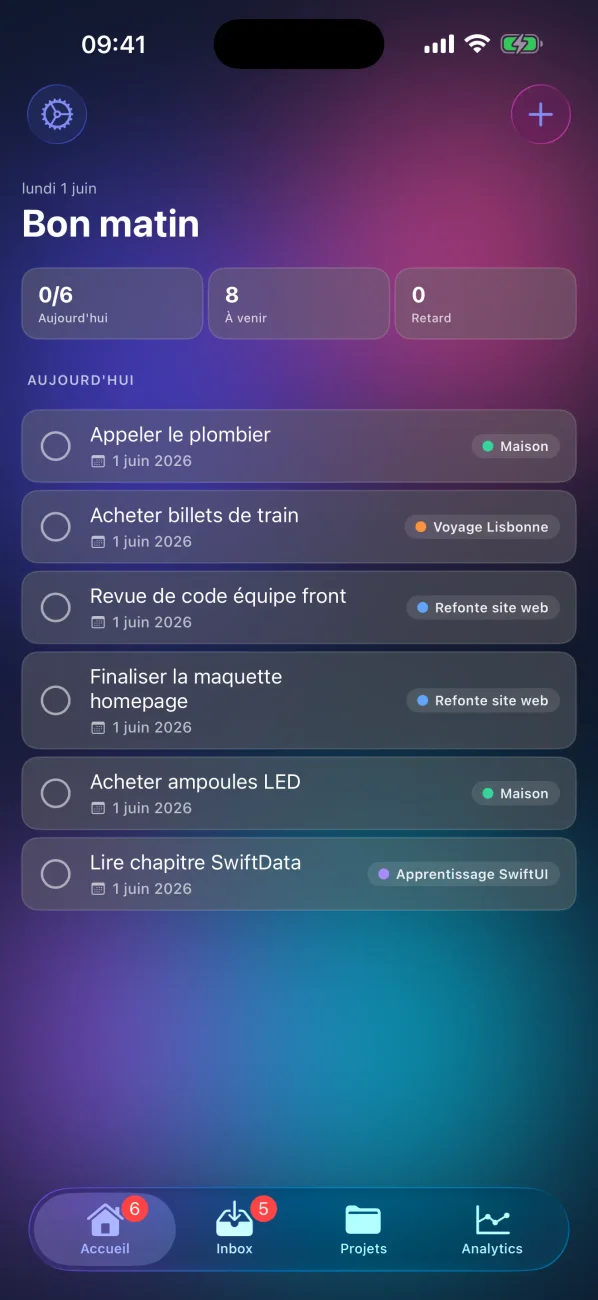
The Today view displays tasks scheduled for today and those with due dates. Each morning, check this list to know exactly what to focus on. It's your daily roadmap.
Due Dates
Set deadlines for your important tasks. Boulot helps you never miss a deadline. Tasks with due dates automatically appear in your Today view at the right time.
Notes and Details
Add as much information as needed to each task. Notes, context, instructions: everything can be recorded so you have all the cards in hand when it's time to act.
Overview
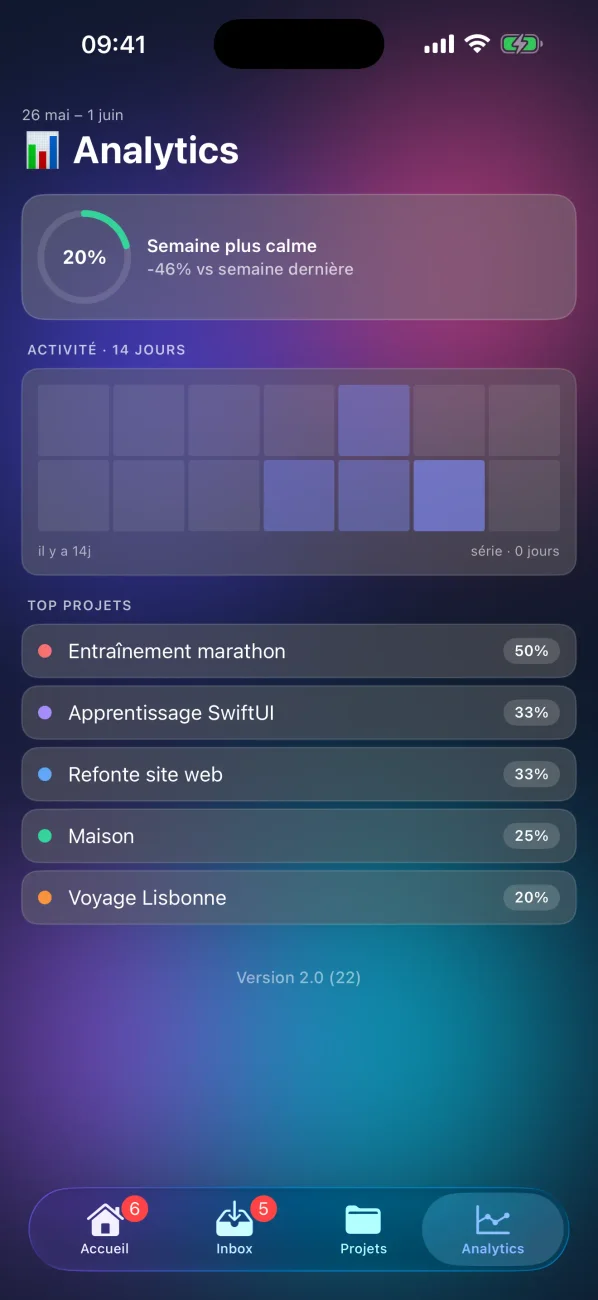
Quickly visualize the number of tasks in your Inbox, across all your projects, and those already completed. Statistics give you a global view of your productivity.
Completed Tasks Tracking
Every completed task is kept so you can track your progress. Check your history and see everything you've accomplished.
DESIGNED FOR iOS
Boulot is specially designed for iPhone, respecting Apple's standards. The app integrates naturally with your device and offers a familiar user experience for iOS users.
Native iOS Interface
Intuitive navigation, smooth animations, respect for iOS conventions: everything has been designed to make you feel immediately comfortable.
Dark and Light Theme
Boulot automatically adapts to your iOS theme preferences, for optimal comfort whatever time of day.
START NOW
Whatever your goals, Boulot helps you achieve them while respecting your privacy. Download the app and take back control of your productivity.
No account required. No credit card requested. No data collected. Just you and your goals.
Questions? Contact us, we're here to help.
What’s new
Version 2.0 · Jun 2, 2026
Boulot 2.0 — full redesign, Liquid Glass style.
NEW LOOK
The whole app has been rebuilt around iOS 26's Liquid Glass design language: dark mesh canvas, translucent glass surfaces, floating tab bar. 13 retuned
project colors that finally pop, and a light mode derived from the same system.
REDESIGNED HOME
A personalized greeting based on the time of day and your name. Three tappable stat capsules replace the old counters, and the day's list clearly
separates what's overdue.
INBOX TRIAGE MODE
A real GTD flow: process your ideas one by one with Sort Mode. Turn any inbox item into a project without leaving the screen.
MOTIVATING ANALYTICS
Weekly momentum ring (this week vs. last), 14-day activity heatmap, ranking of your most active projects. Your progress, made visible.
PROJECTS
Reworked detail view with a hero progress ring, a cleaner header, and editing tucked into the toolbar.
SETTINGS (new)
Profile, appearance, custom accent color, notifications, haptics, data controls.
UNDER THE HOOD
- Reminder notifications and app icon badge for today's tasks
- Haptic feedback on key actions
- "Reduce Transparency" fallback for accessibility
- Fixes: overdue counters, badges, date display
Thanks for using Boulot. If you have feedback, please share it — it really helps.
App privacy
What Kevin Esprit declares on the App Store about how this app handles data.
-
Data not collected
The developer does not collect any data from this app.
Privacy practices may vary, for example with the features you use or your age.
Information
- Seller
- Kevin Esprit
- Category
- Productivity
- Version
- 2.0
- Updated
- Jun 2, 2026
- Released
- Oct 1, 2025
- Size
- 9.4 MB
- Requires
- iOS 26.0 or later
- Age rating
- 4+
- Languages
- French, English
- Copyright
- © 2025 Boulot.
You might also like
-
 My Tasks AIOMinimal notes, max focus
-
 Read My ListRead lists aloud, big text
-
 RE.minder PRO+Reminders + Photos + Sync
-
 My2Do - Tasks & HabitsPlan your day, your way
-
 Screeni: Screen Time & ChoresParental Control App & Rewards
-
 Super Reminder AppDon't be late again
-
 OurTodos: Daily PlanningList for tasks and reminders
-
 SteelNote: Markdown NotesSimple, local, plain text
-
 Barake: Earned Screen TimeParental control, earned time
-
 Private Contacts: Secure VaultWhatsApp Dialer & Phonebook