- Age rating4+
- CategorySports
- DeveloperGene Backlin
- LanguagesEnglish
- Size1.7 MB
Links to the official App Store page
Download.org hosts no file of Bowl Tracker. The button opens its official App Store page, published by Gene Backlin. Listing last checked on Nov 15, 2026.
Screenshots

About
The following will explain how to use this app to keep score for you.
The app is designed for a 3 game series. If you only bowl one game that is fine. If you bowl more than 3 games, you will have to Reset the Series to restart score entry.
At the end of completing your 3 game series, you will be prompted if you want to see the series summary detailing the frame by frame detail and you also have the option to save, email or message your series results.
In the Series summary view, tap on a frame to see the pin count. This will illustrate the pins that you had to pick up on a non strike shot, and if you had an open frame, it will indicate the pins picked up and pins left standing.
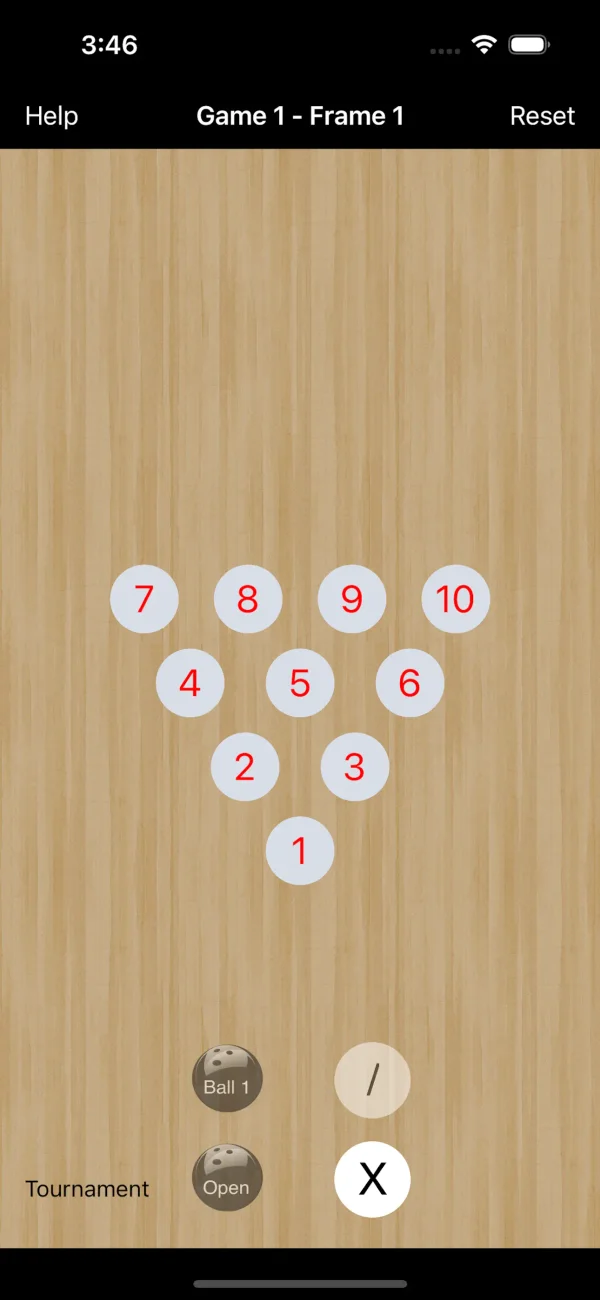
The key to scoring with this app is to remember you are only selecting pins left on your first ball and then select pins you have picked up on your second ball or tapping the spare "/" will understand you have picked up the remaining pins.
To score:
- Strike : Tap the strike button "X" for your first ball
- Spare : Tap the pins you have left on the first ball and tap Ball 1, then tap the spare button "/"
- Open : Tap the pins you have left on the first ball and tap Ball 1, then tap the pins you picked up on your second ball that did not result in a spare, then tap the "Open" button.
To reset:
- A frame : Select the Reset button in the upper right corner, then select Reset Last Frame from the list.
- A game : Select the Reset button in the upper right corner, then select Reset Current Game from the list.
- A series : Select the Reset button in the upper right corner, then select Reset Current Series from the list.
Thank you for downloading and using this app and I hope it helps you keep score.
Enjoy !
What’s new
Version 2.1.0 · Oct 7, 2026
Bug fixes and Maintenance
App privacy
What Gene Backlin declares on the App Store about how this app handles data.
-
Data not collected
The developer does not collect any data from this app.
Privacy practices may vary, for example with the features you use or your age.
Information
- Seller
- Gene Backlin
- Category
- Sports
- Version
- 2.1.0
- Updated
- Oct 7, 2026
- Released
- Nov 29, 2018
- Size
- 1.7 MB
- Requires
- iOS 17.6 or later
- Age rating
- 4+
- Price
- Free
- Languages
- English
- Copyright
- © 2024 Gene Backlin
You might also like
-
 Spare Me LiteBest all in one bowling tool
-
 LuckyStrike - Tenpin TrackerBowling score, stats & average
-
 BowlAssistantAdvanced statistics pin by pin
-
 Bowling XP - Score KeeperTrack Leagues, Stats & More
-
 My Bowling ScoreboardBowling Score & Pin Tracker
-
 TPBS - TenPinBowlingScoreFun to bowling! Score Record!
-
 Bowling Score Keeper ToolkitScorecard tracking & analysis
-
 Bowling RomanceFor the Love of the Game
-
 Best Bowling LTBowling Score Management Tool
-
 AI BowlingAI Shot Tracker & Coach