
BuildCalc: Material & Estimate
Construction Calculator Tools
Designed for iPhone, iPad
Free · In-app purchases
- Age rating4+
- CategoryUtilities
- DeveloperSerhii Tykhonenko
- LanguagesEnglish+ 36 more
- Size20.0 MB
Links to the official App Store page
Download.org hosts no file of BuildCalc: Material & Estimate. The button opens its official App Store page, published by Serhii Tykhonenko. Listing last checked on Nov 26, 2026.
Screenshots



About
Find out how much concrete, lumber, tile, drywall or paint your job needs before you buy.
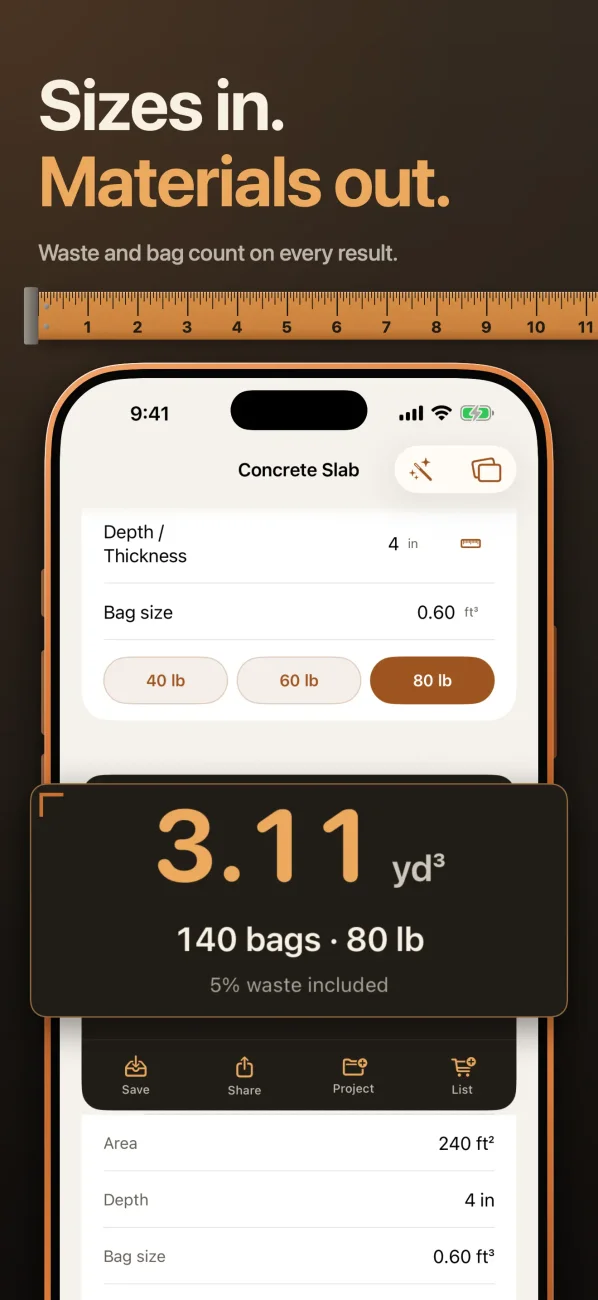
Type your sizes: BuildCalc gives you the bags, boards, sheets and gallons to buy, rounded up, with the waste on its own line.
Same answer every time. Formulas you can check. No account, no ads, no tracking. Works offline.
Free: 25 everyday calculators, 3 unit converters, the Tape Calculator, Stair Stringer and Roof Calculator numbers, and up to 3 saved results at a time. BuildCalc Pro unlocks the rest.
MATERIALS THE WAY YOU BUY THEM
• Concrete in cubic yards and 40, 60 or 80 lb bags, gravel and mulch in cubic yards, depth in inches; metric in m³ and cm
• Price per unit and "already have" on every material calculator
• Free calculators include concrete, mulch, gravel, topsoil, paint, drywall, lumber, deck boards, tile, flooring, fence, roofing and square footage
TAPE CALCULATOR
• Add, subtract, multiply and divide feet, inches and fractions down to 1/64 in, or metric
• Rise, Run, Pitch and Diag keys for framing math
• Saved tape and a Home Screen widget (Pro)
STAIR STRINGER
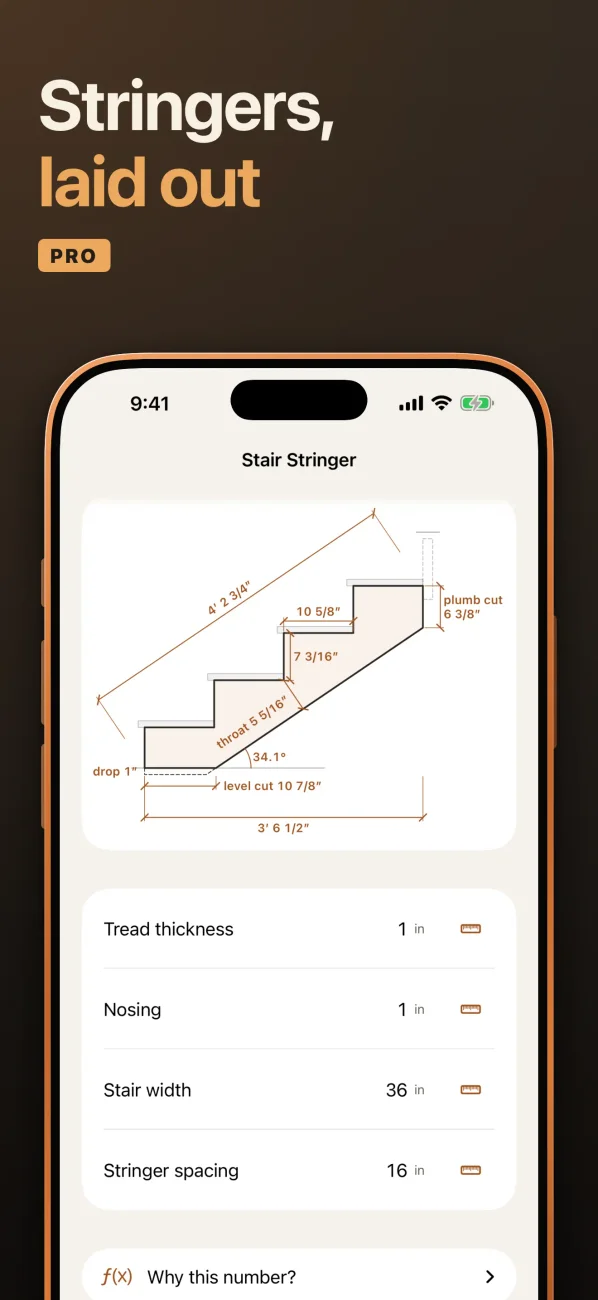
• Enter the total rise: risers, treads, total run, stringer length and angle, or pick a layout from a table
• Checks the layout against IRC 2021 stair limits in imperial, or the 2R + G comfort rule in metric
• Dimensioned stringer drawing, framing-square marks and a PDF (Pro)
ROOF CALCULATOR
• 8 shapes, from gable and hip to gambrel, mansard and L-shaped: area, squares and bundles
• Every slope and edge length, and the full material list with sources (Pro)
• Free code checks from the 2021 IRC; the roof in 3D (Pro)
WHY THIS NUMBER?
• On every result: the formula and assumptions, with your numbers; free and 12 key Pro calculators also list sources
EVERYTHING IN PRO
• All 200 calculators in 12 trades, including rebar, rafters, siding and insulation (Pro)
• Client estimate PDF: your logo, labor, markup, tax, deposit and a signature line, in the language you choose (Pro)
• Projects with budgets, and a shopping list (Pro)
• Cut Optimizer for boards and sheets, kerf included (Pro)
• Draw the Room: sketch it, get paint, flooring and baseboard (Pro)
• Scan a Room: walk a room to measure walls, doors, windows and floor, and get the paint, drywall, flooring and trim (Pro). Needs an iPhone or iPad with LiDAR and iOS 17 or later. LiDAR measurements are close, but not exact. Check key dimensions with a tape measure before ordering or cutting.
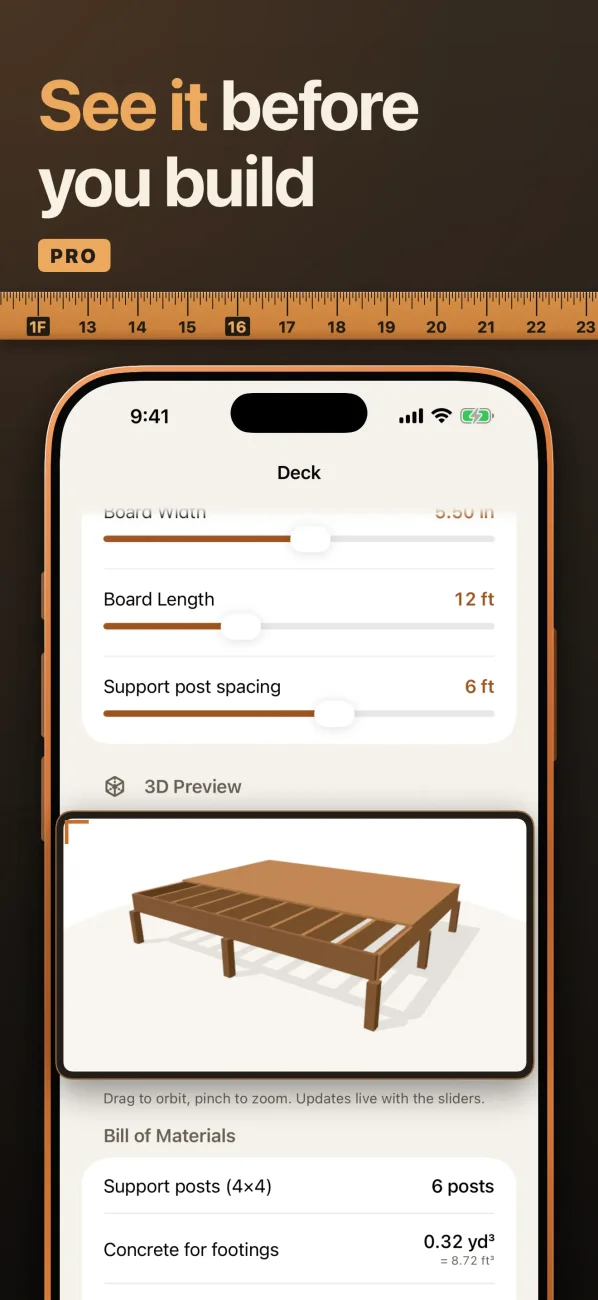
• Templates with the full material list: deck, fence, stairs, patio, shed and more (Pro)
• 3D preview of your numbers (Pro)
• Unlimited saved results (Pro)
ALSO FREE
• Pricebook: type a price once and it fills in results, lists and estimates
• iPhone and iPad, with iCloud sync you can turn off
• Siri, Shortcuts, Spotlight, a widget, dark mode
Estimates only — always verify quantities before ordering materials.
—
BuildCalc Pro is a monthly or yearly subscription, or a one-time Lifetime purchase. The yearly plan starts with a free trial for eligible new subscribers. Payment is charged to your Apple Account. Subscriptions renew automatically unless turned off at least 24 hours before the period ends.
Terms of Use: https://sites.google.com/view/buildcalc-material-calculator/terms-of-use
Privacy Policy: https://sites.google.com/view/buildcalc-material-calculator/privacy-policy
What’s new
Version 2.1 · Nov 24, 2026
NEW IN 2.1
• Tape Calculator: feet, inches and fractions down to 1/64 in, or metric, with Rise, Run, Pitch and Diag keys. Saved tape and Home Screen widget (Pro).
• Stair Stringer: risers, treads, stringer length and layout checks for free; dimensioned drawing, framing-square marks and PDF (Pro).
• Roof Calculator: 8 roof shapes; area, squares and bundles for free; every slope, edge length and the full material list with sources (Pro).
• Scan a Room (iPhone and iPad with LiDAR): walk a room for about 2 minutes to measure its walls, doors, windows and floor, and get the paint, drywall, flooring and trim (Pro). Correct any wall with a tape measure.
• Client estimate: a PDF with your logo, labor, markup, tax, deposit and a signature line (Pro).
• Pricebook: type a price once and it fills in results, lists and estimates.
• Why this number? on every result: the formula and assumptions, with sources on free and key Pro calculators.
• Imperial the way you buy it: cubic yards, 40, 60 and 80 lb concrete bags, depth and spacing in inches (cm in metric).
• A 2-step start: pick your units and what you're building, and a worked example opens.
• Save up to 3 results for free. New installs get 25 free calculators and 3 converters; if you installed before 2.1, you keep the 41 free calculators you had.
• A clearer BuildCalc Pro screen: Lifetime next to the yearly plan, and the free trial only if your account can still get it.
NUMBERS THAT CHANGE
We checked 41 calculators and templates against manufacturers' data and building guides. Saved results keep their numbers; new calculations use these fixes:
• Fence job: post concrete fills the whole hole, 3 times the post's width: about 8 times more concrete.
• Deck job: screws in boxes of 250, as the line says: twice the boxes.
• Block and retaining walls: a bag of mortar mix lays 13 blocks, not 30: more than twice the bags.
• Siding: a carton covers 2 squares (200 ft², 18.6 m²): about a quarter of the cartons.
• Shingles: exactly 3 bundles per square, no extra bundle on round areas; Roofing Area rounds bundles up.
• Ridge Cap: bundles from the hip and ridge length, 25 ft (7.6 m) a bundle, not from an area.
• Fence panels, deck railing and the Fence job: spare panels for waste no longer add posts.
• Paint: a To buy line in whole gallons or liters. Room Paint starts at 350 ft²/gal (8.6 m²/L), and the Paint a Room job and Draw the Room use it too: a little more paint and primer. Concrete Sealer starts at 200 ft²/gal (4.9 m²/L).
• Asphalt: one density in both unit systems; results move by less than 1 %.
• US sizes in imperial: 450 ft² sod pallets (the old default gave 51 pallets where 5 do) and 10 ft gutters.
• Spacing in inches or cm (16 in, 40 cm); imperial rafter and ceiling-joist counts were far too high.
• Board Feet takes inches and feet in both unit systems; Concrete Stairs takes riser and tread in inches or cm.
• Deck Stairs job: 11 in treads, one tread fewer than risers (20–33 % fewer tread boards and brackets), risers over 7¾ in flagged.
• Square Footage, Wall Area and Lot Size no longer add the Settings waste; Trench, Cable Trench and Pool Volume start at it again.
• Underlayment: choose the roll; synthetic rolls cover 10 squares.
App privacy
What Serhii Tykhonenko declares on the App Store about how this app handles data.
-
Data not collected
The developer does not collect any data from this app.
Privacy practices may vary, for example with the features you use or your age.
Information
- Seller
- Serhii Tykhonenko
- Category
- Utilities
- Version
- 2.1
- Updated
- Nov 24, 2026
- Released
- May 2, 2026
- Size
- 20.0 MB
- Requires
- iOS 16.0 or later
- Age rating
- 4+
- Price
- Free
- In-app purchases
- Yes
- Languages
- English, Arabic, Bengali, Bulgarian, Catalan, Croatian, Czech, Danish, Dutch, Finnish, French, German + 25 more
- Copyright
- © 2026 Serhii Tykhonenko
You might also like
-
 BuildCalc - Construction CalcConcrete, Framing & Electrical
-
 BuildCalc: Contractor EstimateConstruction Calculator & Cost
-
 iBuild: ArchitectUtilities
-
 BuildCalc: Job EstimatorTile, paint and concrete fast
-
 CraftmetryJobsite Trade Calculators
-
 RedX Walls - Design & BuildCreate, Plan, Export & Share
-
 RedX Stairs - 3D CalculatorDesign & Calculate Stairs
-
 Material Estimator CalculatorEstimate Construction Projects
-
 Construction Master 5 EspañolUtilities
-
 Construction Master 5 CalcFeet Inch Fraction Calculator