
Burst Music Queue
Your music, to the minute
Designed for iPhone
Free · In-app purchases
- Age rating4+
- CategoryMusic
- DeveloperPixel-Perfect Widgets
- LanguagesEnglish+ 1 more
- Size12.3 MB
Links to the official App Store page
Download.org hosts no file of Burst Music Queue. The button opens its official App Store page, published by Pixel-Perfect Widgets. Listing last checked on Nov 20, 2026.
Screenshots


About
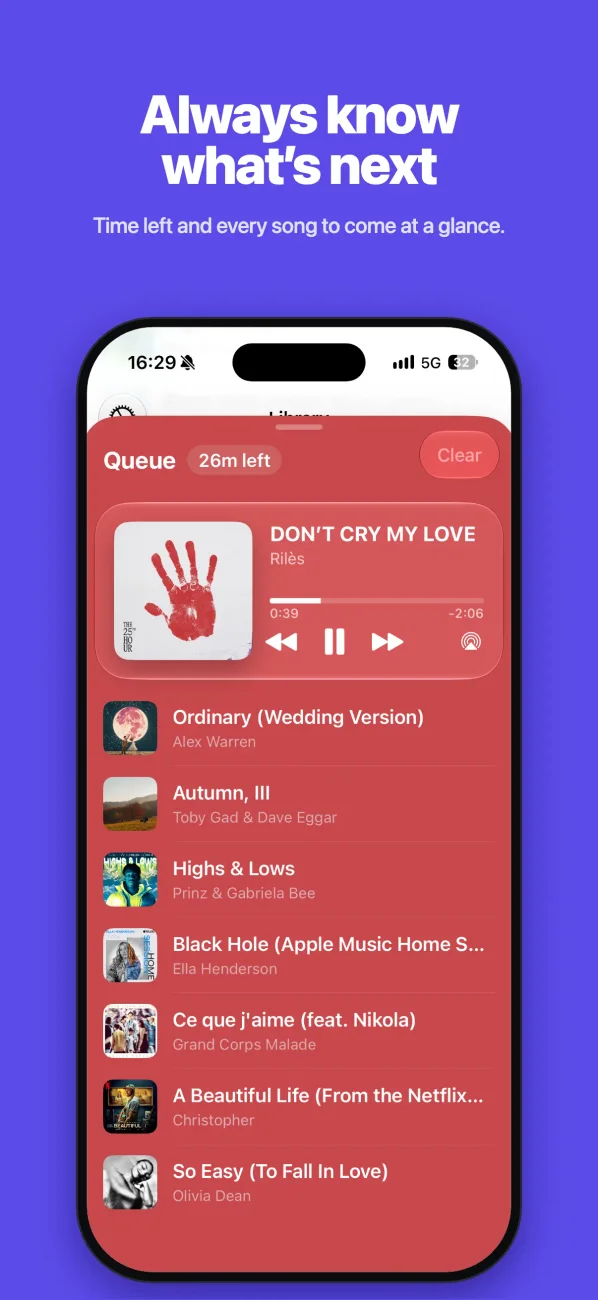
Never quite sure what's playing next? Burst replaces Apple Music's queue with one you understand at a glance.
ONE TAP, IT'S IN THE QUEUE
Pick a song in your library and it joins the queue. The next one lines up right behind it. No menu to open, no choosing between "Play Next" and "Play Last".
ALWAYS KNOW WHERE YOU ARE
• How much time is left, to the minute
• Every song to come, right in front of you
• The songs you already played, a pull on the player away
ON THE ROAD, AT THE GYM, AT A PARTY
• On the road, you know whether the music will last the drive.
• At the gym, you fit the music to your workout.
• At a party, you stay in control of what plays.
IN THE CAR
Burst works with CarPlay: your queue shows up right on the car's screen.
YOUR LIBRARY, CLOSE AT HAND
Recently added and recently played, playlists included, and your most played songs: it's all there, and your queue is ready in seconds. Looking for something else? Search your library and the whole Apple Music catalog.
FREE, THEN BURST UNLIMITED
The free version holds up to 7 songs per queue. With Burst Unlimited, your queues have no limit, on iPhone and in CarPlay. Your choice: a one-time purchase or a yearly subscription.
Burst is made in France by an independent developer.
To use Burst, you need an Apple Music subscription or music saved on your iPhone.
What’s new
Version 1.4 · Nov 16, 2026
Burst 1.4 — search any song, reorder your queue
• Search: type a song, an artist or an album in the field under the title. Results come from your library and, with an Apple Music subscription, the whole Apple Music catalog. Tap one to queue it.
• Reorder the songs to come: hold a song's handle and drag it.
• Taking a song out of the queue no longer stops the music.
• CarPlay opens on your library, with the playlists you played lately, and the Queue tab shows how much time is left.
• A short tour on first launch shows how Burst works.
App privacy
What Pixel-Perfect Widgets declares on the App Store about how this app handles data.
-
Data not linked to you
May be collected but is not linked to your identity.
- Usage data
- Diagnostics
Privacy practices may vary, for example with the features you use or your age.
Information
- Seller
- David Attias
- Category
- Music
- Version
- 1.4
- Updated
- Nov 16, 2026
- Released
- Aug 28, 2022
- Size
- 12.3 MB
- Requires
- iOS 16.0 or later
- Age rating
- 4+
- Price
- Free
- In-app purchases
- Yes
- Languages
- English, French
- Copyright
- © David Attias 2026
You might also like
-
 JukemeisterBroadcast playlists on jukebox
-
 iana – Album ShuffleRediscover your music library
-
 vinylcloudMusic
-
 Deer MusicMusic
-
 Sequence PlaylistPlay, randomize, sort music
-
 Power Player Music PlayerMore Music in Each Pixel
-
 Plum Music PlayerBetter Music Player
-
 SongSwipe: Playlist MakerSong Finder Discover New Music
-
 SoundWave-Music Offline PlayerMusic Player Without Internet
-
 Smart Music Playlist MakerFilter by genre, mood & bpm