
- Age rating4+
- CategoryProductivity
- DeveloperMilos Kral
- LanguagesEnglish+ 4 more
- Size2.2 MB
Links to the official App Store page
Download.org hosts no file of Caller Notes. The button opens its official App Store page, published by Milos Kral. Listing last checked on Nov 6, 2026.
Screenshots


About
A number you haven't saved is calling and you have no idea who it is? You don't want to save every tradesperson, courier or someone who calls once every six months to your Contacts?
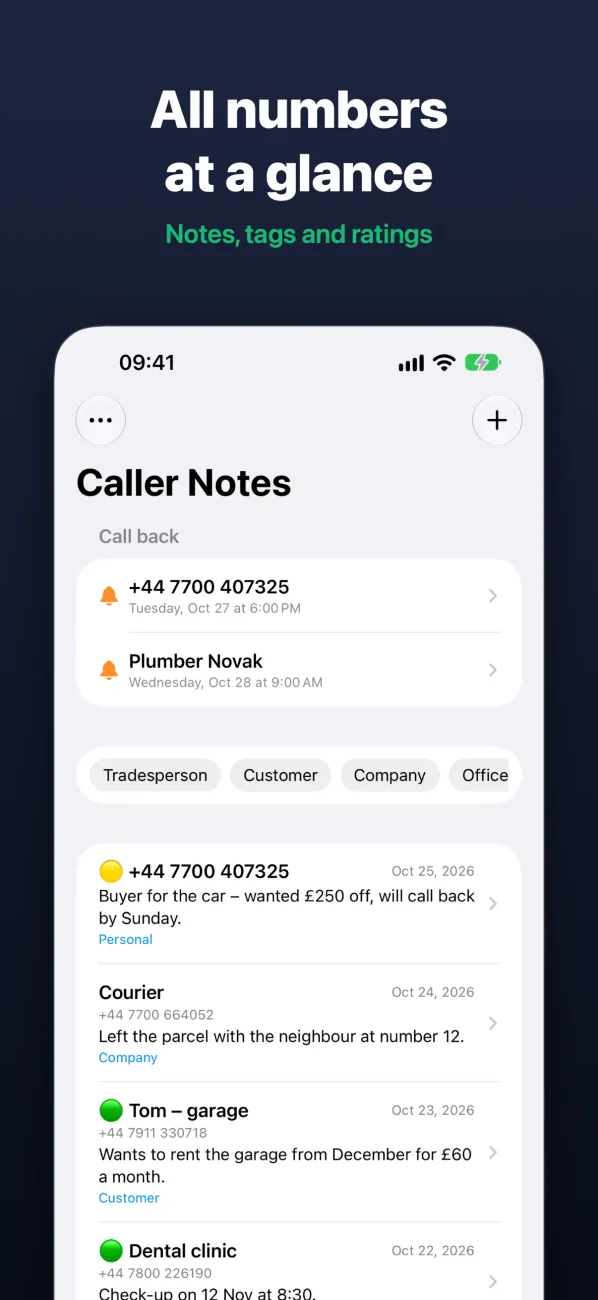
With Caller Notes you add a short note to a number – and when that person calls again, you see who it is and what they wanted last time, right on the incoming call screen. No need to save the number to Contacts.
GREAT FOR
• The tradesperson who called about a quote – six months later you know what it was about
• Someone who only calls once in a while – see why they called last time
• Numbers you'd rather not answer – mark them as “avoid” and you'll see it on the call screen
• Customers, offices, doctors, couriers – all organised without cluttering your Contacts
HOW IT WORKS
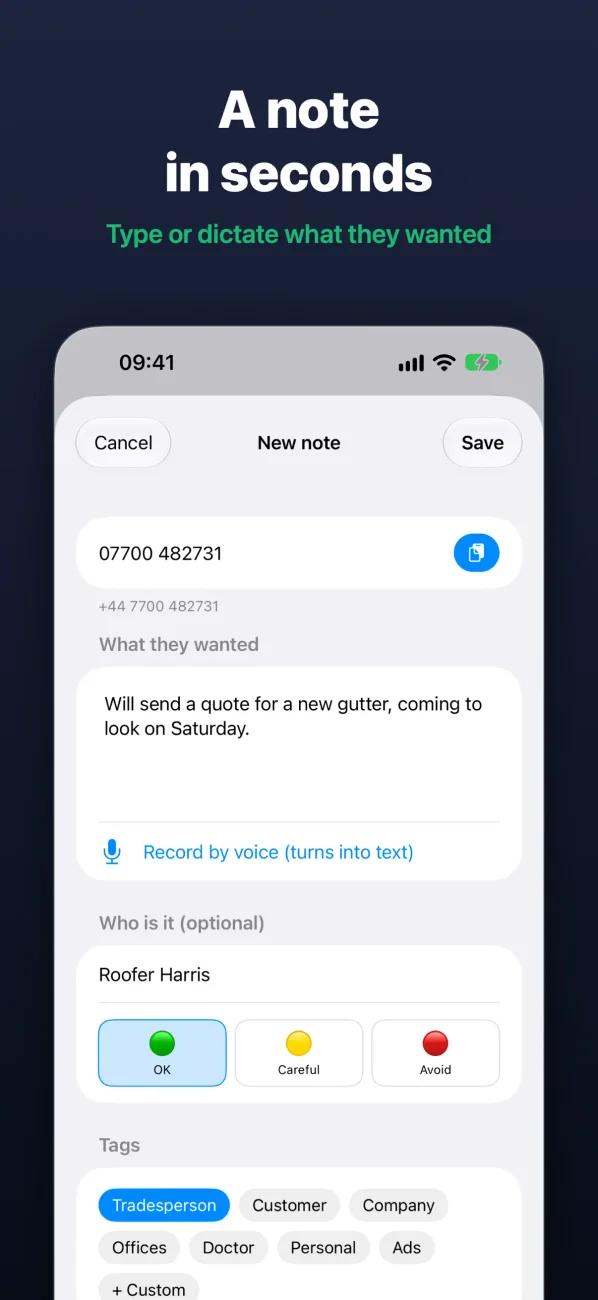
1. After a call, copy the number from Recents
2. Tap + in the app – the number is pasted for you
3. Type or dictate what they wanted
4. Next time they call, you'll see your note instead of just the number
MORE FEATURES
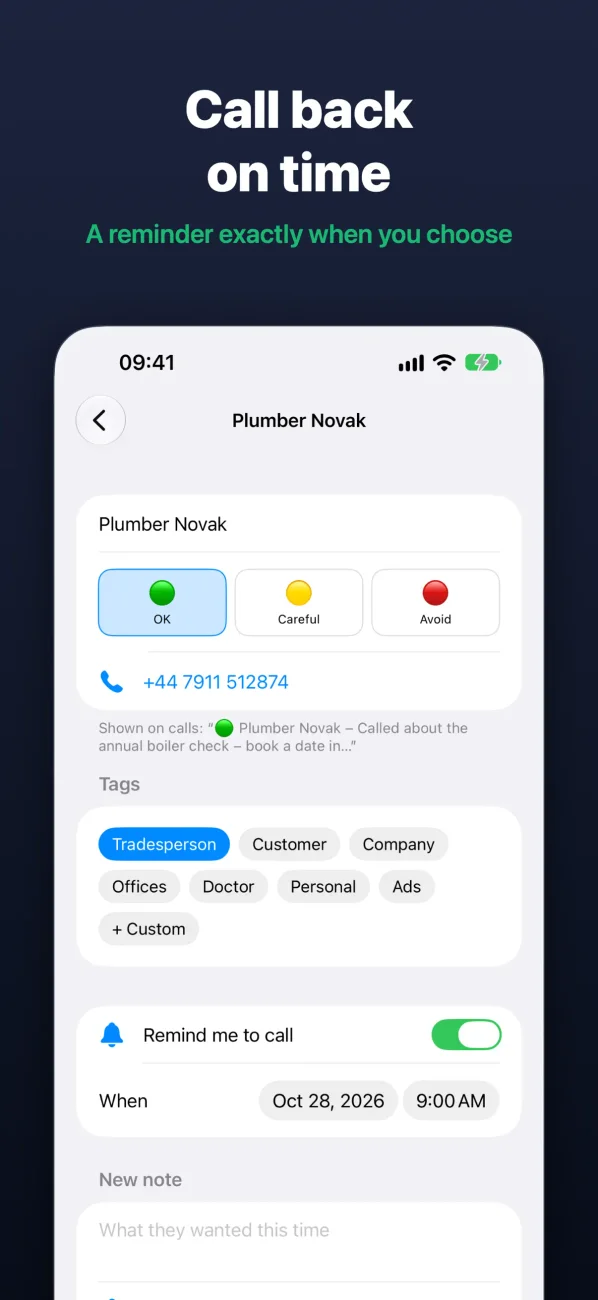
• Caller rating: OK, careful, avoid – also shown on the call screen
• "Call back" reminder at the day and time you choose
• Write a note during a call – add the number afterwards
• Groups – share numbers and notes in your company, family or team, and everyone sees them on their call screen
• Voice notes with transcription
• Tags (tradesperson, customer, offices…) and search
• Photos and documents for a number (e.g. a quote or business card)
• Recent callers widget and a Control Center button
• Export to Excel (CSV)
• English, Slovak, Czech, Polish and Italian – switch the language right in the app
YOUR PRIVACY FIRST
Unlike apps that share numbers with other users, everything here stays yours. Notes are stored on your phone and backed up to your own iCloud – install the app on a new iPhone and they come back. We never send them anywhere, we have no server and collect no data. Only what you add to a group is shared, and only with the people you invite.
IMPORTANT
To see your note on calls, turn the app on in Settings → Apps → Phone → Call Blocking & Identification. Notes are shown for numbers that aren't saved in your Contacts.
What’s new
Version 1.3 · Nov 1, 2026
- New language: Italian, including dictation.
- A shared number can only be deleted or edited by the person who added it or by the group admin.
- The app asks for confirmation before deleting a shared number.
App privacy
What Milos Kral declares on the App Store about how this app handles data.
-
Data not collected
The developer does not collect any data from this app.
Privacy practices may vary, for example with the features you use or your age.
Information
- Seller
- Milos Kral
- Category
- Productivity
- Version
- 1.3
- Updated
- Nov 1, 2026
- Released
- Oct 29, 2026
- Size
- 2.2 MB
- Requires
- iOS 17.0 or later
- Age rating
- 4+
- Price
- Free
- Languages
- English, Czech, Italian, Polish, Slovak
- Copyright
- © 2026 Milos Kral
You might also like
-
 Hello EmmaHow can I help you?
-
 ChatPro - AI Chatbot AssistantPowered by ChatGPT & GPT-4o
-
 My Attendance GIRITONProductivity
-
 Super ProductivityToDo List & Time Tracker
-
 Slovenská poštaProductivity
-
 App InailProductivity
-
 RadosťProductivity
-
 Duet Air - Remote DesktopThe fastest Remote Desktop
-
 Mosa AI: Chatbot AssistantAI Expert Chat: Ask Anything
-
 Electric Scooter Universal AppHelper App by EScooterNerds