
- Age rating4+
- CategoryProductivity
- DeveloperAsp Digital LTD
- LanguagesEnglish
- Size50.7 MB
Links to the official App Store page
Download.org hosts no file of Camera Sheets. The button opens its official App Store page, published by Asp Digital LTD. Listing last checked on Nov 14, 2026.
Screenshots


About
• Turbo charge wrap with powerful camera reporting and distribution.
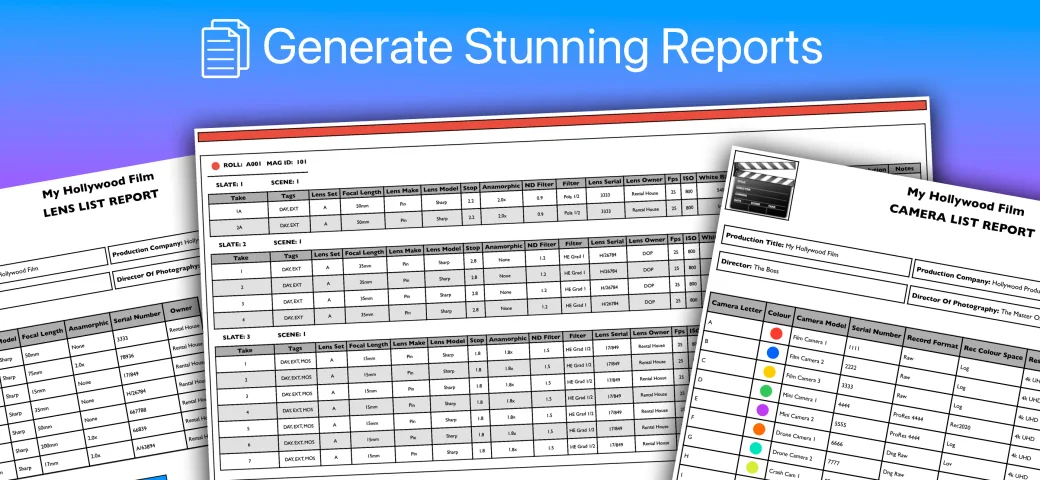
• Create stunning, detailed, easy to read reports.
• Share Projects to collaborate with extra units/departments quickly and easily.
• Have your jobs, data and reports close to hand anytime, any location.
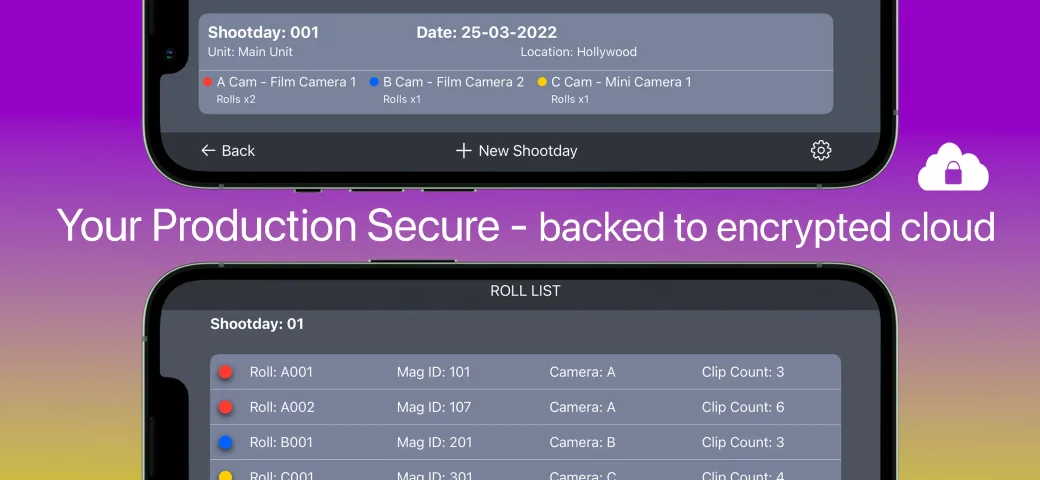
• Backed by the cloud and encrypted, to ensure your critical information is always secure
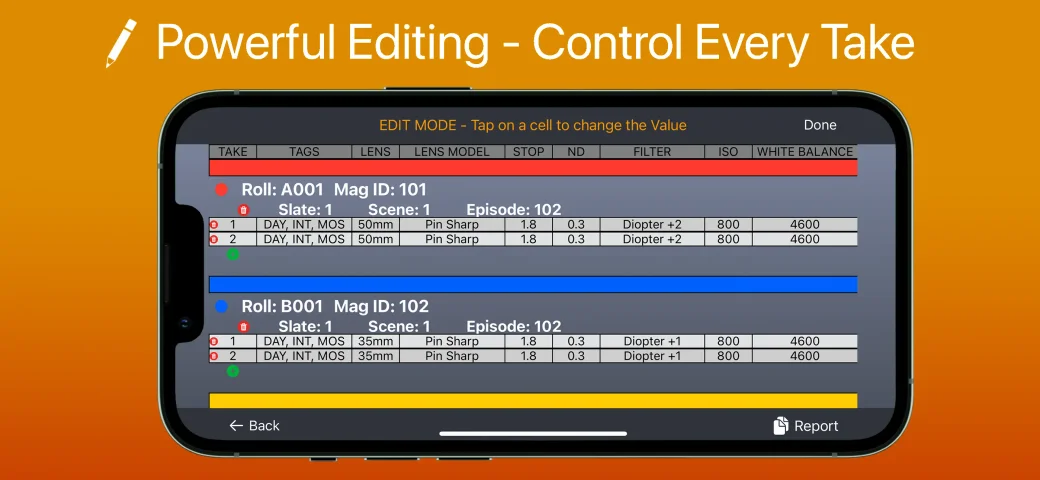
• Fast data entry and editing for full metadata control on every take.
• Add an email list for effortless sending.
• Advanced lens tracking - have 2 or more matching lens sets? Know which exact lens was used for every shot - VFX will thank you!
Camera Sheets is designed with camera and VFX data assistants at the centre, by an industry professional working in camera and post. No more writing paper reports after wrap in the back of the truck or in the rain!
CREATE - make a project and optionally customise with a logo. Add cameras, rolls and shoot days. Save lenses, filters, LUTs and crew members to quickly fill in information. Have your whole production close at hand to always know what slates, cameras and rolls you are on. Inbuilt U.S and U.K quick slating with a special mode for episodic shows. Generate PDFs and CSVs. Also generate camera list and lens list reports for production, edit and post.
DISTRIBUTE - Add a list of email addresses to create a distribution list. Then with a single tap create an email with your distro list, subject and message automatically filled in, reports are attached with filenames. All you have to do is hit send. No more copying and pasting contacts/emails or changing filenames! Airdrop, save to your device, send via messages…..send* or save however you like!
SHARE - Share a project with 2nd or other units, production, edit, post, VFX, script supervisors or any crew. They can then access the project data and generate reports directly, saving precious time on queries. A department needs to check something they can! Data added by participants (with write permission) magically syncs to everyone in the share group. Set individual read or write permissions to prevent editing and control the level of access. Remove participants or stop sharing any time and the project will disappear from their device. No internet, no problem, data added offline will sync when you are next connected.
2 Week Free Trial for new users - Choose a plan to start the free trial. Cancel** at any time.
Full User Guide Included inside.
*Subscription required to send reports, share projects or accept share invites to projects. The subscription will auto renew based on the plan you choose after the end of the current subscription period. The renewal date is shown in the subscriptions section inside Camera Sheets and also in your device subscriptions list. Subscription options include 1 month, 6 moths and 1 year.
** To cancel or manage your subscription go to your device settings. If you cancel you will still have full access until the end of your current subscription period. You can cancel at any time with no obligations. If you cancel during the 2 week free trial any remaining trial days will be lost. Trial available for 1st time subscribers only.
Terms of use: https://www.apple.com/legal/internet-services/itunes/dev/stdeula/
What’s new
Version 1.30 · Dec 23, 2025
- Updated for iOS 26 and Liquid Glass.
- Updated the sharing UI to use Apple’s Cloud Sharing screen for a more streamlined experience.
- Fixed the loading spinner so it appears when creating or sharing a project.
- Users accepting a share now see an “Accepting Share” spinner to indicate the share is processing.
- Removed the Light Mode option. Camera Sheets now uses a single dark, Liquid Glass–friendly colour scheme that looks great in iOS 26.
We’re deep into developing a whole new Camera Sheets experience, with a totally overhauled UI, exciting new features, and even more intuitive ways to log your camera report data. We can’t wait to share it with you soon. Until then, keep on shooting!
App privacy
What Asp Digital LTD declares on the App Store about how this app handles data.
-
Data not linked to you
May be collected but is not linked to your identity.
- Diagnostics
Privacy practices may vary, for example with the features you use or your age.
Information
- Seller
- Asp Digital Ltd
- Category
- Productivity
- Version
- 1.30
- Updated
- Dec 23, 2025
- Released
- May 24, 2022
- Size
- 50.7 MB
- Requires
- iOS 26.0 or later
- Age rating
- 4+
- Price
- Free
- In-app purchases
- Yes
- Languages
- English
- Copyright
- © Asp Digital LTD
You might also like
-
 Crew CallTime Tracking for Film Crew
-
 DigiSheetsDitch The Paperwork
-
 ARRI Rental ARTSARRI Rental Tracking System
-
 KitPrepCamera crew prep & inventory
-
 Film Beans TimesheetsTV & Film Timesheets. Sorted.
-
 Business CalculatorBusiness Calculator
-
 Nuotit — Private Audio PlayerPodcasts, books, music unified
-
 Haystack: Set SolutionsStreamlining film productions
-
 Sixth DegreeFilm & TV industry networking
-
 LayerMapper NDISend and Monitor NDI Signal