
CapsPlan: Medication Tracker
Pill Reminder & Watch App
Designed for iPhone, iPad
In-app purchases
- Age rating4+
- CategoryMedical
- DeveloperDominique Meili
- LanguagesGerman+ 4 more
- Size33.0 MB
Links to the official App Store page
Download.org hosts no file of CapsPlan: Medication Tracker. The button opens its official App Store page, published by Dominique Meili. Listing last checked on Nov 12, 2026.
Screenshots

About
Never miss a dose again. CapsPlan is your medication planner with reliable reminders, supply tracking and a complete history – fully offline, no account needed.
TODAY'S VIEW
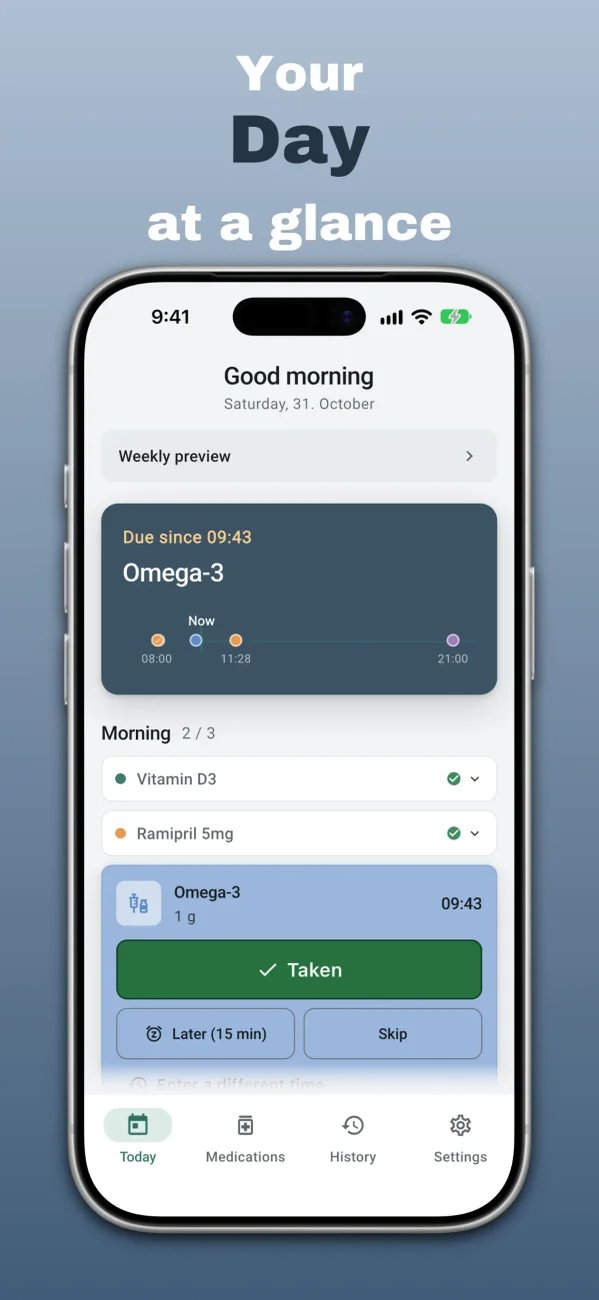
“Today” is grouped by time of day: morning, midday, evening. The next dose sits at the top, one big “Taken” button confirms it, and finished parts fold away. Skipping or a reminder again in 15 minutes is one tap. Notices such as low supply or a new dose step appear right on “Today”, and the weekly preview shows the days ahead. On iPad and the unfolded iPhone Duo, the weekly preview and supply sit in a second column alongside.
ONLY WHAT YOU NEED
In Settings → Features & view you hide what you don't use, such as supply, tapering or the weekly preview. CapsPlan stays as simple as you want it. Saved details and reminders are kept.
APPLE WATCH
Confirm or skip doses right on your wrist with a swipe. Install the watch app once via the Watch app on your iPhone under "My Watch" → "Available Apps".
SIRI
Say "Hey Siri, next dose in CapsPlan" and Siri tells you your next intake or confirms it by voice.
WIDGETS & LIVE ACTIVITIES
Your daily progress as a ring on the home screen, optionally without medication names. Your next dose shows on the lock screen and in the Dynamic Island, with a confirm button.
REMINDERS
Notifications exactly when a dose is due: daily, on specific weekdays, or every N days. With quick actions, follow-up reminders and quiet hours. Travel and time zone mode included.
MINIMUM INTERVAL & DAILY MAXIMUM
Set how much time must pass between two doses and how many are allowed per day, also for as-needed medication. CapsPlan shows when the next dose is allowed and moves the reminder accordingly.
SCAN YOUR MEDICATION PLAN
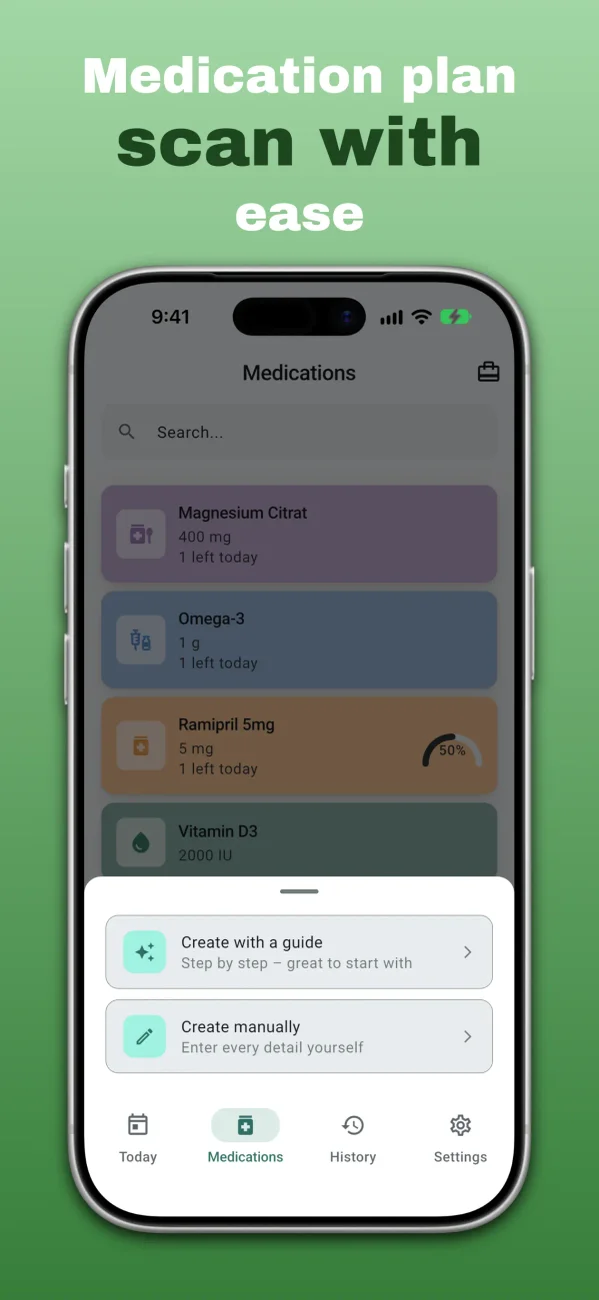
Scan the Data Matrix code of your standardized German medication plan (BMP) and every medication is added in seconds. Or use the guided assistant, or enter everything yourself.
TRACK YOUR SUPPLY
Every confirmed dose counts your remaining stock down, and CapsPlan warns you before a pack runs out. Add a new pack in seconds with “Refill”.
SPLITTING TABLETS & SEVERAL STRENGTHS
Manage several strengths of a medication, e.g. 10 mg and 5 mg, each splittable into halves or quarters. CapsPlan suggests the right pieces for every dose, uses broken pieces first and works out how long each strength lasts. The evening before, it lets you know if the split changes.
HISTORY & STATISTICS
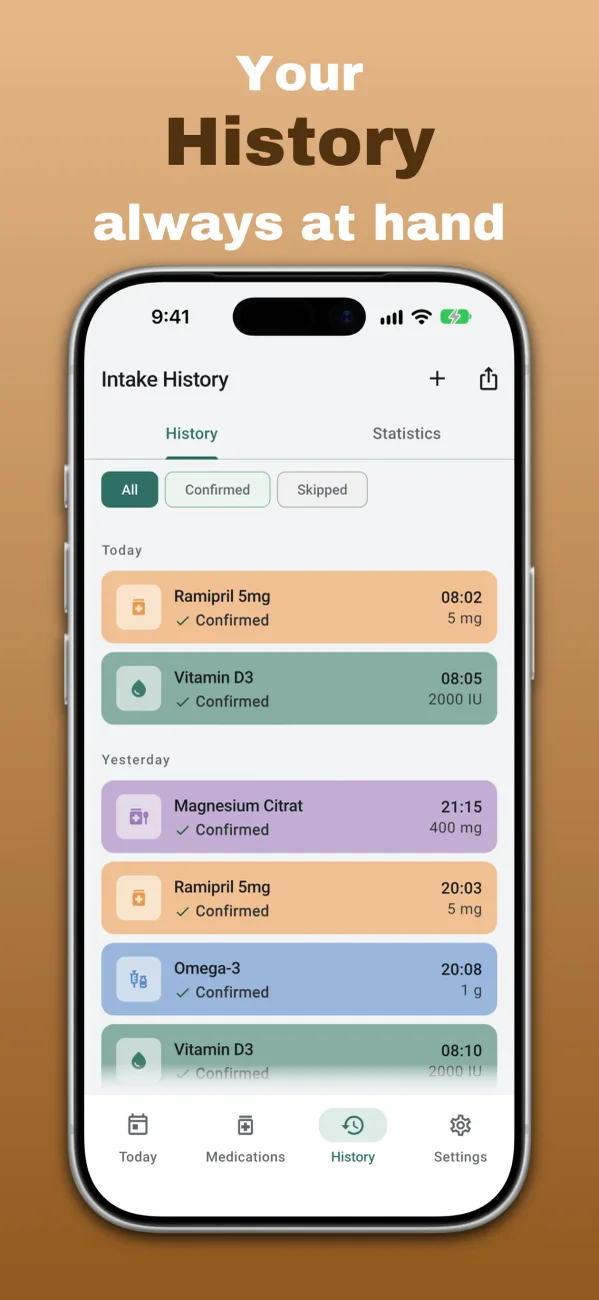
Every intake is logged – confirmed, skipped or snoozed – and can be edited afterwards. Statistics show your adherence. Export as CSV or PDF for your doctor visit (Premium).
TAPERING UP AND DOWN
Reduce or increase a dose automatically in fixed steps — every few days, weeks or months — to 0 or to a target dose. With tablet strengths you see the split for every step and whether your supply lasts to the end. If your doctor changes the therapy, you can adjust the plan at any time. Always agree on this with your doctor.
BUY ONCE, NO SUBSCRIPTION
Free with every feature for up to 2 medications, including supply, statistics and the full history. Premium is a one-time purchase, no subscription: unlimited medications and PDF/CSV export.
PRIVACY
All data stays on your device. No account, no tracking, no sharing with third parties. If you like, back up your data to your own iCloud and keep it the same on your iPhone, iPad and other devices with your Apple ID.
For anyone who takes something regularly – blood pressure medication, antibiotics, vitamin D or omega-3. One supplement or twelve. CapsPlan does not replace medical advice.
What’s new
Version 1.16.1 · Nov 2, 2026
New in 1.16: CapsPlan is clearer. "Today" is grouped by time of day, with one big "Taken" button; finished parts fold away. Every tab has a label and text is larger. In Settings → Features & view you can hide what you don't need, such as supply or tapering. Saved details and reminders stay as they are. Notices now appear right on "Today" instead of behind a bell, and colours have more contrast, in dark mode too.
App privacy
What Dominique Meili declares on the App Store about how this app handles data.
-
Data not collected
The developer does not collect any data from this app.
Privacy practices may vary, for example with the features you use or your age.
Information
- Seller
- Dominique Meili
- Category
- Medical
- Version
- 1.16.1
- Updated
- Nov 2, 2026
- Released
- Jul 10, 2026
- Size
- 33.0 MB
- Requires
- iOS 18.6 or later
- Age rating
- 4+
- In-app purchases
- Yes
- Languages
- German, English, Italian, Spanish, Turkish
- Copyright
- © 2026 Dominique Meili
You might also like
-
 ImproveMe: All-In-One FitnessFitness, Nutrition & Focus
-
 Medicine Info: MediLensMedicine Scanner & Dose Log
-
 Baseline — Mood TrackerPrivate mood & sleep journal
-
 Tray: Pill & Vitamin ReminderSupplement tracker & pillbox
-
 MediBestand – Vorrat & PlanungMedical
-
 Relax & MoveHealth & Fitness
-
 Sonnenapotheke TemplinMedical
-
 PillSeal: Medication ReminderPill Tracker & Medicine Alarm
-
 ElderEase - Pill ReminderMed Tracker for Seniors, Free
-
 Rapid CyclingMood & mental health journal