Car Camera Recorder
Record your trips with data
Designed for iPhone, iPad, Mac
Free · In-app purchases
- Age rating4+
- CategoryNavigation
- DeveloperBeling.pl
- LanguagesEnglish+ 5 more
- Size10.9 MB
Links to the official App Store page
Download.org hosts no file of Car Camera Recorder. The button opens its official App Store page, published by Beling.pl. Listing last checked on Nov 21, 2026.
Screenshots


About
Car Camera Recorder is a powerful, ad-free dashcam app that turns your iPhone into a professional driving recorder. Record your journeys in high resolution with essential telemetry data embedded directly in your videos.
Key features:
Live Preview & Focus
See exactly what is being recorded in real time, adjust or reset the zoom, and choose the focus mode that fits your drive: distant road autofocus, infinity lock, or tap-to-focus on the preview.
Video Overlays & Speed Gauges
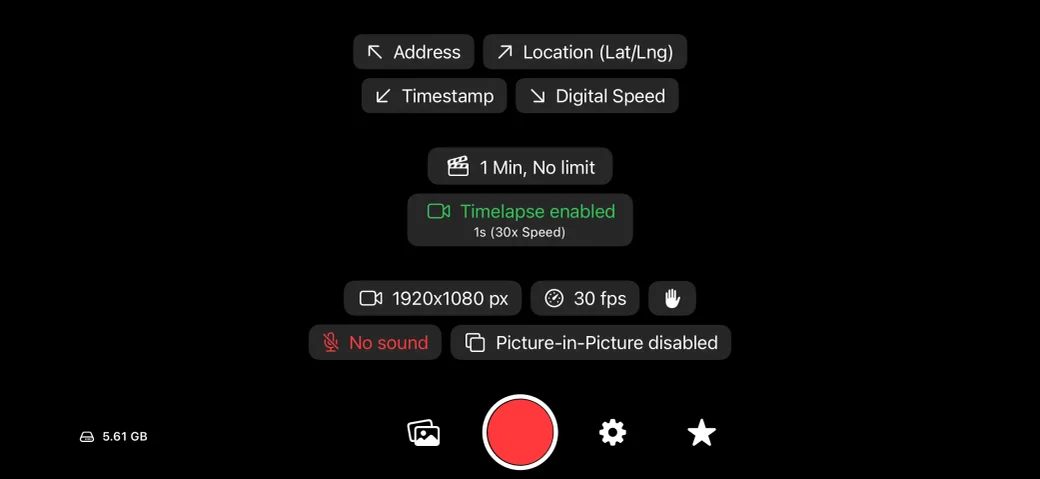
Place telemetry data in any of the four corners of your video: speed (km/h or mph), GPS coordinates, address, FPS, total distance, and elapsed trip time, with customizable font size, text color, and optional semi-transparent background.
Add a graphic speedometer dial or a 7-segment digital display with customizable size, colors, and speed units.
Dual Camera & Separate Recordings
Record with the main rear camera while simultaneously showing the front camera in Picture-in-Picture (PiP), with customizable position, size, and shape (rectangle, rounded rectangle, or circle). You can also record and browse footage from each camera separately and switch between matching clips from the same moment during playback.
High-Performance Recording & Smart Storage
- Record in resolutions up to 4K at up to 60 FPS with configurable video stabilization priorities.
- Split recordings into segments (1 to 60 minutes, or no limit) and set file limits (keep the last 10 to 100 recordings, or no limit) to automatically delete the oldest unlocked files.
- Check estimated recording time, receive low-storage warnings, and use Quick Fix to remove old unprotected segments of your current trip with one tap from the alert.
- Emergency auto-save safely finalizes the video file before device storage runs out completely.
- Configure iCloud backup per video type, automatically create parallel timelapses with customizable intervals, and use stealth mode to dim the screen, hide UI elements, and save battery.
Trip History & Analytics
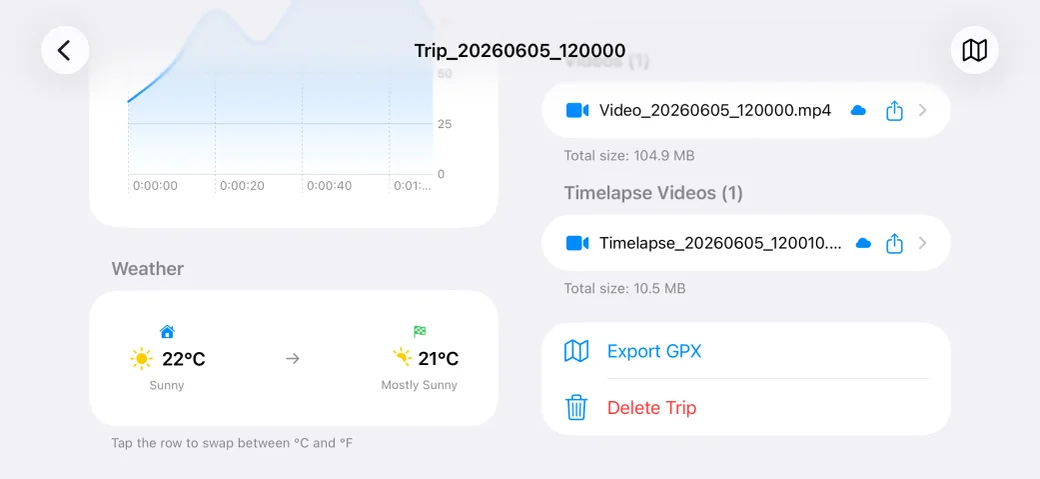
- View detailed trip summaries (start/end times, distance, duration, top and average speed), an interactive speed-over-time graph, and local weather conditions recorded during the trip.
- Explore a smooth interactive route map with selectable style, orientation, and previews of the driven or remaining route.
- Manage your video library (play, export, delete, or lock files), export routes in GPX format, and track storage stats and lifetime gallery totals (trips, videos, timelapses, combined file size, and time on the road).
Apple CarPlay & iCloud Sync
View trip details, browse trips, and use quick recording controls from your CarPlay display. Sync trip details, GPS data, and videos via iCloud, and download videos on demand to save storage space on your iPhone.
No ads, no trackers. Support the app by becoming a Supporter to unlock cabin audio recording and road noise audio enhancement.
Term of Use (EULA): https://www.apple.com/legal/internet-services/itunes/dev/stdeula/
What’s new
Version 10.3 · Nov 16, 2026
- Front and rear camera recordings: Record and browse footage from each camera separately, and switch between matching clips during playback.
- More camera focus control: Choose distant-road autofocus, lock focus at infinity, or tap the preview to focus.
- Custom maps and route previews: Choose map style and orientation, and configure previews for the remaining or driven route.
- Storage protection: See estimated recording time, get low-storage warnings, and use cleanup actions before space runs out.
- Improved playback and reliability: Navigate between video clips more easily; recording also handles phone-call audio interruptions better.
- Smoother long-route maps: Reduced map stuttering on trips with many GPS points.
- Apple CarPlay: View trip information, browse trips, and use quick recording controls from the car display.
- Cloud sync: Sync trip details, GPS data, and videos through iCloud; download videos when needed and save device storage.
- Recorded trips: A new titles view highlights useful trip information. It is currently available in English only.
- Missing translations added.
- Improved recording consistency when recordings are split into segments.
- Fixed time-lapse recording so it stays disabled when turned off.
- Improved picture-in-picture rendering for very large sizes.
- You can customise background transparency for each corner's data
- New custom color picker, more predefined colors
App privacy
What Beling.pl declares on the App Store about how this app handles data.
-
Data not collected
The developer does not collect any data from this app.
Privacy practices may vary, for example with the features you use or your age.
Information
- Seller
- Beling.pl
- Category
- Navigation
- Version
- 10.3
- Updated
- Nov 16, 2026
- Released
- Aug 22, 2013
- Size
- 10.9 MB
- Requires
- iOS 17.6 or later
- Age rating
- 4+
- Price
- Free
- In-app purchases
- Yes
- Languages
- English, French, German, Hebrew, Polish, Spanish
- Copyright
- © 2008-2026 Beling.pl
You might also like
-
 DashMap: Smart Dash CamIn-Car Navigation & 4K Video
-
 CamCarDer LiteGPS car dash camera recorder
-
 TripREC Dash Cam LiteTrip log with loop recording
-
 Dashcam - Car Crash RecorderCamcorder for car accidents
-
 Car Camera DVR - DashcamDrive,Record,Speed Tracker,GPS
-
 Car Camera DVR. HD dash camDriving data & video recorder
-
 Dash Cam | Drive Guardian AIRemote Smart Cloud Car Dashcam
-
 DashCam RecorderUse your iPhone as a DashCam
-
 Driver: Dash Cam & Trip LogAI coaching + cloud backup
-
 Nexar ClassicDash cam app