
CarTest - Performance Tester
Car acceleration measurement
Designed for iPhone, iPad, iPod touch
Free · In-app purchases
- Age rating4+
- CategorySports
- DeveloperTakao Ichimura
- LanguagesEnglish+ 2 more
- Size8.3 MB
Links to the official App Store page
Download.org hosts no file of CarTest - Performance Tester. The button opens its official App Store page, published by Takao Ichimura. Listing last checked on Nov 14, 2026.
Screenshots
About
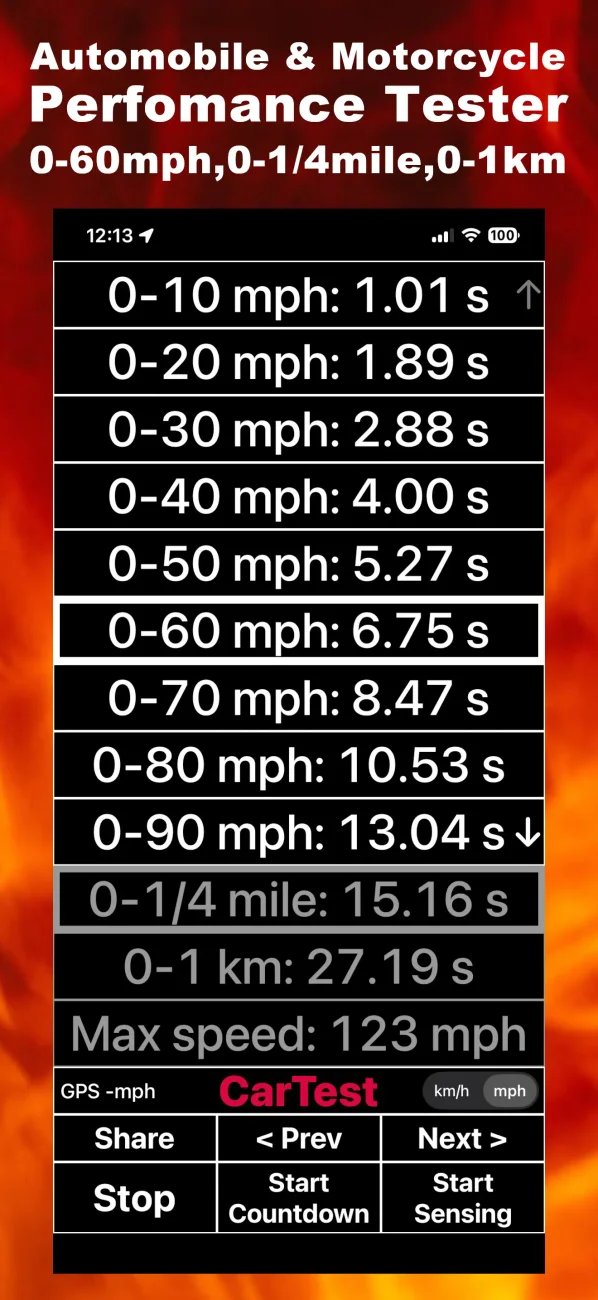
"CarTest" is a tool app that measures acceleration performance of cars, motorcycles.
You can easily measure times such as 0-60 mph, 0-1/4 mile by CarTest.
It is useful for not only measuring full throttle performance but also knowing the usual acceleration on public road for safe driving.
Please use it with safety first. Please comply with the law when using it on public roads.
(How to use)
1. Fix the iPhone (or iPad with GPS) with CarTest installed on the dashboard of your car so that it does not wobble. When using it on a motorcycle, install it on the handlebar or fuel tank.
2. Tap the "Start/Sensing" button or "Start/Countdown" button. After that, instructions will be displayed.
3. If the "Start/Sensing" button is tapped, measurements will be taken repeatedly. Press the "Stop" button to end the measurement.
4. Once the measurement is complete, the latest results will be displayed. The measurement date is also displayed, and the last line indicates the start status as shown below.
- Sensing: Sensing start
- ○Clean: No False with Countdown start
- ×False: False with Countdown start
5. To view previous results, tap the "< Prev" button.
(Button function)
- Stop: Measurement ends. If you tap before the count reaches zero in Countdown start mode, the state before the countdown started will be restored.
- Start/Countdown: The time will start with a countdown and be measured. False start will be checked.
- Start/Sensing: The system detects when the vehicle starts and measures the time. The measurement is repeated.
- Share: A window opens to share the displayed result.
- < Prev: Displays older results.
- Next >: Displays results newer than the past results displayed by clicking the "< Prev" button.
- km/h / mph: Selects the unit of speed
- ↑ / ↓: Page scroll. These buttons are enable when there are other results behind while viewing history.
(Measurement range)
- km/h: From 0-20 km/h to unlimited every 20 km/h. 0-400 m. 0-1 km.
- mph: From 0-10 mph to unlimited every 10 mph. 0-1/4 mile. 0-1 km.
- Max speed
(Large speed display on the screen)
When in the stopped state (when neither "Start/Countdown" nor "Start/Sensing" buttons are tapped), tap the "Stop" button twice to turn it on and off. The speed is displayed during measurement.
(Start-sensor sensitivity setting)
In the stopping state, tap buttons “Stop" → "< Prev" → "Next >" → "< Prev" → "< Prev" to open the setting window at the top of the screen. You can select 5 levels of sensitivity. Please adjust it if there are many false positives or if the response is slow. It is probably not necessary to adjust it.
(Note)
- 1000 cases of measurement results are stored.
- When you uninstall CarTest, the stored measurement results will be deleted.
- CarTest does not work on iPads without GPS.
- If the GPS signal or device reception sensitivity is low, operation may become unstable.
- If the starting acceleration is too small, it may not be measured correctly.
- The developer assumes no responsibility for any accident, violation, loss or claims by third parties which may arise from the use of this app.
Terms of Use:
This application is provided under the Apple Standard End User License Agreement (EULA).
https://www.apple.com/legal/internet-services/itunes/dev/stdeula/
What’s new
Version 5.4.1 · Nov 11, 2026
Made minor improvements and enhanced performance.
App privacy
What Takao Ichimura declares on the App Store about how this app handles data.
-
Data used to track you
May be used to track you across apps and websites owned by other companies.
- Location
- Identifiers
- Usage data
-
Data not linked to you
May be collected but is not linked to your identity.
- Location
- Identifiers
- Usage data
Privacy practices may vary, for example with the features you use or your age.
Information
- Seller
- Takao Ichimura
- Category
- Sports
- Version
- 5.4.1
- Updated
- Nov 11, 2026
- Released
- Oct 8, 2020
- Size
- 8.3 MB
- Requires
- iOS 15.0 or later
- Age rating
- 4+
- Price
- Free
- In-app purchases
- Yes
- Languages
- English, Japanese, Simplified Chinese
- Copyright
- © 2020 Takao Ichimura
You might also like
-
 Race Buddy: Lap & Drag Timer0-60, Quarter Mile, Track Day
-
 FastR - 0-60 Acceleration TestSports
-
 dragy·Lap - New GPS Lap TimerLap Timing, Overlay & Analysis
-
 Dynometry 0-60 & 0-100 testTrack Timer & Daily Dashboard
-
 dragy ConnectSports
-
 TrackAddictLap Timer + Data + Video
-
 PGEARA Powerful Performance Gear
-
 Speedy - Drag TimerTime your 0-60 and 1/4 mile
-
 FastTrack Rides0-60 Timer & Car Community
-
 JB4 MobileSports