- Age rating4+
- CategoryUtilities
- DeveloperERLEND JOHNSRUD VAAGE
- LanguagesSpanish+ 6 more
- Size4.1 MB
Links to the official App Store page
Download.org hosts no file of ChronoCalc Pro. The button opens its official App Store page, published by ERLEND JOHNSRUD VAAGE. Listing last checked on Nov 9, 2026.
Screenshots


About
The simplest and most powerful way to calculate time. Perfect for pilots, freelancers, consultants, and anyone who needs to track and calculate hours with precision.
FEATURES:
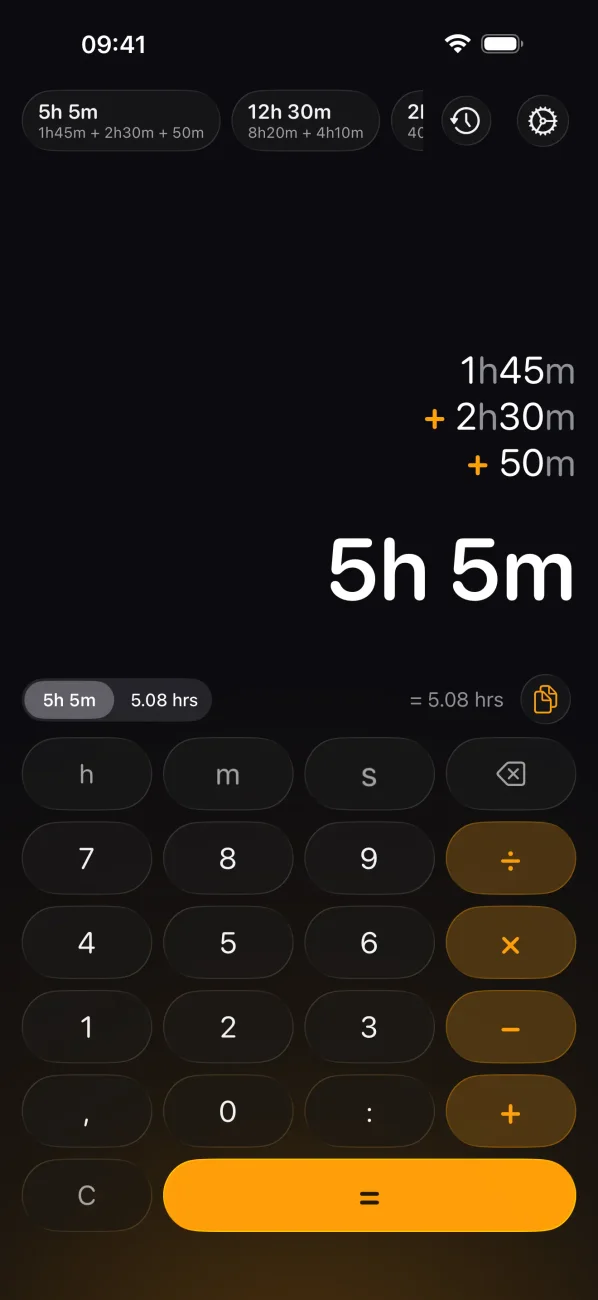
- Pro Time Math - Add, subtract, multiply, and divide time values effortlessly.
- Live Preview - See the result as you type. Tap = to save it.
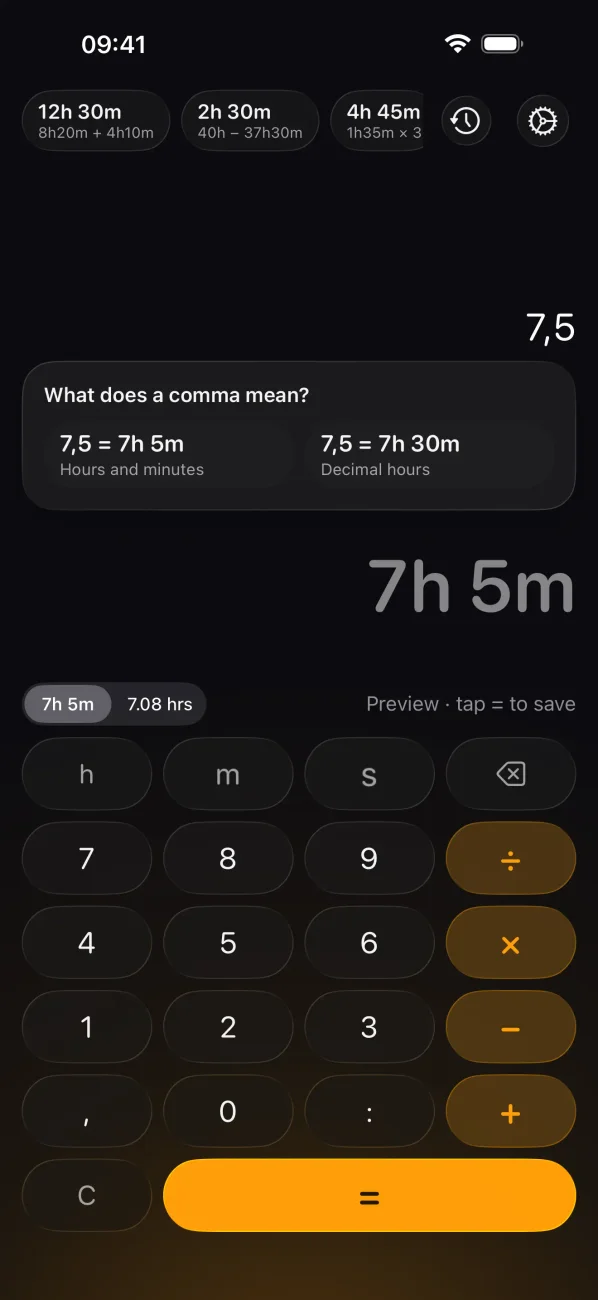
- Flexible Time Input - Enter time your way: 1h30m, 1:30, or with a comma. The first time you type a comma, you choose what it means: 7,5 as 7h 30m (decimal hours) or as 7h 5m (hours and minutes).
- Instant Decimal Conversion - Switch between standard time (1h 30m) and decimal hours (1.50 hrs) right next to the result, with customizable decimal precision.
- History - Your last 100 calculations, one tap to reuse a result. On iPad, a full-height history panel grouped by day. Delete single entries or clear it all.
- Clear Error Messages - Plain-language hints show what went wrong and which line to fix.
- CSV Import/Export - Import time logs or export your calculation history, with a configurable delimiter (comma, semicolon, or tab). Timesheets work in English, Norwegian, Swedish, Danish, German, French, and Spanish.
- Quick Copy - Copy the result to your clipboard with a single tap.
- Designed for iPhone and iPad - Layouts for portrait and landscape, with Liquid Glass on iOS 26.
- Accessible - VoiceOver reads times in whole words and announces every result. Keys support Dynamic Type and the Large Content Viewer, and animations respect Reduce Motion.
- Your Language - Available in English, Norwegian, Swedish, Danish, German, French, and Spanish.
- Smart & Robust - Handles negative time values and seconds with correct formatting.
PERFECT FOR:
- Pilots: Logging flight hours and calculating block time.
- Freelancers & Consultants: Tracking billable hours and creating invoices.
- Project Managers: Calculating project durations and resource timing.
- Anyone: Converting time formats, adding up timesheets, or any task that involves time math.
No ads. No subscriptions. Your data is 100% private and never leaves your device.
What’s new
Version 2.0 · Oct 27, 2026
ChronoCalc Pro 2.0 is a complete redesign.
- New look: a large, easy-to-read result, colour-coded calculations, and Liquid Glass on iOS 26.
- Live preview: see the result while you type, then tap = to save it.
- History: your last 100 calculations, one tap to reuse. On iPad, a full-height history panel grouped by day. Delete single entries or clear all.
- Clear errors: plain-language messages show what went wrong and where.
- Comma your way: the first time you type a comma, choose whether 7,5 means 7h 30m or 7h 5m.
- New languages: Norwegian, Swedish, Danish, German, French and Spanish.
- Better accessibility: VoiceOver reads times in whole words and announces results, and keys support the Large Content Viewer.
- CSV import now recognises duration columns in all of these languages.
App privacy
What ERLEND JOHNSRUD VAAGE declares on the App Store about how this app handles data.
-
Data not collected
The developer does not collect any data from this app.
Privacy practices may vary, for example with the features you use or your age.
Information
- Seller
- ERLEND JOHNSRUD VAAGE
- Category
- Utilities
- Version
- 2.0
- Updated
- Oct 27, 2026
- Released
- Jan 3, 2026
- Size
- 4.1 MB
- Requires
- iOS 17.0 or later
- Age rating
- 4+
- Languages
- Spanish, German, Danish, French, English, Norwegian Bokmål, Swedish
- Copyright
- © AviMedia Erlend Vaage
You might also like
-
 GAB Aviation ToolsGAB Aviation Tools
-
 Mission Alarm Clock ProSolve math or shake to wake up
-
 Sweepr - Clean Device StoragePhotos, Videos & Duplicates
-
 Prepper App ProPlan. Prepare. Stay Ready.
-
 Decibel Meter dB Noise · TacetSound Level Log & Report
-
 ACE Checklist EditorPro Aviation Checklist Tool
-
 Skanbatt BaseBattery Solutions Made Easy
-
 Virtual Performance ToolTakeoff and Landing Calculator
-
 Autograph IdentifierAI Scanner, Identify Celebrity
-
 Flight Bag - Tools for pilotsUtilities