
- Age rating4+
- CategoryProductivity
- DeveloperAndrei Chernyshev
- LanguagesEnglish
- Size86.8 MB
Links to the official App Store page
Download.org hosts no file of Church Presenter. The button opens its official App Store page, published by Andrei Chernyshev. Listing last checked on Nov 18, 2026.
Screenshots


About
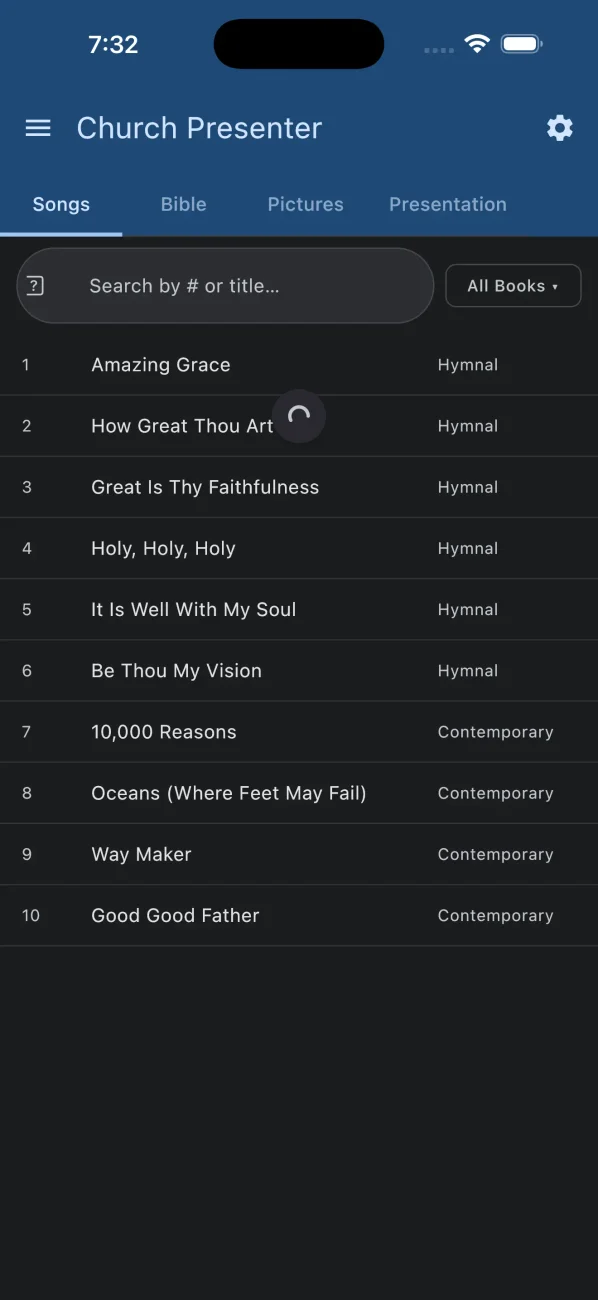
Church Presenter is the mobile companion for the ChurchPresenter desktop app — and it can also run a service on its own. Project songs, Bible passages, pictures, slides and video from anywhere in the room.
THREE WAYS TO PRESENT
• Remote control — drive ChurchPresenter on your church computer over Wi-Fi. The computer shows the slides; your phone is the remote.
• Standalone — your phone or tablet is the presenter. Send slides to a TV with AirPlay or a USB-C or Lightning adapter. No computer and no internet needed.
• Calendar — plan services on your phone during the week. Plans reach the church computer over the cloud, and every enrolled phone sees the same plan.
PROJECT TO SCREEN INSTANTLY
• Songs — search by number or title, filter by songbook, project lyrics verse by verse
• Bible — jump to any book, chapter and verse and put it on screen with one tap
• Pictures — browse image folders and project any photo
• Presentations — show slide decks and step through them
• Media — play video and audio from the computer, a network URL or your phone, with play, pause and seek controls
• Clear the screen at any moment
BUILD THE SERVICE SCHEDULE
Add songs, Bible readings, pictures, presentations and media to the schedule from your phone. It stays in sync with the desktop in real time.
LIVE Q&A
Moderate audience questions: approve or deny them, edit them, put one on screen and mark it done.
YOUR OWN LIBRARY
Write songs and announcements on your phone, copy Bible translations from your computer over Wi-Fi, choose a backdrop and text size, and export a CCLI song usage report — all without internet.
SIMPLE SETUP
1. Run ChurchPresenter on the computer connected to your projector
2. Put your iPhone or iPad on the same Wi-Fi network
3. Scan the QR code shown by the desktop app, or enter the address by hand
4. Start presenting
No account or login required. Designed for iPhone and iPad, available in 35 languages.
REQUIREMENTS
• Remote control and calendar modes need the ChurchPresenter desktop app
• iPhone or iPad with iOS 18.2 or later
What’s new
Version 1.0.28 · Nov 16, 2026
• Redesigned standalone mode with simpler tabs and display looks
• Bible verses can be added to the running order in standalone mode
• Easier calendar sync setup, with clearer help when something goes wrong
• Photos load faster
• Stability fixes for long songs and large libraries
App privacy
What Andrei Chernyshev declares on the App Store about how this app handles data.
-
Data not linked to you
May be collected but is not linked to your identity.
- Identifiers
- Usage data
- Diagnostics
Privacy practices may vary, for example with the features you use or your age.
Information
- Seller
- Andrei Chernyshev
- Category
- Productivity
- Version
- 1.0.28
- Updated
- Nov 16, 2026
- Released
- Apr 9, 2026
- Size
- 86.8 MB
- Requires
- iOS 18.2 or later
- Age rating
- 4+
- Price
- Free
- Languages
- English
- Copyright
- © Church Presenter
You might also like
-
 Pocket WorshipChurch Slides, Lyrics & Bible
-
 WorshipStorm Projector PlusPresent Planning Center plans
-
 WorshipStorm Projector ClassicProject with Planning Center
-
 Bible SlidesPresent scripture with clarity
-
 FreeShow RemoteCompanion remote for FreeShow
-
 Vercast StudioThe console for live worship
-
 ProRemote - Presenter ControlRemote control your presenter
-
 EasySlides Presentation MakerCreate Instant Slides & PPT
-
 Church Directory PlusMember Directory & Groups
-
 magicPresenterElevate your slides.