
- Age rating17+
- CategoryHealth & Fitness
- DeveloperDaniel Oberlechner
- LanguagesGerman+ 2 more
- Size9.0 MB
Links to the official App Store page
Download.org hosts no file of Clarity: Consumption Tracker. The button opens its official App Store page, published by Daniel Oberlechner. Listing last checked on Nov 12, 2026.
Screenshots

About
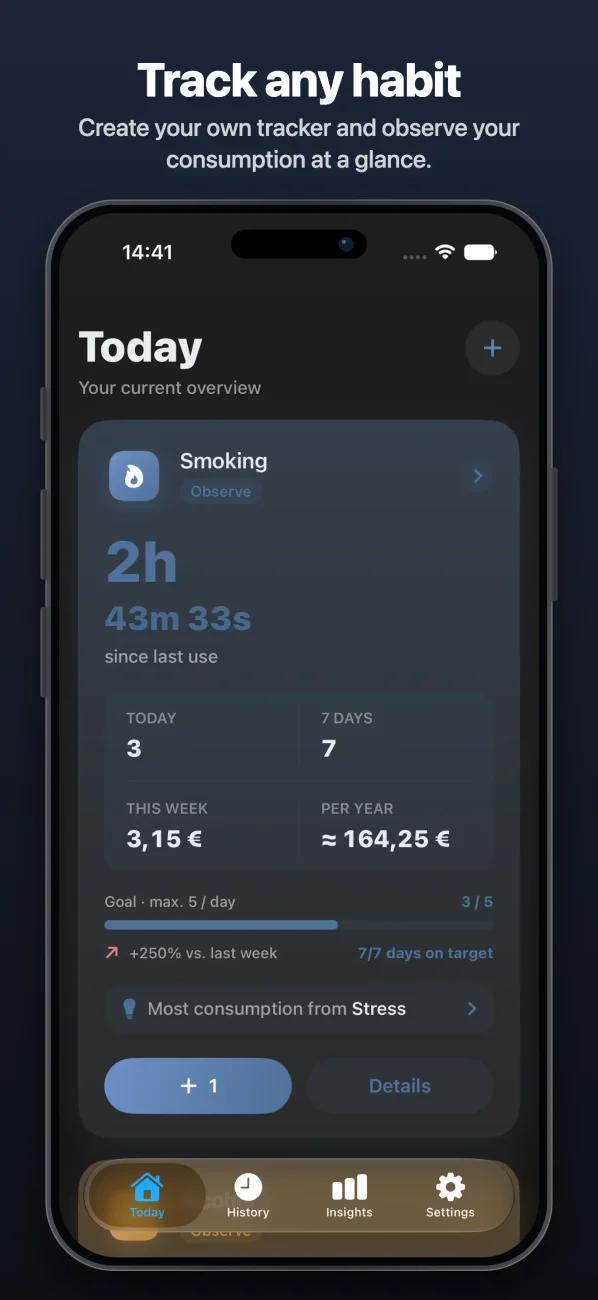
Most consumption trackers just count. Clarity helps you understand what's behind it: when, how often, and above all why you consume.
Whether it's smoking, alcohol, cannabis, caffeine or your own tracker — you decide what to observe. An entry takes seconds. Over time, Clarity reveals the patterns behind it.
Understand your triggers
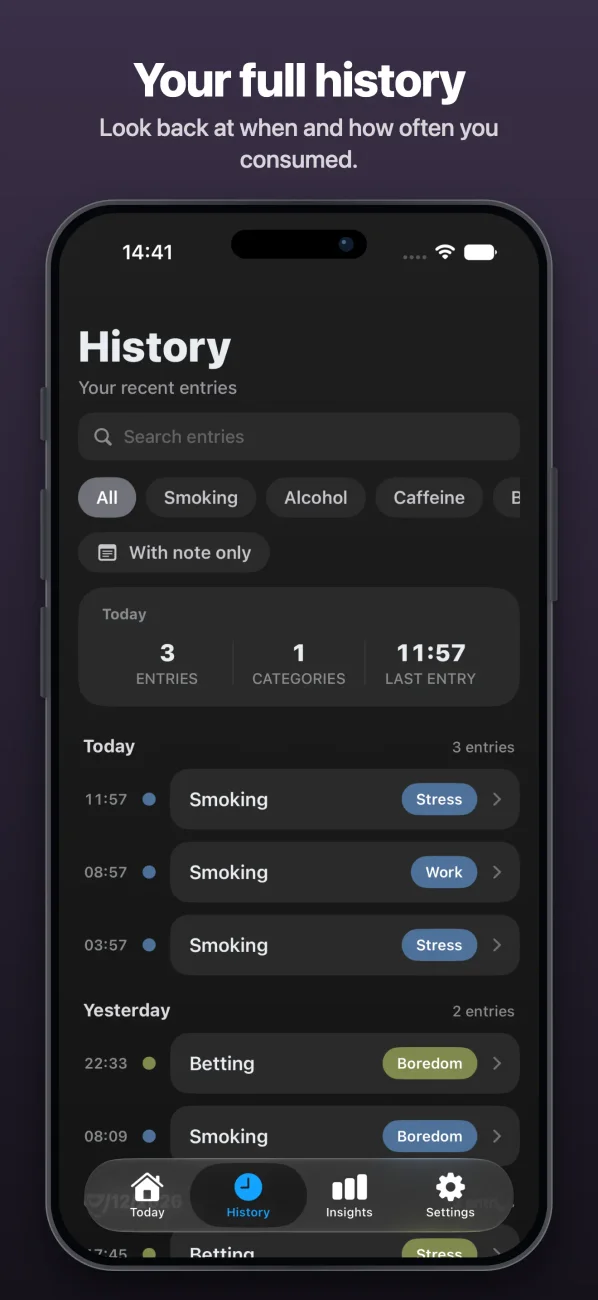
See which situations go with your consumption — stress, downtime, certain moments. That's the heart of it: not just that, but why.
Two paths, one goal
"Observe" for a calm overview. "Pause" for staying on track — with a fixed duration or open-ended. When observing, you can set a daily limit.
Quiet numbers
Trend, average, and — if you like — what your habit costs you or what you save by pausing. Numbers that inform without pushing.
Your history grows with you
Every entry stays searchable. The longer you're at it, the clearer the patterns become.
Gentle milestones
For "Pause" trackers, Clarity reminds you after 7, 30, 180 and 360 days without an entry. No daily nagging.
Private by design
No account, no login, no backend. Your data stays on your device and syncs — if you want — to your other devices via your own iCloud.
Clarity is not a medical tool and not a coach. It doesn't judge. It shows you what is — so you can draw your own conclusions.
Start observing today.
What’s new
Version 1.2 · Aug 22, 2026
Automatic backups
Clarity now saves a backup to your own iCloud Drive once a day and keeps the last 30. If something goes wrong, you can restore an earlier state in the settings. The backup stays with you and is never sent to a server.
Type of consumption
For each tracker you can record what it actually was – coffee, espresso or Red Bull, for example. Insights then shows you how it breaks down. Add no types and nothing changes for you.
Renaming without losing data
Triggers, types and a tracker's name can be changed later on. Existing entries are renamed along with them instead of being left behind with the old wording.
App privacy
What Daniel Oberlechner declares on the App Store about how this app handles data.
-
Data not linked to you
May be collected but is not linked to your identity.
- Identifiers
- Usage data
- Diagnostics
Privacy practices may vary, for example with the features you use or your age.
Information
- Seller
- Daniel Oberlechner
- Category
- Health & Fitness
- Version
- 1.2
- Updated
- Aug 22, 2026
- Released
- Jul 29, 2026
- Size
- 9.0 MB
- Requires
- iOS 26.0 or later
- Age rating
- 17+
- Languages
- German, English, Italian
- Copyright
- © 2026 Daniel Oberlechner
You might also like
-
 X-COACHINGHealth & Fitness
-
 DTR: Rauchen aufhörenHealth & Fitness
-
 ConsoTrack: Track & QuitHealth & Fitness
-
 Hazeless: Quit Weed TrackerCut Back on Cannabis
-
 UnsmokeSmoke-Free Health Tracker
-
 Cleartide – Cannabis TrackerCut down weed & track THC
-
 NIX: Quit Snus & Pouch TrackerStop Zyn, taper nicotine
-
 Shopping Addiction RecoveryBreak Compulsive Buying Habits
-
 Vape Free: Quit VapingQuit nicotine & save money
-
 PouchDown: Zyn & Pouch TrackerQuit Nicotine, Snus & Dip