
- Age rating4+
- CategoryUtilities
- DeveloperAndrew Boardman
- LanguagesEnglish
- Size84.9 MB
Links to the official App Store page
Download.org hosts no file of Clear Steps Guides. The button opens its official App Store page, published by Andrew Boardman. Listing last checked on Nov 20, 2026.
Screenshots


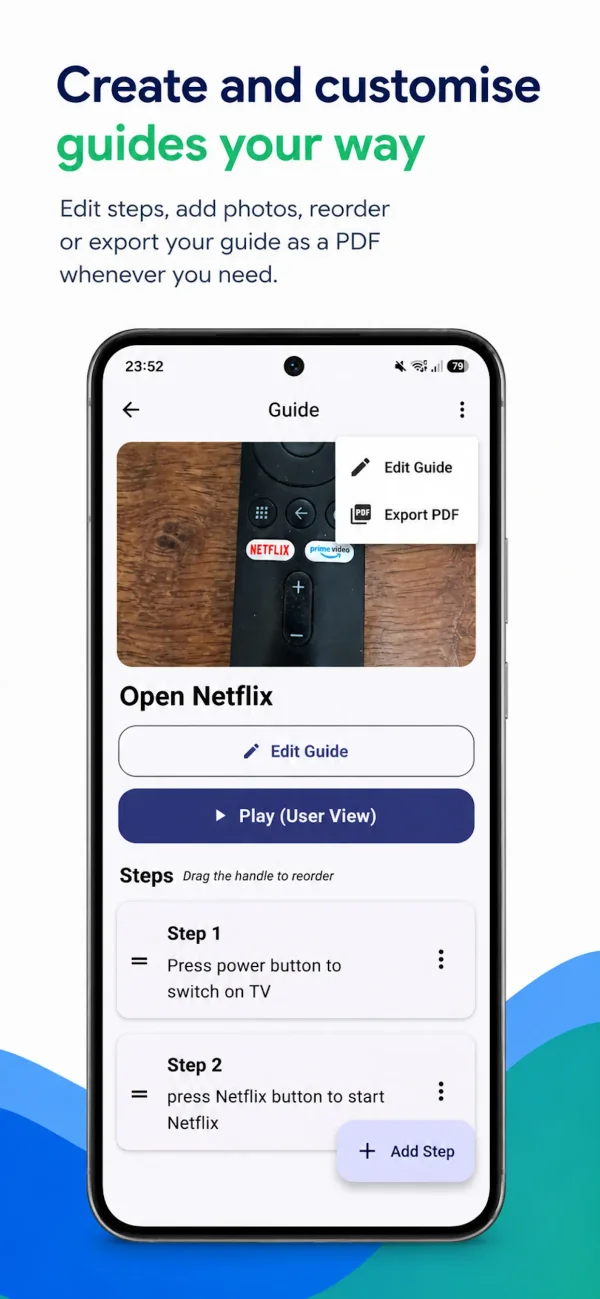
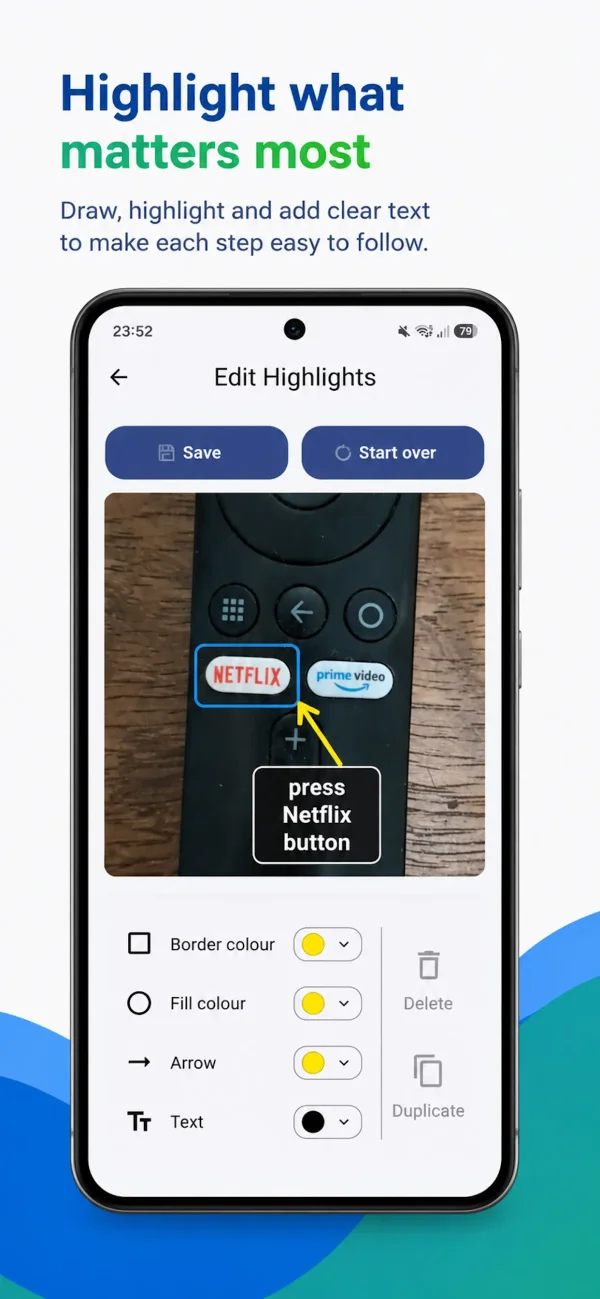
About
ClearSteps
Create simple visual guides that anyone can follow.
ClearSteps helps you create easy, step-by-step visual instructions using your own photos, written guidance and visual highlights. Whether you're supporting a family member, training a new employee, documenting a workplace procedure or teaching a new skill, ClearSteps makes complex tasks easier to understand and remember.
Instead of relying on lengthy written instructions, create clear visual guides that people can follow one step at a time.
Perfect for
• Families and caregivers
• Older adults
• People living with dementia
• Individuals with autism or ADHD
• Teachers and therapists
• Support workers and healthcare professionals
• Schools and training centres
• Businesses and corporate onboarding
• Workshops and manufacturing environments
• Retail, hospitality and customer service teams
• IT support and technical documentation
• Maintenance, facilities and field service teams
Create guides in minutes
Take photos of real objects, equipment or workplaces and turn them into clear visual instructions.
Examples include:
Home & Care
• Using a TV remote
• Making a cup of tea
• Medication routines
• Using a smartphone or tablet
• Daily living skills
Workplace & Business
• Operating machinery and equipment
• Health and safety procedures
• Warehouse picking and packing processes
• Quality control inspections
• Retail opening and closing procedures
• Cleaning and maintenance routines
• Software and IT processes
• Employee onboarding and training
• Standard Operating Procedures (SOPs)
Powerful but simple
• Create unlimited step-by-step guides*
• Add one or two photos per step
• Write clear instructions for every step
• Highlight important buttons, controls and areas with arrows, boxes and labels
• Reorder steps with drag-and-drop
• View guides in a simple full-screen user mode
• Export professional PDF guides
• Share guides by email, messaging apps or print them
• Includes downloadable sample guides to get started
Built for real-world use
ClearSteps is designed to reduce confusion, improve consistency and build confidence through clear visual communication.
Whether you're helping a loved one become more independent, documenting workplace procedures, training new staff or creating easy-to-follow operating instructions, ClearSteps makes it simple to create guides that people can understand and use with confidence.
Because everyone deserves instructions they can understand.
*Premium subscription required for unlimited guides and advanced features.
App privacy
What Andrew Boardman declares on the App Store about how this app handles data.
-
Data not collected
The developer does not collect any data from this app.
Privacy practices may vary, for example with the features you use or your age.
Information
- Seller
- Andrew Boardman
- Category
- Utilities
- Version
- 1.0
- Updated
- Jun 30, 2026
- Released
- Jun 30, 2026
- Size
- 84.9 MB
- Requires
- iOS 13.0 or later
- Age rating
- 4+
- Price
- Free
- Languages
- English
- Copyright
- © 2026 Clear Steps Guides. All rights reserved.
You might also like
-
 iWay netHelpNetwork tests to help support
-
 DunRockUtilities
-
 oneVcard - smart business cardsmart business card + Scanner
-
 Hear Boost: Hearing Aid & MicSound Amplifier & Live Listen
-
 Authenticator App - AuthkeyTwo factor authentication, 2fa
-
 Brother iPrint&LabelUtilities
-
 WiFi Network Scanner, AnalyzerScan Bluetooth & Find Device
-
 WinZip: #1 zip & unzip toolProfessional Zip File Manager