Clipboard Space: Share to PC
Copy, Paste, Text & Files
Designed for iPhone, iPad
Free · In-app purchases
- Age rating4+
- CategoryProductivity
- DeveloperHoi Chun CHAN
- LanguagesEnglish+ 7 more
- Size15.8 MB
Links to the official App Store page
Download.org hosts no file of Clipboard Space: Share to PC. The button opens its official App Store page, published by Hoi Chun CHAN. Listing last checked on Nov 23, 2026.
Screenshots


About
Clipboard Space is the clipboard manager for iPhone that keeps whole files — PDFs, documents, images — alongside the text you copy, on your phone and on every other screen in the room.
iPhone's clipboard only holds one thing. Clipboard Space keeps your whole history, so that paragraph you copied this morning is still there tonight.
PASTE WITHOUT SWITCHING APPS
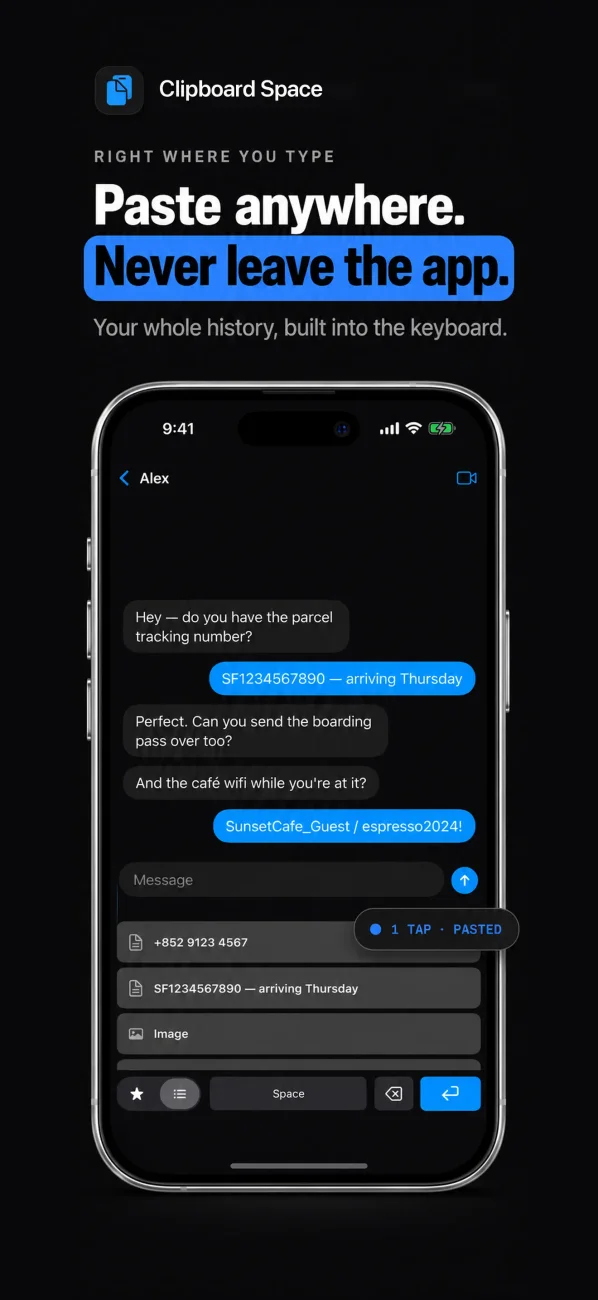
Clipboard's own keyboard puts your history one tap away inside any app — favorites on their own page, everything else beside them. It asks for Allow Full Access: by default the keyboard only reads what the app has already saved on your iPhone, and it has no network access at all. Turn on Capture from Keyboard in Settings and it will also save new text you copy while the keyboard is open — still entirely on your iPhone.
BROADCAST HUB — SHARE WITH ANY DEVICE
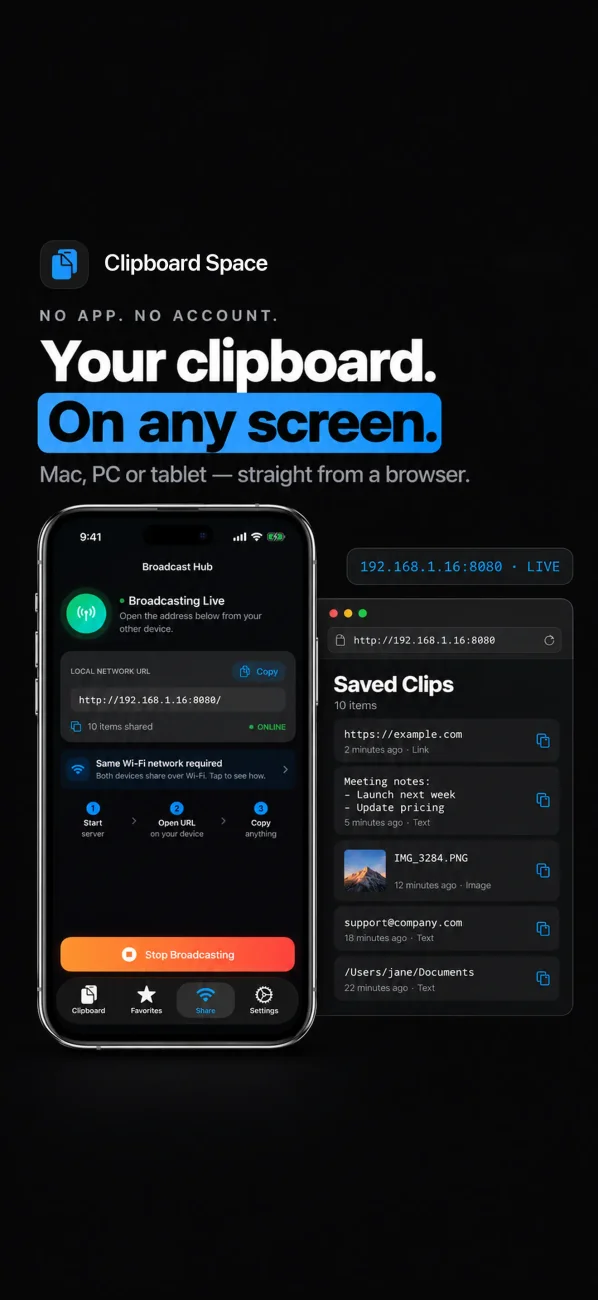
Turn your iPhone into a private clipboard server. Open the address it gives you in any browser on the same Wi-Fi — Mac, Windows PC, iPad, even your TV — and your clips are waiting. Copy from the page, or send text and files from your computer straight back to your iPhone. Tap any clip on the page to read it in full, edit its text or title, or preview an image. No app needed on the other side, no account, no cloud: nothing ever leaves your network.
NEVER LOSE A COPY AGAIN
• Automatically captures what you copy
• Texts, links, images, and files — all in one place
• Smart filters: All, Texts, Images, Links, Files
FIND ANYTHING IN SECONDS
Instant search across every clip you've saved. The thing you copied last week is one keyword away.
ORGANIZE YOUR WAY
• Star favorites into their own Favorites tab
• Add titles to clips: "Wi-Fi password", "Office address", "IBAN"
• Drag to reorder, tap to edit
• Save from any app with the Share Sheet
PRIVATE BY DESIGN
Everything is stored locally on your iPhone and never uploaded. Lock the app with Face ID, Touch ID, or a passcode — and keep your clipboard out of the keyboard with one switch in Settings.
SPEAKS YOUR LANGUAGE
English, 繁體中文, 简体中文, 日本語, 한국어, Deutsch, Français, Español — the app, the Share Sheet, and the Broadcast Hub page all follow your language.
FREE FOR 3 MONTHS
Every feature is free for your first 3 months — capture, unlimited history, Broadcast Hub, everything. After the trial, browsing, copying and downloading stay free; a Pro subscription keeps capture and editing going.
• No subscription starts by itself — you're charged only if you choose to subscribe
• Monthly subscription, cancel anytime
Questions or ideas? We'd love to hear from you.
Terms of Use:
https://www.apple.com/legal/internet-services/itunes/dev/stdeula/
Privacy Policy:
https://tonychz.github.io/ClipSpaceSupportPage/privacy
What’s new
Version 1.7 · Nov 16, 2026
The keyboard now carries your filter row: All, your quick filters, and Texts, Images, Links, Posts and Files sit above the clips, so you can narrow the list without leaving the app you're typing in. Quick filters you add or remove in the app show up on the keyboard within seconds.
Saved posts from Threads, X and Instagram now read as cards with the platform's badge, and the new Posts filter gathers them. Broadcast Hub now shows your whole history on the computer — the 30-item window is gone — and updates faster, loading a clip's full text only when you open it.
Also new: a Move to Top action reorders any row, Settings → General → Move Edited Items to Top floats edited items automatically, and tap an image's title in the viewer to edit or remove it.
App privacy
What Hoi Chun CHAN declares on the App Store about how this app handles data.
-
Data not linked to you
May be collected but is not linked to your identity.
- Purchases
Privacy practices may vary, for example with the features you use or your age.
Information
- Seller
- Hoi Chun CHAN
- Category
- Productivity
- Version
- 1.7
- Updated
- Nov 16, 2026
- Released
- Oct 17, 2025
- Size
- 15.8 MB
- Requires
- iOS 17.0 or later
- Age rating
- 4+
- Price
- Free
- In-app purchases
- Yes
- Languages
- English, French, German, Japanese, Korean, Simplified Chinese, Spanish, Traditional Chinese
- Copyright
- © Clipboard Space
You might also like
-
 Anchu: Notes & TasksTasks, notes, one calm place
-
 ReturnPingReturns, Refunds & Receipts
-
 Clipboard: Copy Paste ToolHistory, Search & iCloud Sync
-
 Copy Paste Clipboard ProText Snippets & Keyboard
-
 Meleve: Before I Leave ListNever forget your essentials
-
 ClipSafeClipboard Manager & Organizer
-
 Projct - Get Things DoneManage your time better
-
 TaskSense: AI To Do ListTask Manager & Daily Planner
-
 Pasty - Text & Hashtag CopierProductivity
-
 Clipp-itClipboard