
Cognitia AI
AI memory across your apps
Designed for iPhone, iPad
Free · In-app purchases
- Age rating4+
- CategoryProductivity
- DeveloperCognitia AI
- LanguagesEnglish+ 19 more
- Size41.4 MB
Links to the official App Store page
Download.org hosts no file of Cognitia AI. The button opens its official App Store page, published by Cognitia AI. Listing last checked on Nov 26, 2026.
Screenshots




About
Cognitia is your personal AI memory layer across the apps you use. Connect your email, calendar, files, chats and social accounts, then ask your memory in plain language. Answers draw on your own emails, files and events, and show which ones they used.
YOUR WORLD, MAPPED
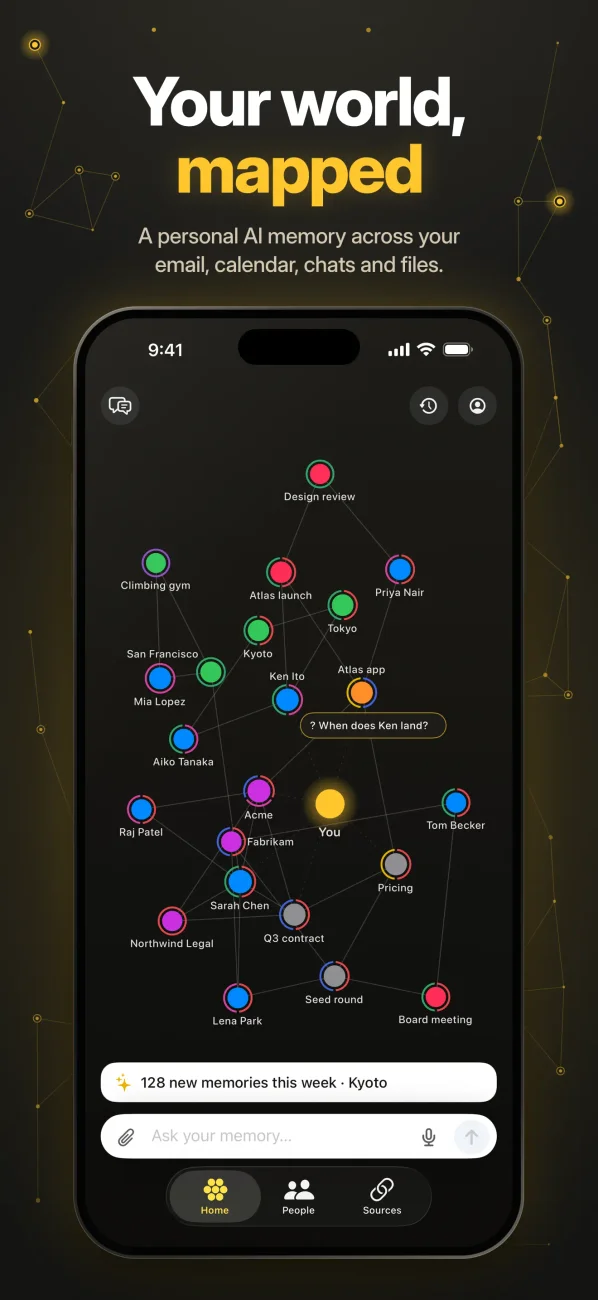
Home is a live map of your memory, with you at the center: the people, companies, projects and places Cognitia has learned, linked by how they relate. The colored ring around each one shows the kinds of sources it came from: email, calendar, files, social and more.
ASK RIGHT FROM THE MAP
Type or dictate a question in the ask bar on Home. The answer opens right over the map, with clear headings and lists, along with the emails, files and events it came from, and Cognitia can read it aloud. Your latest questions stay on the graph as markers while the app is open, so you can reopen one with a tap.
TAP, HOLD, TRAVEL BACK
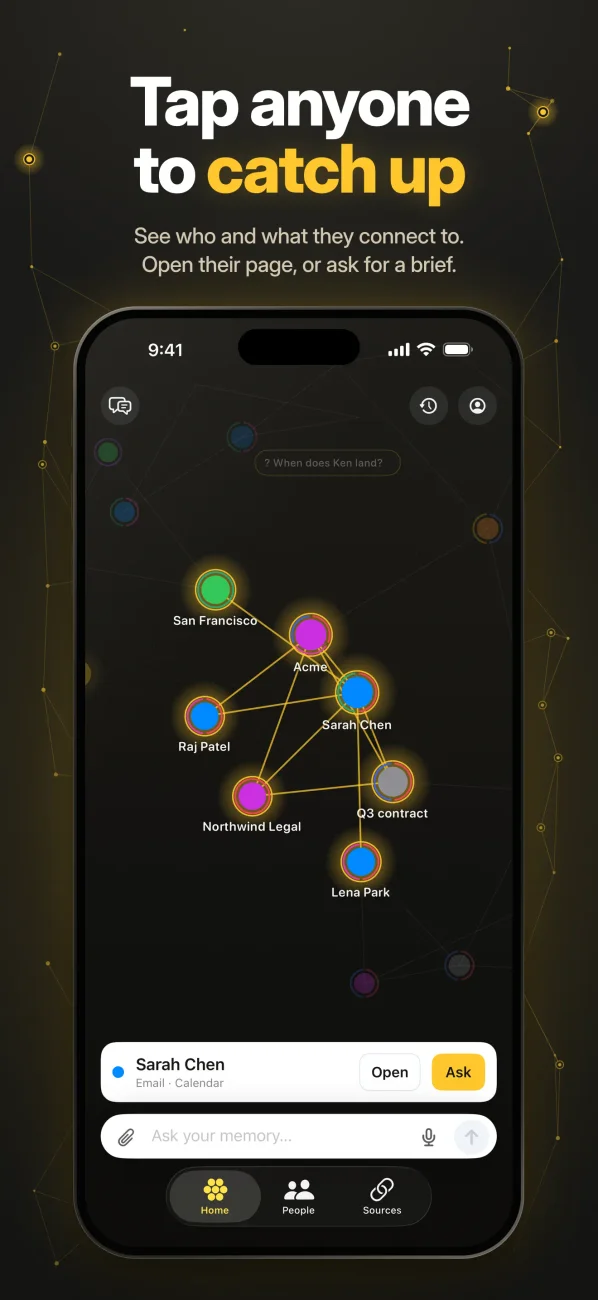
• Tap a node to light up its connections, then ask about it.
• Touch and hold a node for "Brief me", "What changed?" and "Open threads" (what's still unresolved), or open a person's page.
• Time travel shows your graph as it was on an earlier date.
KEEP YOUR MEMORY TRUE
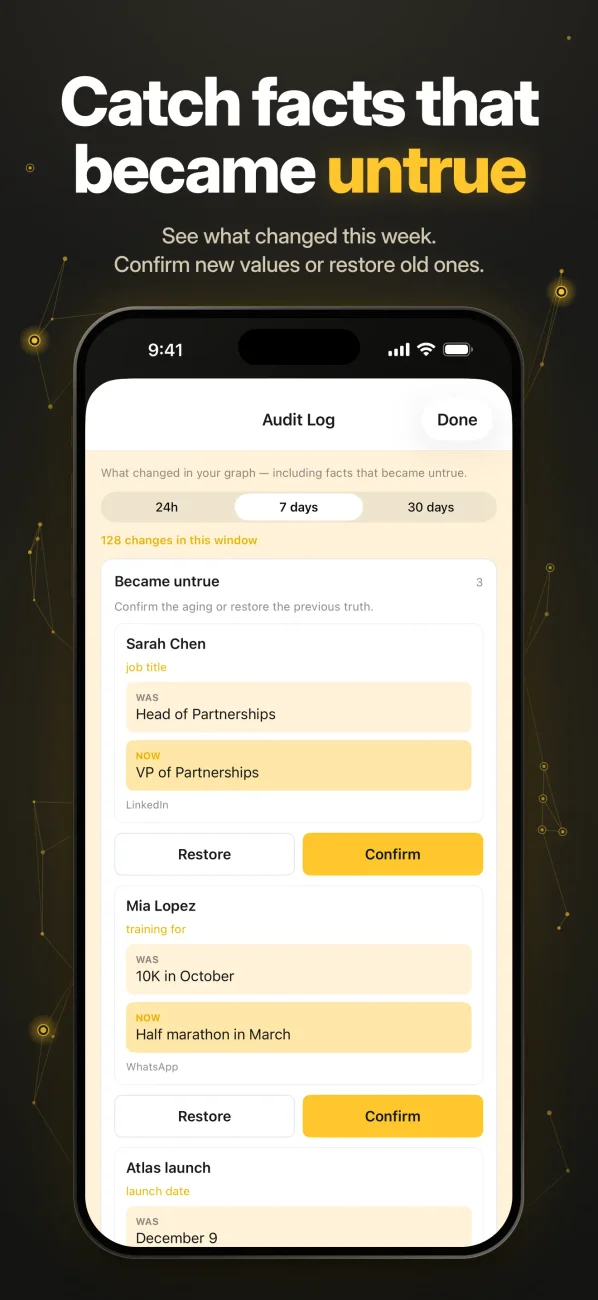
A card on Home counts this week's new memories. Tap it to open the audit log: what Cognitia learned in the last day, week or month, and which facts became untrue, with what each one was and what it is now. For those, confirm the new value or restore the old one.
OPEN LOOPS, PERSON BY PERSON
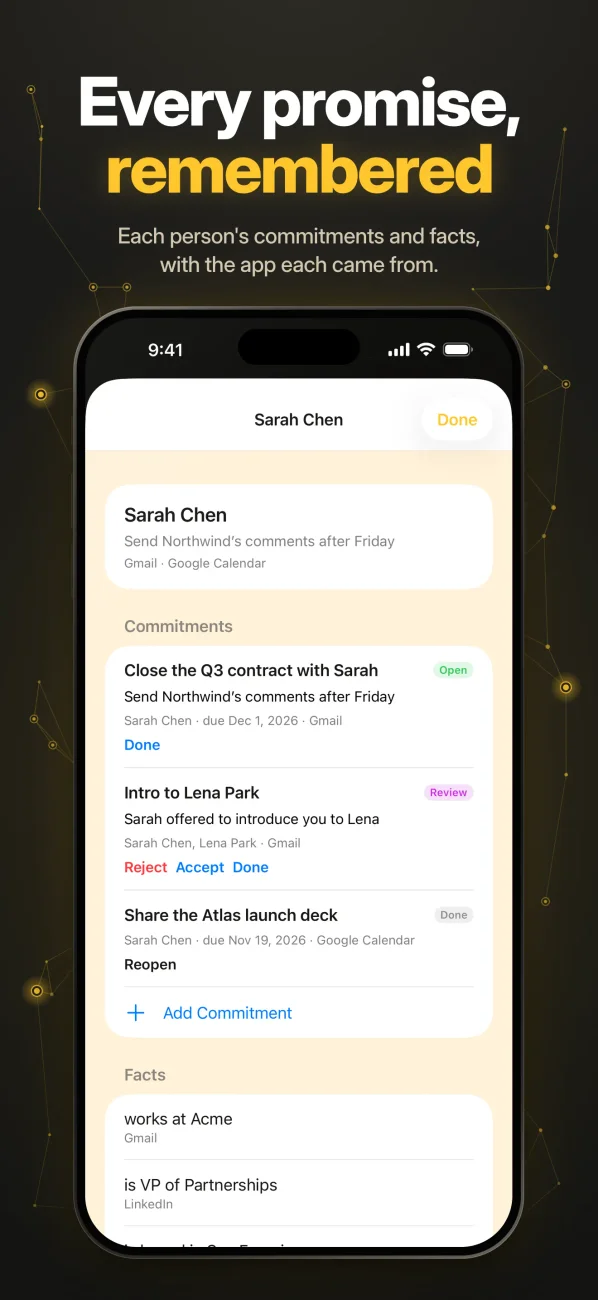
The People tab lists who you're in touch with and what's open with each of them: a file to send, a call to book, a reply that slipped. Each person's page lists your commitments with them, which you can accept, mark done or reopen, and facts that name the source they came from.
CONNECT THE APPS YOU ALREADY USE
• Email and calendar: Gmail, Google Calendar, Google Contacts, Google Tasks, Outlook, iCloud
• Files: Google Drive, OneDrive, Dropbox
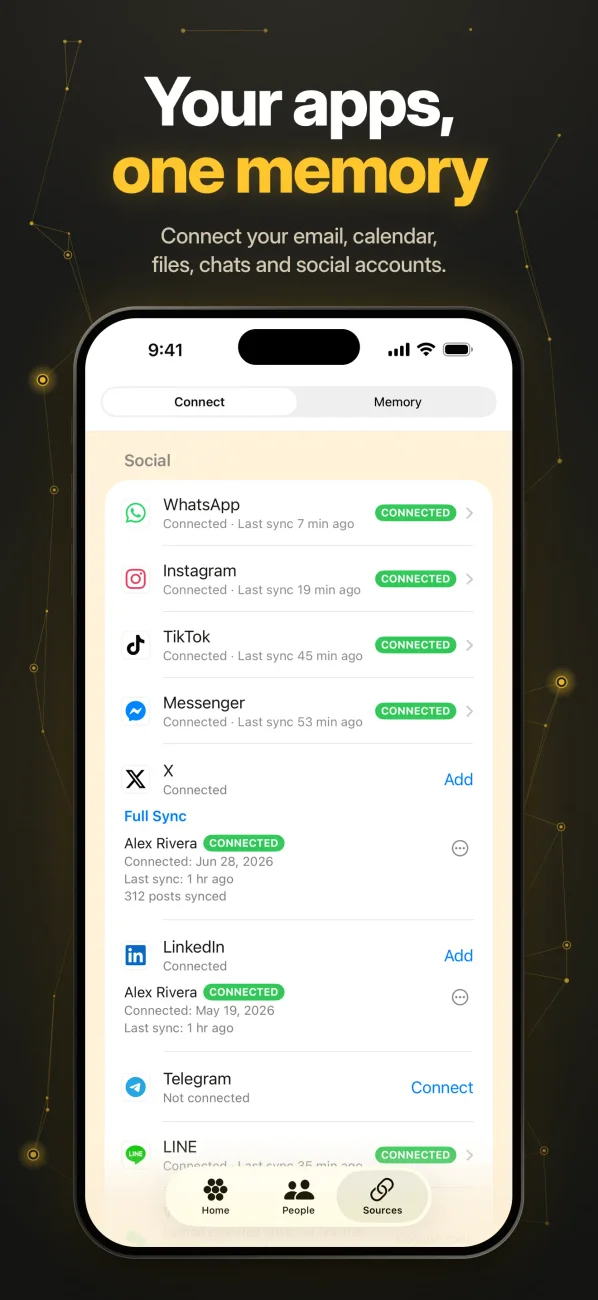
• Messages and social: WhatsApp, Instagram, Messenger, TikTok, X, LinkedIn, Telegram, LINE
• On your iPhone or iPad: Contacts, Calendar, Reminders, Photos, Location, Apple Music and Apple Health (Cognitia only reads Health data)
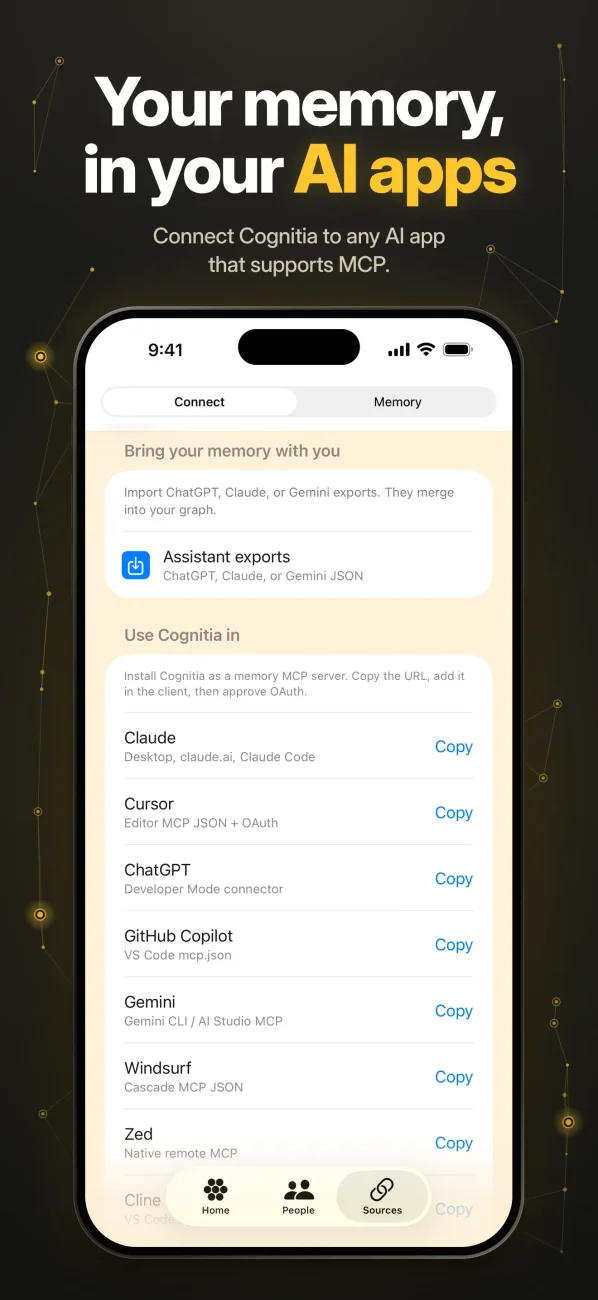
• Chat exports from WhatsApp, Instagram and other apps
BEYOND THE APP
• Your constellation (Home Screen): the people and topics most present in your memory. Tap to ask.
• Ask Cognitia (Lock Screen): opens Cognitia ready to ask.
• Ask Siri about people, commitments and topics Cognitia knows, so your memory is useful outside the app too.
USE YOUR MEMORY IN OTHER APPS
Using an AI app that supports MCP (Model Context Protocol)? Add Cognitia as a memory server so it can draw on what you've connected, and stop pasting the same context by hand.
BUILT FOR THE BIG SCREEN
On iPad, answers dock in a panel at the bottom of the screen, so the graph stays in view while you read.
YOU STAY IN CONTROL
See where each fact came from, review what changed, correct what's wrong, and decide which sources Cognitia can use. Pick up where you left off across devices.
PLANS
Cognitia is free to start. Some features, such as more credits each month and Full Sync for X, need a paid plan, offered as a monthly or yearly auto-renewing in-app subscription. Extra credits are also sold as in-app purchases. Subscriptions renew automatically unless cancelled at least 24 hours before the end of the current period; manage or cancel them in your App Store account settings.
Terms of Use: https://www.cognitia-ai.com/terms
Privacy Policy: https://www.cognitia-ai.com/privacy
What’s new
Version 2.7.0 · Nov 25, 2026
A new Home: your memory as a live map you can ask.
• Home: the people, companies, projects and places in your memory, linked, with rings colored by source type.
• Ask in plain words from Home. The answer opens over the map, with the emails and files it came from, and the people, projects and places it used light up on the graph ("In this answer").
• Questions you ask stay on the graph as markers while the app is open. Tap one to reopen it.
• Tap a node to light up its connections, then ask about it.
• Touch and hold a node for "Brief me", "What changed?" and "Open threads" (what's still unresolved), or open a person's page.
• VoiceOver: each node on Home is a button. Swipe up or down on it for Quick actions.
• Time travel, now on Home: see your graph as it was on an earlier date.
• The "new memories this week" card on Home opens the audit log. Confirm or restore facts that became untrue.
• New tabs: Home, People and Sources replace Chat, Memory, Connect and Settings. Past chats are behind the chat button at the top left of Home, Connect and Memory are under Sources, and Settings is behind the profile button on Home.
• New widgets: Your constellation (Home Screen) and Ask Cognitia (Lock Screen).
• iPad: answers dock at the bottom, so the graph stays in view.
• Sources > Connect: for Gmail, Outlook, Drive, X and other signed-in accounts, Disconnect is now in the … menu next to the account. A Gmail account's Google Calendar, Contacts and Tasks share one line when there's room.
• Full Sync for X now needs a paid plan. On every plan, new X posts and likes still sync every day.
• Fixes: answers no longer run headings, paragraphs and lists together; past chats show up right away; and the knowledge graph in Sources > Memory no longer shows an old error after you switch tabs or open Cognitia from a link.
App privacy
What Cognitia AI declares on the App Store about how this app handles data.
-
Data linked to you
May be collected and linked to your identity.
- Health and fitness
- Contact info
- Contacts
- User content
- Search history
- Usage data
-
Data not linked to you
May be collected but is not linked to your identity.
- Diagnostics
Privacy practices may vary, for example with the features you use or your age.
Information
- Seller
- Cognitia AI Inc
- Category
- Productivity
- Version
- 2.7.0
- Updated
- Nov 25, 2026
- Released
- Mar 20, 2026
- Size
- 41.4 MB
- Requires
- iOS 26.0 or later
- Age rating
- 4+
- Price
- Free
- In-app purchases
- Yes
- Languages
- English, Arabic, Dutch, French, German, Hindi, Indonesian, Italian, Japanese, Korean, Polish, Portuguese + 8 more
- Copyright
- © 2026 Cognitia-ai
You might also like
-
 PouchbrainThoughts, sorted.
-
 Agentic ChatAI Workspace with Agents
-
 Numly: Paper Journal & PlannerWrite a Number, Open the Link
-
 KinicWiki: AI MemorySave and browse your AI memory
-
 Isy.AI: AI Notes, Second BrainText, voice, image & PDF notes
-
 Journella: Daily PlannerYour day at a glance!
-
 Steer: AI Life DashboardYour life, AI-coached
-
 LLM Power ToolsAI chat with 300+ models
-
 Gizmo: Local AI AgentPrivate on-device AI assistant
-
 Keep AwareHuman-centric Browser Security