- Age rating4+
- CategoryUtilities
- DeveloperPentair, Inc.
- LanguagesEnglish
- Size48.7 MB
Links to the official App Store page
Download.org hosts no file of ConnectMySoftener. The button opens its official App Store page, published by Pentair, Inc. Listing last checked on Nov 17, 2026.
Screenshots


About
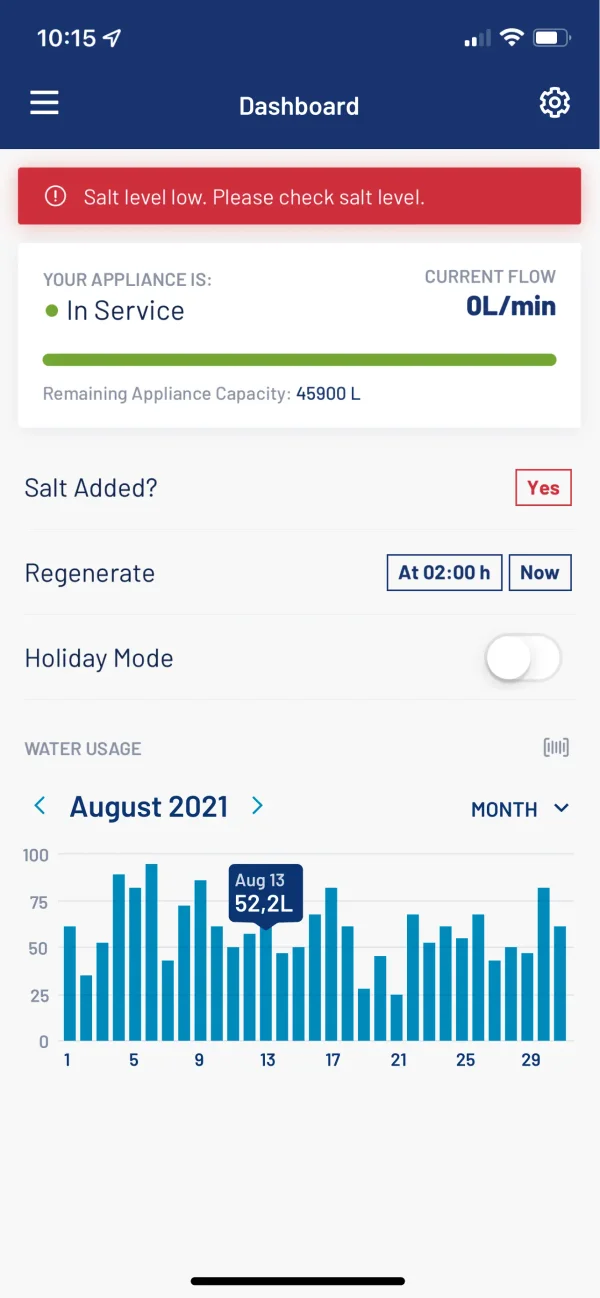
Pentair offers you the ability to easily connect and remotely control and monitor your Pentair water softeners. The ConnectMySoftener app makes it possible to monitor and manage your water softeners and water usage via smartphone or tablet wherever you are.
MAIN FEATURES
- Check the remaining regenerating salt level and the autonomy of your softener
- Follow the softened water consumption of your home
- Spot peaks in water consumption
- Consult your current water flow
- Find the history of water consumption per day, per week and per month
- Avoid unnecessary water consumption during your holidays
Control your settings | Settings
Notifications
With our app, you can install notifications to keep up with the salt level of your appliances, and get notified whenever your products require their next maintenance.
Settings
Set the correct system language and time, and set the appropriate hardness unit for your appliances.
Info
Look up general information about your products, like the serial number, total volume and software version, and check your appliances’ regeneration and maintenance history.
GET STARTED WITH 3 EASY STEPS
Step 1: Signing in
Sign in with your account information, or sign up by creating a new account. Leave the necessary information, and confirm your registration through your email.
Step 2: Adding appliances to your list
Add appliances to your account by simply using the serial number of your appliance and your personal pin code. You can also register new devices.You can do this by filling out all the necessary information about your appliance, and follow the directions on your screen to link the device to your mobile phone.
Enable the WiFi mode on your softener, change the WiFi network on your mobile phone to your appliance’s , add your home WiFi credentials, and lastly change the WiFi network on your mobile phone back to your home WiFi.
Step 3: Ready to use
The set-up of your Pentair app is completed. Start exploring your dashboard right away, to optimize the use of your softener, and maximize the benefits of your water treatment.
NEED ANY HELP?
Visit our support page to contact us in case you need any help, or have any difficulties setting up your ConnectMySoftener app.
What’s new
Version 2.8.1 · Oct 8, 2026
Bugfixes
App privacy
What Pentair, Inc. declares on the App Store about how this app handles data.
-
Data linked to you
May be collected and linked to your identity.
- Contact info
- User content
- Identifiers
Privacy practices may vary, for example with the features you use or your age.
Information
- Seller
- Pentair, Inc.
- Category
- Utilities
- Version
- 2.8.1
- Updated
- Oct 8, 2026
- Released
- Jan 19, 2018
- Size
- 48.7 MB
- Requires
- iOS 15.0 or later
- Age rating
- 4+
- Price
- Free
- Languages
- English
- Copyright
- © 2022 Pentair