
- Age rating4+
- CategoryUtilities
- Developer剑锋 易
- LanguagesEnglish
- Size1.8 MB
Links to the official App Store page
Download.org hosts no file of CookWhat. The button opens its official App Store page, published by 剑锋 易. Listing last checked on Nov 8, 2026.
Screenshots

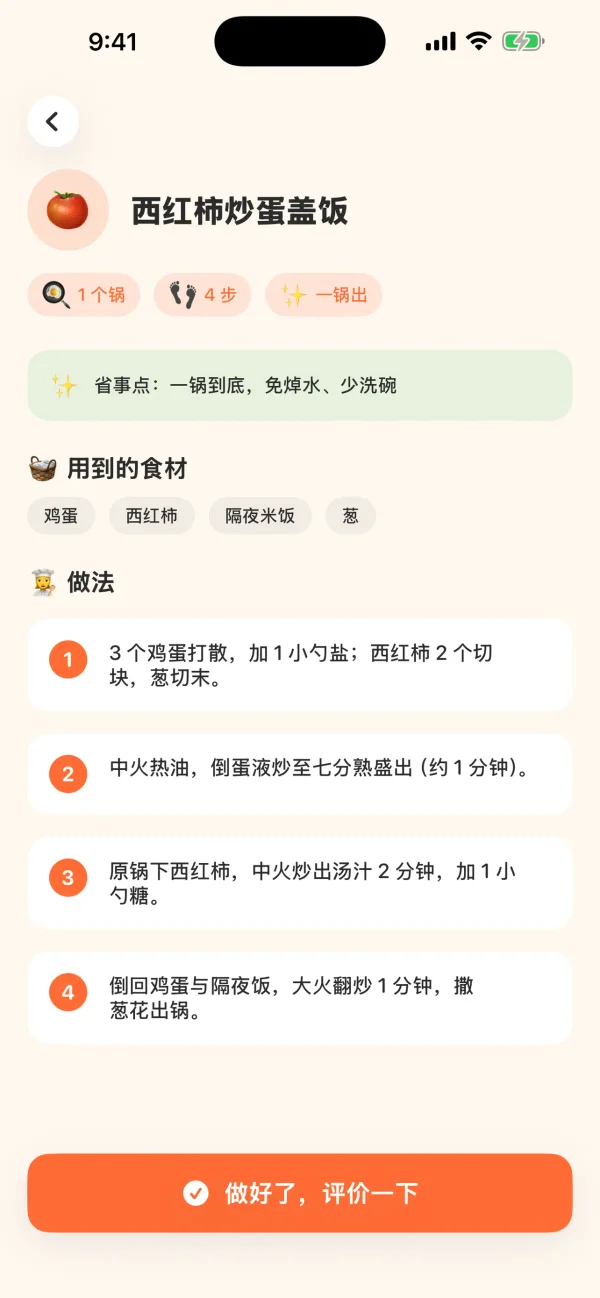


About
Not sure what to cook today? Snap a photo of your fridge or countertop, or simply type what you have, and get home-style Chinese dishes you can make right now.
The app interface is currently in Simplified Chinese.
COOK WITH WHAT YOU HAVE
• Photo recognition: snap your fridge or cutting board, or pick a photo from your library
• Manual entry: type several ingredients at once, or tap common ones to add them
• Confirm before cooking: tap to rename, tap × to remove, and add anything that was missed
• No ingredients recognized in a photo? Switch straight to typing instead of retaking it
ONLY THE INGREDIENTS YOU HAVE
• Dishes use only your list plus pantry basics such as salt, sugar, soy sauce, scallion, ginger and garlic, so there's no extra shopping trip
• Each dish shows how many pans and steps it takes, and whether it's a one-pot meal
• "Add one more": a tip for one extra ingredient that would take the dish up a level
• Not in the mood? Get a fresh batch of ideas
STEPS YOU CAN ACTUALLY FOLLOW
• Step-by-step instructions with amounts (grams, spoons, pieces), heat and timing
• Portions scaled to the number of people you're cooking for
GETS TO KNOW YOUR TASTE
• Set your spice level, dietary restrictions or allergies, and servings once
• Restricted ingredients are checked twice, when dishes are created and again in the results, and you're warned before generating if your list contains one (please double-check ingredients if you have a severe allergy)
• Rate a dish Tasty, OK or Flopped after cooking and suggestions drift toward your taste; this taste memory is saved on your phone and can be cleared anytime
RECIPE LIBRARY & FAVORITES
• Classic home-style recipes built in, browsable by category, even offline
• Save the dishes you love and come back to them anytime
FREE TRIAL & LIFETIME MEMBERSHIP
• Free to download, with 3 free tries of AI dish suggestions; the recipe library and favorites are always free
• A one-time Lifetime Membership purchase unlocks 30 AI dish suggestions per day
• Lifetime Membership is a one-time purchase, not a subscription, and never renews; after reinstalling or switching phones, tap Restore Purchases in Settings
Works on iPhone and iPad. No sign-up required. Photo recognition and AI dish suggestions need an internet connection.
What’s new
Version 1.2 · Sep 23, 2026
Added manual ingredient entry. In addition to photo recognition, you can now type in the ingredients you have and continue through the same recipe recommendation flow.
- Added Lifetime Membership. A single non-consumable purchase permanently unlocks member benefits, including up to 30 recipe generations per day.
- New users can try the complete recipe recommendation flow three times for free.
- Added purchase restoration and entitlement verification to recover membership after reinstalling the app or changing devices.
- Added membership status, remaining quota, and a Privacy Policy link in Settings.
- Improved quota calculation, concurrent request handling, and purchase-state synchronization.
App privacy
What 剑锋 易 declares on the App Store about how this app handles data.
-
Data not collected
The developer does not collect any data from this app.
Privacy practices may vary, for example with the features you use or your age.
Information
- Seller
- 剑锋 易
- Category
- Utilities
- Version
- 1.2
- Updated
- Sep 23, 2026
- Released
- Jun 23, 2026
- Size
- 1.8 MB
- Requires
- iOS 17.0 or later
- Age rating
- 4+
- In-app purchases
- Yes
- Languages
- English
- Copyright
- © 2026 Bao