
Copy Paste List-Only One Tap
Simple TODO from share message
Designed for iPhone, iPad, iPod touch
Free
- Age rating4+
- CategoryLifestyle
- DeveloperMUTSUMI SUZUKI
- LanguagesEnglish+ 3 more
- Size35.2 MB
Links to the official App Store page
Download.org hosts no file of Copy Paste List-Only One Tap. The button opens its official App Store page, published by MUTSUMI SUZUKI. Listing last checked on Nov 16, 2026.
Screenshots
About
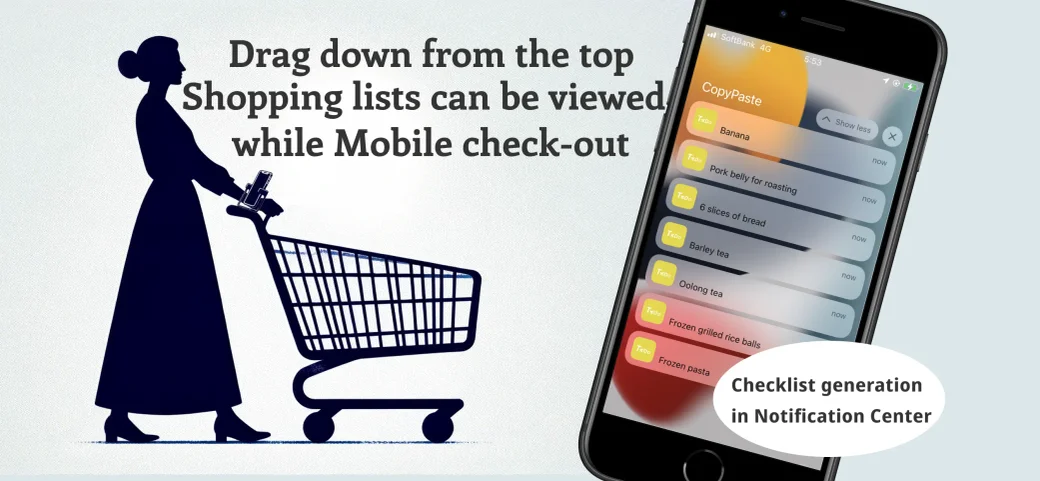
The app can display the list in the Notification Center, so you can easily refer to the list while using other apps!
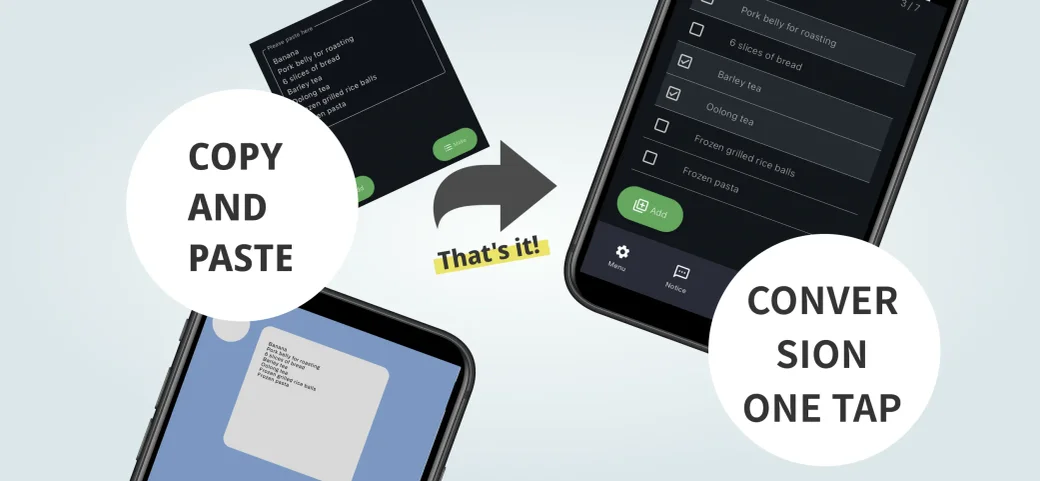
You can create checklists by simply copying and pasting bulleted messages sent by email, LINE, etc. into the app!
You can easily create a checklist at the touch of a button by simply copying and pasting a text message with bulleted items or paragraphs sent by email, LINE, etc. into the app.
In addition, by notifying the Notification Center of the list, you can comfortably refer to the list while using other applications such as Smartphone Registry by dragging down from the top edge of the device to the Notification Center.
The following messages can be easily converted into checklists
-TODO list
-Shopping list
-Task list
Operation in the app is simple and easy!
-Tap an item to mark it with a checkmark.
-Swipe left to delete.
-Swipe left to delete an item ・Press and hold to rearrange items
You can easily add items, and with the auto-save feature, you can easily restore the list even after closing the app!
You can create up to 3 lists per category!
How to use
-Copy messages received via email, LINE, etc. to this app
-Tap "Make a list" button
-Create a checklist -> Tap to mark checkmarks one after another
-The current list will be listed in the Notification Center by clicking the "Notification" button in the bottom menu!
What’s new
Version 1.3.3 · Aug 27, 2024
-Minor UI fixed
App privacy
What MUTSUMI SUZUKI declares on the App Store about how this app handles data.
-
Data used to track you
May be used to track you across apps and websites owned by other companies.
- Location
- Identifiers
- Usage data
- Diagnostics
-
Data linked to you
May be collected and linked to your identity.
- Location
- Identifiers
- Usage data
- Diagnostics
Privacy practices may vary, for example with the features you use or your age.
Information
- Seller
- MUTSUMI SUZUKI
- Category
- Lifestyle
- Version
- 1.3.3
- Updated
- Aug 27, 2024
- Released
- Jul 3, 2022
- Size
- 35.2 MB
- Requires
- iOS 12.0 or later
- Age rating
- 4+
- Price
- Free
- Languages
- English, Japanese, Korean, Thai
- Copyright
- © 2022 m suzuki