CPianoS
Scan sheet music, learn piano
Designed for iPhone, iPad
Free · In-app purchases
- Age rating4+
- CategoryMusic
- DeveloperMiyauchi Isao
- LanguagesEnglish+ 19 more
- Size118.3 MB
Links to the official App Store page
Download.org hosts no file of CPianoS. The button opens its official App Store page, published by Miyauchi Isao. Listing last checked on Nov 28, 2026.
Screenshots


About
Learning piano on your own? Photograph printed sheet music and the app reads it on your device (no account, no upload). See note names, hear them read aloud, or listen on a piano.
IMPORT YOUR MUSIC
- Scan with the camera (perspective correction, multiple pages), or pick from Photos or Files
- Printed piano scores (grand staff) become playable music on your device
- The printed tempo is read too (M.M. = 120, Allegro, rit., accel.)
- Premium's latest recognition model also reads dynamics, hairpins, and pedal marks; pick the previous version in Settings
- Re-read earlier scores by touching and holding them in the Library (the latest model needs Premium)
REVIEW AND FIX THE RESULTS
- Turn on Settings → Review recognition results to check uncertain notes one by one beside the image
- Fix pitches and durations, add or remove notes, and finish your review later
- After importing, fix notes, rests, chords, measures, key, time signature, dynamics, pedal, and tempo changes per measure in Edit
- Tap the original image for full screen, zoomed in on the selected note
READ MUSIC FASTER
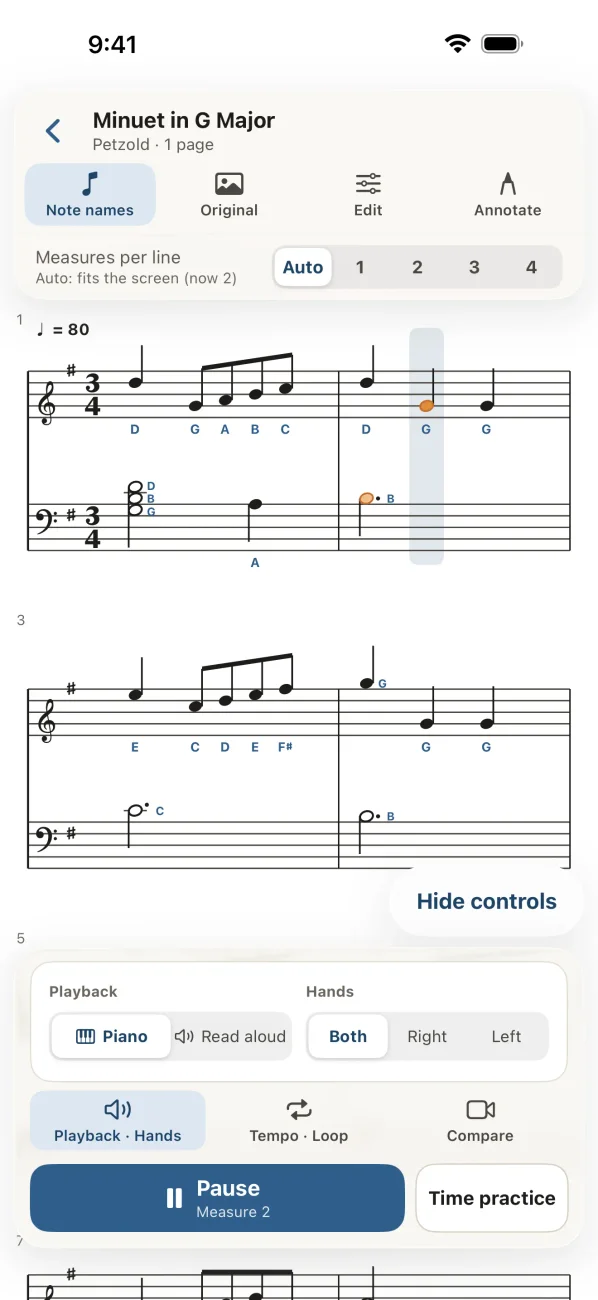
- Note names on every note (C D E, Do Re Mi, or Japanese note names)
- Read aloud, with a different voice for each hand
- Choose voices, speech speed, and app language (20 languages) in Settings
HEAR HOW IT GOES
- Start at the score's own tempo (100%), then slow down or speed up, with dynamics, pedal, and tempo changes (rit., accel.)
- Sounds: built-in upright, or download a grand piano. Concert grand piano with Premium
- Play one hand only, loop A to B (saved per score), and follow along on the score
COMPARE WITH YOUR PLAYING
- Play a video of your playing (keys and hands) beside the score
- Match one spot to the score, and the score follows the video
ANNOTATE THE SCORE
- Write on the score with a pen (4 colors, 3 sizes) and an eraser
- Add text memos you can move, resize, and rotate
- Marks are see-through and stay with each measure
LIBRARY AND PRACTICE TIME
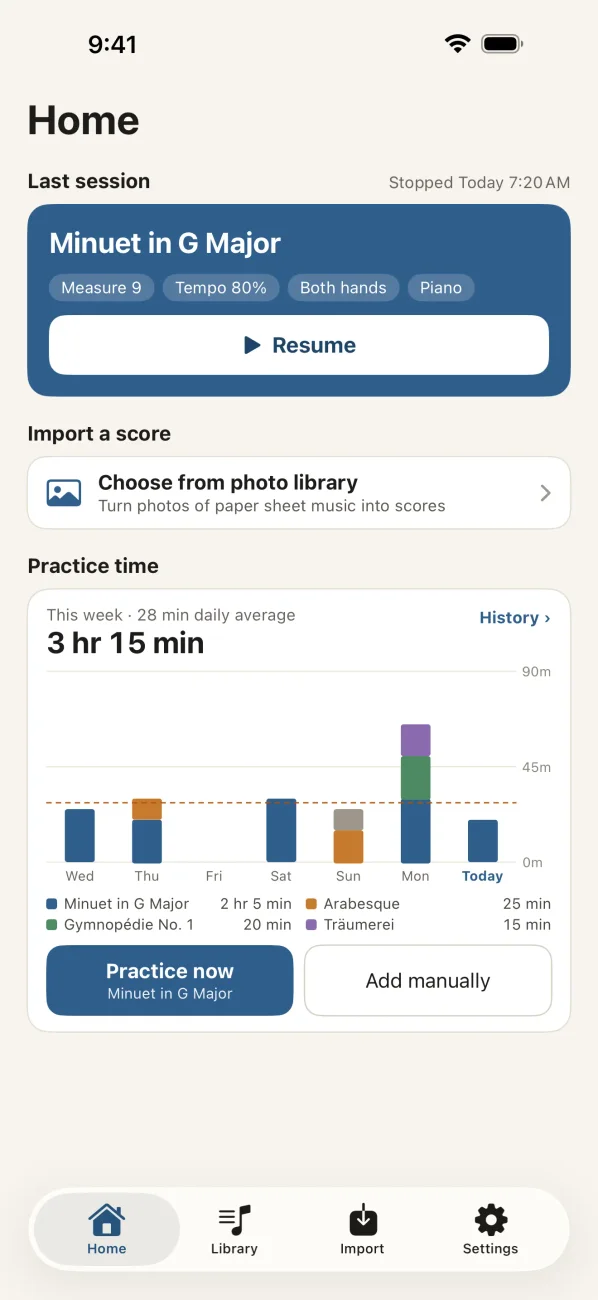
- Scores on a bookshelf; search and sort. Resume where you left off from Home
- Time your practice; also on the Lock Screen and Dynamic Island
- Add time manually; look back with weekly, monthly, and yearly charts by score
FREE TO USE, WITH ADS
- CPianoS is free, with ads in the Library and on the Import screen
- 1 in 5 times you open a score, a short ad appears that you can close right away
- Import up to 3 pages at a time without ads; from the 4th page, each ad you watch reads 2 more pages (internet required)
PREMIUM (AUTO-RENEWING SUBSCRIPTION)
- No ads at all, unlimited pages per import, and unlimited saved loops, plus the latest recognition model and the concert grand piano sound
- Monthly and yearly plans. Prices are shown on the in-app purchase page
- Payment is charged to your Apple ID when you confirm the purchase. It renews automatically unless canceled at least 24 hours before the current period ends
- Manage or cancel in iPhone Settings → your Apple ID → Subscriptions
- Terms of Use: https://giorrr.github.io/cpianos/terms_en.html
- Privacy Policy: https://giorrr.github.io/cpianos/privacy_en.html
PRIVACY
- No account required
- Score images, recognition results, practice history, and performance videos stay on your device and are never sent to the developer
- Recognition and read-aloud run on your device
- Premium shows no ads. Ads come from Google AdMob, which may use device identifiers and your interactions with ads. Your advertising identifier is used only if you allow tracking; every feature works either way
- In the EEA, the UK, and some other regions, change your ad consent anytime in Settings → Privacy Settings
GOOD TO KNOW
- Only printed piano scores (grand staff) are supported, not handwriting or other instruments
- Notes may be misread depending on print quality, lighting, and complexity. Review and fix them before you practice
- Use imported scores for your own practice and respect the copyright of sheet music
- Read-aloud uses the voices installed on your device
What’s new
Version 1.6.0 · Nov 27, 2026
Write on your scores
- Tap Annotate in the viewer, or touch and hold a score in the Library and choose Annotate
- Use a pen (4 colors, 3 sizes), an eraser (Whole line or Traced part), and text memos
- Drag a memo to move it, pinch or drag its handle to resize it, and tap the button to rotate it
- Marks are see-through, so notes stay visible. They stay with each measure, even when you change how many measures fit on a line
A fresh look for the viewer
- Note names, Original, Edit, and Annotate now sit under the title with icons
- The playback control tabs have icons too, and the play and Show controls buttons are bigger
Bug fix
- Fixed a rare crash during playback
App privacy
What Miyauchi Isao declares on the App Store about how this app handles data.
-
Data used to track you
May be used to track you across apps and websites owned by other companies.
- Identifiers
- Usage data
-
Data not linked to you
May be collected but is not linked to your identity.
- Location
- Identifiers
- Usage data
- Diagnostics
Privacy practices may vary, for example with the features you use or your age.
Information
- Seller
- Miyauchi Isao
- Category
- Music
- Version
- 1.6.0
- Updated
- Nov 27, 2026
- Released
- Oct 8, 2026
- Size
- 118.3 MB
- Requires
- iOS 26.0 or later
- Age rating
- 4+
- Price
- Free
- In-app purchases
- Yes
- Languages
- English, Arabic, Dutch, French, German, Hindi, Indonesian, Italian, Japanese, Korean, Polish, Portuguese + 8 more
- Copyright
- © Isao Miyauchi
You might also like
-
 Ear Training: Music Theory LabPerfect Pitch & Sight Reading
-
 Music Banana: Sheet ScannerPhoto to Do-Re-Mi & C-D-E
-
 Lumenote: Music TheoryLearn Music Theory & Fretboard
-
 Piano Keyboard Pro: PracticeLearn songs with falling notes
-
 Shiba Go for Piano!Piano self-study, sheets, MIDI
-
 Pink Treble: Sheet Music MakerPlay a tune, get the score
-
 Diapason: Guitar TunerMetronome & Practice Journal
-
 NoteBuddy: Learn Piano with AISmart Sheet Music Tutor & Help
-
 Metronome Grid - Tempo BPM ProBeat Trainer,Polyrhythm,Tuner
-
 Note Names: Sheet Music ScanLetters above every note