
Cube Keyboard
Speed Cube Notation Keyboard
Designed for iPhone, iPad, iPod touch
$0.99
- Age rating4+
- CategoryUtilities
- DeveloperShawn Boucke
- LanguagesEnglish
- Size511.0 KB
Links to the official App Store page
Download.org hosts no file of Cube Keyboard. The button opens its official App Store page, published by Shawn Boucke. Listing last checked on Nov 20, 2026.
Screenshots

About
Cube Keyboard – The Ultimate Typing Tool for Speedcubers
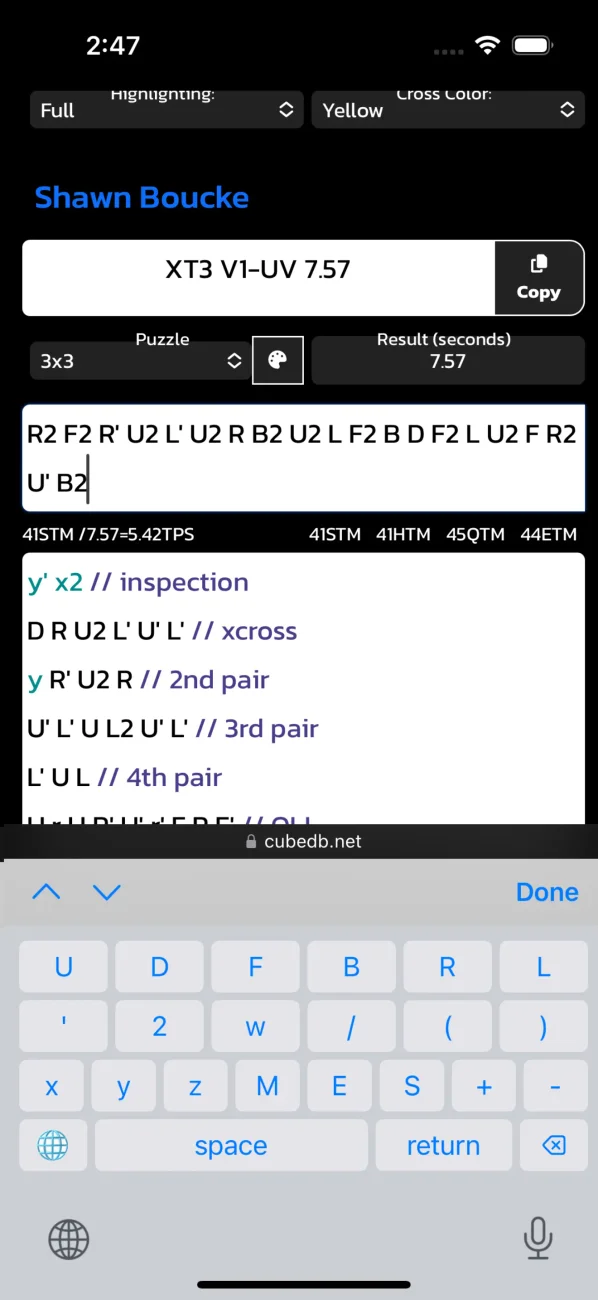
Tired of struggling to type cube notation quickly? Cube Keyboard makes it effortless to input cube algorithms, notation, and move sequences anywhere—whether you're discussing strategies, sharing solves, or writing tutorials.
With a thoughtfully designed layout, Cube Keyboard gives you quick access to essential cube notation, including:
Face moves (U, D, F, B, R, L, and lowercase u, d, f, b, r, l)
Modifiers for turns (' , 2, w, /, ( ) )
Rotation moves (x, y, z, M, E, S)
Quick access to space, return, and delete keys
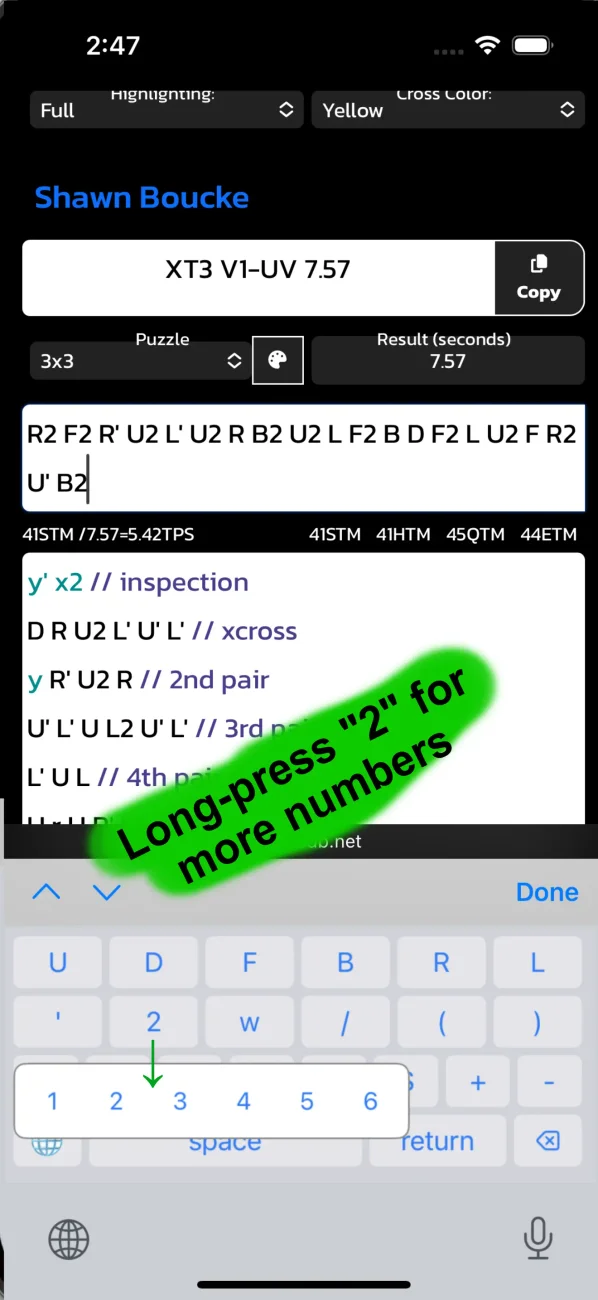
Numbers 1-6 for Square-1 and +/- for Megaminx
Designed for speedcubers, puzzle enthusiasts, and educators, this keyboard makes inputting cube notation faster and more efficient.
No more searching for notation symbols—just type and go!
-Shawn from SpeedCubeReview.com
Privacy Policy
1. Information We Collect
No Personal Data Collected
Cube Keyboard does not collect, store, or share any personal information. The app functions entirely on your device and does not transmit any data to external servers.
No Keyboard Input Logging
Cube Keyboard does not record, store, or track what you type. All keystrokes remain private and are only sent to the active text field within your selected app.
2. Permissions & Full Access
Why Does Cube Keyboard Request "Full Access"?
Some apps require "Allow Full Access" for third-party keyboards to function properly. If you enable this setting, Cube Keyboard can be used across more apps.
However, even with Full Access:
We do not collect or transmit keystrokes
We do not access any personal data
No internet connection is used for keyboard operations
Enabling Full Access is optional, and Cube Keyboard will still function in many apps without it.
3. Data Sharing & Third Parties
Cube Keyboard:
Does not share data with third parties
Does not use analytics or tracking services
Does not display ads or collect advertising data
Your privacy is 100% respected at all times.
4. Children's Privacy
Cube Keyboard is safe for all ages. Since the app does not collect any data, there are no risks related to children's privacy.
5. Contact Us
If you have any questions about this Privacy Policy, feel free to contact us:
Email: appkeyboards@gmail.com
We are committed to keeping Cube Keyboard secure and private for all users.
6. Changes to This Policy
We may update this Privacy Policy from time to time. Any updates will be posted on this page with a revised "Effective Date" at the top.
By using Cube Keyboard, you agree to this Privacy Policy.
This ensures compliance with Apple's App Store privacy requirements while making it clear that your app does not collect any user data. Let me know if you need any adjustments!
What’s new
Version 1.4 · Mar 27, 2025
Extended the space bar for easier access
Removed the second row for a cleaner, more streamlined layout
Added long-press support for U, D, F, B, R, L to access lowercase and other variations (like U', U2, u)
App privacy
What Shawn Boucke declares on the App Store about how this app handles data.
-
Data not collected
The developer does not collect any data from this app.
Privacy practices may vary, for example with the features you use or your age.
Information
- Seller
- Shawn Boucke
- Category
- Utilities
- Version
- 1.4
- Updated
- Mar 27, 2025
- Released
- Mar 20, 2025
- Size
- 511.0 KB
- Requires
- iOS 15.6 or later
- Age rating
- 4+
- Price
- $0.99
- Languages
- English
- Copyright
- © 2025
You might also like
-
 Cube Rivals: Speedcubing TimerAlgorithm Trainer & Statistics
-
 Cube Color TrainerUtilities
-
 Cuber AppUtilities
-
 Cube Timer - CubeeFor Rubiks & more
-
 Machine AnalysisUtilities
-
 Ayin - Scan HebrewUtilities
-
 BlenaBrowser with Web APIs.
-
 WatchThisCubeA Puzzle Timer For Your Wrist
-
 Zman ConnectUtilities
-
 ScrambleMeUtilities