
Cut & Paste – Erase Background
Photo Editor, Stickers Maker
Designed for iPhone, iPad, iPod touch
Free · In-app purchases
- Age rating4+
- CategoryEntertainment
- DeveloperPocket School - Basic education to learn for adults & kids
- LanguagesEnglish+ 1 more
- Size129.7 MB
Links to the official App Store page
Download.org hosts no file of Cut & Paste – Erase Background. The button opens its official App Store page, published by Pocket School - Basic education to learn for adults & kids. Listing last checked on Nov 12, 2026.
Screenshots



About
Create fun pictures montages and collages with personalized or custom stickers
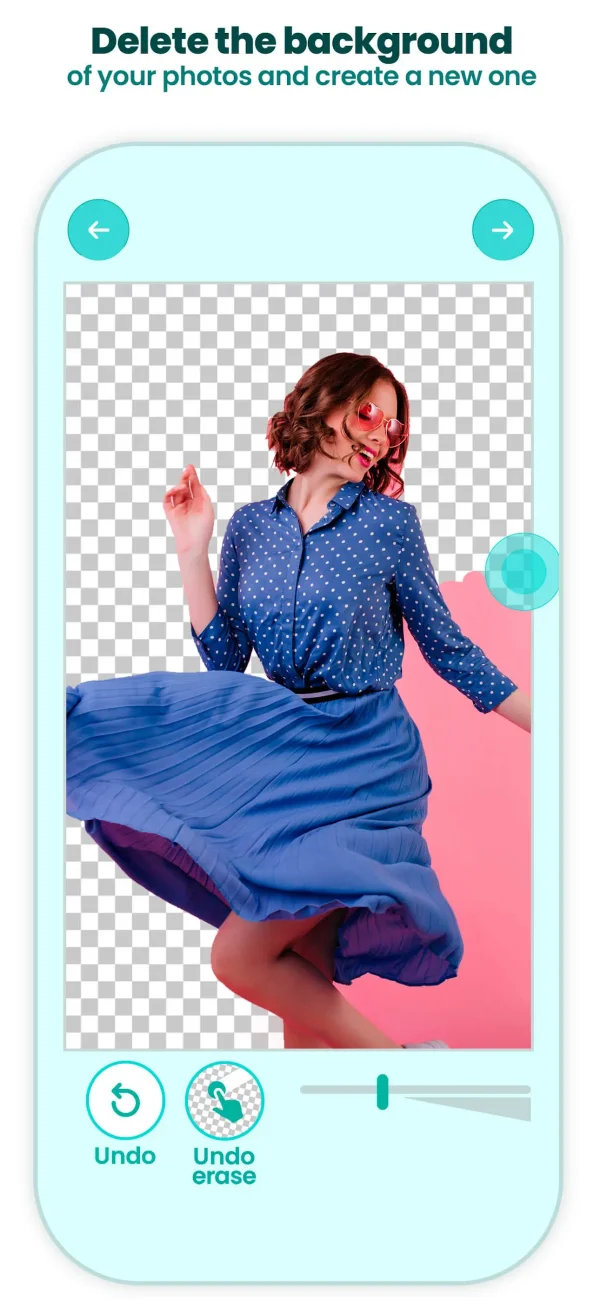
Are you looking for simple photoshop tricks, photo montages and face swaps? Cut paste photo editor – create fun pictures let you create your own personalized or customized fun photo stickers. Import your personal photos or pictures and start to decorate your images with fun stickers. Create fun photo montages and enjoy these funny pictures. As simple as cutting one side of a photo and paste it into another.
With this fun app, swap sides, cut and paste into another photo you want. You can also remove background image, change background image or add background photo. You can cut people out and put them on another background as well. Cut paste photo editor – create fun pictures is very useful to remove people who do not want to be in the photos. Before using photo filters or effects on your photos, you can create fun custom stickers. This application is a great tool to cut and paste photos on your mobile phone without needing a complicated photoshop program.
A quick, easy and simple way to cut and paste to create fun photo montages or collages:
Choose pictures from your photo gallery or take a new one and outline the image you want to convert into a sticker, delete the part that you do not want.
Click on a corner and frame the image with your finger.
Your sticker has already been generated and your sticker is saved in the gallery of stickers.
SAVE your frames and SHARE it on Facebook, Whatsapp or Instagram with your friends!
If you like our app, please rate and comment to help us improve!
You can buy a version without ads.
What’s new
Version 1.9 · May 7, 2024
Updates:
Updated libraries to improve performance and security.
Enhanced compatibility with the latest devices and operating systems.
Bug Fixes:
Fixed various bugs reported by users to enhance stability and reliability.
Addressed issues related to app crashes and freezes reported in previous versions.
Resolved user-reported issues with certain features not functioning as expected.
Enhancements:
Improved the visual appearance of certain elements for a better user experience.
Other Changes:
Implemented backend improvements to support upcoming features and enhancements.
App privacy
What Pocket School - Basic education to learn for adults & kids declares on the App Store about how this app handles data.
-
Data used to track you
May be used to track you across apps and websites owned by other companies.
- Identifiers
- Usage data
-
Data linked to you
May be collected and linked to your identity.
- Identifiers
- Usage data
Privacy practices may vary, for example with the features you use or your age.
Information
- Seller
- Cortinajes Bonisa SL
- Category
- Entertainment
- Version
- 1.9
- Updated
- May 7, 2024
- Released
- Mar 10, 2017
- Size
- 129.7 MB
- Requires
- iOS 13.0 or later
- Age rating
- 4+
- Price
- Free
- In-app purchases
- Yes
- Languages
- English, Spanish
- Copyright
- © Bonisa Apps
You might also like
-
 Cut paste for create stickersPhoto editor erase background
-
 Cut and Paste Stickers MakerPhoto Editor, Erase Background
-
 cut & paste for photos deleteCrop images and create meme
-
 AI Face ChangerVideo Photo face changing
-
 Sticker Maker - Emoji StickersEmojis & Memoji Meme Pack
-
 Gif Your Face - video editorFunny meme videos for share
-
 Face in 3D photo dancing appFunny music video maker dance
-
 Photo frames collection appFor 2026 summer day images
-
 Love frames for picturesCreate romantic postcards
-
 Funny Video Maker - JokeFacesPut your face in funny videos