
decalq INK
Tattoo Stencil Maker
Designed for iPhone, iPad, iPod touch
Free · In-app purchases
- Age rating17+
- CategoryGraphics & Design
- DeveloperRB ART LTDA
- LanguagesEnglish+ 9 more
- Size39.5 MB
Links to the official App Store page
Download.org hosts no file of decalq INK. The button opens its official App Store page, published by RB ART LTDA. Listing last checked on Nov 20, 2026.
Screenshots
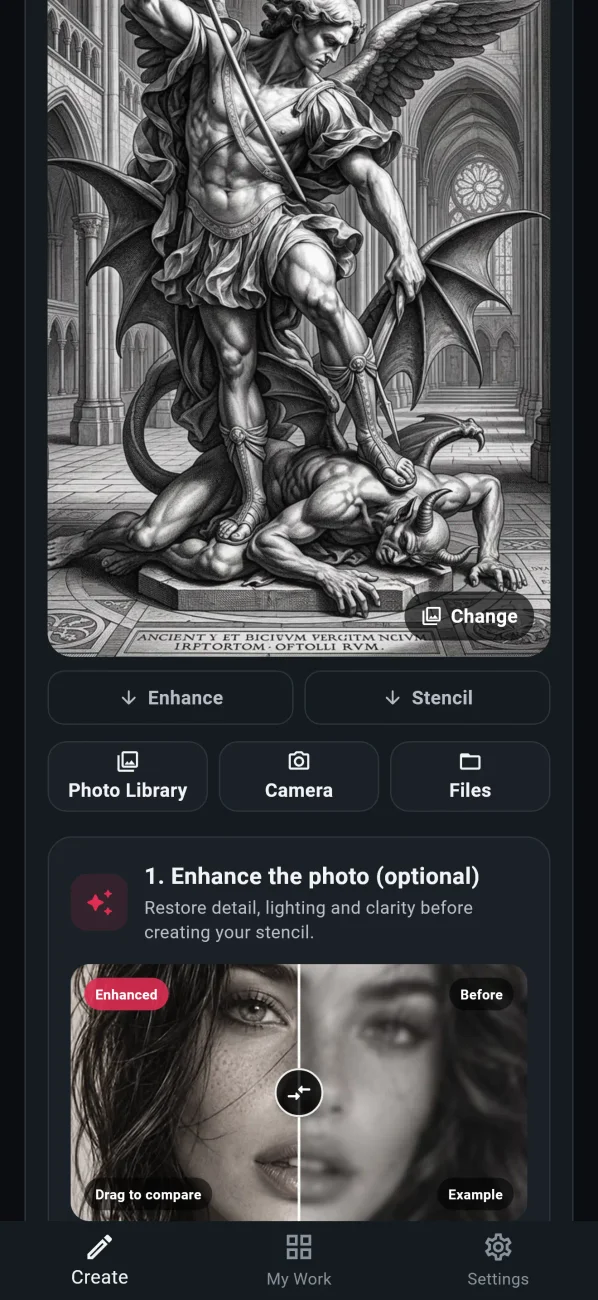
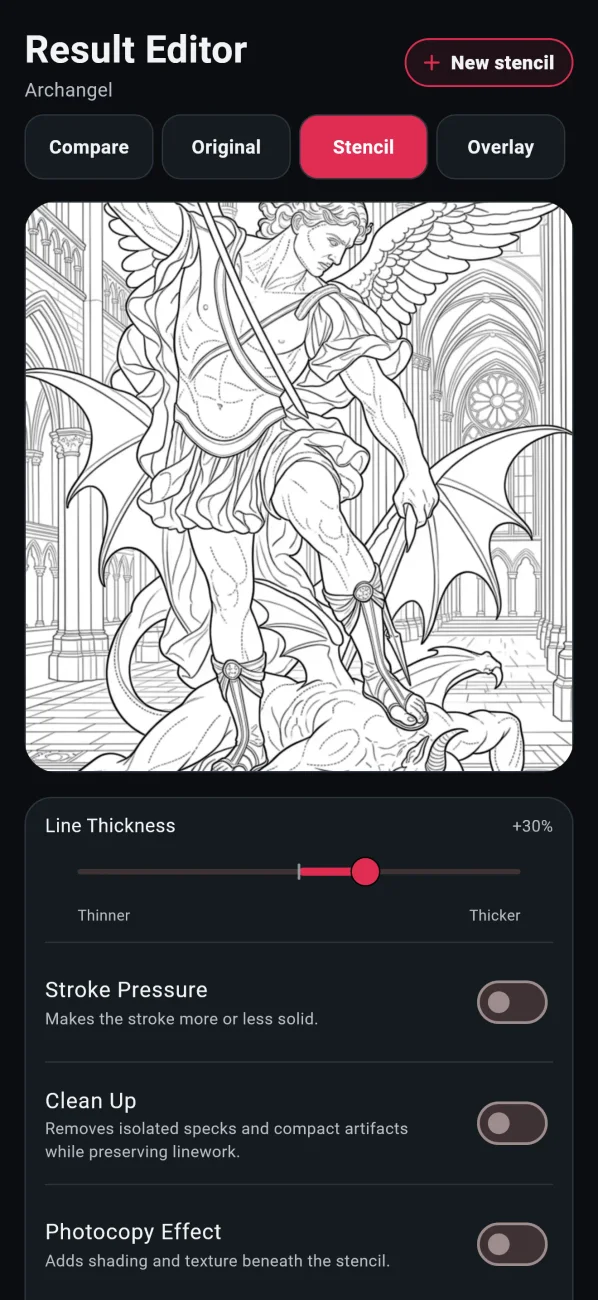


About
Turn your art into a tattoo stencil in seconds.
decalq INK was made by a tattoo artist, for tattoo artists. No more printing your stencil like it's a photo: here the AI creates the stencil in the style of a traditional hand-traced stencil, with clean lines, the way a tattooer does it by hand. It respects your design. If a line doesn't come out the way you want, just fix it in the editor.
A stencil true to your design
- Standard or Ultra (higher resolution, to scale up without losing quality)
- Overlay and comparison with the original art, to check every line
- Automatic cropping of screenshots and photos, so the stencil comes out aligned
An editor built for tattoo artists
If the AI marks something you don't want, erase it. If a detail is missing, add it with the pencil. You can also adjust the line weight across the whole stencil.
Line pressure and photocopy effect
Make the lines more or less solid, or go for the classic photocopy look.
Image enhancement
Makes your reference cleaner, with more light and depth, without changing the features of the design.
Print at the real tattoo size
Even before generating the stencil, print the art and settle the right size with your client for the forearm, the back or wherever it goes. Approved? Generate the stencil and it comes out at exactly the size you agreed on. The size is saved in the project, so every time you open it, it prints at the same measurement. No ruler, no trial and error, no wasted paper.
Print straight from the app on compatible printers, including thermal printers with AirPrint, send the stencil to your printer's app, or save and share the image to print it however you like.
Start for free
Get 3 credits to try it out. Then choose the Basic, Pro or Studio plan, or buy extra credits whenever you need them.
Your projects are saved on your device.
Terms of Use: decalqink.com/terms
Privacy Policy: decalqink.com/privacy
What’s new
Version 1.0.6 · Nov 11, 2026
What's new in 1.0.6
• Sketch: choose Traditional or Sketch lines, with shading marked in hatching strokes.
• A4 × 2 printing: two portrait A4 sheets for long pieces (21 × 57.9 cm).
• Easier stencil editor: Edit button right on the image, no dot under the tip and a brush size preview.
• Overlay with a slider to see it with and without the lines.
• Print keeps the artwork size on any screen.
App privacy
What RB ART LTDA declares on the App Store about how this app handles data.
-
Data linked to you
May be collected and linked to your identity.
- Purchases
- Contact info
- User content
- Identifiers
- Usage data
- Diagnostics
-
Data not linked to you
May be collected but is not linked to your identity.
- Diagnostics
Privacy practices may vary, for example with the features you use or your age.
Information
- Seller
- RB ART LTDA
- Category
- Graphics & Design
- Version
- 1.0.6
- Updated
- Nov 11, 2026
- Released
- Nov 2, 2026
- Size
- 39.5 MB
- Requires
- iOS 15.0 or later
- Age rating
- 17+
- Price
- Free
- In-app purchases
- Yes
- Languages
- English, French, German, Italian, Japanese, Korean, Portuguese, Russian, Simplified Chinese, Spanish
- Copyright
- © 2026 RB ART LTDA
You might also like
-
 Stencil Lab - Tattoo StencilPhoto to stencil, print fast
-
 Inkline Pro StencilPhoto to tattoo stencil
-
 Inkprint: Tattoo Stencil MakerAI Generator, Try On & Print
-
 Easy Tattoo StencilGraphics & Design
-
 Tattoo Daddy: AI Tattoo MakerDesign Ideas, Try On & Stencil
-
 Tattoo Stencil: StencilDropPhoto to Line Art & Transfer
-
 FaceRef Studio3D head reference for artists
-
 Stencil FlowGraphics & Design
-
 InkMentors LabTattoo image editing
-
 Stencil Tattoo AR LiDAR ScanLiDAR measure & A4 print