
Dev Keyboard: Code & Symbols
Terminal keys for programmers
Designed for iPhone, iPod touch
Free · In-app purchases
- Age rating4+
- CategoryDeveloper Tools
- DeveloperAnshika Maurya
- LanguagesEnglish
- Size10.8 MB
Links to the official App Store page
Download.org hosts no file of Dev Keyboard: Code & Symbols. The button opens its official App Store page, published by Anshika Maurya. Listing last checked on Nov 12, 2026.
Screenshots
About
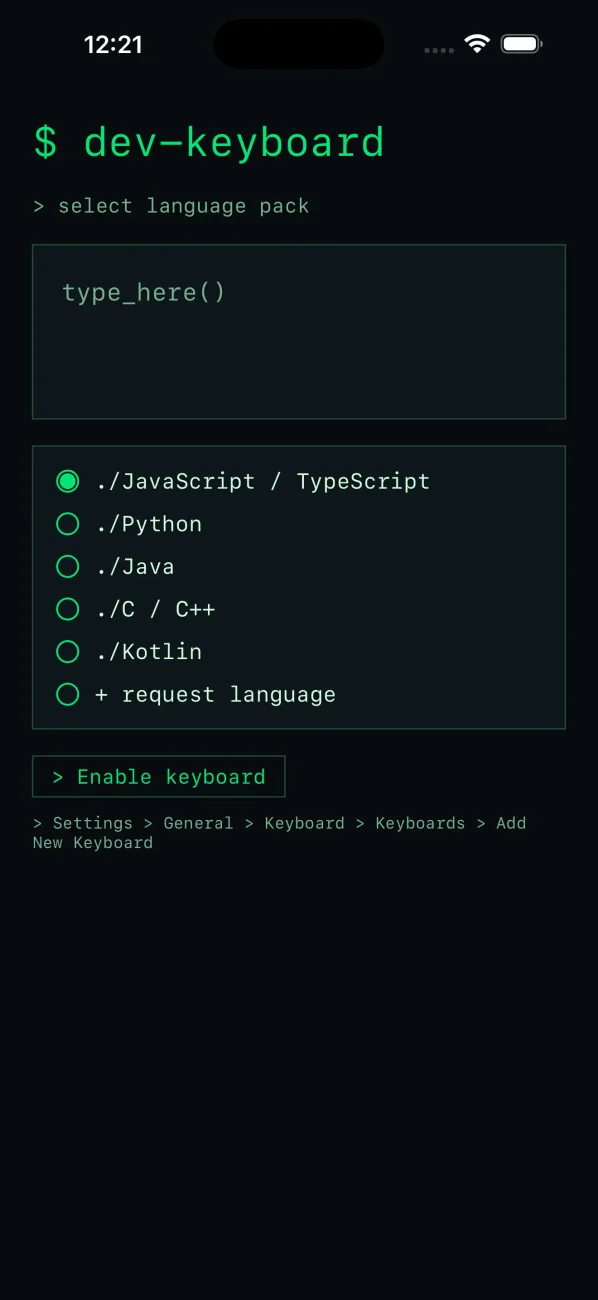
Dev Keyboard is a terminal-styled coding keyboard that puts the symbols you actually type one tap away. A PC-style layout (Esc, Ctrl, Shift, Alt, Cmd, Tab, Caps) sits above quick rows of developer symbols and brackets.
FEATURES
- PC-style modifier row and key layout
- One-tap brackets and symbols: {} [] () => ; / \ | and more
- Long-press letters for extra developer symbols
- Language packs: JavaScript / TypeScript, Python, Java, C / C++, Kotlin
- Terminal aesthetic: monospace, dark, distraction-free
- Privacy-first: no Full Access required, nothing leaves your device
Type code faster in any app - notes, chat, editors, terminals.
What’s new
Version 2026.09.11 · Sep 12, 2026
Bug fixes and performance improvements.
App privacy
What Anshika Maurya declares on the App Store about how this app handles data.
-
Data not linked to you
May be collected but is not linked to your identity.
- Purchases
Privacy practices may vary, for example with the features you use or your age.
Information
- Seller
- Anshika Maurya
- Category
- Developer Tools
- Version
- 2026.09.11
- Updated
- Sep 12, 2026
- Released
- Jun 23, 2026
- Size
- 10.8 MB
- Requires
- iOS 15.0 or later
- Age rating
- 4+
- Price
- Free
- In-app purchases
- Yes
- Languages
- English
- Copyright
- © 2026 Trei
You might also like
-
 TypeTab: Coding KeyboardSnippets, Symbols & Cursor
-
 Moshi: herdr/tmux on SSH/MOSHAgent terminal for Codex CLI
-
 Blink Shell, Build & CodeThe Pro tool for developers
-
 a-ShellLocal Unix terminal (& ssh)
-
 Textastic Code EditorText, Coding, SFTP Client, SSH
-
 Pyto IDEPython & WASM
-
 Runestone Text EditorEdit plain text and code
-
 Git client - Working Copyfor GitHub and self-hosted
-
 LocalDevVPNDeveloper Tools