
Device Settings Information
Device Settings Information
Designed for iPhone, iPad, iPod touch
Free · In-app purchases
- Age rating4+
- CategoryProductivity
- DeveloperYalintech
- LanguagesEnglish
- Size31.9 MB
Links to the official App Store page
Download.org hosts no file of Device Settings Information. The button opens its official App Store page, published by Yalintech. Listing last checked on Nov 12, 2026.
Screenshots

About
Device Settings Information shows what is inside your iPhone or iPad, in one place: model, iOS version, display, storage, memory, CPU and battery. Go deeper with Advanced Insights, check your security settings and look up your Wi-Fi connection.
DEVICE INFORMATION
• Model identifier, iOS version, manufacturer and platform
• Display: resolution, pixel density and orientation
• Storage: total, used and available space
• Memory: total, used and available RAM
• CPU: architecture, cores and ABI
• Battery: level and charging state
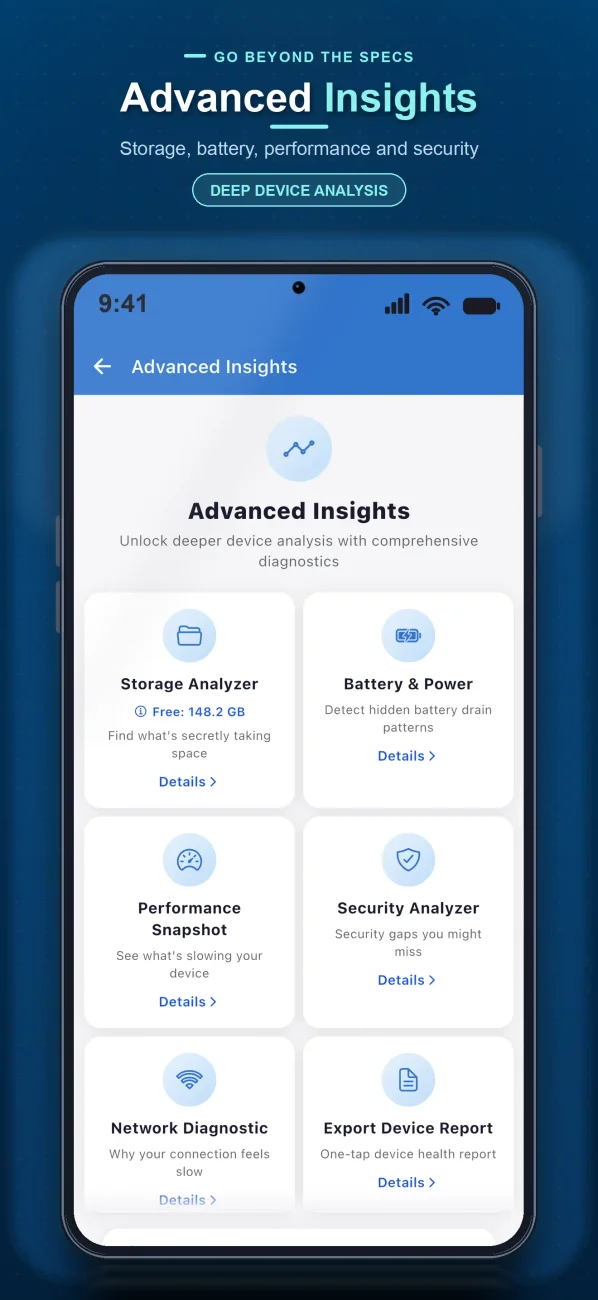
ADVANCED INSIGHTS
• Storage Analyzer: see what is taking up space, with tips to free it
• Battery & Power: understand your battery
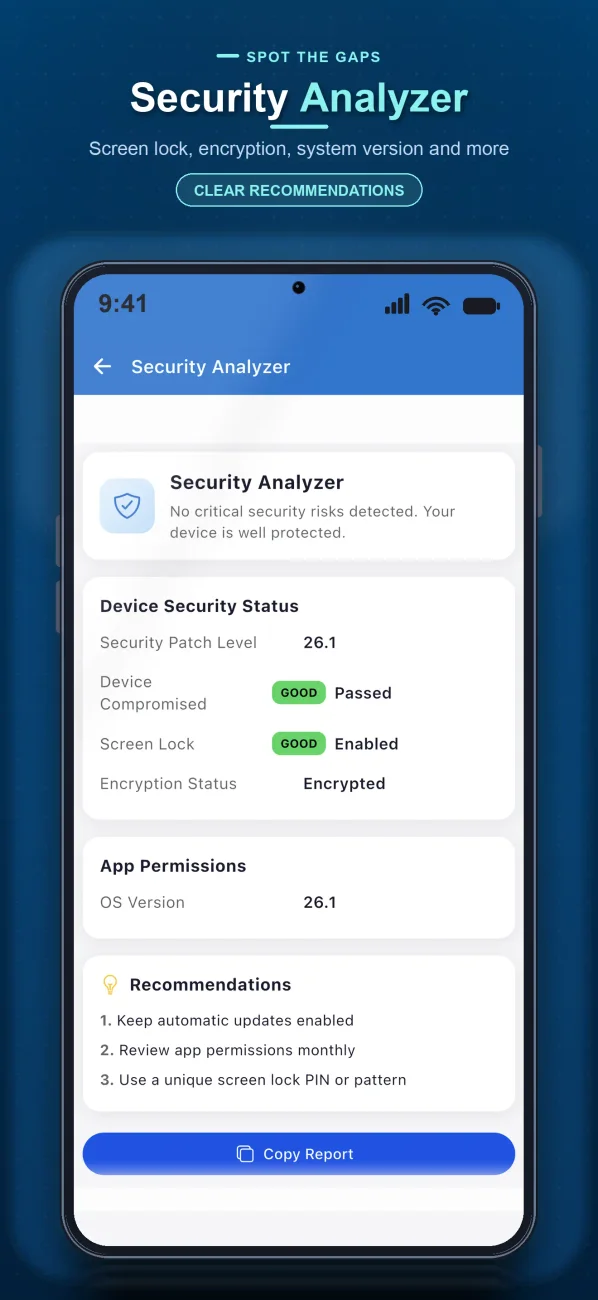
• Security Analyzer: screen lock, encryption and system version, with clear recommendations
• Performance Snapshot: CPU and memory at a glance
• Network Diagnostic: your connection status
• Export Device Report: copy or share a full device report
WI-FI TOOLS
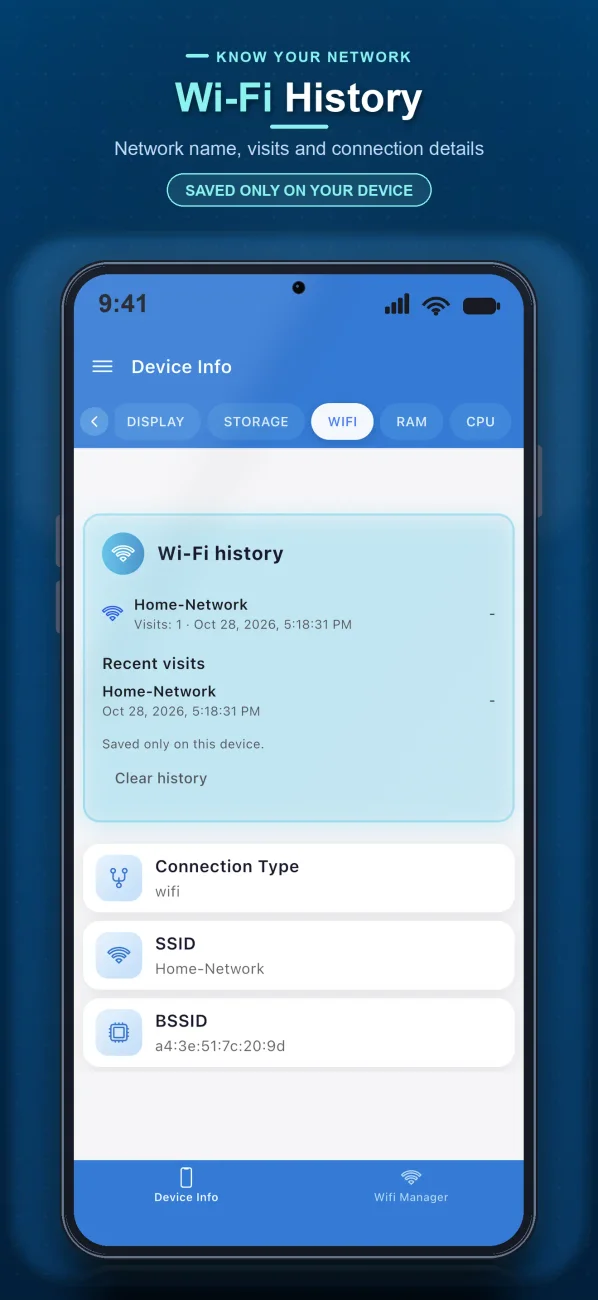
• Wi-Fi details: network name, BSSID and IP address
• IP information: connection type, IP address and time zone
• Wi-Fi history: the networks you joined and your visits to each
GOOD TO KNOW
The app reads information about your device; it does not change system settings. Some details depend on what iOS makes available to apps. Wi-Fi history is saved only on your device. Location access is used only to read the Wi-Fi network name, as iOS requires.
ADS AND PRO
The app shows ads. Without Pro, Advanced Insights open with daily passes or after a short video. The optional Pro upgrade removes all ads and unlocks every Advanced and Battery insight and unlimited reports, with no passes or videos. Pro is available monthly, yearly or as a one-time purchase. Subscriptions renew automatically unless cancelled at least 24 hours before the end of the current period; manage or cancel them in your App Store account settings.
Questions or a problem? Write to support@yalintech.com and we will help.
Privacy Policy: https://yalintech.com/legal/device/privacy
Terms of Use: https://yalintech.com/legal/device/terms
What’s new
Version 2.11.17 · Nov 7, 2026
What's new:
• Device Info Pro – monthly, yearly and lifetime plans in one clear screen
Fixes & improvements:
• Faster start-up and stability improvements
App privacy
What Yalintech declares on the App Store about how this app handles data.
-
Data used to track you
May be used to track you across apps and websites owned by other companies.
- Location
-
Data linked to you
May be collected and linked to your identity.
- Location
-
Data not linked to you
May be collected but is not linked to your identity.
- Usage data
- Diagnostics
Privacy practices may vary, for example with the features you use or your age.
Information
- Seller
- Yalintech
- Category
- Productivity
- Version
- 2.11.17
- Updated
- Nov 7, 2026
- Released
- Apr 23, 2022
- Size
- 31.9 MB
- Requires
- iOS 15.0 or later
- Age rating
- 4+
- Price
- Free
- In-app purchases
- Yes
- Languages
- English
- Copyright
- © Copyright (c) 2024, Yalintech
You might also like
-
 Device info: Mobile Phone InfoProductivity
-
 System Activity MonitorsCamera Info, Memory, Battery
-
 Device Monitor & DiagnosticsCPU, System, Battery,Temp Info
-
 Device Monitor - DiagnosticsSystem, CPU Battery,Temp Info
-
 Network Utilities & AnalyzerWiFi Scanner, Ping, Speed Test
-
 Tips & Tricks - for iPhoneNews, Guides & Shortcuts
-
 CPU Max x mobile Spin Wheelmeasure cpu freq. lock widgets
-
 Network Toolbox Net securityWiFi Cell LAN scanning tools
-
 Device HelpYour Device, Simplified
-
 System utility! monitor statusMemory status, battery, disk