
- Age rating4+
- CategoryFood & Drink
- DeveloperJustin Mathew
- LanguagesEnglish
- Size44.5 MB
Links to the official App Store page
Download.org hosts no file of Dialed-In. The button opens its official App Store page, published by Justin Mathew. Listing last checked on Nov 16, 2026.
Screenshots

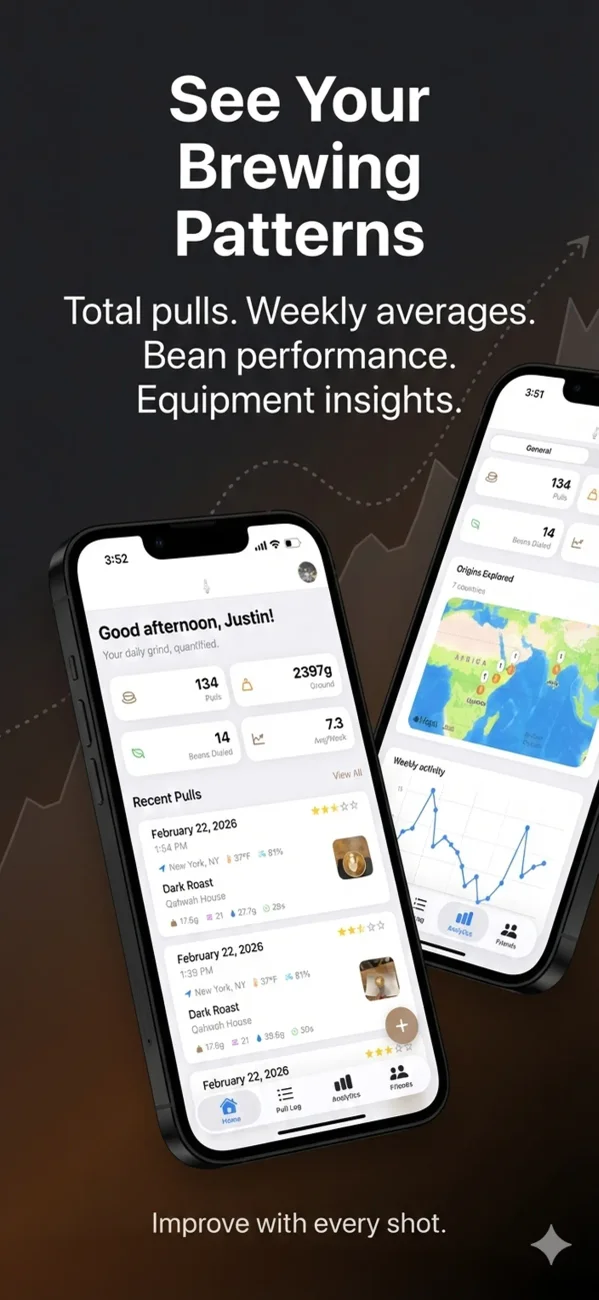
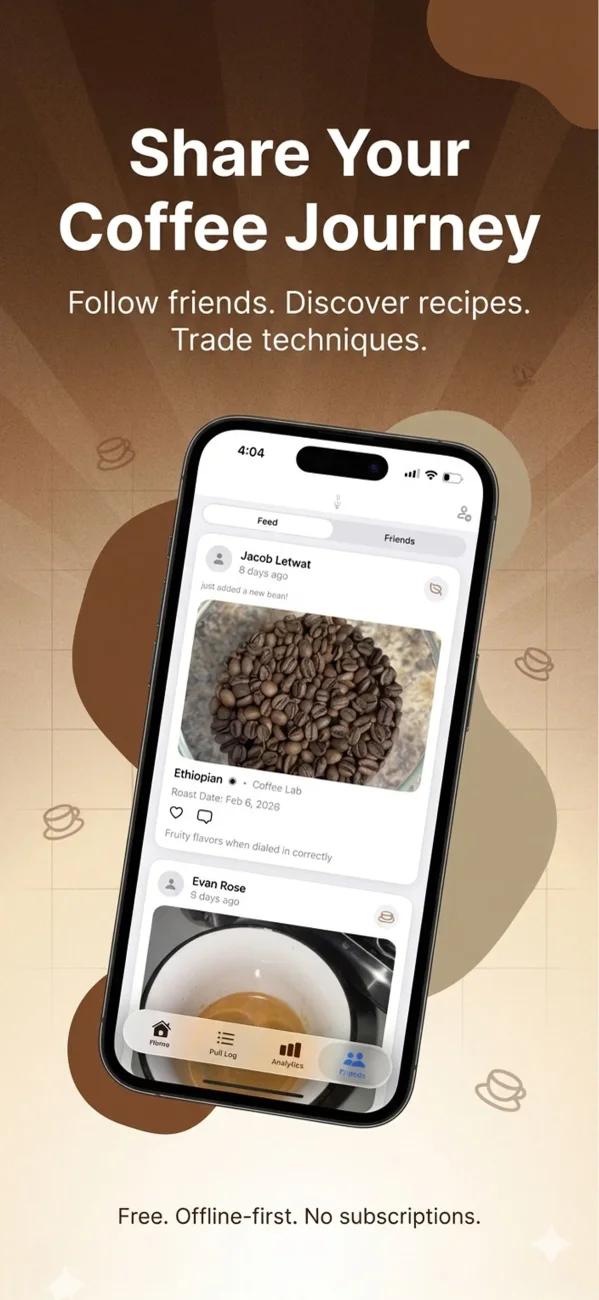
About
Dialed In — The Espresso Companion for Home Baristas
Dialed In is the espresso companion built for home baristas who care about every detail of their craft. Track your pulls, dial in your beans, analyze your brewing, and share your journey with a community of coffee lovers.
Log Every Detail - Record comprehensive brew parameters for each espresso pull — bean weight, yield, extraction time, pressure, temperature, flow rate, and more. Track pre-infusion and first-drip times with the built-in advanced timer. Rate your shots, add tasting notes, and capture flavor profiles on an interactive flavor grid.
Manage Your Equipment - Keep a digital countertop of your espresso machines and grinders. Create setups by pairing your machine and grinder for quick selection when logging pulls. Browse a curated equipment catalog to add popular machines and grinders.
Track Your Beans - Build a personal bean library with details like roaster, origin, processing method, variety, and roast level. Attach photos and notes to remember what works — and what doesn’t.
Analyze Your Brewing - See your coffee stats at a glance — total pulls, average ratings, weekly frequency, and more. Dive into Coffee Insights to explore trends across beans, origins, roasters, and equipment. Learn your preferences and improve over time.
Connect With Coffee Friends
Follow fellow coffee enthusiasts and see their latest pulls in your feed. Share your unique Coffee Code to connect with friends. Like and comment on pulls to discuss technique, flavor, and gear.
Works Offline, Syncs Everywhere
Dialed In is built offline-first. Log pulls, add beans, and manage equipment with or without an internet connection. Everything syncs automatically when you’re back online — nothing is ever lost.
Capture the Moment
Attach up to two photos per pull or bean. Snap your latte art, puck prep, or favorite bag of beans directly from the app or your photo library.
Weather & Location (Optional)
Optionally capture weather conditions and location for each pull. Track how temperature and humidity affect extraction across seasons and environments.
Privacy First
Sign in securely with email, Apple, or Google. All permissions — camera, photos, and location — are optional. Your data is yours.
Free to use. No subscriptions. No paywalls. Just better espresso.
What’s new
Version 1.3.1 · May 22, 2026
What's New
Coffee Shop Check-Ins
Discover cafés near you right on the map. Tap any pin, browse photos and visit history, then check in while you're there to log your visit and build your personal coffee shop rankings.
New Profile Experience
Your profile and your friends' profiles now share a unified four-tab view — pulls, equipment, visited shops, and activity — so everything is in one place.
Dark Mode
The app now fully adapts to your system appearance with a refined dark color system across every screen.
Try Before You Sign Up
Explore Dialed In as a guest and save your data locally. When you're ready, create an account and everything syncs automatically.
Also in this update
- Add and view photos for machines and grinders
- Delete your account from Settings
- Improved pull log and beans loading reliability
- Flavor profile grid improvements
- Various performance and stability fixes
App privacy
What Justin Mathew declares on the App Store about how this app handles data.
-
Data not collected
The developer does not collect any data from this app.
Privacy practices may vary, for example with the features you use or your age.
Information
- Seller
- Justin Mathew
- Category
- Food & Drink
- Version
- 1.3.1
- Updated
- May 22, 2026
- Released
- Feb 11, 2026
- Size
- 44.5 MB
- Requires
- iOS 18.2 or later
- Age rating
- 4+
- Price
- Free
- Languages
- English
- Copyright
- © 2026 Justin Mathew
You might also like
-
 DialedIn - Coffee TrackerPerfect Every Cup You Brew
-
 Dialed In - Espresso TrackerDial In Every Espresso
-
 BeanaryEspresso dial-in companion
-
 Dialed ShotsFood & Drink
-
 Dialed In - Grind Size TrackerFood & Drink
-
 Coffee Counter Brew TrackerTrack your coffee brews!
-
 Dialin Espresso JournalDial in better espresso
-
 PerfessoMake your perfect espresso!
-
 Dialed - Espresso LogbookKnow Every Shot
-
 Brewster - Espresso CompanionBrew Better Espresso