
- Age rating4+
- CategoryGames
- Developer培基 王
- LanguagesEnglish
- Size8.8 MB
Links to the official App Store page
Download.org hosts no file of Domino Physics. The button opens its official App Store page, published by 培基 王. Listing last checked on Nov 17, 2026.
Screenshots
About
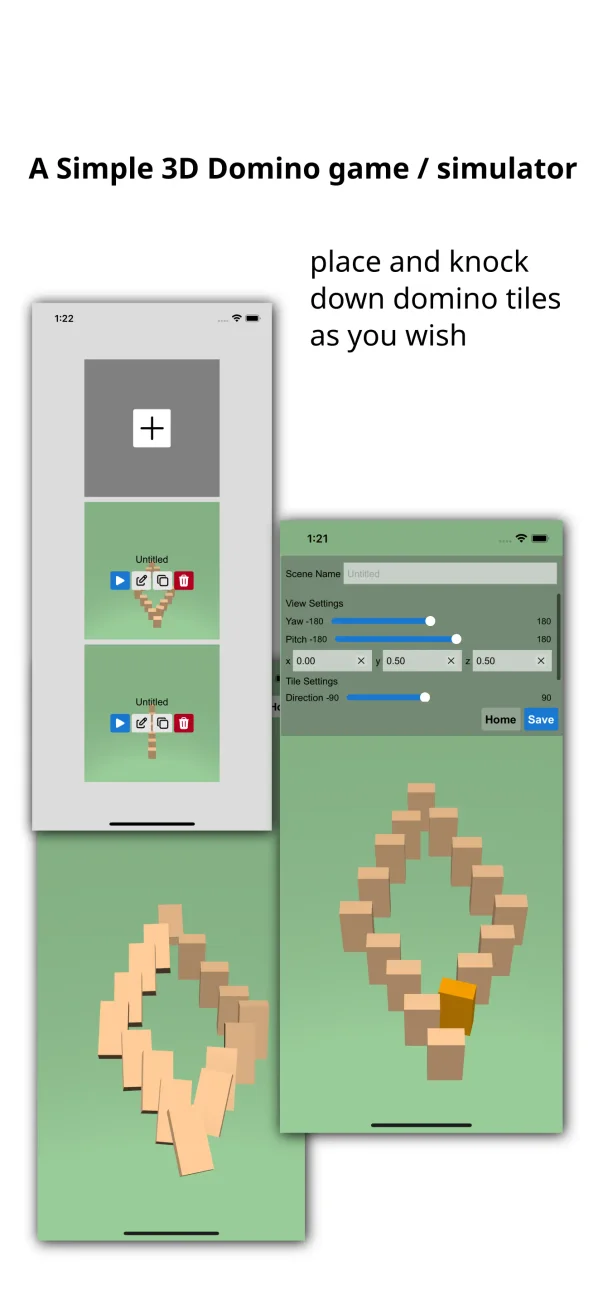
Domino Physics is a 3D domino sandbox: place tiles and balls on the ground, drag a single curve to lay a whole run of tiles, then press Fire and watch them fall with real physics.
[Edit scenes]
· The editor switches between Domino, Ball and Track at the top of the panel; the mode's own controls sit right below the switcher
· Domino: click the ground to place a tile, hold to select; Height Layer stacks tiles into multi-storey walls, Auto Height hugs the ground
· Snap Grid and Show Grid keep placement aligned; Tile Thickness and Time Speed are also adjustable
· Ball: Ball Size and Ball Density adjustable, click to place
· Track: press and drag on the ground to draw a curve — dominoes line up along it automatically; Track Density and Angle to Track are adjustable; grab any tile of a track to move the whole run, Delete / Esc removes the whole run
[Play]
· Press Play (Fire in the toolbar) to enter play mode: click a domino to tip it, click a ball to give it a push
· Hold a ball to charge (a ring appears under it); release to launch it — a full charge carries it roughly 7.8 m, enough to smash through a long run
· Hovering a ball shows a blue aim line that previews its rolling direction
· Auto Topple: mark a domino / ball with As Trigger (the triangle points the way it falls / rolls), Reverse flips it, Trigger Interval (ms) staggers the volley; press Fire to launch everything
· Reset Scene and Reset View get you back to the start any time; Top View jumps straight overhead
[Camera]
· Drag = rotate the view, 1:1 like pushing on the tabletop, height unchanged (touch: one or two fingers)
· Wheel = rotate, Shift + Wheel = raise / lower (touch: pinch to zoom)
· W A S D = fly forward / back / left / right, Q down, E up; multiple keys at once, diagonals are not faster; Ctrl / Cmd / Alt keep these keys for the system
· Flight speed scales with camera height — the further you are, the faster you go; tune the whole thing with Key Move Speed in App Settings (0.1×–5×)
· Double-tap the ground = a 1-second smooth move to that point; heading and height never change. Double-tap Locate offers Center in view or Walk to point; near-horizontal views auto-switch to Walk to point
· The camera only moves when your tap truly hits the ground: hitting a domino / ball, or the sky, does nothing; any manual input cancels a glide in flight
[Multiple scenes]
· Scenes form a list automatically; Search scenes supports pinyin initials; sort by Recent, Created or Title
· The card menu can rename, duplicate and delete; deleting asks for confirmation
· Leaving a scene with unsaved changes warns Changes Not Saved
[Other]
· Collision sound is spatial: volume follows impact energy and distance, stereo pans with the collision's direction
· Theme color and UI scale are adjustable; dark / light follow the system
· The interface language follows your system (Simplified Chinese, Traditional Chinese, English, Japanese) — there is no in-app switch
· Every scene is stored on this device; no network, no uploads, no account needed
For whom: people who like setting up domino runs and chain-reaction rigs, anyone who wants to demo the domino effect and energy transfer to kids, and everyone who just wants to watch a long line go down.
What’s new
Version 1.1 · Oct 1, 2026
· Curve track: drag an arc and dominoes lay themselves along it; Track Density and Angle to Track adjustable; the whole run moves and deletes as one
· Camera rework: drag rotates 1:1, Shift + Wheel raises / lowers; double-tap locate now glides for 1 second, choose Center in view or Walk to point
· New App Settings → Game Controls: double-tap locate mode, Key Move Speed multiplier (0.1×–5×)
· Ball charge launch: ring + blue aim line, full charge rolls about 7.8 m
· Scene search supports pinyin initials; the search box can use (or bypass) the input method
App privacy
What 培基 王 declares on the App Store about how this app handles data.
-
Data not collected
The developer does not collect any data from this app.
Privacy practices may vary, for example with the features you use or your age.
Information
- Seller
- 培基 王
- Category
- Games
- Version
- 1.1
- Updated
- Oct 1, 2026
- Released
- May 30, 2025
- Size
- 8.8 MB
- Requires
- iOS 16.0 or later
- Age rating
- 4+
- Price
- Free
- Languages
- English
- Copyright
- © Copyright @2025 top.toolstack. All rights reserved.
You might also like
-
 bricolangTouch. Bond. Your own language
-
 Last Island To SurviveIsland Survival Escape Game 3D
-
 NeurocuberImpossible neural cube puzzle
-
 Bubble Pop Game! Ball ShooterBlast Mania & Popping Bubbles
-
 Pet Salon .Dress up & Nail Games For Kids
-
 Bird Sort Puzzle-Pop Sort GameColor Match & Sort Challenge
-
 Antistress Toys: ASMR & RelaxSatisfying fidget & calm games
-
 Code of War 2:Shooting Game CSOnline action military shooter
-
 GraviTraxBuild beyond the usual
-
 Tabula: Forbidden WordsWord Guessing Party Game