Draft Survey Calculator
Draught survey to cargo figure
Designed for iPhone
Free · In-app purchases
- Age rating4+
- CategoryUtilities
- DeveloperANDRII MUSHTA
- LanguagesEnglish+ 3 more
- Size41.7 MB
Links to the official App Store page
Download.org hosts no file of Draft Survey Calculator. The button opens its official App Store page, published by ANDRII MUSHTA. Listing last checked on Nov 23, 2026.
Screenshots
About
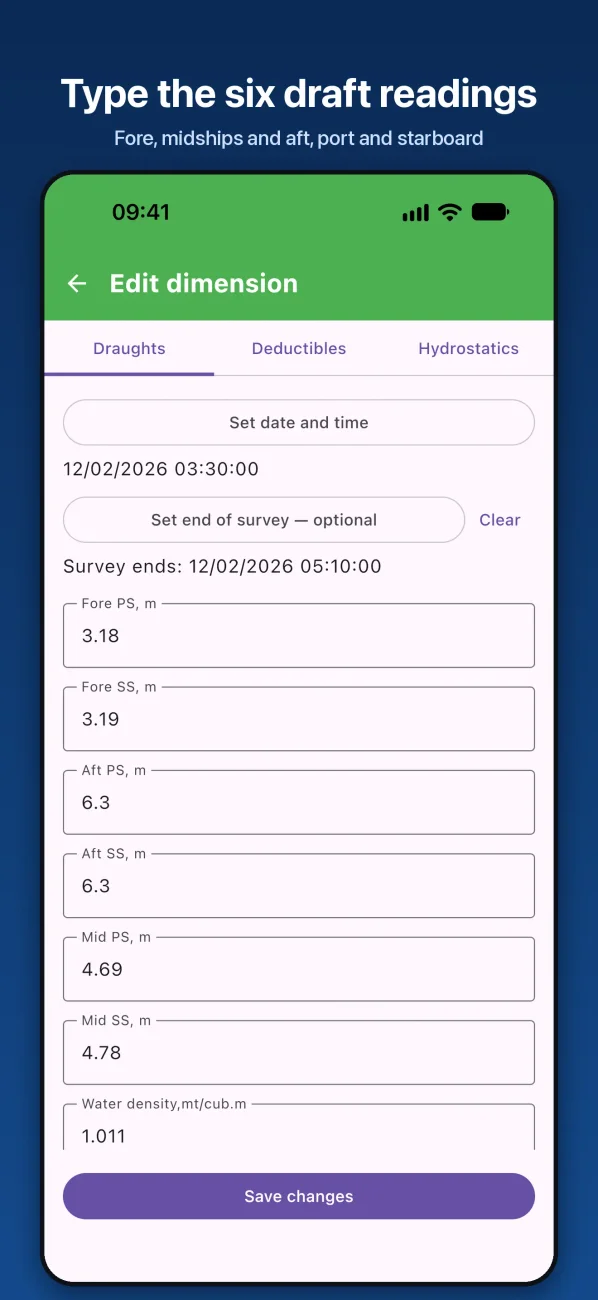
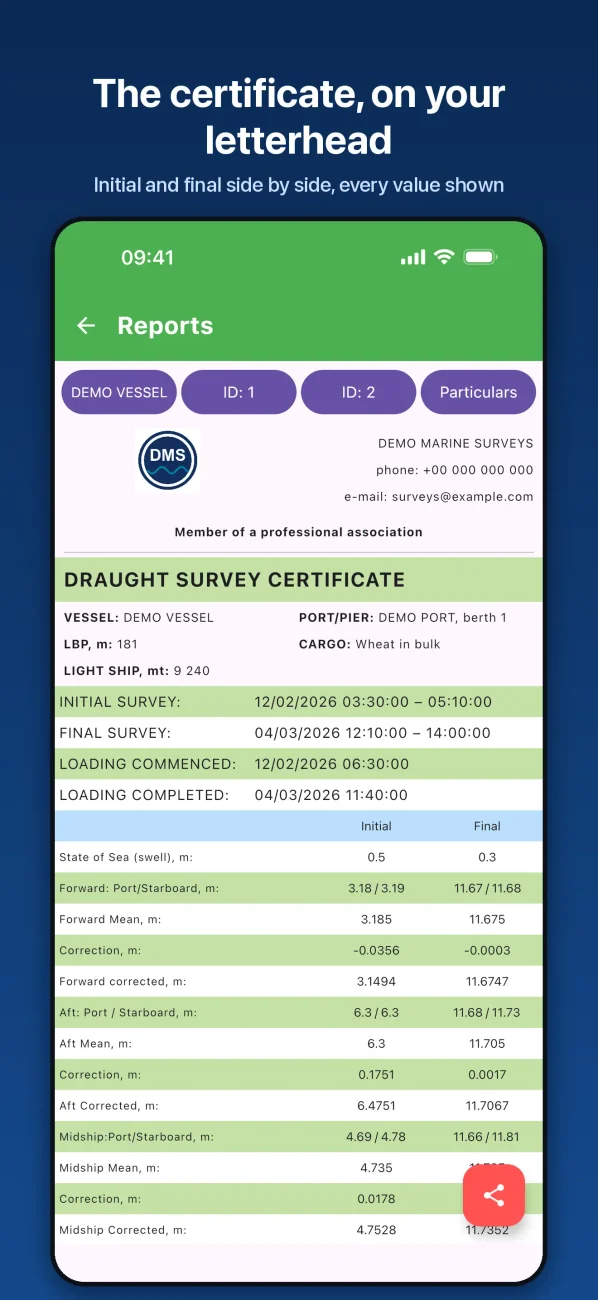
Draft Survey Calculator works a draught survey from the six draft readings to the cargo figure, and lays out the certificate the way a surveyor's worksheet does: initial and final side by side, every intermediate value shown.
For independent cargo surveyors, chief officers and port captains who need a figure they can defend.
CHECKED AGAINST REAL WORKSHEETS
Every formula was checked, column by column, against real surveyors' worksheets and certificates: from the same readings the app reaches their figures, to the worksheet's own rounding. The example vessel in the app is one of those surveys.
WHAT IT CALCULATES
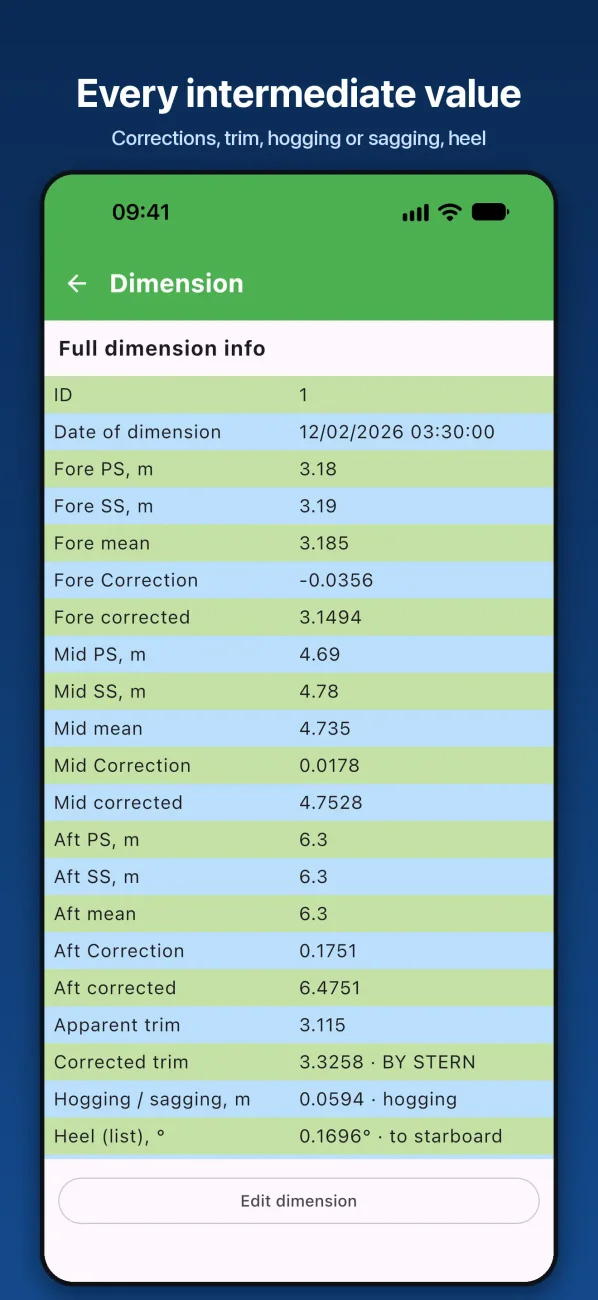
• Six draft readings: forward, midships and aft, port and starboard
• Draft marks corrected to the perpendiculars
• Fore, mid and aft means, and the mean adjusted draft
• Hogging or sagging, and heel to port or starboard
• Apparent and corrected trim, by the stern or by the bow
• First and second trim corrections
• Correction for the density of the dock water
• Deductibles: ballast, fresh water, fuel oil, diesel oil, lubricating oil and others
• Net displacement, the ship's constant, and the cargo loaded or discharged
Every stage is carried at full precision, and you choose how many decimals the screen shows.
HYDROSTATICS: TYPE THEM, OR KEEP THE TABLE
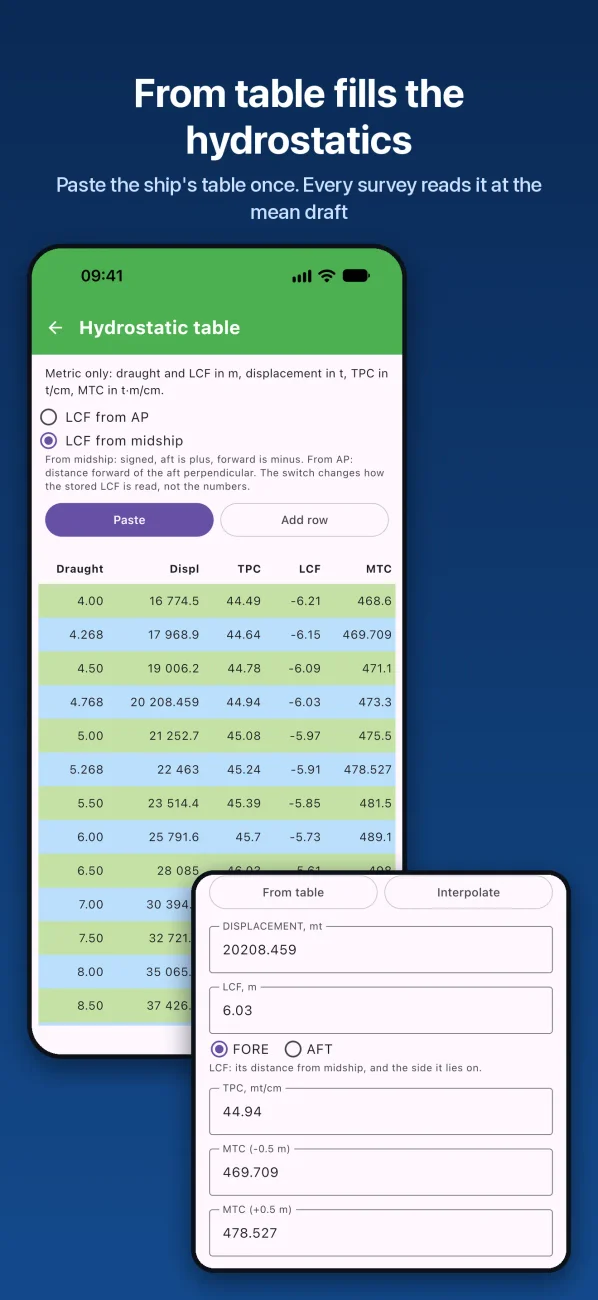
Type the five values a survey needs straight into it: displacement, TPC and LCF at the mean draft, and MTC half a metre above and below. No table is required.
Or keep each vessel's hydrostatic table in the app. Paste it from a PDF or a spreadsheet, check the preview, and say whether LCF is taken from the aft perpendicular or from midship. On every survey, From table then fills all five values at the mean draft, interpolated as a surveyor does it by hand. A draft outside the table is refused, never extrapolated.
No table? Interpolate takes the two rows either side of the draft, typed from the ship's book, and works out each missing value.
THE CERTIFICATE
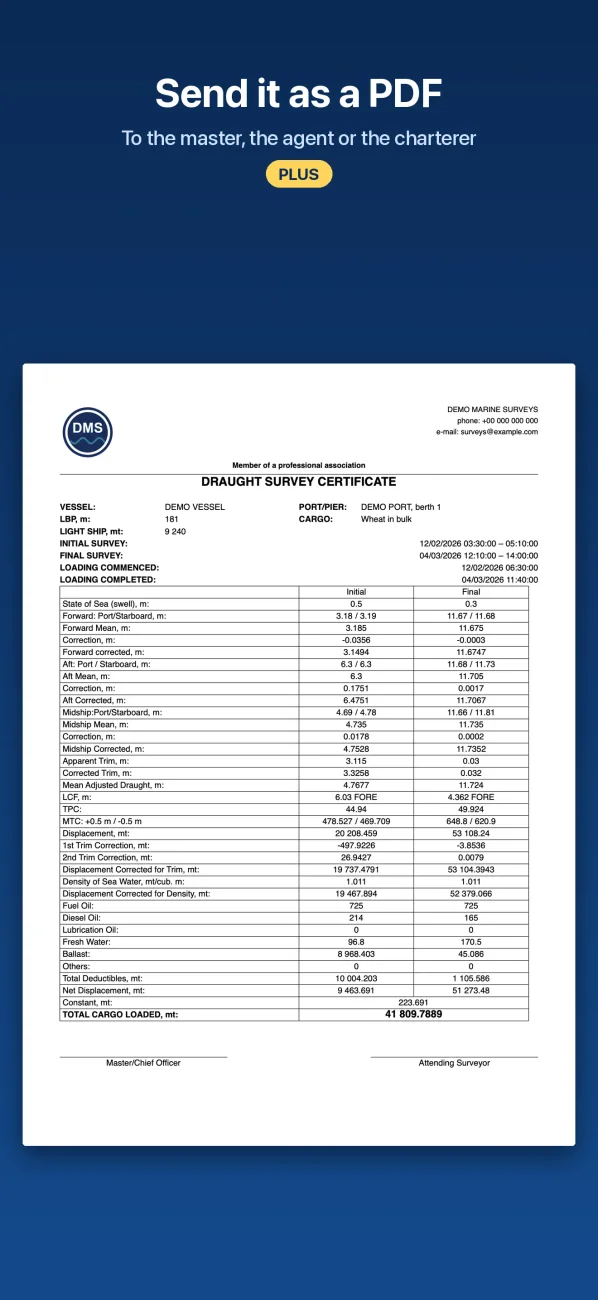
Reports puts the initial and final surveys side by side on one certificate: every intermediate value in both columns, the constant, and the cargo figure. Put your letterhead on it: company name, phone, e-mail, two membership lines and your logo. Add the port, the cargo, loading or discharging, and the working times for each pair of surveys. Export it as a PDF and send it to the master, the agent or the charterer without leaving the ship.
LEARN IT ON A WORKED EXAMPLE
A short first-run tour walks through one complete survey and saves it as DEMO VESSEL, so you start from a finished example. A guide in Settings shows how to enter a hydrostatic table once and fill every survey from it.
YOUR VESSELS
Keep the ships you work on, with their particulars from IMO number to keel thickness, so they are waiting the next time you board. A photo tells sister ships apart.
WORKS WITHOUT A SIGNAL
Everything is calculated on the phone. No account, no sign-in, no ads. In a hold or at anchor with no coverage, it works as it does ashore. Your surveys stay on your phone; a certificate leaves it only when you send it.
FOUR LANGUAGES
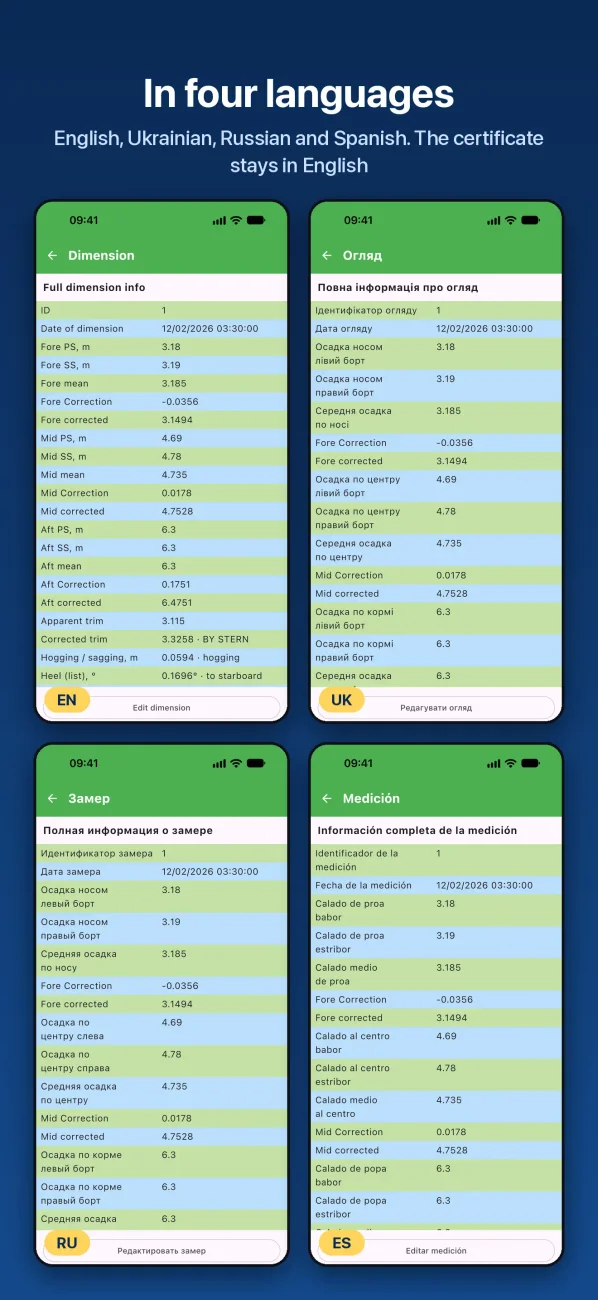
English, Spanish, Ukrainian and Russian. The certificate itself stays in English, as on the paperwork.
FREE, AND WHAT PLUS ADDS
Free: one vessel of your own with as many surveys as you need, its hydrostatic table with From table and Interpolate, and the full certificate on screen with your letterhead. The arithmetic is never reduced in the free version.
Draft Survey Plus is one purchase, not a subscription. It adds every other vessel you board, and PDF export of the certificate on your letterhead.
Questions and corrections: Draft_Survey@and.od.ua
What’s new
Version 0.2.4 · Nov 17, 2026
• The free version covers one vessel, now with as many surveys as you need.
• The hydrostatic table, with From table and Interpolate, is now free.
• Plus adds every other vessel you board and the certificate as a PDF on your own letterhead.
• The survey form now refuses impossible draughts, water density (0.980–1.050 t/m³), deductibles and hydrostatics, and names the field. Earlier surveys with such values open as they were; correct them to save.
• Mean adjusted draft now follows Accuracy at the screen.
• In English, Displacement and TPC now read mt and mt/cm.
• New installs start in English; updates keep your language.
• The hydrostatic table now fits a phone screen: each column is as wide as its longest value, so nothing wraps or is cut off.
• Full dimension info: Mid mean, Mid Correction and Apparent trim no longer show underscores.
App privacy
What ANDRII MUSHTA declares on the App Store about how this app handles data.
-
Data not linked to you
May be collected but is not linked to your identity.
- Purchases
- Location
- Identifiers
- Usage data
- Diagnostics
Privacy practices may vary, for example with the features you use or your age.
Information
- Seller
- ANDRII MUSHTA
- Category
- Utilities
- Version
- 0.2.4
- Updated
- Nov 17, 2026
- Released
- Oct 15, 2026
- Size
- 41.7 MB
- Requires
- iOS 16.0 or later
- Age rating
- 4+
- Price
- Free
- In-app purchases
- Yes
- Languages
- English, Russian, Spanish, Ukrainian
- Copyright
- © 2026 Andrii Mushta
You might also like
-
 Draft OpticVessel draft video reports
-
 CleanPilot: Duplicate PhotosClean Photos, Free Up storage
-
 MetaCAD Pocket: Marine ToolsSea Time, Cases & Stability
-
 NavStationLogbook Management
-
 Scale Calculator EasyUtilities
-
 StarfloaTikMikroTik Hotspot by Starfloat
-
 Jotron EPIRBEPIRB Programming Tool
-
 Elsoft HR IndonesiaUtilities
-
 Nautical Calculator.Accurate Marine Calculations
-
 Mutual Fund Calculator - CalcSIP, Financial Goal, Inflation